Protect Your Toast Account From Scammers
Last updated: Sep 16, 2026, 4:12 PM
Learn what scams to look out for and how you can help keep your Toast account secure.
| Confirmed Security Alert - Active Toast Capital Phishing Scam
We’ve received reports of scam emails impersonating Toast, including messages about Toast Capital offers. These emails may come from lookalike domains and link pages requesting sensitive information.
To keep your information safe, only apply for Toast Capital through our official website: https://pos.toasttab.com › products › capital. Toast will never ask for sensitive information through unverified links.
If you’re unsure about an email, please contact us at (617) 209-3198 or forward it to capital@toasttab.com. |
- Beware of Suspicious Activity
- Keep Your Account Secure
- Verify Your Identity to Customer Care
- Frequently Asked Questions
Learn what scams to look out for and how you can help keep your Toast account secure.
| If you suspect a scam attempt or unauthorized transaction or fraudulent activity related to your Toast account, please contact Customer Care via chat in Toast Now (iOS or Android), on Support Center, or Toast Web, 24/7.
Toast will never proactively contact you to ask for passwords, one-time passcodes, or other sensitive information. |
Beware of Suspicious Activity
We take the security and privacy of our customers' information very seriously. Your partnership is critical in protecting your account and the rest of our Toast customer community.
To help keep your Toast account secure, you must stay vigilant against sharing your personal or account information with bad actors. While unpleasant to think about, scammers sometimes target Toast customers, attempting to gain access to their accounts and conduct fraudulent activity.
| Toast will never contact you to ask for passwords, one-time passcodes, or other sensitive information. |
Some common scams involve individuals pretending to be Toast Customer Care representatives contacting customers and referencing things like:
- resolving an error in online ordering
- sending you money to credit you for order issues
- making changes to Toast hardware
- completing a promotion for new hardware
- or other reasons that require you to provide sensitive personal identifying information
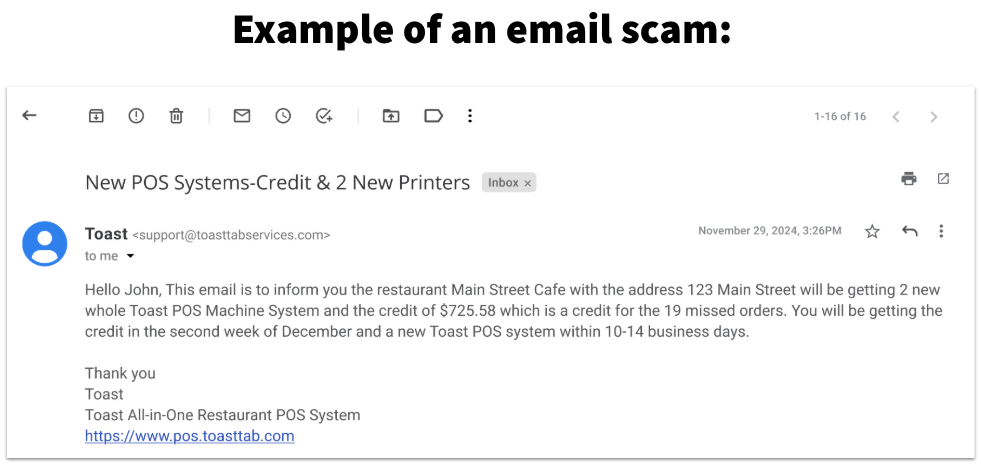
In the example email above, the sender's email address is coming from "toasttabservices", which is not an official Toast domain. The sender also mentions sending money for missed orders -- this is a tactic that scammers can use to obtain your sensitive account information.
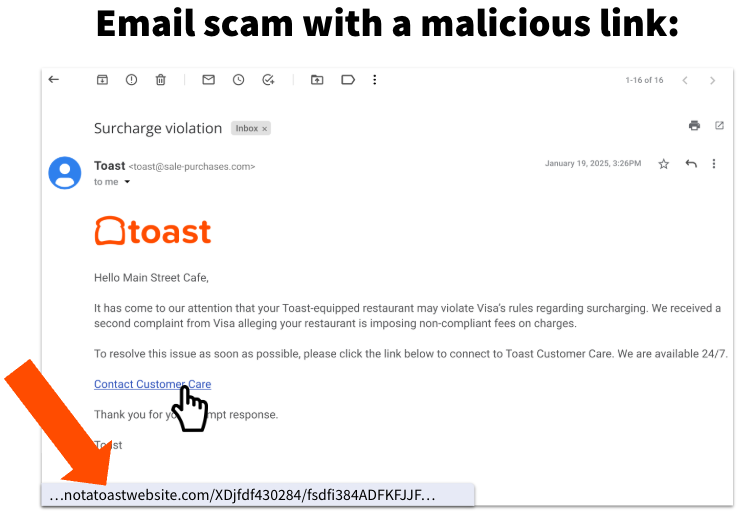
Some email scams can be very sophisticated. While the example below may look like an official Toast email at first glance, you can see that the sender's email address is coming from a domain called "sale-purchases" (not an official Toast domain), and if you hover your cursor over the link in the email you would see that the URL is not a Toast website.
If you ever receive an email that looks suspicious, don't respond or click on any links in the message. Contact Toast to verify or report the email.
Again, Toast will never contact you to ask for sensitive information about your account. Toast will also never provide or suggest a password for you to use with your account. Your account password should be personal and private.
If you suspect a scam attempt, reach out to Toast’s support team via chat in Toast Now (iOS or Android), on Support Center, or Toast Web, 24/7. You can also reach Customer Care via our phone support line:
- U.S.: (617) 682-0225 (7 a.m. to 12 a.m. ET)
- Canada: +13434516295
- Ireland: +35319131083
- U.K.: +442045713302
Thank you for your continued partnership in keeping Toast and our customer community secure.
Questionable Phone Calls
Beware of:
- Phone calls from withheld or unknown numbers. Toast does not call from "No Caller ID" or unknown numbers. Legitimate calls usually display as “Toast.”
- Urgent requests for sensitive information, such as passwords, one-time passcodes, or account credentials. Toast will never proactively request this type of information.
- Other red flags, such as discussing urgent financial matters (e.g., "rate changes" or "funds on hold"), should be treated as suspicious. Fraudsters often use coercion or urgency to manipulate responses.
Keep Your Account Secure
There are a few steps you can take to help protect yourself and your business:
- Enroll in multi-factor authentication (MFA) for both your email account and your Toast account. MFA adds an extra layer of security by requiring additional verification beyond your email/password, which is critical given how easily passwords can be stolen or guessed. To learn more, see Set Up Multi-Factor Authentication.
- Add a verified phone number to your account for enhanced access. When accessing sensitive information in Toast Web, you’ll be asked for a one-time passcode that will be sent to this phone number. Learn more: Set Up One-Time Password Verification.
- If you'd prefer not to use biometric verification (such as Face ID or a fingerprint) on a device, adding a verified phone number lets you use a one-time passcode instead for sensitive actions in Toast Web.
- Review your employees’ permissions. It’s a good idea to periodically check your list of employees and archive any outdated or unexpected users. Ensure only the necessary users have the following sensitive permissions:
- 4.9 Employee Info
- 4.10 Employee Jobs & Wages
- Any of the 8. Account Admin permissions
Learn more: Add and Manage Employees in Toast Web.
If you use Toast Payroll, manage employee status changes directly in Toast Payroll instead - see Toast Payroll: Make an Employee Status Change.
If you suspect a scam attempt, reach out to Toast’s support team via chat in Toast Now (iOS or Android), on Support Center, or Toast Web, or through our phone line. We also recommend these security measures:
- Update your password for your Toast Web account.
- Update your password for the email address associated with your Toast Web account.
- Notify other restaurants in your organization to be vigilant and avoid interacting with suspected scammers.
Never use the same password for both your Toast account and your email account, and never share your passwords with anyone.
Verify Your Identity to Customer Care
When you contact Toast through our official channels (see Contact Customer Support), you may be asked to verify your information to prevent unauthorized access or changes to your account. You will never be asked to provide the following sensitive information to a Toast representative:
- Full credit card number
- Full Social Security number
- Toast Web account password
- One-time authentication passwords
Frequently Asked Questions
Am I safe if I received a scam call but didn’t provide any information?
Yes, if no sensitive credentials were shared, your account should remain secure. Continue ignoring suspicious calls and emails.
Are unsolicited calls about hardware updates from Toast legitimate?
No, unsolicited calls claiming to be about hardware updates from Toast are likely fraudulent.
Can scam callers contact me about payment processing issues?
Scammers commonly impersonate support for credit card processing issues. Do not share any sensitive data and verify any claims independently. By staying informed and vigilant, you can safeguard your business and account. For additional support, always refer to alerts and communications directly within your Toast account or contact Toast Support.
I received a text or email receipt for a restaurant visit that wasn't mine. Is this a scam?
Not necessarily, this was most likely just a mistake, but do not act on the message. Do not open any link in it and do not reply with personal, account, or payment information. Toast will never contact you to ask for passwords, one-time passcodes, or other sensitive information. If you believe your card was actually used without your permission, contact your card issuer directly — they can dispute the charge. If you are a Toast customer and suspect fraudulent activity on your own account, contact Customer Care.