Toast Payroll: Change Company Bank Account On File
Last updated: Jul 23, 2026, 4:56 PM
| To update or change the restaurant's payroll bank account, check out the information below. To update a Toast Web bank account, visit Update or Add a New Bank Account in Toast Web. If you're trying to update the bank account for an employee's direct deposit, read Toast Payroll: Get Help With Direct Deposit Accounts. |
- Add a New Bank Account
- Update a Toast Payroll Bank Account
- Remove a Bank Account
- Troubleshoot Bank Accounts and Unique Scenarios
Add a New Toast Payroll Bank Account
- An HR+ user should navigate to Payroll > Pay group settings (in the upper-right corner).
- Select the pay group on the left.
- In the Bank account section:
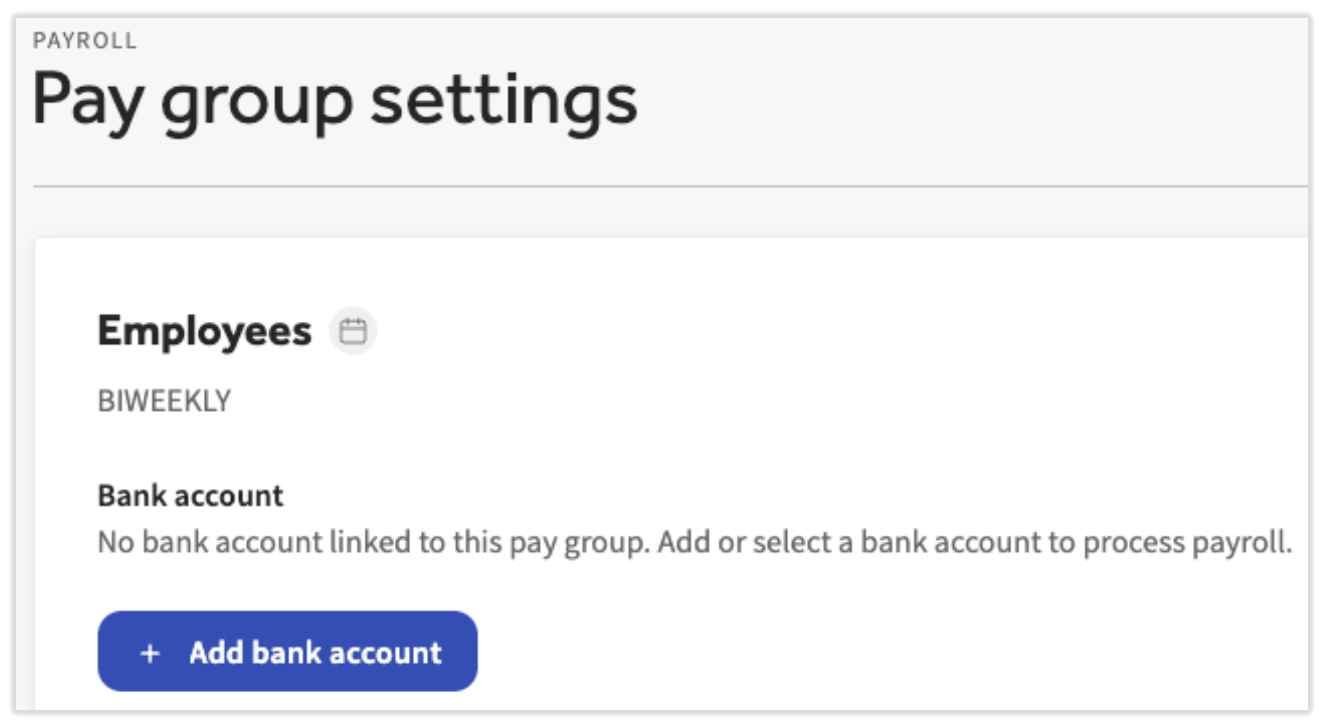
- if you already have an authorized bank account, select Update > + Add bank account.
- If you are adding an account for the first time, select + Add bank account.
- Select whether you'll add the account through Plaid or manually before selecting Next.
- If you choose to use Plaid, a new pop-up will appear where you will be asked to login to your bank via your online banking credentials and select the account of your choice.
- If your bank does not appear in Plaid or you otherwise cannot connect your bank account via Plaid, use the manual route.
- If you cannot complete this connection using either Plaid or the manual route, fill out the New Bank Account Form and send both the form and a voided check to Toast Customer Care by selecting the blue chat button in the lower-right corner of any Toast Payroll page. Note: Toast Payroll is currently unavailable in Quebec. A French version of this form will be made available when the product launches in your region.
- If you choose to go the manual route, have your bank information ready to input into the system.
- If you choose to use Plaid, a new pop-up will appear where you will be asked to login to your bank via your online banking credentials and select the account of your choice.
- You must also select the ACH Authorization checkbox before selecting Save. You may need to scroll down to see this checkbox.
- If you get an error after selecting Save, read the "Couldn't Update Bank Account for [pay group]" Error section or the Bank Account Updates Limit Has Been Reached section of this article.
- Once the steps are complete, this bank account will immediately be applicable for this pay group.
Update a Toast Payroll Bank Account
Toast uses separate systems for handling customer deposits from Toast Web/POS and Toast Payroll withdrawals. If you need to confirm, add or update your bank account information in Toast Payroll:
- If you only have one bank account per pay group, an HR+ user can update the Toast Payroll bank account on their own.
- If you use multiple bank accounts per pay group (e.g. taxes come from one bank account and wages come from another), Toast Payroll will need to update your bank account on your behalf.
Update Your Business's Bank Account
If you only have one bank account per pay group, an HR+/Admin user can:
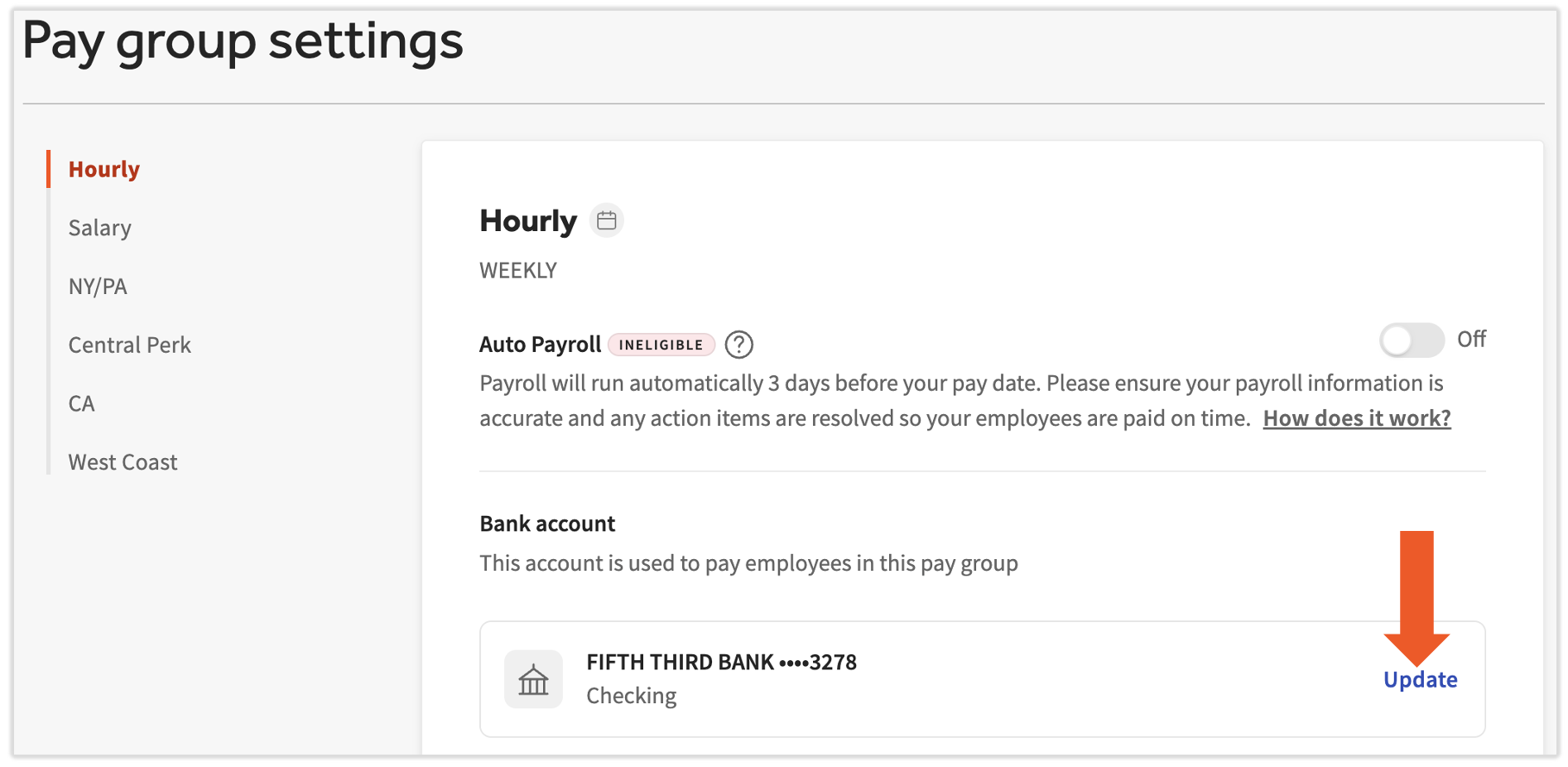
- Log into Toast Payroll and select Payroll > Pay group settings. This is in the Quick Actions menu, either on the right side or bottom of the page.
- Select the pay group on the left.
- Now select Update in the Bank account section.
- If you do not see Update, you may not have the HR+ security role that is required to manage this update.
- If you do not see Update, you may not have the HR+ security role that is required to manage this update.
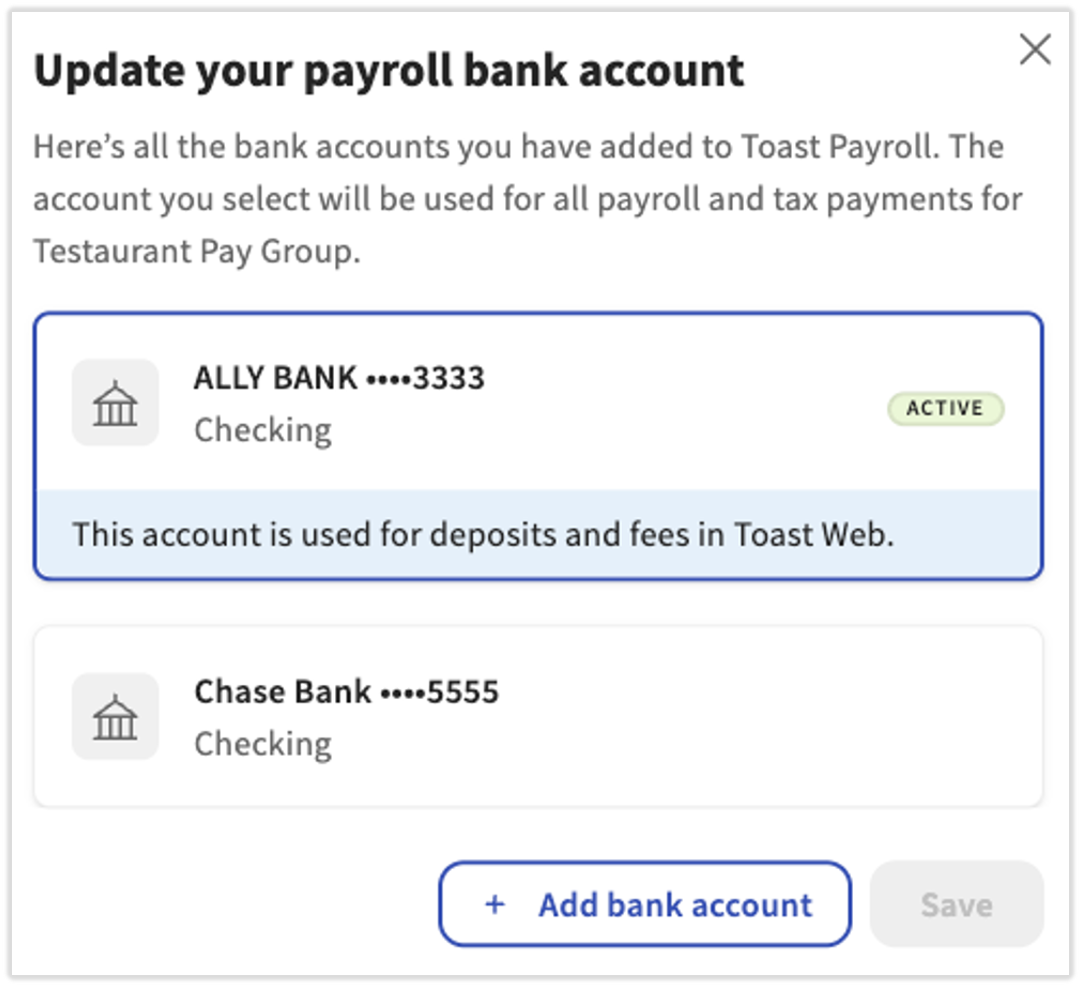
- Next, a list of pre-approved bank accounts will populate.
- If you see a bank account with a blue banner, that means this bank account was authorized in Toast Web and can be selected to be used in Toast Payroll. If you need to edit or remove this account, you must log into Toast Web and make your changes on that platform.
- If you want to add a new bank account, see the Add a New Bank Account section.
- When you select an existing bank account, you'll be asked for the starting check date and a signature. Then check the ACH Authorization checkbox (you may need to scroll down to see this).
- Finally, select Save to complete updating your bank account for that pay group. Repeat for other pay groups if necessary.
Ask Toast to Update Your Business's Bank Account
If you use multiple bank accounts per pay group:
- Download and fill out the New Bank Account Form. The signature on this form will be used as the signature for your printed checks. Note: Toast Payroll is currently unavailable in Quebec. A French version of this form will be made available when the product launches in your region.
- Obtain a document that displays both the routing and account number, such as a voided check or a Letter of Account Confirmation from your financial institution.
- Send the form and proof of account to Toast Customer Care via the blue chat dot in the lower-right corner of any Toast Payroll page.
- This process can take up to three business days, but we will let you know when your changes take effect.
- In the meantime, we strongly recommend waiting to submit any payrolls associated with the intended pay group until your change has been acknowledged by Toast Payroll.
Notes:
- If the FEIN (Federal Employer Identification Number), business name, and/or the person behind the authorized signature are also changing, additional steps are required. Contact us via the blue chat dot in the lower-right corner of any Toast Payroll page for more information.
- If you also use NEXT Insurance for workers' compensation, contact support@apintego.com to ensure they also have your updated bank information on file.
Remove a Bank Account
We will store any bank accounts you've previously added to Toast, but are no longer using. However, if you'd like to remove a bank account from the list you see in the Pay group settings page, the financial contact should reach out to us via the blue chat button in the lower-right corner of any Toast Payroll page.
Troubleshoot Toast Payroll Bank Accounts and Unique Scenarios
"Verify Your Payroll Bank Account With Plaid" Notification
Some Toast Payroll users may see a notification on the Preview Payroll step. The notification reads Use Plaid to verify your current account or choose an account you've already connected through Toast.

This does not mean that you cannot process payroll or your bank account information is no longer present in Toast Payroll. This is simply a suggested step to take to better secure your account information; Toast strongly recommends that users who see this notification take this step. To connect your bank account through Plaid:
- Select the Verify with Plaid button from the notification
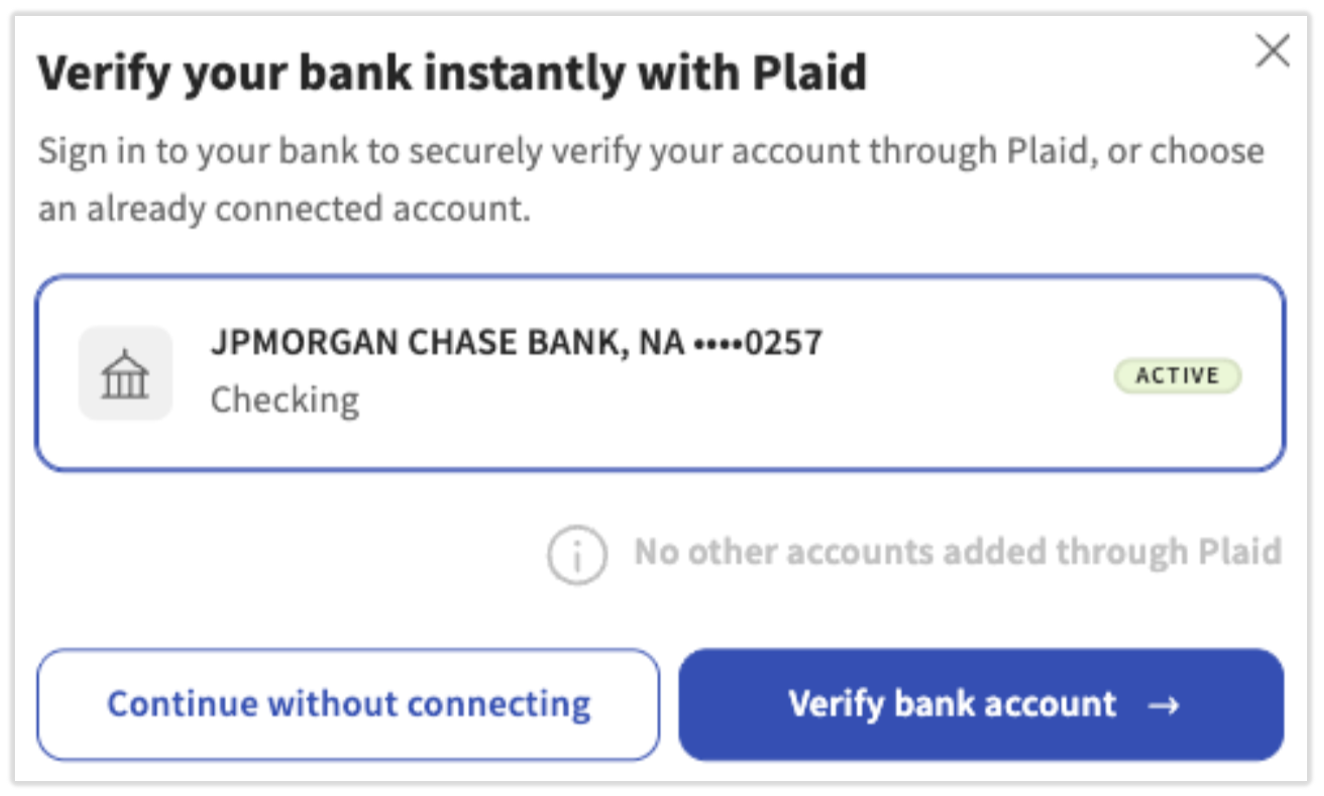
- You can take three options on the pop-up:
- If you already have another bank account securely connected through Plaid, you can select that bank account.
- If no accounts are connected through Plaid, the pop-up will mention this and you have two remaining options:
- Select Verify bank account to begin the Plaid connection workflow. In short, this will ask you for your phone number to verify your identity, then will ask you to select your bank and log in with online banking credentials before you select your bank account. You can use your existing bank account to complete this step.
- If your company uses Chase Bank, PNC Bank, or US Bank, they use a substitute account number system that is not compatible with this specific action in Toast Payroll. When Toast Payroll recognizes this, you will be redirected to complete filling out your bank account information manually. Once complete, this will fulfill the requirements presented by the notification and you will no longer see it.
- Select Continue without connecting to continue running payroll with the existing bank account. However, this notification will continue to appear in subsequent payroll runs.
- Select Verify bank account to begin the Plaid connection workflow. In short, this will ask you for your phone number to verify your identity, then will ask you to select your bank and log in with online banking credentials before you select your bank account. You can use your existing bank account to complete this step.
"Couldn't Update Bank Account for [pay group]" Error
If you're attempting to fill out your bank information via the manual route, you might get an error stating Couldn't update bank account for [pay group]. If you need help updating your account, start a chat. There are a few reasons why this could happen:
- Incorrect information was entered.
- The account is too new (it must be a week old to be "accepted" via this route).
- Your bank does not participate in GIATC validation. This happens with less than 5% of banks.
To solve this error, first attempt to re-enter your information from scratch, keeping a close eye on routing and account number accuracy. If you still get the error, contact Customer Care by selecting start a chat from the error message.
Bank Account Updates Limit Has Been Reached
An error message may appear when you attempt to add/change your Toast Payroll bank account or remove a bank account (which can only be done in Toast Web). The error message will state: [pay group] has reached its limit for bank account updates. Please try again later or start a chat.

A Payroll Bank Account Was Deleted in Toast Web
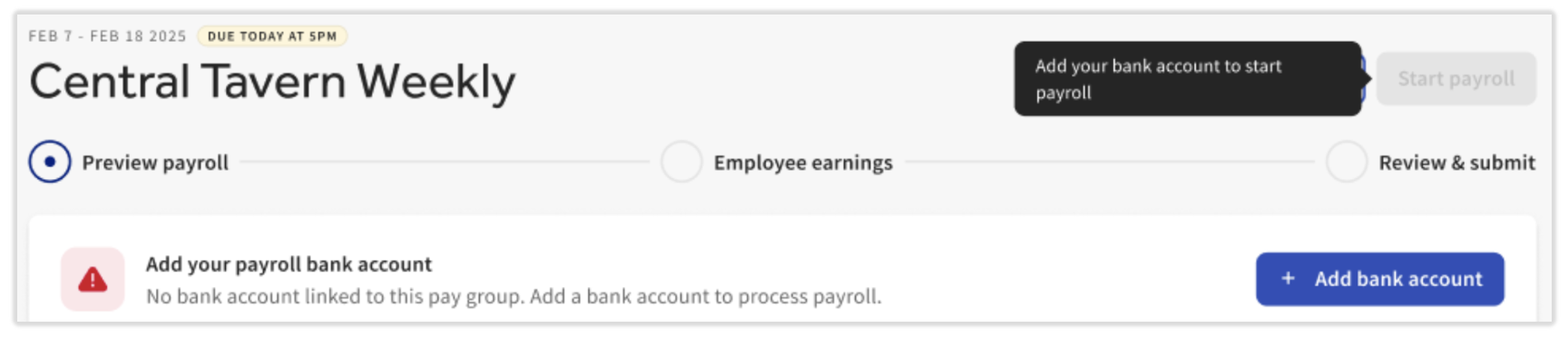
If the bank account you removed was a Toast Web-managed bank account, you may see the "Add your payroll bank account" notification, as shown below. This error could mean the bank account that was chosen for your Toast Payroll account was your pre-authorized Toast Web account and it was deleted in Toast Web. This means you will not be able to process payroll until you either add the account directly to Toast Payroll or add it back in Toast Web and reconfigure in Toast Payroll.
Users with the legacy Payroll security role can run payroll, but they will need an HR+ user to re-attach a bank account to the pay group.
This content is for informational purposes and is not intended as legal, tax, HR, or any other professional advice. Please contact an attorney or other professional for advice.