Toast Payroll: Minimum Wage
Last updated: Oct 9, 2026, 4:54 PM
- Minimum Wage Basics
- Check the Minimum Wage in Your Toast Payroll Database
- Set a Minimum Wage
- Additional Resources
Minimum Wage Basics
Minimum wage is the minimum amount an employer is required to pay a covered employee. Under the federal Fair Labor Standards Act (FLSA), the minimum wage for a covered, non-exempt employee is $7.25 per hour. Many states and local jurisdictions also have their own minimum wage requirements. When an employee is subject to multiple minimum wage laws, the employee is entitled to the highest rate.
Federal minimum wage increases are implemented by legislative action. States and local jurisdictions differ on how minimum wage is increased. Some jurisdictions index their minimum wage rate each year based on inflation. These increases generally occur on January 1 or July 1, although some increase on other dates. Other jurisdictions increase the minimum wage by legislative action which often take effect on January 1 or July 1, but could increase on other dates.
Toast Payroll customers can find information on minimum wage or state or local wage and hour enforcement agencies by accessing Mineral that comes with their Toast Payroll services. Log in to Mineral here or visit Toast Payroll: HR Toolkit FAQ. Additionally, visit Toast Payroll: Get Started With 2026 Minimum Wages.
Customers who have employees who are paid minimum wage, or slightly above, may need to increase the pay rate to meet new requirements when there is a minimum wage increase.
Minimum wage requirements can vary. Toast has populated the system for the calculation of tip makeup and overtime with the state or local rate that may be applicable to many customers. However, you should verify that the rate in the system is applicable to your business. See below to determine how to change the rate, if necessary.
Check the Minimum Wage in Your Toast Payroll Database
To verify the minimum wage your employees are based on, navigate to an hourly employee's profile and select Employment > Recurring. (Learn how the new Toast Payroll navigation works by visiting Navigate Toast Payroll Within Toast Web.) Just below the Earnings tab, you can view the employee's minimum wage in the system.
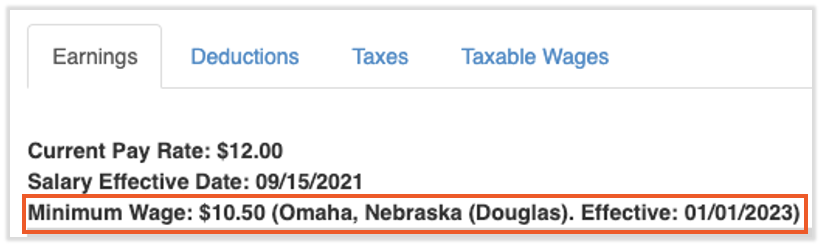
For informational purposes only.
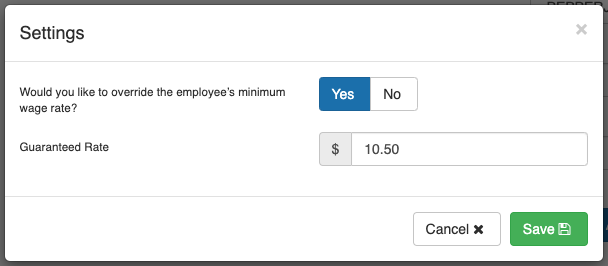
To adjust the minimum wage for a single employee, locate and select the Settings button at the bottom of this page. Toggle the switch to Yes and the Guaranteed Rate shown is the minimum wage for this individual. You can set this and select Save to update the employee's rate.
Set a Minimum Wage
You can set a minimum wage within the Toast Payroll system by following all applicable steps of the Updating Multiple Employees section of Toast Payroll: Make a Pay Change. In order for these updates to apply to an upcoming payroll, they must be completed prior to selecting a payroll's Preview button since this is when Toast looks at the system to start gathering earnings data.
Additional Resources
- US Department of Labor
- Toast Payroll: Get Started With 2026 Minimum Wages
- Toast Payroll: Make a Pay Change
- Toast Payroll: Get Help With Tip Credit and Tip Makeup
This content is for informational purposes and is not intended as legal, tax, HR, or any other professional advice. Please contact an attorney or other professional for advice.