Toast Payroll: Manage Overtime
Last updated: Oct 16, 2026, 11:47 AM
| New for 2026: The One Big Beautiful Act has "no taxes on tips" and "no taxes on overtime" provisions. This means individual employee tax deductions are available for eligible employees when they file their 2025 personal income tax return in 2026. To aid in this personal tax filing, Toast payroll has indicated these tip amounts and overtime premium amounts on employee profiles in Toast Payroll under My Profile > Taxes & Documents > Year End Documents. Toast Payroll: No Tax on Tips and/or Overtime offers more information. See an accountant or tax professional for advice.
If you do not see My Profile on the left side of the screen, select Payroll from the Toast Web navigation rail on the left to make the Toast Payroll navigation rail appear. |
| The Blended Overtime guide may also assist restaurants where employees work multiple jobs at different rates. Similarly, there are situations when employees earn overtime when they work in two or more locations and Toast Payroll: Overtime Across Different Locations can offer more details. |
- Overtime Guidelines
- Overtime System Rules in Toast Payroll
- Where Overtime Hours and Rates Are Displayed
- When and How Overtime Calculations are Generated
- State-Based Overtime Handling Within Toast Payroll
Overtime Guidelines
Per the Fair Labor Standards Act (FLSA), covered nonexempt employees must receive overtime (OT) pay for all hours worked over 40 in a workweek at a rate not less than time and one-half their regular rate of pay. See the complete set of guidelines by visiting the Department of Labor's Overtime Pay page or find information on exempt employees here.
Overtime System Rules in Toast Payroll
Many factors can contribute to overtime calculations. Listed below are some of the relevant factors and a description of how these factors contribute to setting up the rate for and generating overtime within the Toast system:
Settings configured by Toast employees:
- An employee must be classified as nonexempt to be eligible for overtime within the system. Salaried individuals are not configured within the system as eligible for overtime at this time. An employee's exemption status is marked on the Position page in their profile. View Toast Payroll: Exempt vs. Non-Exempt Employees to learn more on employee exemption status.
- If a position has been set up as exempt or nonexempt and you'd like to change that setting for all employees who belong to the position, you can navigate to Settings > General Setup > Position > Position Setup. Select Update from the drop-down menu, then select the Name of the position. At the bottom of this screen, toggle the Is Exempt? checkbox to the desired setting and select Save.
- If you do not see Settings on the left side of the screen, select Payroll from the Toast Web navigation rail on the left to make the Toast Payroll navigation rail appear.
- If a position has been set up as exempt or nonexempt and you'd like to change that setting for all employees who belong to the position, you can navigate to Settings > General Setup > Position > Position Setup. Select Update from the drop-down menu, then select the Name of the position. At the bottom of this screen, toggle the Is Exempt? checkbox to the desired setting and select Save.
- Employees must be assigned to the correct work tax location within Toast Payroll. This is because minimum wage regulations can play an important part in calculating overtime rates for tipped employees. Additionally, the employee's work tax locations associates them with your restaurant's FEIN, which also dictates overtime calculations.
- Toast Payroll will calculate individual overtime across hours worked in all FEINs within an account (company code). For instance, if an employee works at two different locations, the locations are under two different FEINs, and both these locations/FEINs live under the same company code within Toast Payroll, the employee’s combined hours will be subject to overtime regulations.
- The rate of overtime cannot be directly edited; it is based on the overtime-eligible earnings an employee has. State laws may have additional regulations which employers may also be subject to.
Where Overtime Hours and Rates Are Displayed
Whether you are reviewing or approving timesheets, running payroll, or have already submitted payroll, overtime may be tracked within the Toast Payroll system.
Timesheets
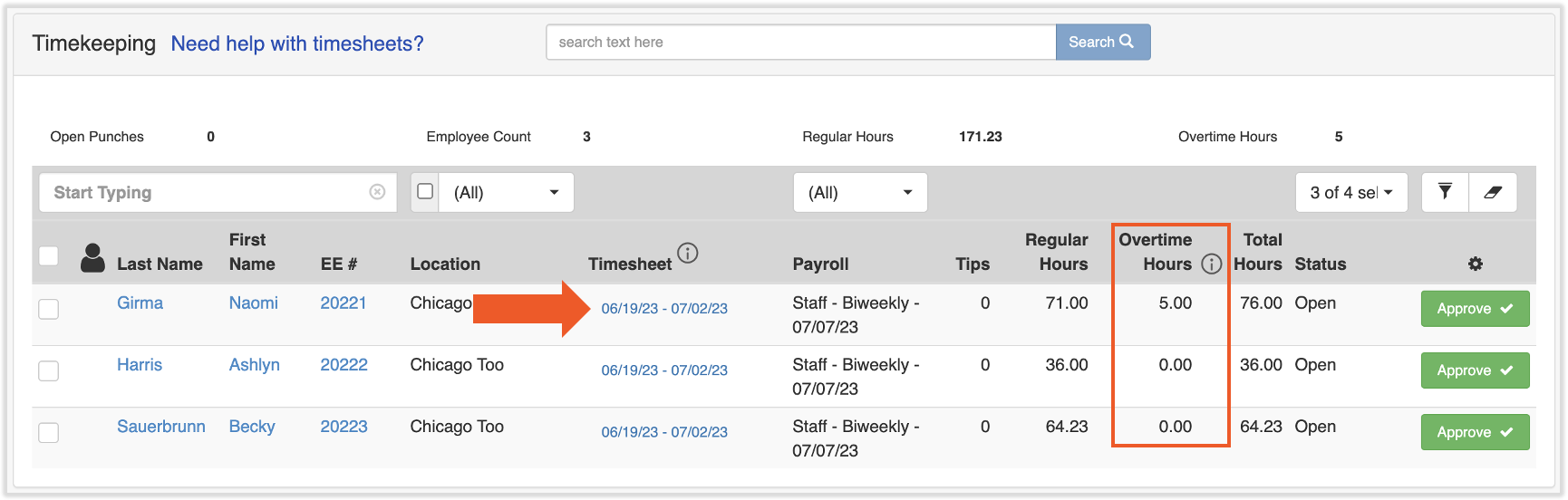
Access current employee timesheets by navigating to Time. (If you do not see Time on the left side of the screen, select Payroll from the Toast Web navigation rail on the left to make the Toast Payroll navigation rail appear.) Note the Overtime Hours column. Then select a link under the Timesheet column to see more data.
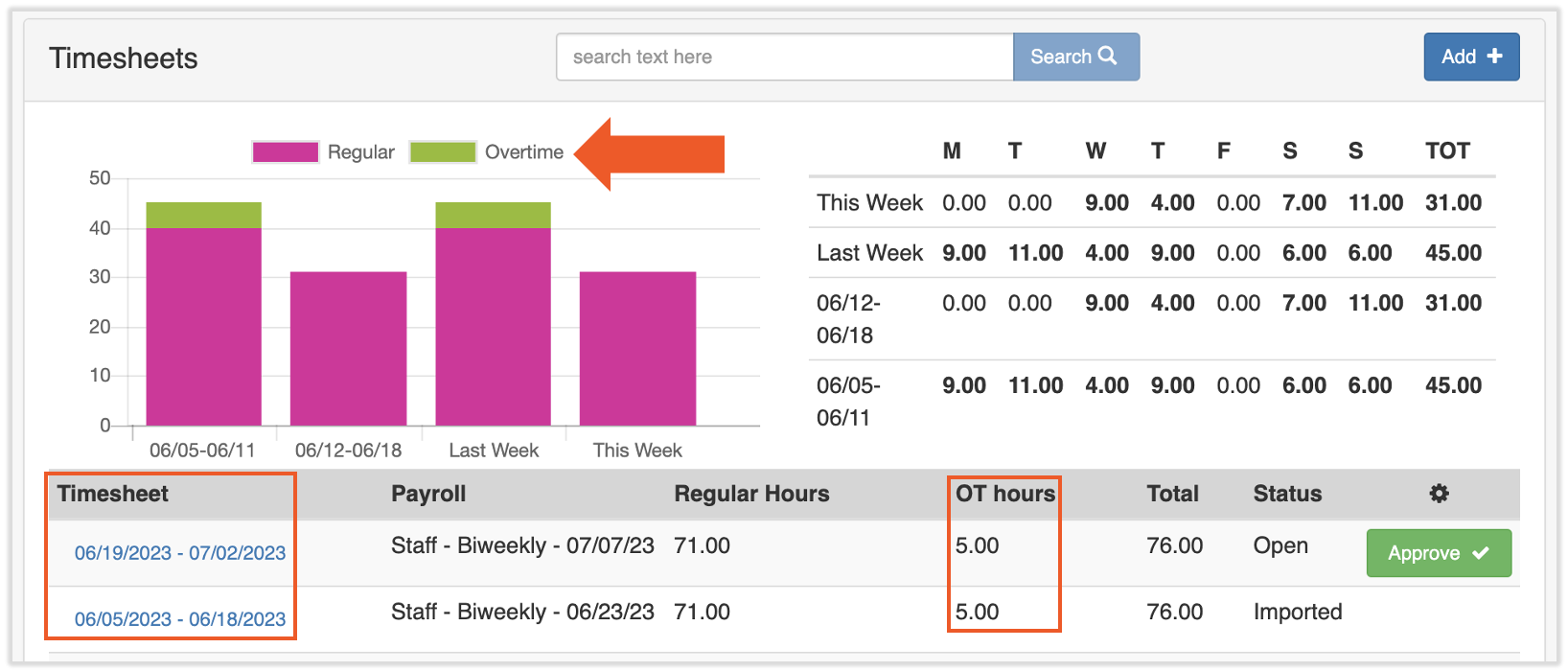
To review historical data for individual employees, locate their profile in Toast Payroll and select Pay History > Timesheets. The graph and table below can assist with viewing overtime at a glance or select a timesheet to see more data.
Employee Earnings Step
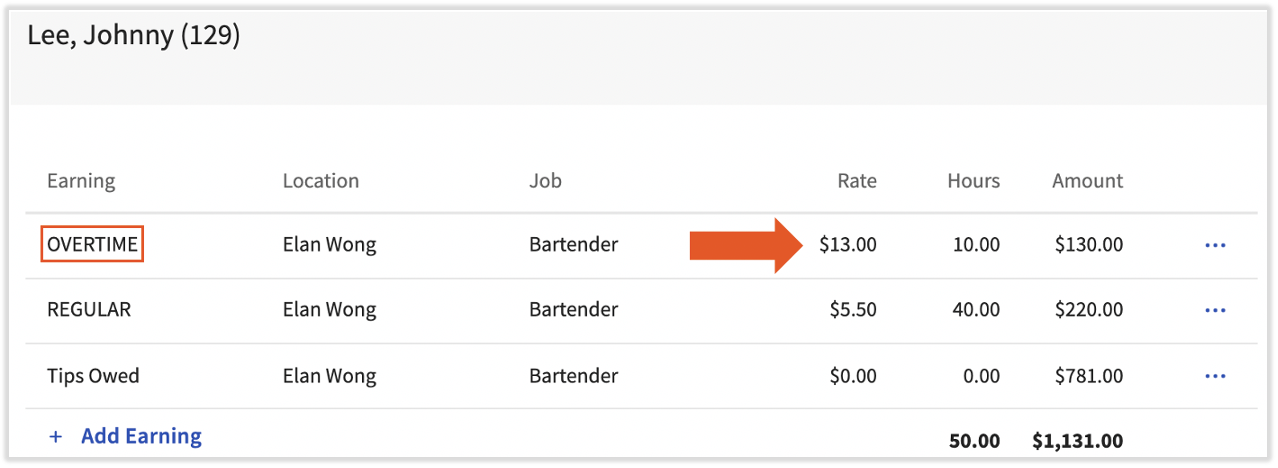
During a payroll run, overtime will appear on the Employee Earnings step as an earning. The $13 rate for overtime is calculated using formulas in scenario 2 in this section of the article.
Single Payroll Reports
Once payroll has been calculated within the system, the Review and Submit step offers several reports for employers to review for accuracy before submitting payroll. The Payroll Exception report combines all overtime hours into a table for easy review. You may also view this report after submitting payroll by navigating to Payroll > Past Payrolls tab > View for the intended payroll. (When the Toast Web and Toast Payroll navigation menus are both visible, select Payroll from the Toast Payroll navigation sub-menu. If you don't see the Toast Payroll sub-menu, selecting Payroll from the Toast Web navigation menu will expand it.)

Report Library
- In Toast Payroll, navigate to Reports > Standard.
- When you select Reports in Toast Payroll, you should see a URL that begins with payroll.toasttab.com. Visit Navigate Toast Payroll Within Toast Web to learn how the new Toast Payroll navigation works.
- Search for the words "per pay."
- Select the eyeball icon for the Per Pay Period Employee Payroll Audit Report.
- Select Queue at the bottom of the page.
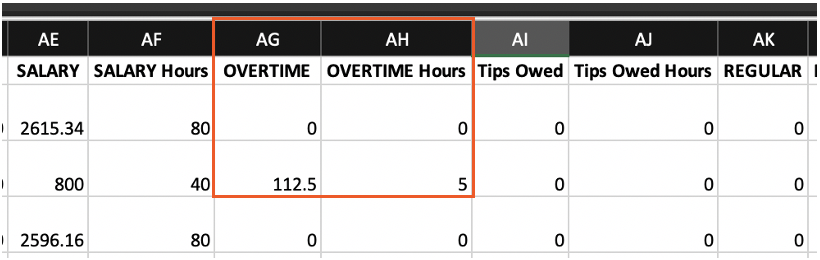
- On the next screen, set the parameters for your report. You may hold the Ctrl/command key on your keyboard while selecting pay periods to choose more than one. Lastly, be sure to check (at least) Include Earnings before running your report. Earnings such as Overtime will appear as one of the headers in this spreadsheet.
When and How Overtime Calculations are Generated
The FSLA overtime fact sheet provides that covered nonexempt employees begin receiving overtime following 40 hours in a workweek. State laws may have additional regulations which employers may also be subject to. In the following two scenarios, covered nonexempt employees with a single rate of hourly pay are receiving overtime wages pursuant to the FLSA (see Toast Payroll: Get Help With Blended Overtime for additional information on employees with multiple jobs or with different rates of pay). The first scenario describes a situation where an employee's regular rate is at or above the federal minimum wage rate. The second scenario describes a situation where an employee's regular rate of pay is less than the federal minimum wage rate.
Scenario 1 - employee's regular rate is at or above the federal minimum wage rate
- Wendy is a nonexempt hostess who worked 45 hours during the workweek. Her regular hourly rate of pay is $15.
- In this scenario, Wendy has worked 40 hours at her hourly rate of pay and 5 hours at her overtime rate of pay.
- Since Wendy's regular rate of pay is $15 per hour (which is greater than the federal minimum wage rate), the Toast system will first calculate her regular pay for the first 40 hours worked by multiplying $15 by 40 hours to equal $600 in regular pay.
- Because under the FLSA overtime is paid at 1.5x the regular hourly pay rate for the time worked over 40 hours, the system will automatically multiply $15 x 1.5 to arrive at $22.50 per hour for her overtime premium rate.
- The system will then multiply Wendy's overtime premium rate by the amount of overtime hours she worked. In this scenario, the system would multiple $22.50 by 5 hours worked to reach $112.50 in overtime premium pay.
- To obtain the gross pay that Wendy received, the system adds the amount of regular pay and overtime premium pay that Wendy earned. Regular earnings of $600 and overtime earnings of $112.50 equals the gross pay of $712.50 for the workweek.
Regular pay: Regular hours x regular hourly rate: 40 hours x $15 = $600
Overtime premium rate: Regular hourly rate x 1.5: $15 x 1.5 = $22.50
Overtime premium pay: Overtime hours x overtime premium rate: 5 hours x $22.50 = $112.50
Gross pay: Regular pay + overtime premium pay: $600 + $112.50 = $712.50 in gross pay
Scenario 2 - employee's regular rate of pay is less than the federal minimum wage rate
- John is a nonexempt bartender who worked 50 hours during the workweek. His regular hourly rate is $5.45. During the workweek, John also earned $100 in tips.
- In this scenario, John has worked 40 hours at his regular rate of pay and 10 hours at his overtime premium rate.
- Since John's regular rate of $5.45 is less than minimum wage, the Toast system will apply several different formulas. First, the system will multiply the hourly rate of pay John makes by the amount of hours he worked. In this scenario, the system would multiply $5.45 x 50 hours worked to equal $272.50.
- However, the FLSA also provides that the regular rate of pay for covered nonexempt employees may not be less than the federal minimum wage rate, including permissible remuneration. To determine if John's regular pay plus the tips he earned will meet the federal minimum standard rate, the system must first calculate whether a tip credit might apply (click here to find more information on tip credits and how they work). Assuming that John works in a location where tip credits are permitted, the system would first subtract John's current hourly rate of pay from the federal minimum hourly rate, so $7.25 - $5.45, to equal $1.80. The system would then multiply the tip credit by the actual hours worked. Here, that would mean the system would multiply 50 hours worked by $1.80 to equal $90.
- Because John earned $272.50 in regular pay, John would need to acquire at least $90 in tips for his pay to meet the federal minimum standard. In this scenario, John earned $100 in tips. The system would then add the $100 in tips John earned to his regular pay. This would bring his regular pay plus tips to $372.50, which is more than what John would have made had his wages been calculated at only the federal minimum wage rate without tips, which would have been $362.50.
- Because John's tipped hourly rate of pay is more than federal minimum wage rate of pay, the system is able to credit John's tips towards John's employer's obligation to pay minimum wage. This calculation also provides an additional variable called the adjusted rate of pay which will assist later on when ascertaining how much overtime premium pay John has earned.
- Per the FLSA, a covered nonexempt employee's regular rate of pay is determined by the compensation earned and the hours worked within a particular workweek. To determine John's adjusted regular rate of pay for this workweek, the Toast system would divide his adjusted rate of pay by his hours worked. In this scenario, the system would divide $372.50 by 50 hours worked to equal $7.45 per hour worked.
- Now that the system has generated John's adjusted rate of pay for the workweek, the system will now be able to calculate his overtime premium rate. To do that, the system will multiply John's adjusted rate of pay by .5 ($7.45 x .5) to equal $3.725 as the overtime premium rate.
- Next, the system would multiply the overtime premium rate by the overtime hours that John worked. In this scenario, the system would multiply $3.725 x 10 hours to equal $37.25 in overtime premium pay.
- Once the overtime premium pay has been calculated, the system will now generate the gross pay for John's workweek by combining his regular pay, tips, and overtime premium pay. In this scenario, the system would add $272.50 in regular pay, $100 in tips, and $37.25 in overtime pay together to equal $409.75 in gross wages for John's workweek.
Regular pay: Hours worked x regular hourly rate: 50 hours x $5.45 = $272.50
Tip credit hourly rate: Federal minimum hourly rate - regular hourly rate: $7.25 - $5.45 = $1.80
Tip credit: Hours worked x tip credit hourly rate: 50 hours x $1.80 = $90
Tips received: $100
Tip credit make-up: Tip credit - tips received: $90 - $100 = - $10
Federal minimum wage pay: Hours worked x federal minimum hourly rate: 50 hours x $7.25 = $362.50
Regular pay + tips: (Hours worked x regular hourly rate) + tips: (50 hours x $5.45) + $100 = $372.50
Adjusted hourly rate of pay: (Regular pay + tips) / hours worked: $372.50 / 50 hours = $7.45
Overtime premium rate: Adjusted hourly rate of pay x .5: $7.45 x .5 = $3.725
Overtime premium pay: Overtime premium rate x overtime hours worked: $3.725 x 10 hours = $37.25
Gross pay: Regular pay + tips + overtime premium pay: $272.50 + $100 = $37.25 = $409.75 in gross pay
State-Based Overtime Handling Within Toast Payroll
California
If an employee works overtime in California, the regulations below are enforced by the system:
- Daily Overtime: If an employee works more than 8 hours, but not more than 12 hours in one day, the hours after 8 will be considered overtime.
- Weekly Overtime: If an employee works more than 40 hours in a workweek, all hours after 40 will be considered overtime.
- 7 Days in a Row: If an employee works 7 days in a row, the first 8 hours on the seventh day are considered overtime.
- Double Overtime: If an employee works more than 12 hours in a single day, all hours after 12 are considered double overtime. Also if an employee works 7 days in a row and on the seventh day, they work more than 8 hours, all hours after 8 are considered double overtime.
- These overtime calculations can be seen on timesheets.
Colorado
Toast Payroll has logic built-in to accommodate the overtime laws of Colorado.
Nevada
Nevada measures a workday as a 24-hour window that starts when the employee first clocks in, not as a calendar day from midnight to midnight. For example, if an employee clocks in at 1:00 p.m. on Monday, their workday runs until 1:00 p.m. on Tuesday. Hours worked over eight in that 24-hour workday are paid as overtime for applicable employees.
Nevada daily overtime will calculate for any employee's daily overtime threshold when it is set to Follow State Regulations; this is the system's default setting.
Nevada daily overtime applies to employees who:
- Work at a location with a Nevada work tax location and FEIN
- Earn less than 1.5 times the Nevada minimum wage
Employees who earn $18 per hour or more receive weekly overtime only, after 40 hours in a workweek. Daily and weekly overtime do not stack. The employee receives whichever calculation pays more.
For example, let's say a line cook earns $15 per hour:
- If they work Monday from 4:00 p.m. to midnight (eight hours) AND
- Tuesday from 10:00 a.m. to 4:00 p.m. (six hours).
- That totals to eight hours + six hours = 14 total hours worked over that employee's 24 hour window.
- The first eight hours would classify under regular pay ($15/hr) and the six hours would classify under premium pay ($15/hr x 1.5/hr).
Nevada Overtime Settings Changed on October 19th, 2026
On October 19th, 2026, Toast Payroll set the daily overtime settings for employees at Nevada work tax locations to Follow State Regulations. If you previously set employees to OT after 8 hours to approximate Nevada rules, you no longer need to do that. New hires will use the Follow State Regulations setting by default.
If your business uses a different daily overtime policy than the Nevada state calculation, update the daily overtime threshold on each employee's Toast Payroll profile (see the instructions below). Manage Your Overtime Thresholds in Toast Web and Toast Payroll explains each setting.
- Navigate to the employee's Toast Payroll profile.
- Learn how the new Toast Payroll navigation works by visiting Navigate Toast Payroll Within Toast Web.
- In the lower-left corner of the page, select Profile Settings.
- Update the Daily overtime threshold field from the default Follow State Regulations setting to OT after 8 hours. Select Save changes.
- Now repeat steps 1-4 for every employee in the applicable location.
Nevada Overtime Hours Without Regular Hours
A Nevada employee's timesheet can show overtime hours with no regular hours. This happens when the employee's 24-hour workday spans two pay periods. For example, the last day of one pay period shows eight regular hours and one overtime hour, and the first day of the next pay period shows eight overtime hours.
For more on Nevada overtime law, use the HR Toolkit provided by Mineral.
This content is for informational purposes and is not intended as legal, tax, HR, or any other professional advice. Please contact an attorney or other professional for advice. Additional information on overtime requirements can be found on the federal and state regulator websites as well as the Toast HR Toolkit powered by Mineral.