Toast Payroll: Get Started With the Year-End Checklist
Last updated: Oct 9, 2026, 2:31 PM
What to do each key date of year-end season in Toast Payroll — before your last payroll, finding and distributing Form W-2s, ACA, 1099s, and new-year prep.
- Year-End Overview
- Before You Begin
- Important Year-End Dates
- Before Your Last Payroll of the Year
- Find, Distribute, and Correct Form W-2s
- Complete ACA Filing
- Find Contractor (1099) Information
- Update Tax Account Information After a Tax Notice
- Prepare for the New Year
- Frequently Asked Questions
- Related Articles
Year-End Overview
Year-end season means managing payroll, tax, and Affordable Care Act (ACA) obligations at the same time. This checklist is your starting point: it tells you what to do before your last payroll of the year, what happens on each key date, and which article owns the detailed steps for each task.
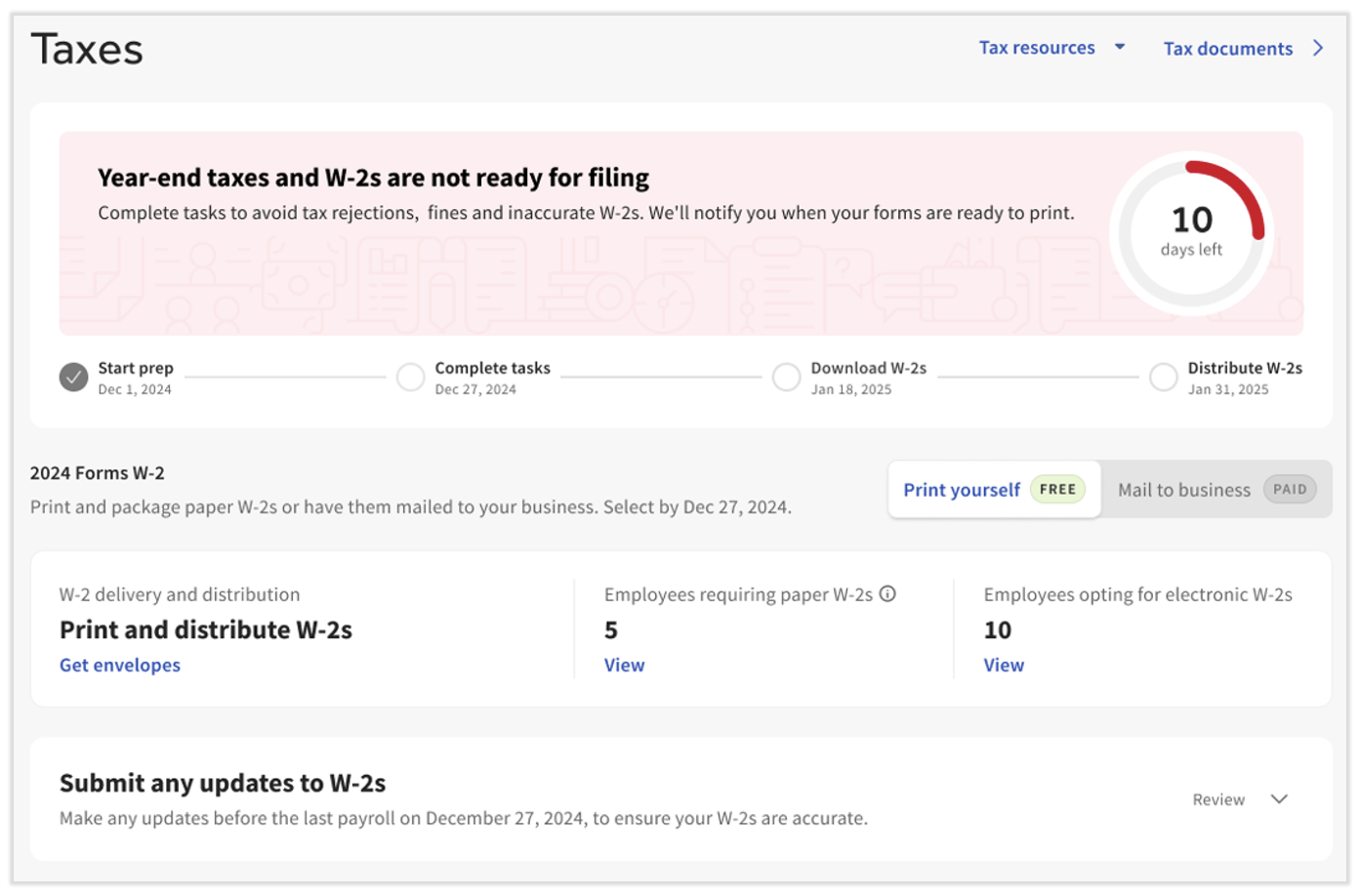
Your main hub throughout the season is the Tax Center, found by navigating to Taxes in Toast Payroll. (If you do not see Taxes on the left side of the screen, select Payroll from the Toast Web navigation rail on the left to make the Toast Payroll navigation rail appear.) It holds employee, year-end, and Form W-2 tasks. Visit it often in November and December to complete any available tasks. To see how the Tax Center helps at year-end, see Toast Payroll: Manage Payroll Taxes.
Note: This checklist is not all-inclusive, and not every item applies to every employer. This content is for informational purposes and is not legal, tax, or HR advice. Consult your HR team or a professional advisor to confirm the year-end requirements that apply to your business.
Before You Begin
Applies to: Toast Payroll
Permissions needed:
- HR+ user role in Toast Payroll for employer year-end tasks (tax accounts, ACA filing, downloading bulk Form W-2s). Employees can complete their own profile and Form W-2 tasks from their own login.
What you'll accomplish: Complete the tasks that must happen before your last payroll of the year, then locate and distribute year-end documents and prepare your account for the new payroll year.
Important Year-End Dates
These dates apply to the 2025 payroll year, which is filed in early 2026. Use this table to scope what happens when and who is affected.
| By this date | Do these things, if applicable | Notes |
| Before your last payroll of the year | Confirm each employee's Form W-2 delivery method; submit any off-cycle payrolls; record group term life, third-party sick pay (3PSP), S-corp health premiums, taxable fringe benefits, and large-employer (250+) health care costs (Box 12DD) | In Toast Payroll, navigate to Taxes to confirm Form W-2 delivery settings. Create and submit off-cycle payrolls. Contact Customer Care through the blue chat button in the lower-right corner of any Toast Payroll page to record year-end earnings such as group term life and 3PSP. |
| January 6th, 2026 (three business days after the end of the quarter) | Complete open tasks in the Tax Center; add one-time earnings or deductions; choose self-print or Toast-printed paper Form W-2s; confirm accurate Social Security numbers, names, and addresses for current and former employees; request any voids | In Toast Payroll, navigate to Taxes to complete each Tax Center task. Current and former employees should confirm their own SSN, name, and address in their profiles — this is a vital step toward an accurate Form W-2. Information received after this date will not be reflected on your Q4 or annual tax filings. |
| January 9th, 2026 | Complete ACA filings if you use the Toast Payroll Classic Benefits module | In Toast Payroll, navigate to Benefits > View and manage health benefits > Apply for ACA filing and complete all ACA checklist items. |
| January 19th, 2026 (on or after) | Retrieve Form W-2s | Form W-2s are ready, including for former employees. Employers retrieve bulk copies from Taxes in Toast Payroll. Employees retrieve their own from MyToast or Toast Payroll. |
| January 31st, 2026 | Distribute paper Form W-2s to employees who opted into paper, including former employees | This is the SSA deadline for delivering or postmarking paper forms. |
Note: Please confirm the exact January cutoff dates for your filing year, as deadlines shift slightly each year based on the calendar.
Before Your Last Payroll of the Year
Some items must be on a payroll within the calendar year to appear on the 2025 Form W-2. Complete these before you submit your last payroll of the year.
- Confirm each employee's Form W-2 delivery method (paper or electronic) by navigating to Taxes. Delivery method locks after your last payroll of the year.
- If you do not see Taxes on the left side of the screen, select Payroll from the Toast Web navigation rail on the left to make the Toast Payroll navigation rail appear.
- Record any year-end additional earnings that belong on the Form W-2 — group term life, third-party sick pay, S-corp health insurance premiums, and taxable fringe benefits — by contacting Customer Care through the blue chat button in the lower-right corner of any Toast Payroll page.
- Create and submit any off-cycle payrolls you need (for example, a separately taxed bonus or a final paycheck) by using Toast Payroll: Set Up and Configure Off-Cycle Payrolls.
Expected outcome: Every year-end earning and delivery setting is recorded before your last payroll, so it appears correctly on the 2025 Form W-2.
For the full set of quarter-end deadline tasks — voids, SSN verification, and tax account checks — see Toast Payroll: Quarter-End Checklist. For the individual year-end earnings procedures, see Toast Payroll: Record Group Term Life Benefits, Toast Payroll: Manage Third-Party Sick Pay at Year End, Toast Payroll: Record S-Corp Health Insurance Premiums, and Toast Payroll: Record Taxable Fringe Benefits.
Find, Distribute, and Correct Form W-2s
2025 Form W-2s (W2s) are available in Toast Payroll and the MyToast app on Monday, January 19th, 2026. This includes former employees, who access their forms the same way active employees do.
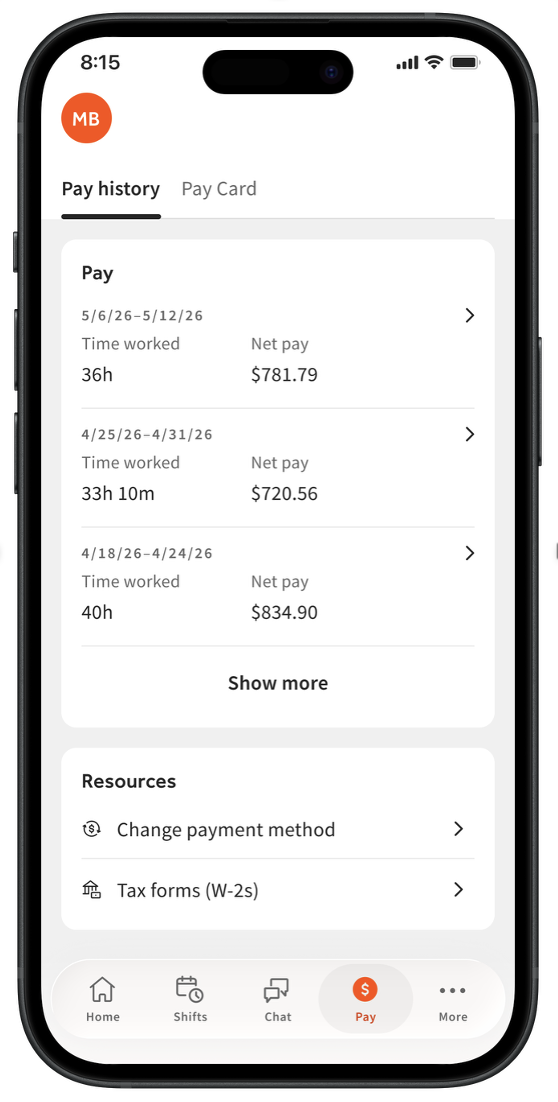
How employees find a Form W-2. In 2026, active employees can use the MyToast app and navigate to Pay > Tax forms (W-2s). Make sure you are using the MyToast app and not the Toast Now or Toast - Local Restaurants app. Former employees, or anyone on a computer, can log in to Toast Payroll and select Taxes & Documents on the dashboard, or select the Download link in the blue banner at the top of the page.
How employers distribute paper Form W-2s. If any employees opted into paper, navigate to Taxes on or after January 19th, 2026 and select the 2025 Paper W-2s button to download a bulk PDF for printing. (If you do not see Taxes on the left side of the screen, select Payroll from the Toast Web navigation rail on the left to make the Toast Payroll navigation rail appear.) You only distribute paper forms to employees who opted into paper; everyone else retrieves their own electronic copy.
If a Form W-2 is wrong. A name or address error is fixed with a refresh, and an SSN, wage, or tax error is fixed with an amendment. Both are requested by an HR+ user. For the refresh-versus-amendment decision, the fee, and how to request one, see Toast Payroll: Get Help With Form W-2 Amendments.
For complete W-2 instructions — finding, downloading, printing, distributing, reading the boxes, and former-employee access — see Toast Payroll: Manage the Form W-2 Experience.
Note: To keep employee information secure, Toast cannot email or mail a Form W-2 directly to an employee. Forms are available in MyToast and Toast Payroll for the employee to retrieve.
Complete ACA Filing
If you use the Toast Payroll Classic Benefits module, complete your Affordable Care Act (ACA) filings — including Form 1095-C — by logging into Toast Payroll and navigating to Benefits > View and manage health benefits > Apply for ACA filing and completing all ACA checklist items.
Expected outcome: Your ACA checklist items are complete before the ACA filing deadline.
For ACA reporting, measurement periods, and 1095-C details, see Toast Payroll: Tax Filing and Year-End Tax FAQ.
Find Contractor (1099) Information
Toast Payroll does not file taxes for 1099 contractors, but you can find the figures a contractor needs to file. To set up, pay, or change a contractor — including changing an existing employee from W-2 to 1099 — see Toast Payroll: Manage 1099 Contractors.
Note: A 1099-NEC reports what you paid a contractor through payroll. A 1099-K is a separate statement of your restaurant's card-payment processing and is not a payroll document. If you are looking for your restaurant's card-sales statement, see Understand Form 1099-K.
Update Tax Account Information After a Tax Notice
Toast Payroll customers are responsible for keeping tax information up to date. This includes your state withholding account number and its payment frequency, and your state unemployment (SUTA) account number and its rate. Inaccurate rates may cause a tax variance at quarterly filing or a tax notice.
If you receive a notice from a tax agency, navigate to Settings > Payroll > Tax Accounts to verify or update your tax account information. For details on the Tax Accounts page, see Toast Payroll: Get Help With Tax Accounts. (If you do not see Settings on the left side of the screen, select Payroll from the Toast Web navigation rail on the left to make the Toast Payroll navigation rail appear.)
Expected outcome: Your state tax account numbers, rates, and payment frequencies are accurate in Toast Payroll.
Note: If your state has a FUTA credit reduction (California only in 2026), prepare for a higher Q4 variance in your Q1 tax package.
Prepare for the New Year
After you submit all applicable 2025 information, prepare your account for the new payroll year.
Form W-2 timing and the One Big Beautiful Bill. The One Big Beautiful Bill includes "no tax on tips" and "no tax on overtime" provisions, allowing individual tax deductions for eligible employees on their 2025 personal income tax returns filed in 2026. Toast Payroll lists these tip and overtime premium amounts on employee profiles under My Profile > Taxes & Documents > Year End Documents. (If you do not see My Profile on the left side of the screen, select Payroll from the Toast Web navigation rail on the left to make the Toast Payroll navigation rail appear.) For more, see Toast Payroll: No Tax on Tips and/or Overtime. Consult an accountant or tax professional for advice.
Minimum wage updates. Review your state and local minimum wage rates and update affected employees before the effective date. Many changes take effect on January 1st and July 1st. Check your state or local Department of Labor website for requirements. For the current rates, see Toast Payroll: Get Started With 2026 Minimum Wages, and for the steps to update an employee, see Toast Payroll: Make a Pay Change.
Company holidays. If you plan to offer holiday pay in the new year, update your company holidays. For the steps, see Toast Payroll: Add Company Holidays.
Expected outcome: Your minimum wage rates, company holidays, and tax account information are ready for the new payroll year.
Frequently Asked Questions
When are Form W-2s available?
Form W-2s are available in Toast Payroll and the MyToast app on Monday, January 19th, 2026, including for former employees. Employees find their form in the MyToast app under Pay > Tax forms (W-2s) or by logging in to Toast Payroll. For full details, see Toast Payroll: Manage the Form W-2 Experience.
Also asked as:
-
- When will my W2 be ready?
- When does Toast release W2s?
- Where can I find the 2025 W2 documents?
How do I find an employee's W-2?
To find an employee's W-2, the employee logs in to Toast Payroll or the MyToast app and retrieves their own form from their profile on or after January 19th, 2026; employers can download bulk copies by navigating to Taxes. (If you do not see Taxes on the left side of the screen, select Payroll from the Toast Web navigation rail on the left to make the Toast Payroll navigation rail appear.) If a form does not appear, the most common causes are a login tied to a different profile or a company that left Toast Payroll for that year. For complete steps, see Toast Payroll: Manage the Form W-2 Experience.
Also asked as:
-
- Where do I find an employee W2?
- My W2 says I have no tax forms?
- An inactive employee can't get their W2?
How do I change an employee from W-2 to 1099?
To change an employee from W-2 to 1099, follow the contractor setup and reclassification steps in Toast Payroll: Manage 1099 Contractors. Toast Payroll does not file 1099 contractor taxes, but it can provide the figures a contractor needs to file.
Also asked as:
-
- How do we change an employee from W2 to 1099?
- Convert a W-2 employee to a 1099 contractor?
- Need to change an employee to a 1099?
Did Toast file my Form W-2s, ACA forms, or contractor 1099s?
Toast Payroll generates and files your Form W-2s when you used Toast Payroll for the full year and have complete tax information on file. ACA filing is completed through the Classic Benefits module if you use it. Toast Payroll does not file 1099 contractor taxes. If you receive a notice from a state agency about a missed filing, contact Toast Customer Care with the notice details.
Also asked as:
-
- Did Toast file our ACA and 1095c forms?
- Do you offer ACA filing?
- Were any 1099s prepared for this year?
Where do I find ACA filing in Toast Payroll?
You find ACA filing by logging into Toast Payroll and navigating to Benefits > View and manage health benefits > Apply for ACA filing if you use the Toast Payroll Classic Benefits module. Complete all ACA checklist items there. For ACA reporting and 1095-C details, see Toast Payroll: Tax Filing and Year-End Tax FAQ.
Also asked as:
-
- Where do you find ACA filings?
- Where do I upload my ACA filing data?
- Is there ACA reporting?
Related Articles
- Toast Payroll: Manage the Form W-2 Experience
- Toast Payroll: Manage Payroll Taxes
- Toast Payroll: Quarter-End Checklist
- Toast Payroll: Get Help With Form W-2 Amendments
- Toast Payroll: Tax Filing and Year-End Tax FAQ