Use Click to Pay With Toast Mobile Order & Pay®
Last updated: Sep 17, 2026, 12:28 PM
Click to Pay is used by many consumers today across other merchants. Guests with existing Click to Pay accounts can now use their stored payment information with Click to Pay for faster checkout. New users can seamlessly enroll in Click to Pay for faster checkout next time. See more details in this external article here.
Click to Pay FAQ
What credit cards are accepted through Click to Pay?
Click to Pay works with all EMVCo partners (Mastercard, Visa, American Express, and Discover).
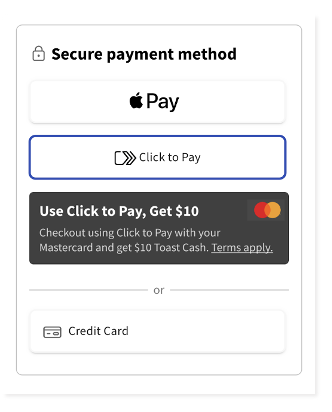
Can guests still use Apple Pay or manually enter their Credit Card?
Yes. Click to Pay is just one of several payment options available for guests at checkout.
Can guests use Click to Pay to pre-authorize?
No. Click to Pay is only supported on checkout, not preauthorization.
Can restaurants disable Click to Pay?
No. Like Apple Pay, at this time, Click to Pay will be available as an option for all guests.
Does Click to Pay exist on other digital ordering platforms, like Online Ordering and Toast Local?
No. At this time, Click to Pay is only supported on Toast Mobile Order & Pay.
How does the Click to Pay guest experience work?
- Guests select the Click to Pay payment option at checkout, enter the email they want the receipt to go to, and select Continue to Click to Pay.
- Then, they enter either their email or phone number. If they have a Click to Pay account, they will receive a one-time passcode sent to their email or via SMS, depending on the guests’ selection.
- After successfully entering their one-time passcode, they can pay using their saved payment methods.
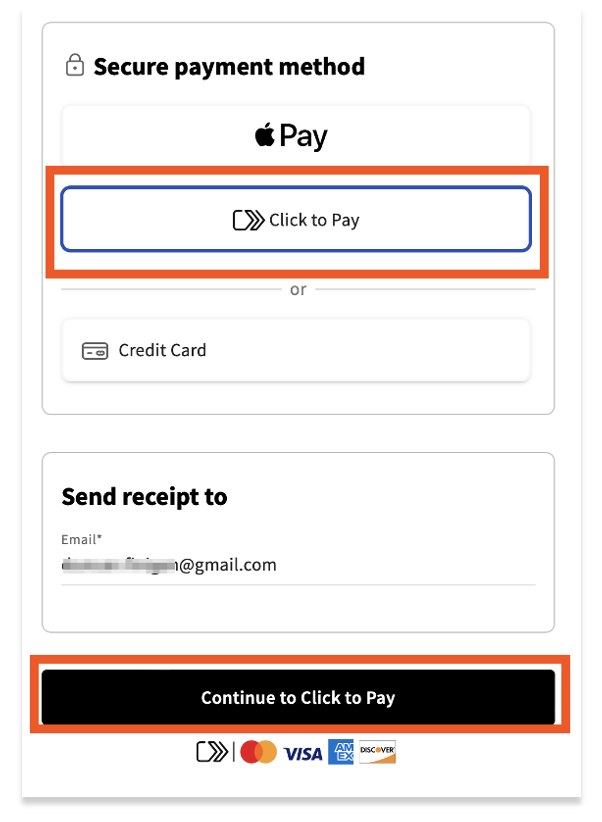
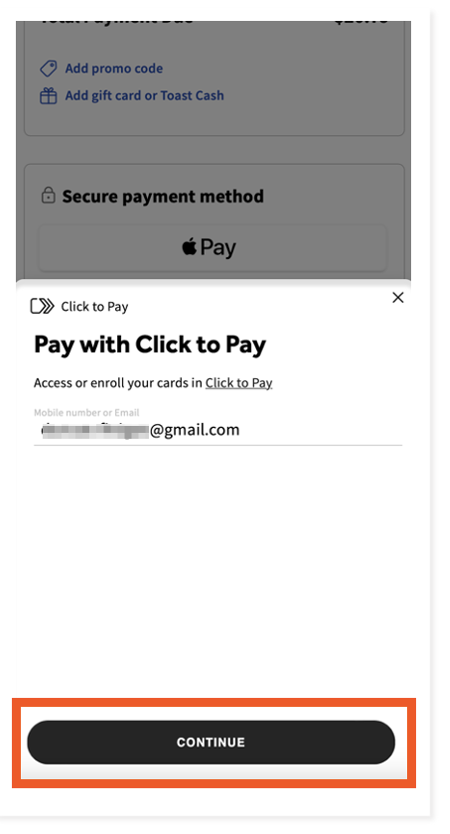
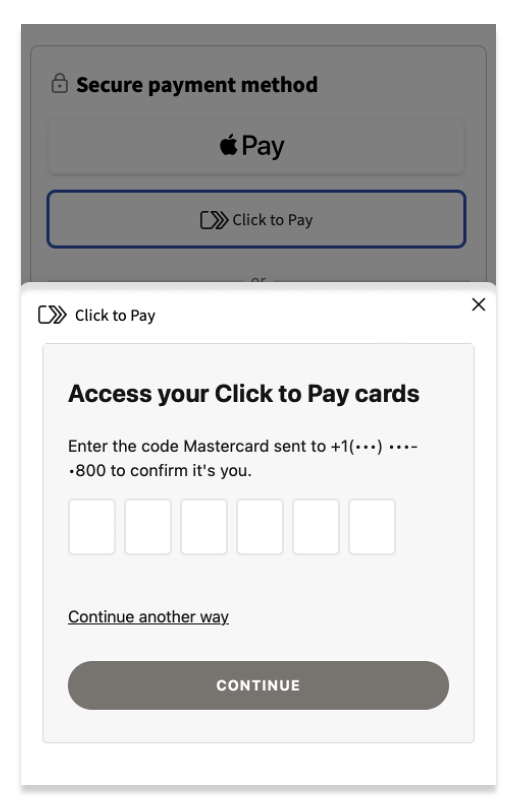
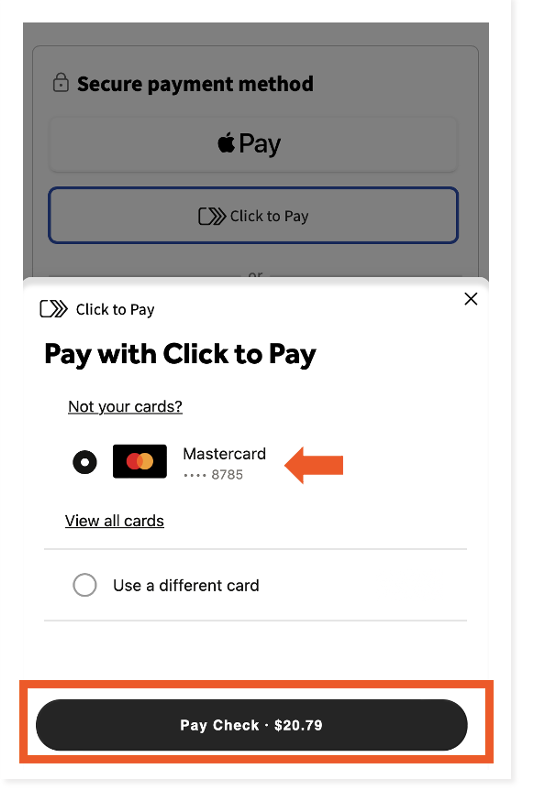
Guests without Click to Pay accounts will be prompted to create an account and add payment info before successfully paying their check via Click to Pay.
Guest Promotion for Click to Pay FAQ
What is the Click to Pay Promotion for guests?
By registering and transacting with Mastercard on Click to Pay, guests will get Toast Cash* rewards that can be redeemed through the Mobile Order & Pay, Online Ordering, Toast Local Sites, or the Toast Local app. Toast Cash rewards will be issued to guests in the format of a promo code sent via email, with a 30-day expiration. The rewards are limited and are subject to change.
What is required of the restaurants for the Click to Pay Promotion?
Absolutely nothing. There is no action required from the restaurants. The Click to Pay Promotion is sponsored by Mastercard and will be operated by Toast. The goal is to reward guests with Toast Cash* that encourages them to continue to dine out!
Can restaurants opt out of the Click to Pay Promotion?
Restaurants can opt out of the Click to Pay promotion by contacting Customer Care. Keep in mind that opt-outs typically take 24 hours to clear the cache; accordingly, guests may be able to use Toast Cash rewards with your restaurant during that time.
Note: Promotions and rewards are subject to change without notice
Which guests are eligible for the Click to Pay Promotion?
All guests using Mastercard are eligible to receive this Click to Pay Promotion. Guests are limited to one promotion. Guests must complete their transaction through Click to Pay using a Mastercard on Toast Mobile Order & Pay to receive the promo code, which will be delivered to their email.
How do guests receive their rewards?
Guests will receive the reward via email if they qualify for the promotion. The Toast Cash reward will come in the form of a promo code.
How do guests redeem their rewards?
The Toast Cash rewards can be redeemed at Toast Mobile Order & Pay® (in-store), Toast Local (find a restaurant near you at http://toasttab.com/local), or the Toast Local app at participating restaurants.
| *Toast offers Toast Cash as a way for guests to have part or all of their meals paid for through a promotional code. Toast Cash is not a cash and does not represent prepaid or stored value. Toast Cash is not redeemable for cash or credit. |
Additional Resources
Back to top