Optimize Online Ordering Dashboard Controls
Last updated: Sep 17, 2026, 7:03 PM
- Find the Online Ordering dashboard
- Snooze or turn off Online Ordering
- Add a delay to takeout and pickup orders
- Add a delay to delivery orders
- Turn delivery off
- Save and publish your changes
- Frequently asked questions
- Related articles
Use the Toast Online Ordering dashboard to make quick changes to your takeout, pickup, and delivery orders without opening your full availability settings. From one drop-down, you can snooze ordering, turn it off, add a delay to the quoted prep time, or turn delivery off during a rush.
Applies to: Toast Online Ordering, managed in Toast Web
Permissions needed: Restaurant Operations Setup, Throttle Online Orders, and Publishing. If these controls do not appear in your account, the permissions above are not enabled for your user.
Find the Online Ordering dashboard
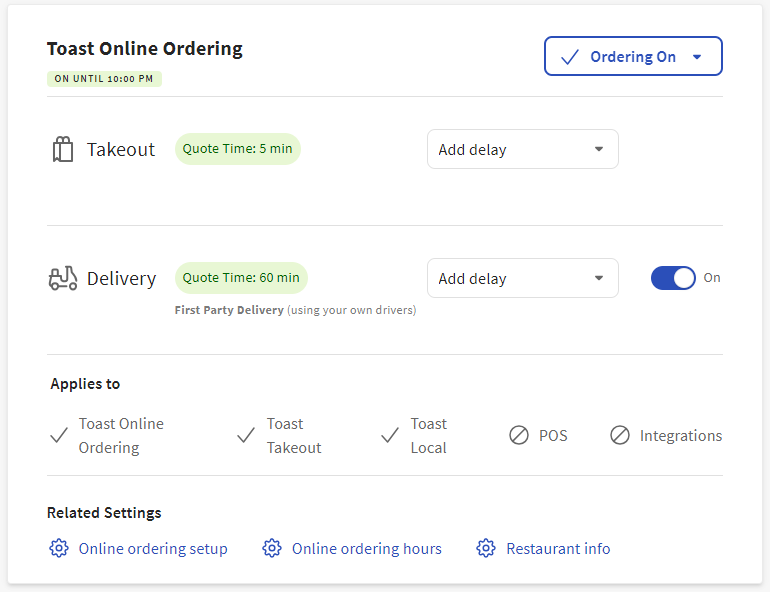
To find the Online Ordering dashboard, log in to Toast Web and navigate to the Takeout & delivery page using the navigation on the left side of your screen. The Online Ordering dashboard appears at the top of the page, and your current status displays in the dropdown.
Snooze or turn off Online Ordering
When the kitchen is overwhelmed or you need to stop online orders for the rest of the day, use the dropdown on the Online Ordering dashboard. The dropdown gives you these options:
- Snooze for 20 minutes or Snooze for 40 minutes — temporarily pauses new online orders, then returns Online Ordering to its normal function automatically when the snooze period ends.
- Snooze until tomorrow — pauses new online orders for the rest of the business day. Online Ordering resumes when your Online Ordering hours begin the next business day.
- Turn Off Online Ordering — stops new online orders until you turn ordering back on.
- Turn Off Online Ordering until tomorrow — stops new online orders for the rest of the business day.
When Online Ordering is snoozed or turned off, your Online Ordering page displays a message to guests, and guests are not able to place orders.
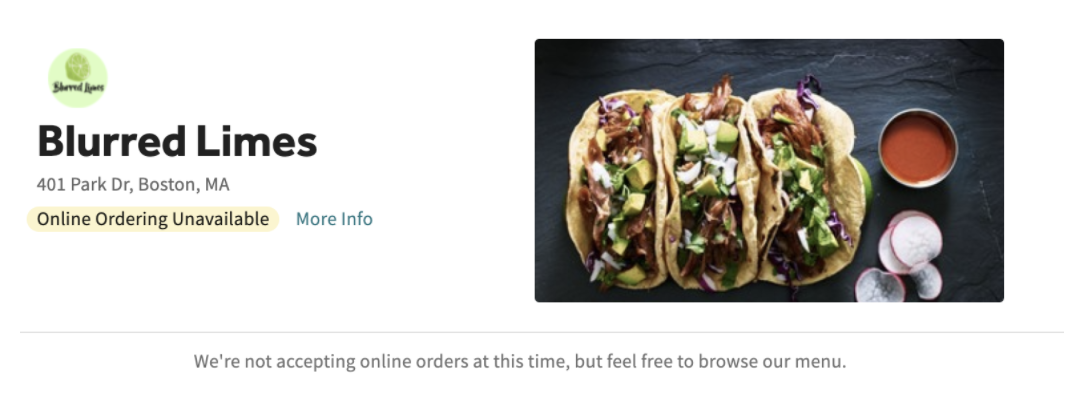
Note: A timed snooze (20 or 40 minutes) automatically turns Online Ordering back on when the window ends. If Online Ordering appears to "turn itself back on," confirm whether a timed snooze was used rather than Turn Off Online Ordering.
Note: Snooze and Turn Off apply to Toast Online Ordering, Toast Delivery Services®, and direct integrations with DoorDash, Grubhub, and Uber Eats. For all other third-party providers, pause ordering from that provider directly. To pause a single third-party channel, navigate to Takeout & delivery > Third-party ordering in Toast Web. For more detail, see Manage Third-Party Availability With Snooze and On/Off Functions.
Add a delay to takeout and pickup orders
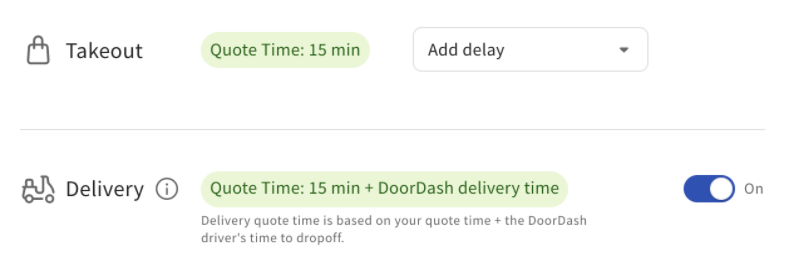
A delay adds time to the quoted prep time without stopping orders, so the kitchen gets breathing room during a rush while guests can still order. On the Online Ordering dashboard, add a delay to the Takeout section in 5-minute increments.
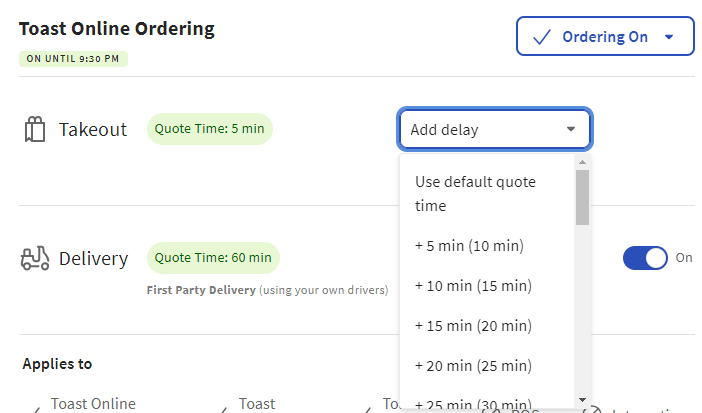
Guests will see the quoted time on the Online Ordering page account for that delay. They will not see anything that indicates throttling is in effect or that the restaurant is busy.
Note: If your restaurant uses Toast Delivery Services and you want to add a delay, add a Takeout delay to adjust the quote time for Toast Delivery Services®. The takeout and pickup quote time adjusts automatically as a result.
Note: A delay stacks on top of your existing quote time strategy. If you use SmartQuote, the delay is added on top of the time SmartQuote suggests. For how each strategy sets the base quote time, see Manage Your Quote Time Strategy.
Add a delay to delivery orders
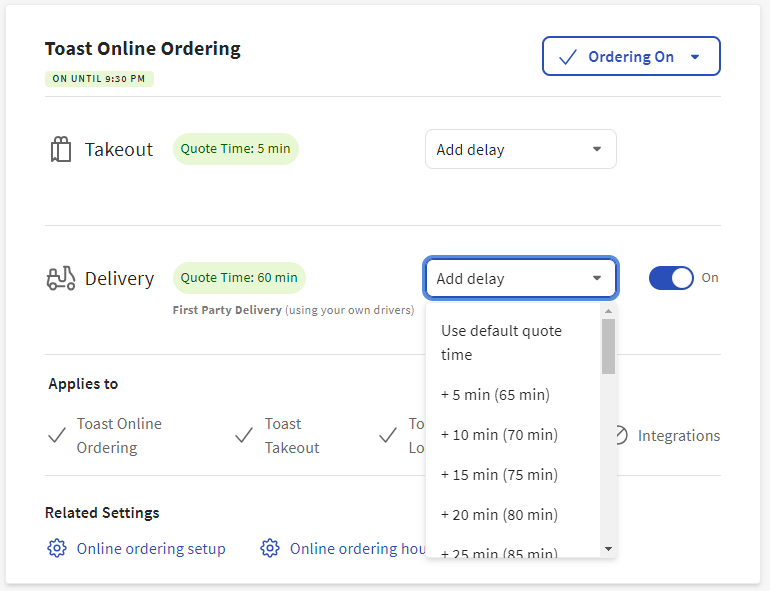
If you manage deliveries with your own drivers (self-managed delivery), add a delay to the Delivery section on the Online Ordering dashboard in 5-minute increments. This adjusts the quoted delivery time guests see.
Turn delivery off
To stop delivery orders without affecting takeout and pickup, turn delivery off on the Online Ordering dashboard. This applies to both self-managed delivery and Toast Delivery Services. When delivery is turned off, your Online Ordering page does not display the delivery option to guests.
Save and publish your changes
How your change takes effect depends on which control you used:
- Changes made with the dropdown (snooze and turn off) are saved and published automatically to your Online Ordering page and the Local by Toast app.
- Changes made by adding a delay or toggling delivery on or off must be published. Select Publish all changes at the top of the Takeout & delivery page to apply them to your Online Ordering page and the Local by Toast app.
Note: A delay or delivery change that is not published does not affect what guests see. If you added a delay or turned delivery off and nothing changed for guests, confirm that you selected Publish all changes.
Frequently asked questions
Where do I find the Online Ordering dashboard controls?
You find the Online Ordering dashboard controls at the top of the Takeout & delivery page in Toast Web. Log in to Toast Web, navigate to Takeout & delivery using the left-side navigation, and the dashboard with the status dropdown appears at the top of the page. You also need the Restaurant Operations Setup, Throttle Online Orders, and Publishing permissions for these controls to appear.
Why don't the dashboard controls appear in my account?
The dashboard controls do not appear when your user is missing the required permissions: Restaurant Operations Setup, Throttle Online Orders, and Publishing. Ask an admin at your restaurant to enable these permissions for your user, or to enable them at the Jobs level so everyone in a job can use the controls. For managing permissions, see Permissions Reference Guide.
I snoozed or turned off Online Ordering, but orders are still coming in. Why?
Orders can still come in after you snooze or turn off Online Ordering for two common reasons. First, if you added a delay or toggled delivery off, the change does not take effect until you select Publish all changes at the top of the Takeout & delivery page — a dropdown snooze or off selection publishes automatically, but delay and delivery changes do not. Second, orders that guests placed in the moments before your change took effect are still accepted and processed; check the order timestamps against the time you made the change. If orders continue arriving after you confirmed the off state and published, see Check Online Ordering Status.
Why does my snooze keep reverting to 20 minutes when I select a longer period?
If the snooze reverts to 20 minutes after you select a longer period, re-select the longer snooze and confirm the displayed countdown matches what you chose. As an alternative to snoozing until the next business day, you can use a schedule override to stop ordering until your hours begin again, which restarts automatically — see Manage Your Takeout and Delivery Schedule. If the snooze value continues to revert after you re-select it, contact Toast Customer Care.
Does turning off Toast Online Ordering also turn off DoorDash, Uber Eats, or Grubhub?
No. Turning off Toast Online Ordering from the dashboard stops orders on your Toast Online Ordering page, Toast Delivery Services, and direct DoorDash, Grubhub, and Uber Eats integrations. To pause or turn off a third-party channel on its own, navigate to Takeout & delivery > Third-party ordering in Toast Web. For details, see Manage Third-Party Availability With Snooze and On/Off Functions.
My Online Ordering page says it is not accepting orders, but Toast Web shows it is on. What should I do?
When your Online Ordering page says it is not accepting orders while Toast Web shows it is on, the most common causes are an unpublished change or a cached version of the page. Select Publish all changes at the top of the Takeout & delivery page, then open your ordering page in a new browser session. Also confirm the current time falls within your configured Online Ordering hours. For the full step-by-step check across Toast Web, the dashboard, and the Toast Now app, see Check Online Ordering Status.
Related articles
- Check Online Ordering Status
- Manage Online Order Volume (Delaying/Snoozing Orders)
- Manage Your Takeout and Delivery Schedule
- Manage Your Quote Time Strategy
- Manage Third-Party Availability With Snooze and On/Off Functions
- Get Started With Online Ordering