Troubleshoot Internet Connection Issues on Toast Devices
Last updated: Jun 8, 2026, 1:10 PM
Diagnose and fix internet connection problems on Toast devices—hardwired or wireless—including router checks, Wi-Fi credentials, and offline mode.
- Overview steps
- Quick triage: which branch should I follow?
- Check a hardwired device connection
- Check a wireless connection
- Wi-Fi password and Toast network credentials
- Troubleshoot your Toast router
- "I have internet but Toast is offline"
- A single device is offline (others are working)
- Wider connectivity issues that affect Toast and non-Toast devices
- Before you contact Customer Care
- FAQ
- Related articles
Overview steps
Use these steps for the most common scenario—one or more Toast devices show "no network connection" and you need to get back online quickly. Most issues resolve in under five minutes.
Prerequisite: Physical access to the affected Toast device and to your Toast router. No Toast Web permissions are required for the device-side checks.
Note: Before getting started with troubleshooting, check with your Internet Service Provider (ISP) to see if there is an internet outage in your area. If your ISP confirms an outage, do not restart the Toast router—restarting during a known ISP outage can cause printing issues when service returns.
The quickest fix covers most cases:
- Confirm the Toast router has power and the router LED is white (or green if recovering).
- Identify whether the affected device is hardwired (Ethernet cable to the device) or wireless (Wi-Fi only).
- For a hardwired device: confirm Ethernet is enabled and Wi-Fi is disabled on the device.
- For a wireless device: confirm the device is connected to your Toast managed network (named YourRestaurantName_Secured or YourRestaurantName_TOAST).
- Restart the device if the issue persists.
If the issue is not resolved, use the Quick triage table to route to the correct branch.
Quick triage: which branch should I follow?
| Symptom | Most likely cause | Quick fix | Self-service? |
| One terminal has no internet, others work | Cable, switch, or device-level setting | See Check a hardwired device connection or A single device is offline | Yes |
| All Toast devices show no internet | Toast router, Toast network, or ISP | See Troubleshoot your Toast router | Yes for most causes; see flagged steps |
| Toast says we are offline but my phone has internet | Device on wrong network, or router upstream offline | See "I have internet but Toast is offline" | Yes |
| I forgot my Toast Wi-Fi password | Credentials live in Toast Web | See Wi-Fi password and Toast network credentials | Yes |
| Router LED is orange or red | Router has lost upstream connection or has a fault | See Troubleshoot your Toast router | Partially—red may require Customer Care |
| Wi-Fi signal is weak (1–2 bars) | Router placement or interference | See Wider connectivity issues | Yes |
| Device was offline after a power outage | Recovery sequence | Link to What To Do After a Power Outage | Yes |
Check a hardwired device connection
A hardwired device connects to the Toast network through an Ethernet cable—either an RJ-45 cable plugged into the back of the terminal, or a USB-C cable that provides both power and a network connection (commonly used when a Toast printer is daisy-chained to a Toast Flex).
The screenshots referenced below depict the interface of a Toast Flex device.
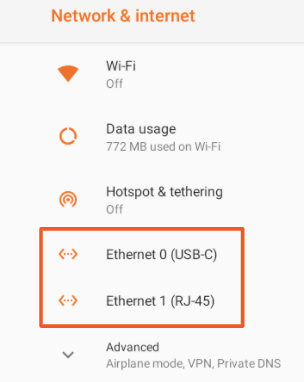
To check a hardwired device:
- Close the Toast app to access the device's main menu.
- Select the gear icon to open device settings.
- Locate the Network & Internet settings and select Ethernet.
- Confirm that only one Ethernet option is enabled, matching your physical setup:
- If you are using a USB-C cable to your terminal, Ethernet USB-C should be enabled.
- If you are using an RJ-45 Ethernet cable to your terminal, Ethernet RJ-45 should be enabled.
- If the affected device is an Elo V2 or Elo V3, you will see only one Ethernet option—enable it.
- Reset the Ethernet connection by toggling Ethernet off, waiting five seconds, and toggling it back on.
- Navigate to the device's Wi-Fi settings page and confirm Wi-Fi is Off.

Expected outcome: The Toast device displays a network connection icon and the Toast app loads normally.
Note: With hardwired devices, one wired connection (RJ45 or USBC) should be on, and Wi-Fi should always be off.
If the device still shows no connection, see Troubleshoot your Toast router below or Troubleshoot Your Toast Ethernet Cable Connection to confirm you are using a supported cable.
Check a wireless connection
A wireless device connects to the Toast Managed network over Wi-Fi. THis is intended for Toast Go 2 and Toast Go 3.
To check a wireless device:
- Look for the Wi-Fi icon in the top right corner of the device screen to verify if you are connected to the internet.
- Open device settings and select Wi-Fi under the Wireless & Networks section.
- Confirm Wi-Fi is enabled. The toggle is colored when enabled and grey when disabled.
- Connect to the correct network. In Toast Web, navigate to Toast account > Privacy Compliance > Wi-Fi configuration, to see what SSID to connect to It is named YourRestaurantName_Secured or YourRestaurantName_TOAST.
- In Overflow menu select "Connect to PCI Network"
- When the device is connected, the network name displays the word "Connected" directly underneath.
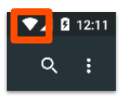
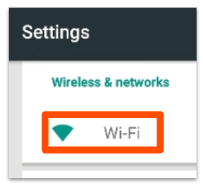
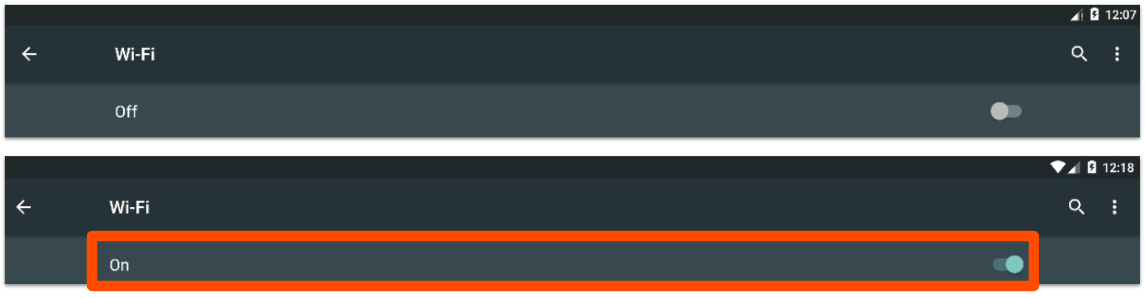
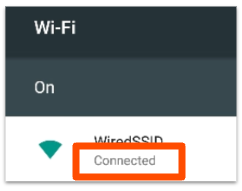
If Wi-Fi is not enabled, toggle it on, then select your Toast network from the list.
Expected outcome: The Wi-Fi indicator shows full bars and the network name displays "Connected." The Toast app loads normally.
Note: If your terminal is connected to Wi-Fi but payments are pending and will not process, you may not be on the secure Toast Wi-Fi network at your restaurant. Re-check the network name and choose YourRestaurantName_Secured or YourRestaurantName_TOAST.
If a device is connected to the wrong network (for example, a guest network or a personal Wi-Fi) and refuses to switch, see Forget a Network on a Toast Device to remove the unwanted connection, then reconnect to the Toast network.
Wi-Fi password and Toast network credentials
Toast Wi-Fi passwords are not displayed in the help center for security reasons. To find your Toast Wi-Fi password:
In Toast Web, navigate to Toast account > Privacy Compliance > Wi-Fi configuration. See: Locate Your Toast Wi-Fi Password
If you are unable to retrieve your password through Toast Web, contact Customer Care.
Troubleshoot your Toast router
Use this branch when all Toast devices at the location show no internet but your other restaurant networks (guest, personal, office) are working—or when the router itself displays an unusual LED color.
Important: If you are aware of an internet provider outage, do not restart the router. Restarting during an ISP outage can cause printing issues when service returns.
To troubleshoot the Toast router:
- Confirm the affected device is connected to the dedicated Toast network. See Check a hardwired device connection or Check a wireless device connection above.
- Restart the affected device to rule out a device-level issue.
- Confirm this is a Toast-network-only issue by checking that other networks at the restaurant (guest, personal Wi-Fi) on other devices have an active internet connection through your ISP. If those other networks are also down, the cause is the ISP, not Toast.
- Locate your Toast router. It is typically black, white, or silver and is branded "Cisco," "Pronto (Toast Router)," or "Meraki."
- Confirm the router's power cord is plugged in and that the router is plugged into a working outlet.
Note: If you're aware of an internet provider outage, do not restart the router. This will cause issues with printing and kitchen display screens in offline mode.
If you're still unable to achieve internet connectivity, start a live chat here with our Customer Support team. Chat is available in Toast Web and Payroll Web (blue support button in the bottom right of every page) and the Support tab in the Toast Now app.
For more information on how to contact support, view How to Contact Customer Support or go to support.toasttab.com.
Self-managed networks
If your restaurant uses a self-managed network (you do not use a Toast-provided router), the steps above may not apply. Contact your network administrator for guidance specific to your hardware.
"I have internet but Toast is offline"
This is a common scenario where general internet works on phones and personal devices, but Toast devices show offline. The cause is usually one of the following:
- The Toast device is connected to the wrong Wi-Fi. Open device settings, select Wi-Fi, and confirm the device is on YourRestaurantName_Secured or YourRestaurantName_TOAST, not on a guest or personal network. If it is on the wrong network, switch networks.
- The Toast router is offline upstream. Check the router LED. Orange or red indicates a router or ISP issue.
- The Toast device cached an old network and won't reconnect. Forget the network and reconnect—see Forget a Network on a Toast Device.
- You are operating in offline mode following an outage. Toast devices buffer transactions during outages. See Use Toast in Offline Mode for the recovery steps.
If none of the above resolves the issue, see Outages and Disruptions: Troubleshoot Internet or Network Connection Issues for the full outage troubleshooting flow.
A single device is offline (others are working)
If one Toast device shows no network connection while the rest of your devices work, the issue is with that specific device or its physical connection rather than your Toast network.
For step-by-step recovery of a single offline device, see Single Terminal With No Network Connection.
If the single offline device is the only one not recovering after a power outage, see What To Do After a Power Outage.
Wider connectivity issues that affect Toast and non-Toast devices
If the internet is slow or intermittent for Toast and non-Toast devices, especially during peak hours:
- Check the Wi-Fi signal strength on your Handheld device. Look at the Wi-Fi icon in the notification bar—for optimal performance, you should see four to five bars. If you see only one or two bars, move the tablet closer to the Toast router or wireless access point.
- Disable any additional devices or services running through your internet connection.
- Limit streaming apps (iTunes, music services, video services) running on the same internet connection—heavy traffic from other Wi-Fi networks (private office, guest) sharing the same ISP line can slow Toast.
- Restart the router by unplugging the power cord and plugging it back in. This clears temporary issues affecting performance. (Do not restart during a known ISP outage.)
- Contact your ISP to check for neighborhood or area-wide connection issues.
- Consider upgrading to a faster internet package.

Before you contact Customer Care
If the steps above do not resolve the issue, gather the following information before starting a chat with Customer Care. Having this ready reduces back-and-forth and speeds up resolution:
- The exact symptom (for example, "POS terminal shows no internet—Wi-Fi shows full bars but app says offline").
- Whether the affected device is hardwired or wireless.
- The Toast or Meraki router LED color.
- A photo of the router (front and back) if you are unsure of the model.
- The location's name and the affected device's name (for example, "Bar terminal," "Kitchen expediter tablet").
- Whether the issue affects one device or all devices at the location.
- Whether non-Toast devices (phones, guest Wi-Fi) at the location also have issues.
- What you have already tried from the steps above.
To start a chat, select the blue Customer Care button in the bottom right of any page in Toast Web or Payroll Web, or open the Toast Now app and select Customer Care. You can also visit the Toast support site.
FAQ
Why does my POS say no internet when the router shows everything is active?
The router may be connected to the internet but the POS may not be on the right network. Open device settings, select Wi-Fi (for wireless devices) or Ethernet (for hardwired devices), and confirm you are on YourRestaurantName_Secured or YourRestaurantName_TOAST. If the device is on a guest or personal network, it will not connect to Toast services even though the internet itself is working.
What is my Toast Wi-Fi password?
Toast Wi-Fi passwords are not displayed in the help center. Log in to Toast Web with admin permissions to view your network credentials, or contact Customer Care if you cannot access Toast Web. See Wi-Fi password and Toast network credentials above.
Should hardwired devices have Wi-Fi enabled or disabled?
On hardwired devices, Wi-Fi should always be off and Ethernet should always be on. The exception is self-managed networks, where your network administrator may configure differently.
What does it mean if the Toast router LED is orange?
An orange LED means the router may not be connected to your Internet Service Provider. Confirm with your ISP that service is up. If the ISP confirms service is working, restart the Toast router by unplugging the power cord, waiting 30 seconds, and plugging it back in. Wait 30–60 seconds for the LED to turn yellow, then green or white.
My internet is back but one tablet is still offline. What do I do?
When most devices recover from an outage but one stays offline, the issue is with that specific device. See Single Terminal With No Network Connection for the recovery steps. If the outage was caused by a power outage, see What To Do After a Power Outage.
Can I use a different Wi-Fi to take payments while my Toast network is down?
Toast devices are configured to work with the Toast secure network. Switching to a different Wi-Fi (such as a personal hotspot) is not supported and may prevent payments from processing. If your Toast network is down, use Toast offline mode to continue taking payments and let them sync once the network recovers. See Use Toast in Offline Mode.
What if my network is self-managed?
If you do not use a Toast-provided router, your restaurant's network is considered self-managed. The router troubleshooting steps in this article may not apply. Contact your network administrator for guidance specific to your hardware. Toast Customer Care can support the Toast device side of the connection (Ethernet, Wi-Fi, app behavior) but cannot configure third-party routers.
Related articles
- Outages and Disruptions: Troubleshoot Internet or Network Connection Issues
- Single Terminal With No Network Connection
- Troubleshoot Your Toast Ethernet Cable Connection
- What To Do After a Power Outage
- Forget a Network on a Toast Device
- Disable Wi-Fi on Hard-Wired Devices
- Set Up Your Toast Router
- Get Help With Your Meraki Router
- Use Toast in Offline Mode / Offline mode overview
- Toast Network Differences / Toast Network Requirements Overview
- Handheld Not Connecting to Toast Secure Network
- How to contact Customer Care