Order New Products on Toast Shop
Last updated: Jun 5, 2026, 2:02 PM
Use Toast Shop to order new or replacement Toast hardware and software, order a paid replacement, and track or view your order history.
With Toast Test Kitchen, you can learn about all new and ongoing beta testing opportunities, opt in to beta programs, and provide feedback straight from Toast Web.
Use Toast Shop to order new and replacement Toast hardware and software for your restaurant—handhelds, terminals, card readers, Kitchen Display Systems (KDS), printers, cash drawers, accessories, and software modules like Toast Loyalty and xtraCHEF. This article covers placing an order, ordering a paid replacement, tracking an order, and what to do when the item you need isn't available in Toast Shop.
- Before You Begin
- Place an Order in Toast Shop
- Order Replacement Hardware
- Track an Order or View Order History
- Items Available and Not Available in Toast Shop
- Frequently Asked Questions
- Related Articles
Before You Begin
Applies to: Toast Web | Permissions needed: Toast Shop Purchases (permission 8.5)
What you'll accomplish: Place an order for Toast hardware or software directly in Toast Shop, order a paid replacement for an eligible device, or track an order you've already placed.
If you can't access Toast Shop, can't see certain products, or need to confirm your account is eligible to purchase, see Place an Order on the Toast Shop for permissions, account-state, and reseller requirements.
If your device is broken or not working, first check if it's under warranty. Warranty status lookup is handled by Toast Customer Care through the RMA process—see Replace Faulty Hardware (RMA) for the warranty replacement workflow. Warranty replacements are not handled through Toast Shop.
Note: Orders placed on Toast Shop ship to the restaurant address on file and bill to the bank account on file. To update your bank account, see Update or Add a New Bank Account in Toast Web. To change the restaurant address, see Update Restaurant Phone Number or Address.
Place an Order in Toast Shop
Follow these steps to place an order in Toast Shop:
- In Toast Web, select Shop or Online store from the left-hand navigation menu, or select the cart icon located to the right of the search bar at the top of the page.
- Use the icons at the top of the page to browse available products. Select a product image to learn more about it.
- Select Add To Cart to begin your checkout experience.
- Once you're finished adding items to your cart, select Continue to Checkout.
- Review your order, confirm your shipping address, delivery method, and payment method, and then select Complete Your Order to complete your purchase.

Expected outcome: Your order is placed and you'll receive an email confirmation. You'll receive a separate email with shipment tracking information once your order has shipped.
If you can't find the specific item or model you need, or you're not sure which replacement kit fits your device, see the Items Available and Not Available in Toast Shop section below for the chat path to Customer Care.
Order Replacement Hardware
If your device is broken or not working, the right path depends on whether it's a paid replacement or a warranty replacement.
Important: If your device is broken or under warranty, a paid replacement is likely the wrong path. Warranty replacements are handled through Toast Customer Care via the RMA process—see Replace Faulty Hardware (RMA) for the replacement workflow.
The three replacement paths:
- Paid replacement on Toast Shop is available only for Toast Go® 2 and Toast Flex devices. Use the steps below to order a paid replacement of a Toast Go® 2 or Toast Flex without paying additional software fees.
- Warranty replacement (RMA) is handled by Toast Customer Care for any device under warranty—including handhelds, terminals, printers, Kitchen Display Systems (KDS), card readers, and other Toast hardware. See Replace Faulty Hardware (RMA) for the self-service Replacement Shop flow.
- Broken hardware that isn't a Toast Go® 2 or Toast Flex and isn't covered by warranty—for example, a printer, terminal, KDS, or card reader that's out of warranty—is ordered by contacting Toast Customer Care directly. See Items Available and Not Available in Toast Shop below.
To order a paid replacement Toast Go® 2 or Toast Flex device on Toast Shop:
- In Toast Web, select Shop or Online store from the left-hand navigation menu.
- Navigate to the Toast Go® 2 or Toast Flex product page.
- Select Order a replacement, located directly below the Add To Cart button.
- Enter the serial number of the device you are replacing and the reason for replacement.
- Complete the checkout process.
Expected outcome: Your replacement device is ordered, and you'll receive a confirmation email and a separate tracking email when the device ships.
Note: Replacement hardware must be purchased separately. You'll be unable to add other items to your cart while a hardware replacement is in it—complete that purchase first, then start another order for any other items.
Track an Order or View Order History
After you place an order, you can track its status, retrieve a tracking number, or review past orders.
Check your shipment email. When your order ships, Toast sends an email with a tracking link. The tracking email is the fastest way to find the carrier, tracking number, and estimated delivery.
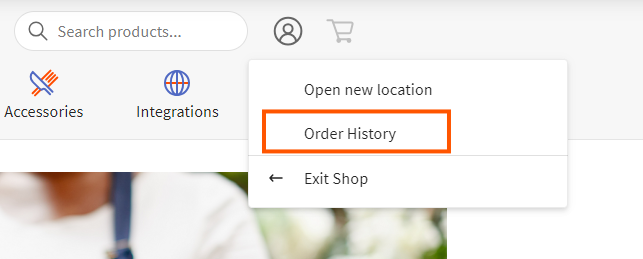
View your order history in Toast Shop. In Toast Shop, open the Account menu (located next to the search bar at the top of the page) and select Order History.
Need to find a missing tracking number, check the status of an active RMA, or report a missing item from a delivered order? See Check Your Hardware Order or RMA Request Status.
Items Available and Not Available in Toast Shop
The most popular Toast hardware items are available in Toast Shop, including Toast Tap™ contactless card readers, printers, cash drawers, Ethernet switches, handhelds, terminals, KDS devices, and accessories. The product selection is updated regularly, so check Toast Shop first before contacting Customer Care.
Some items aren't sold standalone on Toast Shop and must be ordered through Toast Customer Care. Common examples:
| Item | How to order |
| USB-C cables, micro-USB cables, terminal-to-printer cables, cash drawer cables | Contact Customer Care |
| Specific impact or kitchen printer models (for example, TP200, U220, M300, T88V, TPK300, TM-M30 family) | Contact Customer Care |
| Label paper, thermal paper, receipt paper | Contact Customer Care |
| Label printers (specific models for curbside, kitchen, or to-go labels) | Contact Customer Care |
| Mounts, wall mounts, screen mounts | Contact Customer Care |
| Replacement screws and small hardware parts | Contact Customer Care |
To contact Customer Care, start a live chat with the team. Chat is available in Toast Web and Payroll Web (the Support button in the bottom right of every page) and from the Support tab in the Toast Now app. For more information on contacting Customer Care, see Contact Customer Support or visit support.toasttab.com.
Frequently Asked Questions
When will I receive my hardware order from Toast Shop?
Hardware orders placed through Toast Shop ship via Ground transport, and you can select standard or expedited shipping at checkout. With standard shipping, you'll receive a tracking email within five to seven business days of placing your order. With expedited shipping, you'll receive a tracking email within one to two business days.
To check the status of an order you've already placed, see the Track an Order or View Order History section above.
Can I order replacement cables, cords, or power adapters on Toast Shop?
Yes, many replacement cables, cords and power adapters are available for purchase in the Toast Shop in the Power & Charging tab of the Printers & Accessories page.
Also asked as:
-
- I need a charger for my handheld?
- Where do I get a replacement power cord?
- The USB-C cable is broken, where do I order one?
How do I check if my device is under warranty?
To check if your device is under warranty, contact Toast Customer Care—warranty status lookup is handled through the RMA (Return Merchandise Authorization) process and isn't available as a self-service check in Toast Web or Toast Shop. For the warranty replacement workflow, see Replace Faulty Hardware (RMA).
Also asked as:
-
- Is my handheld still under warranty?
- How long are printers under warranty for?
- Is this device covered?
What if I have a broken printer, terminal, or KDS? Can I order a paid replacement on Toast Shop?
Toast Shop's paid replacement path covers Toast Go® 2 and Toast Flex devices only. For a broken printer, terminal, KDS, card reader, or other Toast hardware, the right path depends on warranty status. If the device is under warranty, file an RMA—see Replace Faulty Hardware (RMA). If the device is out of warranty, contact Toast Customer Care to order a paid replacement—see the Items Available and Not Available in Toast Shop section above.
Also asked as:
-
- My printer is broken; where do I get a new one?
- Card reader stopped working, need a replacement?
- Terminal isn't working, can I replace it?
Can I order replacement hardware without paying for additional software fees on Toast Shop?
Yes, you can order a paid replacement Toast Go® 2 or Toast Flex device without associated software fees. See the Order Replacement Hardware section above for the procedure. If your device is broken or under warranty, see Replace Faulty Hardware (RMA) instead.
What if I don't see the item I need on Toast Shop?
If you don't see the item you need on Toast Shop, contact Toast Customer Care to place the order. See the Items Available and Not Available in Toast Shop section above for the chat path and a list of common items.
How do I view my previous orders on Toast Shop?
To view your order history on Toast Shop, open the Account menu (located next to the search bar at the top of the page) and select Order History. See the Track an Order or View Order History section above for additional tracking options.
What are the shipping costs for products on Toast Shop?
Toast Shop calculates and displays shipping costs before checkout based on the items in your order. You'll see the shipping cost on the checkout page before you complete your purchase.
Can I cancel a Toast Shop order?
For information on cancellation and returns, see Cancel a Toast Shop Order.
Is my Toast hardware under warranty?
Warranty status, eligibility for warranty replacement (RMA), and limited warranty terms are not handled through Toast Shop. For warranty information and the RMA process, see Replace Faulty Hardware (RMA).
Related Articles
- Place an Order on the Toast Shop
- Replace Faulty Hardware (RMA)
- Check Your Hardware Order or RMA Request Status
- Order New Products on Toast Shop (Canada, Ireland, and the U.K.)
- Cancel a Toast Shop Order