Informe de Cajón Cerrado
Última actualización: 17 sept 2026, 5:15 p.m.
| Este artículo cubre la funcionalidad de cajón de efectivo heredada. Una versión actualizada de la funcionalidad del cajón de efectivo está actualmente en lanzamiento limitado con clientes seleccionados. Si la experiencia del cajón de efectivo en su Toast POS difiere de lo que se describe aquí, consulte los Recursos Adicionales para obtener detalles sobre la nueva funcionalidad. |
- Introducción al Informe de Cajón Cerrado
- Configurar el Informe de Cajón Cerrado
- Imprimir el Informe de Cajón Cerrado
- Recursos Adicionales
Introducción al Informe de Cajón Cerrado
Después de cerrar el cajón de efectivo de un terminal, se puede imprimir un informe de Cajón Cerrado para monitorear las transacciones del cajón de efectivo. Esto es útil para mantener registros físicos de los cierres de cajón de efectivo y para rastrear actividades inusuales del cajón de efectivo.
Por defecto, el informe de Cajón Cerrado incluirá:
- Nombre del dispositivo (configurado en la configuración del dispositivo - consulte este artículo del Centro de Soporte, Descripción General de la Configuración del Dispositivo para aprender más)
- Hora en que se abrió y cerró el cajón de efectivo
- Nombre del empleado al que se bloqueó el cajón de efectivo (si corresponde)
- Nombre del empleado que cerró el cajón de efectivo
- Nombre del empleado que imprimió el informe del cajón cerrado
Se pueden configurar secciones adicionales para mostrar en el informe, como se describe en la siguiente sección de este artículo.
Configurar el Informe de Cajón Cerrado
La siguiente información se puede agregar opcionalmente a su informe de Cajón Cerrado:
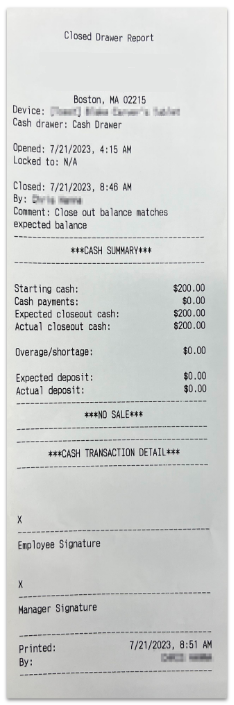
- Resumen de Efectivo
- Incluye el monto inicial de efectivo, pagos en efectivo, efectivo esperado al cierre y efectivo real al cierre
- Auditoría de No Venta
- Incluye la hora, el nombre del empleado y el motivo de la "no venta"
- Detalle de Transacción en Efectivo
- Incluye la hora, el nombre del empleado y el monto de cada transacción en efectivo
- Firmas de Empleado y Gerente
Nota: Si el empleado que cierra un cajón de efectivo tiene el 3.17 Cajones de Efectivo (Ciegos) permiso, no verá detalles adicionales del cajón de efectivo en el informe de Cajón Cerrado. El empleado no tendrá información sobre los pagos en efectivo que se recibieron en el cajón de efectivo, los montos esperados al cierre, los depósitos esperados o cualquier exceso/falta de efectivo en el cajón.
El informe de Cajón Cerrado se puede configurar para imprimirse automáticamente cuando se cierra un cajón de efectivo, o se puede imprimir bajo demanda.
Para editar la configuración de su informe, siga estos pasos:
- En Toast Web, navegue a Finanzas > Relacionados > Configuración > Resumen de Efectivo > Configuraciones de informes de POS > Informe de Cajón de Efectivo.
- En la página del Informe de Cajón Cerrado, seleccione su método de impresión preferido ("Imprimir informe automáticamente después de cerrar el cajón" o "Solo imprimir el informe de cajón cerrado bajo demanda")
- Luego, seleccione las casillas para incluir cualquier sección que desee ver en la impresión de su informe. Puede reordenar las secciones haciendo clic y arrastrando en el ícono de seis puntos a la izquierda.
- En la parte inferior de la página, seleccione Publicar todos los cambios.
- En la ventana de confirmación emergente, selecciona Publicar.
Imprimir el Informe de Cajón Cerrado
Para imprimir el informe desde un terminal, sigue estos pasos:
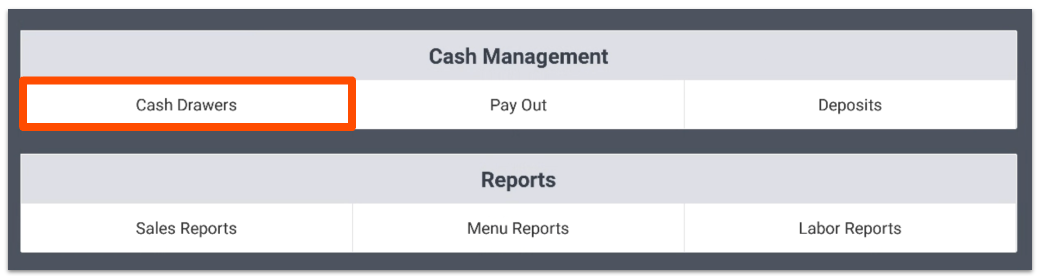
- Abre la secciónCajones de Efectivo bajoGestión de Efectivoen tu dispositivo Toast.
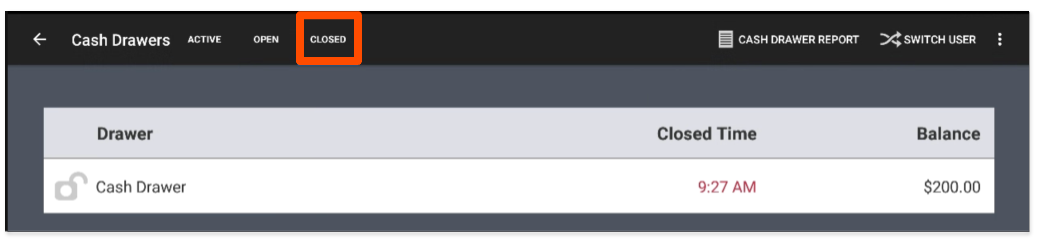
- Selecciona la pestañaCajones Cerrados y luego selecciona el cajón de efectivo para el cual deseas imprimir un informe.
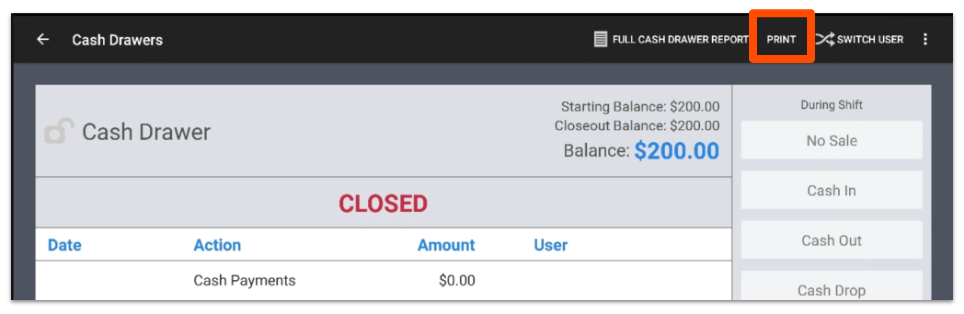
- SeleccionaImprimir. El informe se imprimirá en el impresora de recibos asignada al terminal que se está utilizando.
- El informe de Cajón Cerrado aparecerá como se muestra a continuación:
- El informe de Cajón Cerrado aparecerá como se muestra a continuación:
Recursos Adicionales
- Usar Cajones de Efectivo
- Resumen de Informes de Cajón de Efectivo
- Obtener Ayuda con Cajones de Efectivo
- Configurar Cajones de Efectivo
- Ajustar un Cajón de Efectivo Después de que Ha Sido Cerrado