Obtenga ayuda con el error de nómina de Toast: Por favor, ingrese un número de seguro social válido
Última actualización: 1 jul 2026, 11:42 a.m.
Pregunta
Recibí el mensaje de error "Por favor, ingrese un número de seguro social válido." ¿Qué debo hacer para solucionarlo?
Respuesta
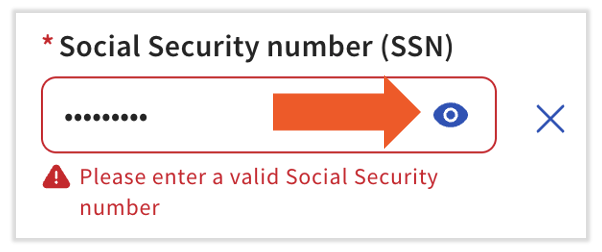
Cuando está ingresando o actualizando un número de seguro social (SSN), este código de error puede aparecer por dos razones: el formato es incorrecto o el sistema está reconociendo los asteriscos (puntos) como el SSN.
El formato es incorrecto
No requerimos guiones ni espacios al ingresar un SSN. Además, Toast reconoce estos SSNs como inválidos:
- Un SSN que comienza con "9", "000" o "666"
- Un SSN con los dos dígitos del medio como "00"
- Un SSN donde los últimos cuatro dígitos son "0000"
- Un SSN con una secuencia numérica como 123-45-6789 o 987-65-4321
- Nómina de Toast: Obtenga ayuda con los números de seguro social tiene más información sobre este tema.
Los asteriscos/puntos son reconocidos como el SSN
Este error ocurre en la página perfil del empleado > Perfil > Editar. Cuando agregue o edite el SSN mientras está oculto y esté "escribiendo asteriscos", Toast Payroll puede ver esta entrada como asteriscos en lugar de números y no aceptará el formato. Para solucionar esto, simplemente seleccione el ícono de ojo para que ahora tenga una línea a través de él y vea números en lugar de asteriscos. Seleccionar Guardar cambios le permitirá continuar.
Este contenido es solo para fines informativos y no está destinado como asesoría legal, fiscal, de recursos humanos o de cualquier otro tipo profesional. Por favor, contacte a un abogado u otro profesional para obtener asesoría.