Primeros pasos con la integración del PMS descalzo
Última actualización: 19 may 2026, 10:32 a.m.
Información general sobre la configuración, la incorporación y la configuración del sistema de gestión de propiedades de Barefoot Hotels.
Barefoot, con tecnología de Omniboost, es una integración hotelera de sistema de gestión de propiedades (PMS) que permite a los clientes cargar las comidas directamente a su habitación o folio mediante un cargo a la habitación o el pago de membresía.
Nota: Debes tener la suscripción a la API del hotel para cada ubicación a fin de obtener acceso a Descalzo en las integraciones de socios de Toast (TPI), que se puede comprar en la Tienda de Toast. Sin embargo, no necesitas el cargo de suscripción a la API de USD 25 para usar integraciones de hotel/PMS.
- Configuración de integración e incorporación
- Artículos de configuración de Toast Web
- Flujo de trabajo de cargo de miembro de POS
- Asistencia y escalamiento
- Recursos adicionales
Configuración e incorporación de integración de Pies Descalzos
Si nunca usaste TPC, sigue el proceso que se muestra en de ToastConfigurar integraciones de socios de Toast o como se describe a continuación para activar Descalzo con Toast.
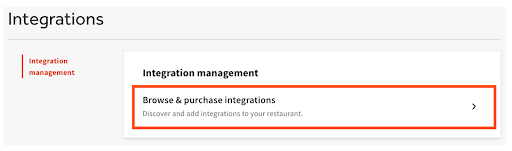
- Ve a la sección Integraciones de Toast Web en el menú de navegación de la izquierda. Selecciona Gestión de integraciones>Buscar y comprar integraciones.
- Ingresa “Descalzo” en el campo de búsqueda y, luego, selecciona Agregar ahora. Si tienes varias ubicaciones, selecciona qué restaurante(s) te gustaría conectar a tu cuenta de Pies Descalzos y selecciona Aplicar.
- Revisa los términos y condiciones de visibilidad del alcance de los datos y selecciona Confirmar para aceptar. Consulta la visibilidad del alcance de los datos de las integraciones de socios de ToastInformación general sobre la visibilidad del alcance de los datos de las integraciones de socios de Toast para obtener más información.
- Recibirás un correo electrónico confirmando la activación de la integración. Una vez recibido el correo electrónico, ponte en contacto con el servicio de atención al cliente de Omniboost a través de la dirección integrations@omniboost.io para finalizar la integración y conectar Toast a Barefoot. El equipo de Omniboost también recibe un correo electrónico en el que se les avisa que se ha agregado una nueva integración para Toast. El equipo de Omniboost se pondrá en contacto contigo directamente en un plazo de tres días hábiles. El tiempo total de incorporación y configuración varía en función de la información necesaria sobre los pies descalzos, tus necesidades y tu capacidad de respuesta.
- Después de agregar el mosaico Descalzo en TPC, Omniboost y Toast continuarán con la configuración de tu integración.
Elementos de configuración de Toast Web
Al igual que con todas las integraciones de sistemas de gestión de propiedades y hoteles, Descalzo requiere que los siguientes elementos de configuración se configuren en Toast Web.
Categorías de ventas
Para que los ingresos generados por el POS de Toast se contabilicen con precisión dentro de la integración descalza del sistema de gestión de hoteles y propiedades, Toast categorías de ventas deben asignarse a cada artículo del menú antes de que la integración del sistema de gestión de propiedades pueda configurarse por completo.
Ya sea que las categorías de ventas se hereden del nivel de menú o grupo de menús, o se apliquen individualmente a un artículo específico del menú, esto se puede configurar en cualquiera de las siguientes opciones: Propiedades avanzadas, Editar menús o la herramienta Generador de menús.
Dentro del sistema de hoteles descalzos, las categorías de ventas se asignan a las categorías de ingresos descalzos, lo que permite la integración para contabilizar con precisión los ingresos generados por la venta de cada artículo del menú publicado en el folio de un cliente. Si no se aplican categorías de ventas, no se contabilizan ventas con la integración.
Nota: Las categorías de ventas deben configurarse y asignarse a menús, grupos de menú y/o artículos de menú en Toast Web para cada ubicación que aproveche cualquier integración de hotel/PMS antes de que la integración de PMS pueda configurarse por completo.
Otras opciones de pago
Como parte de la configuración de integración, Toast creará las siguientes Otras opciones de pago necesarias para ti:
- Cargo por habitación: En el caso de transacciones con cargo a la habitación, cuando esté en línea. Debes agregar el mosaico de PMS descalzo en TPI para activar los cargos de habitación.
- Cargo por habitación - Sin conexión: Cuando estás en modo sin conexión o durante una interrupción, ofrece a los clientes la posibilidad de continuar las transacciones para su posterior procesamiento y cierre. Debes agregar el mosaico de PMS descalzo en TPI para activar los cargos de habitación aquí también.
- Cargo del miembro: Para que los clientes puedan usar su membresía “Descalzos” para el pago en el POS. Debes agregar el mosaico Club descalzo en TPI para activar los cargos de habitación.
Configuración de recibos
Los cambios en la configuración avanzada de recibos de tu ubicación permiten a los clientes de tu hotel proporcionar la información de su habitación de hotel directamente en su recibo para que los meseros y administradores del restaurante puedan actualizar la información relacionada con el hotel. Lo más probable es que esta información incluya el nombre, la habitación y la firma del cliente.
Para configurar recibos de integraciones de sistemas de gestión de propiedades de hoteles:
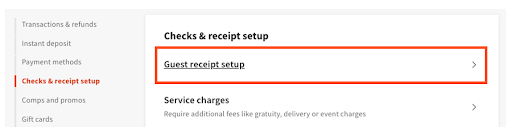
- Inicia sesión en Toast Web y ve aFinanzas>Configuración relacionada>Configuración del recibo para clientes.
- Selecciona el nombre del recibo.
- Desplázate hacia abajo hasta la sección Avanzadas.
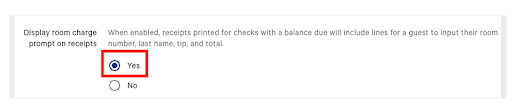
- Junto a la instrucción de Mostrar cargo en los recibos, selecciona Sípara agregar líneas para el número y el nombre de la habitación de un cliente del hotel en los recibos impresos.
- Selecciona Guardar > Publicar ahora.
Una vez guardada y publicada esta configuración, los recibos se Imprimirán como se muestra en la imagen a continuación:
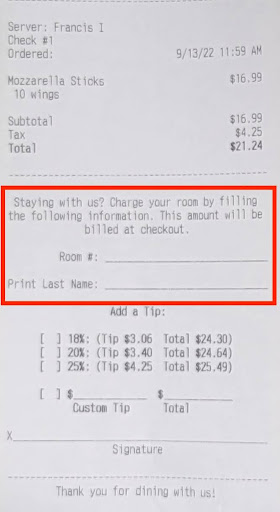
Si deseas eliminar las líneas de cargo de la habitación de sus recibos, sigue los pasos anteriores y, luego, selecciona No junto a,Mostrar aviso de cargo de habitación en los recibos. ThenSaveandPublish Now.
Nota:Para los clientes de MLM/MUO, la configuración de recibos de sistemas de gestión de propiedades (PMS) de hoteles puede configurarse para ser propiedad de o estar dirigida tanto a nivel de ubicación individual como a nivel de grupo.
Volver arriba
Flujo de trabajo de cargo de miembro de POS
Si un cliente desea pagar con una tarjeta de regalo Descalzo, sigue estos pasos:
- Elige Seleccionar tipo de pago alternativo.
- Selecciona Cargo del miembro.
- Ingresa la información de membresía del cliente en la pantalla de búsqueda.
- Selecciona un resultado para procesar el pago del cargo de miembro descalzo.

Asistencia y escalamiento
Ponte en contacto con Omniboost directamente a través de support@omniboost.io si tienes algún problema con tu integración con Pies Descalzos que no esté relacionado con los productos Toast (software o hardware) o con problemas de red o conexión.
Si tienes preguntas o problemas técnicos relacionados con la integración con Pies descalzos, ponte en contacto con Omniboost directamente a través de un correo electrónico a support@omniboost.io.
Si tienes problemas con tu sistema Barefoot que no están relacionados con la integración de Toast, ponte en contacto directamente con el equipo de asistencia de Barefoot. Puedes ponerte en contacto con su equipo de asistencia técnica a través del de Pieseste formulario de envío.