Importar información del cliente para facturación de Toast
Última actualización: 17 sept 2026, 10:41 a.m.
- Prepárate para importar información del cliente
- Importar información del cliente
- PREGUNTAS FRECUENTES
- Recursos adicionales
Prepárate para importar información del cliente
¿Estás en transición a usar la facturación de Toast desde otro sistema? Con esta función, puedes ahorrar tiempo si cargas previamente la información del cliente en la plataforma de facturación de Toast.
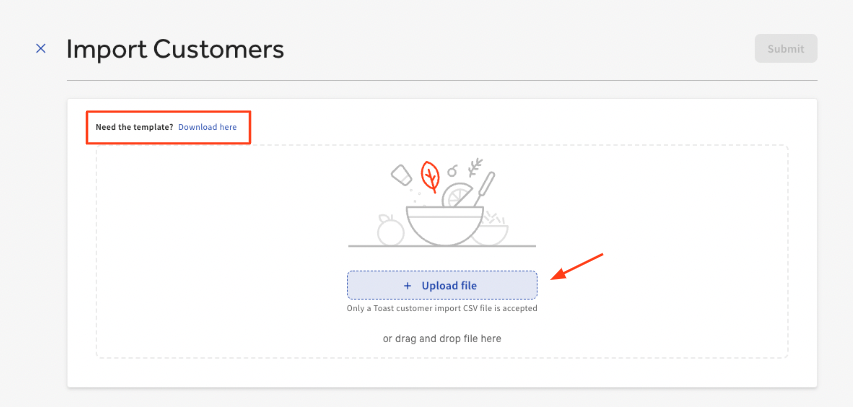
La facturación de Toast solo puede admitir un tipo específico de formato de archivo para cargar. Puedes descargar este formato en este enlace <DESCARGAR PLANTILLA AQUÍ >
El archivo que subas debe estar en formato CSV e incluir la siguiente información en este pedido específico.
- Nombre
- Apellido
- Nombre de la empresa
- Línea de dirección 1
- Línea de dirección 2 (opcional)
- Ciudad
- Estado
- Código ZIP
- C. e.
- Número de teléfono
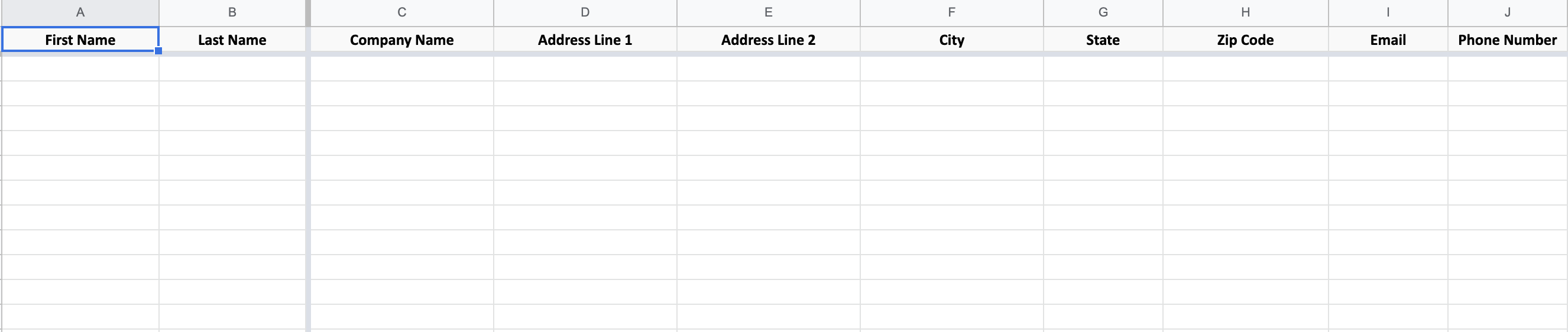
Una vez ingresada la información, descarga el archivo en formato CSV antes de cargarlo en Toast.
Volver al inicio
Importar información del cliente
- Después de iniciar sesión en Toast Web, ve a la sección Pagos desde la pantalla de inicio.
- En el encabezado Métodos de pago, seleccionaFacturas de clientes.
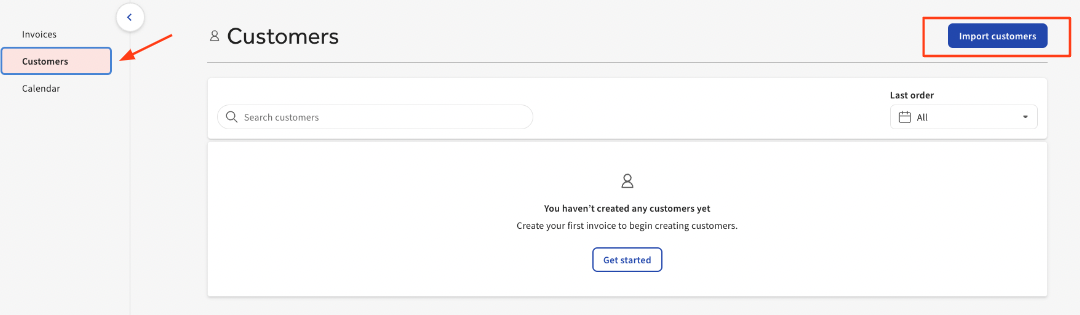
- Selecciona Clientes y, luego, Importar clientes.
- Selecciona Cargar archivo.
Nota: Si aún no completaste esta plantilla, sigue los pasos de Preparación para importar de información del cliente. También puedes descargar la plantilla preferida directamente desde esta página. Una vez ingresada la información, descarga el archivo en formato CSV antes de cargarlo en Toast.
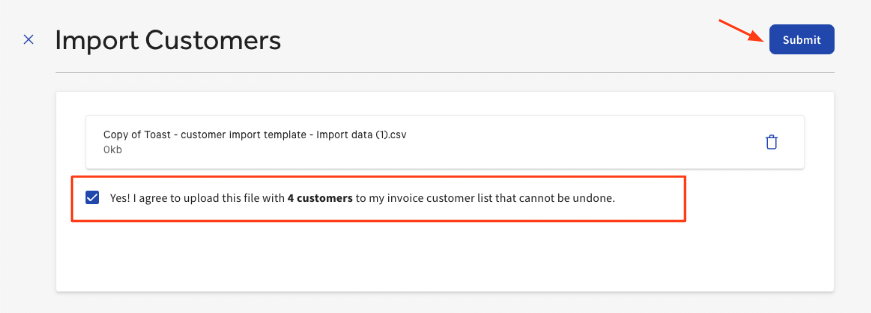
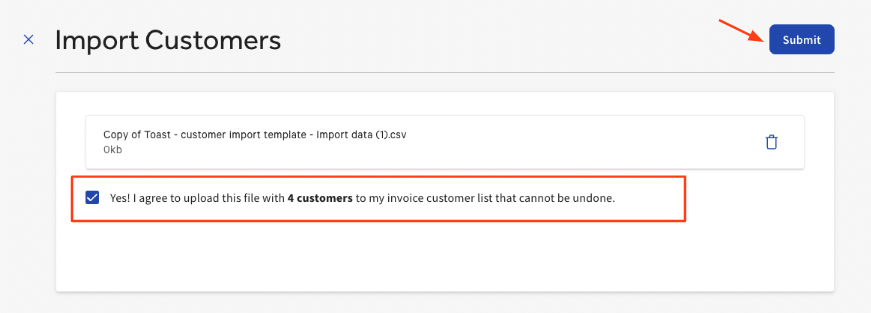
- Una vez que hayas seleccionado el tipo de archivo necesario para cargarlo, selecciona ¡Sí! Acepto cargar este archivo con X clientes a mi lista de clientes de factura y acepto que esta acción no se puede deshacer.
El número aquí indica cuántos clientes se están cargando. En este ejemplo, estamos cargando (4) clientes. - Selecciona Enviar.
- Después de que se complete la carga, se generará una lista de todos los clientes. Aparecerá una insignia verde en la parte inferior de esta página para avisarte que esta carga se completó correctamente.
Los clientes que importaste aparecerán ahora en tu lista de clientes al enviar una factura.
FAQ
¿Qué información del cliente se puede importar en Toast para las facturas?
El archivo que subas debe estar en formato CSV e incluir la siguiente información en este orden específico.
- Nombre
- Apellido
- Nombre de la empresa
- Línea de dirección 1
- Línea de dirección 2 (opcional)
- Ciudad
- Estado
- Código ZIP
- C. e.
- Número de teléfono
Toast creó una plantilla que incluye esta información en el orden correcto. Una vez ingresada la información, descarga el archivo en formato CSV antes de cargarlo en Toast. <DESCARGAR PLANTILLA AQUÍ >
¿Puedo usar mi propio archivo o tengo que usar la plantilla que proporciona Toast?
No es obligatorio usar la plantilla de Toast para esta carga. Sin embargo, la información y el orden en que está organizada deben ser los mismos para que la carga se realice correctamente.
¿Por qué falló mi carga?
Hay varias razones por las que una carga podría fallar.
- formato incorrecto
- entrada no válida
- falta información
- clientes duplicados
¿Se puede compartir esta información del cliente con mi programa Fidelidad con Toast?
No. Una vez que la información del cliente se ha cargado en la plataforma de facturación de Toast, estos datos no se comparten con tu programa Fidelidad con Toast. Sin embargo, estos mismos clientes pueden subirse a tu programa de fidelidad siguiendo estas instrucciones.
Nota: Son dos cargas separadas.
Recursos adicionales
¿Quieres saber más sobre la facturación de Toast? Consulta estos recursos a continuación.
- Cómo enviar una factura a tus clientes
- Cobrar a los clientes por depósitos de eventos utilizando la facturación de Toast
- Informes de facturas de Toast