xtraCHEF: Comience con los plazos de pago
Última actualización: 28 abr 2026, 4:19 p.m.
Nuevos plazos de pago
Importar plazos de pago
Si su cuenta de xtraCHEF está integrada con QuickBooks Online, puede importar sus plazos de pago existentes directamente desde QuickBooks. Comience navegando a la icono de engranaje > Plazos de pago. Seleccione el botón Importar plazos de pago desde QuickBooks Online en la parte superior de la página. Si su cuenta no está integrada con QuickBooks Online, este botón no aparecerá en su pantalla. Consulte xtraCHEF: Integración de QuickBooks Online.
Para importar sus plazos de pago desde QuickBooks Online, elija Importar del menú emergente. Esto agregará automáticamente cualquier plazo de pago de QuickBooks a su cuenta de xtraCHEF. Los plazos de pago estarán disponibles para su uso inmediato en el Centro de Proveedores una vez que se hayan importado.
Agregar plazos de pago
Navega a la icono de engranaje > Plazos de pago. Para crear un nuevo plazo de pago, selecciona el botón +Agregar Plazos de Pago.
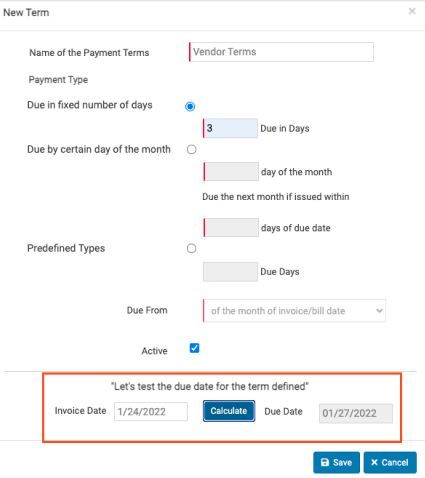
Completa la ventana emergente con la información relevante, incluyendo cómo te gustaría llamar a tu plazo de pago y cómo funcionarán los términos con tu(s) proveedor(es). Prueba tus términos seleccionando Calcular en la sección Probemos la fecha de vencimiento para el plazo definido. Si tu fecha de vencimiento se calcula como se esperaba, presiona Guardar para agregar inmediatamente el nuevo plazo de pago a tu cuenta de xtraCHEF.
Editar y Ver Plazos de Pago
Editar Plazos de Pago
Navega a la icono de engranaje > Plazos de pago. Para editar los términos existentes, primero selecciona un plazo de pago específico de la lista para que se vuelva azul. El botón Editar Plazos de Pago ahora estará disponible, así que selecciónalo ahora.
Esto revelará la misma ventana emergente que usaste para crear un nuevo plazo de pago. Edita los campos según sea necesario y selecciona Guardar. Tus cambios tendrán efecto inmediato.
Ver Plazos de Pago
Si necesitas verificar un cierto plazo de pago, selecciónalo de tu lista de plazos de pago para que se vuelva azul. El botón Ver Plazos de Pago está disponible para seleccionar. Presiónalo para avanzar.
Nuevamente, verás una ventana emergente con la misma información que ingresaste para crear el plazo de pago. Si necesitas hacer cambios al plazo de pago, selecciona el botón Editar Plazos de Pago en su lugar.
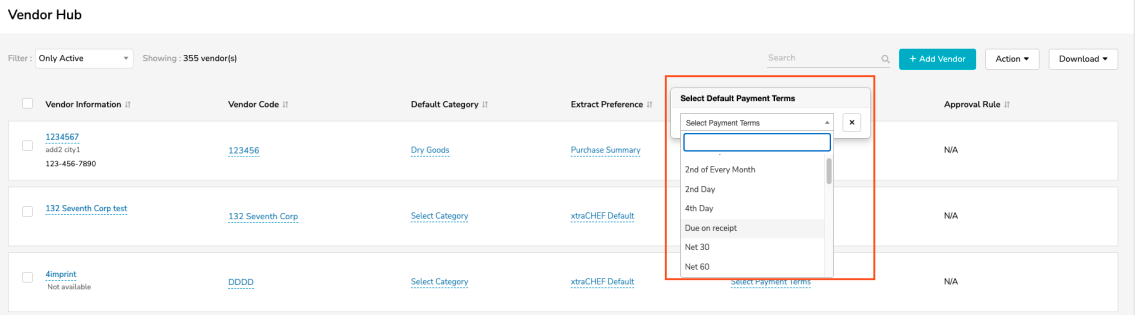
Verás tus términos de pago reflejados en el xtraCHEF Vendor Hub. Para agregar tus términos de pago en el Vendor Hub, elige Seleccionar Términos de Pago y selecciona tu término elegido del menú desplegable.