翻译仅供参考。您与 Toast 签署的任何法律协议(包括但不限于《商户协议》和《终端用户许可协议》),其订立语言可能不同于以上页面所使用的语言,无论是否提供本页面其他语言的译文,均应以您所签署的协议条款为准
构建嵌套修改项(向修改项添加修改项)
上次更新时间:2026年9月17日 18:39
嵌套修饰符可以帮助您在菜单中有需要后续选择才能下单的修饰符选项时。
嵌套修改项概述
当将修改组添加到修改选项时,会创建嵌套修改项。这些“如果这样,那么那样”风格的修改构建可以帮助根据客人之前的选择自动化后续选择。这是一个示例:
假设您菜单上的每道主菜都需要一个配菜选择。这个配菜选择被构建为一个修改组,其中包含客人可以选择的选项,以搭配他们的主菜选择。在配菜选择修改组中,有修改选项,包括薯条、卷心菜沙拉、通心粉和奶酪,以及配菜沙拉。
在这种情况下,如果客人选择配菜沙拉作为他们的配菜选择,我们还需要知道他们想要什么类型的调料。因为如果客人选择薯条、卷心菜沙拉或通心粉和奶酪,则此调料选择不相关,我们希望将其仅应用于配菜沙拉修改选项。
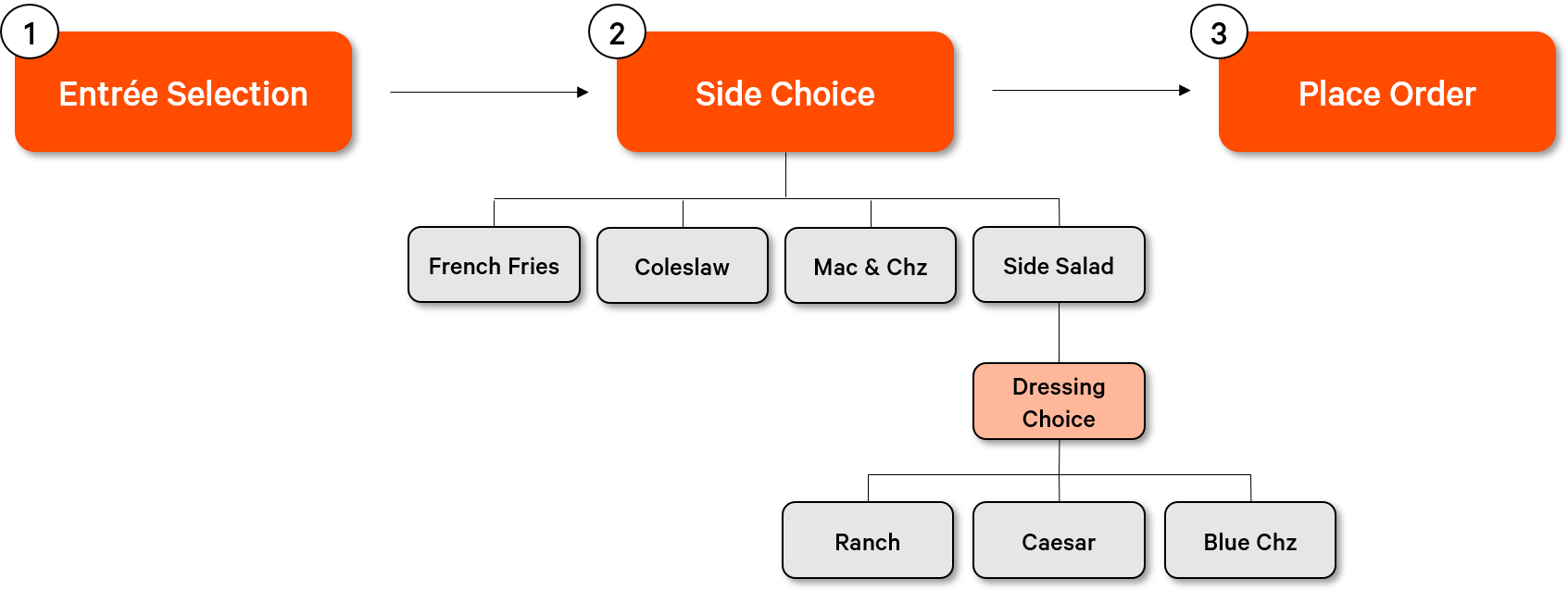
这就是创建“嵌套”效果的地方。我们可以构建或应用一个修改组(在这种情况下,调料选择)到现有的修改选项。这样做将确保选择配菜沙拉选项的客人会立即被提示选择一个“嵌套”修改项(在这种情况下,实际的调料)以完成他们的订单。
构建嵌套修改项
要在 Toast Web 中构建嵌套修改项,请按照以下步骤操作:
- 在Toast Web中,导航至我菜单 >批量管理> 高级属性属性。
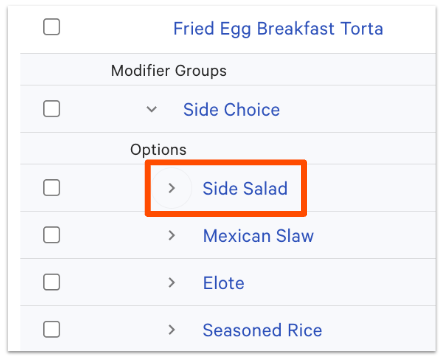
- 使用左侧的>图标展开您的菜单并找到您想要添加嵌套修改项的修改组。选择您希望应用嵌套修饰符的修饰符选项。
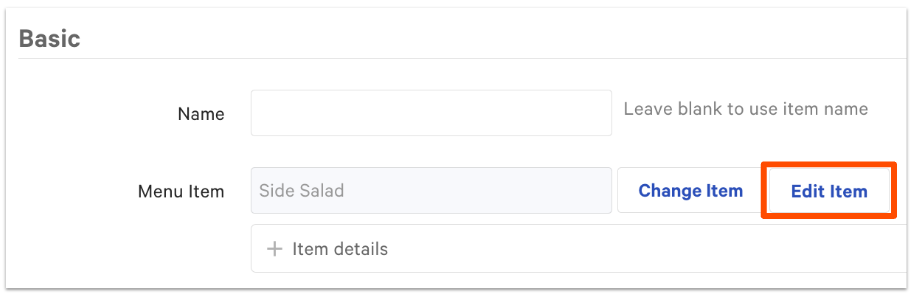
- 选择编辑项目。
- 向下滚动到修饰符 部分,+ 添加一个新的修饰符组,或使用+ 添加按钮旁边的下拉箭头添加现有修饰符。
- 根据情况,您可能希望对修饰符组进行深度复制。如果是这样,请访问复制菜单、项目、组或修饰符部分,了解有关浅复制和深复制的更多信息,见复用或复制菜单项和修饰符。
- 完成后,保存并发布您的更改。
注意:可能会创建一个无限循环的嵌套修饰符,系统会不断要求客人或员工进行选择。当现有修饰符组用于嵌套修饰符选项,而嵌套的修饰符又是用于创建嵌套选项的修饰符组中的修饰符选择时,就会发生这种情况。
- 例如,选择一个带调料选择的配菜沙拉。
- 一个项目有一个名为配菜选择的修饰符组,其中有一个修饰符选项是配菜沙拉。
- 配菜沙拉有一个嵌套的、必需的修饰符组,名为调料选择,列出了所有调料选项,包括一个额外调料的选项。
- 额外调料与原始调料选择修饰符组嵌套在一起。每次选择额外调料时,都会存在持续选择额外调料的选项,没有停止点。
- 为了避免这种情况,请确保复制(不深度复制)您希望嵌套的修饰符组(了解更多:复用或复制菜单项和修饰符)。
其他资源