翻译仅供参考。您与 Toast 签署的任何法律协议(包括但不限于《商户协议》和《终端用户许可协议》),其订立语言可能不同于以上页面所使用的语言,无论是否提供本页面其他语言的译文,均应以您所签署的协议条款为准
MLM的本地菜单编辑权限
上次更新时间:2026年9月17日 13:06
了解如何在不影响其他地点的情况下更改您位置的菜单。
Toast多地点管理的本地菜单编辑概述
对于使用Toast多地点管理(MLM)的餐厅,个别地点提供的菜单项可能与其他地点不同。这些项目可能仅在有限的时间内提供,或者可能会根据季节在菜单中轮换。
在这种情况下,特许经营概念的公司层面会为所有地点创建整个“项目数据库”,然后赋予店级经理添加/删除这些现有项目到其地点菜单的能力。要使用本地菜单编辑,请为员工(或职位角色)分配4.14 本地菜单编辑权限(要分配或调整权限,请参见使用MLM管理用户职位和权限)。
拥有4.14 本地菜单编辑权限的用户将能够对公司级菜单项或项目修饰符:执行以下操作:
- 仅在 项目启用了特定地点定价时更改项目价格(有关更多信息,请参见多地点管理的特定地点定价 )。
- 注意:特定地点定价可以由拥有4.5 编辑完整菜单权限的用户启用。
拥有4.14 本地菜单编辑权限的用户将能够对本地对象执行以下操作,包括本地菜单组和本地修饰符组中的项目:
- 添加或删除现有菜单项和现有修饰符选项
- 更改名称
- 更改价格或定价策略
- 编辑本地对象的价格级别(要了解更多关于价格级别及其使用方法的信息,请查看文章为具有相同价格的项目设置价格级别)
4.14 本地菜单编辑是4.5 编辑完整菜单权限的一个子集,允许餐厅管理员在处理多个地点时简化菜单编辑访问。拥有4.5 编辑完整菜单权限的用户不需要4.14 本地菜单编辑,因为他们已经可以访问相同的功能。同时拥有这两项权限的用户将能够编辑完整菜单。
例如,查看下面的饮料菜单:
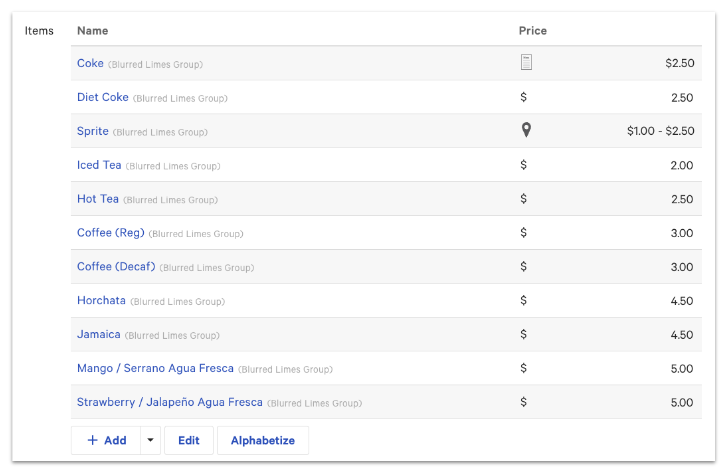
- 具有4.14 本地菜单编辑权限的用户将只能添加存在于企业级项目数据库中的项目
- 具有4.5 编辑完整菜单权限的用户将能够选择+ 添加以将新项目添加到同一饮料菜单中
在某些情况下,特许经营概念的企业级控制定价结构以及可以从各个地点添加或删除的菜单项目。为了在单一的跨店报告结构中保持同步,重要的是菜单项目不能在单个商店级别创建,而是应从现有的项目数据库中提取。这防止了地方经理创建可能会膨胀跨店报告数据的菜单项目。
返回顶部