Navigate Toast Payroll Within Toast Web
上次更新时间:2026年10月8日 12:21
Now that Toast Payroll opens within Toast Web, use this article to understand how the new navigation works.
- Toast Payroll Within Toast Web Overview
- Who Sees Toast Payroll in Toast Web Navigation
- How Toast Payroll Navigation Works
- What Stays the Same in Toast Payroll
- Related Articles
Toast Payroll Within Toast Web Overview
Beginning in September 2026, the Toast Payroll module now appears within Toast Web. This means you'll no longer need to switch between two separate platforms. When you select Payroll in the Toast Web left-hand navigation, Toast Payroll opens in the same window with its own navigation shown as a sub-menu.
Your Toast Payroll tasks work the same way they did before; same with Toast Web. The only thing that changes with this update is where Toast Payroll appears. Employee profiles, permissions, reports, logins, and syncing between Toast Payroll and Toast Web all work as they did before. This helps:
- Manage payroll, team, and restaurant settings from one place with one navigation menu.
- Move between Toast Web pages and Toast Payroll pages without opening a new window or tab.
- Get a more connected experience as more Toast Payroll and Toast Web features come together over time.
Who Sees Toast Payroll in Toast Web Navigation
All Toast Payroll customers can use the new navigation. What you see depends on your access to Toast Web and permissions within Toast Web.
If you have access to Toast Payroll pages beyond My Profile (which is most common with manager and HR+ ):
- You'll see the Toast Web primary left-hand navigation, with Toast Payroll as a navigation sub-menu under Payroll.
- You can access the Toast Payroll navigation sub-menu by selecting Payroll from the Toast Web navigation.
If you don't have Toast Web access, or only have access to My Profile in Toast Payroll (most common for Employee security roles):
- You see Toast Payroll as a standalone product with no changes to its navigation menu.
- This could also include terminated employees, and third-party payroll or HR admins (bookkeepers, accountants, etc.) who don't have restaurant access or permissions in Toast Web.
If you use separate logins for Toast Web and Toast Payroll:
- You see Toast Payroll as a standalone product when you log in with your Toast Payroll credentials.
- To switch platforms, log out and log back in with your other credentials to view Toast Web.
- Consider combining your two logins for a unified experience. Follow the instructions in Unified Login Experience for Toast Web and Toast Payroll to do this. If you get stuck, contact Customer Care.
How Toast Payroll Navigation Works
Open Toast Payroll
Logging in at payroll.toasttab.com opens the Toast Payroll dashboard. If you have Toast Web access, the page opens inside Toast Web with Payroll selected from the Toast Web navigation menu.
If you aren't seeing the payroll navigation sub-menu, select Payroll from the Toast Web navigation menu.
Page Header and Search
If you have Toast Web restaurant access and permissions, the header at the top of the page changes based on what page you're viewing:
- On Toast Payroll pages, you see the Toast Payroll header with your company code towards the right and a Search employees search bar.
- On Toast Web pages, you see the Toast Web header with your location towards the left. You can use the Toast Web global search to find pages in Toast Web.
Two Employee Profiles
If you use Toast Payroll, your employees will continue to have two profiles, their Employee profile and their Payroll profile. Both can now be accessed from the Toast Web navigation.
- Toast Web employee profile: From Toast Web, navigate to Team > Employees, then select the employee's hyperlinked last name.
- Toast Payroll employee profile: From Toast Web, navigate to Payroll. Then select Team from the Toast Payroll sub-menu before selecting the employee's name.
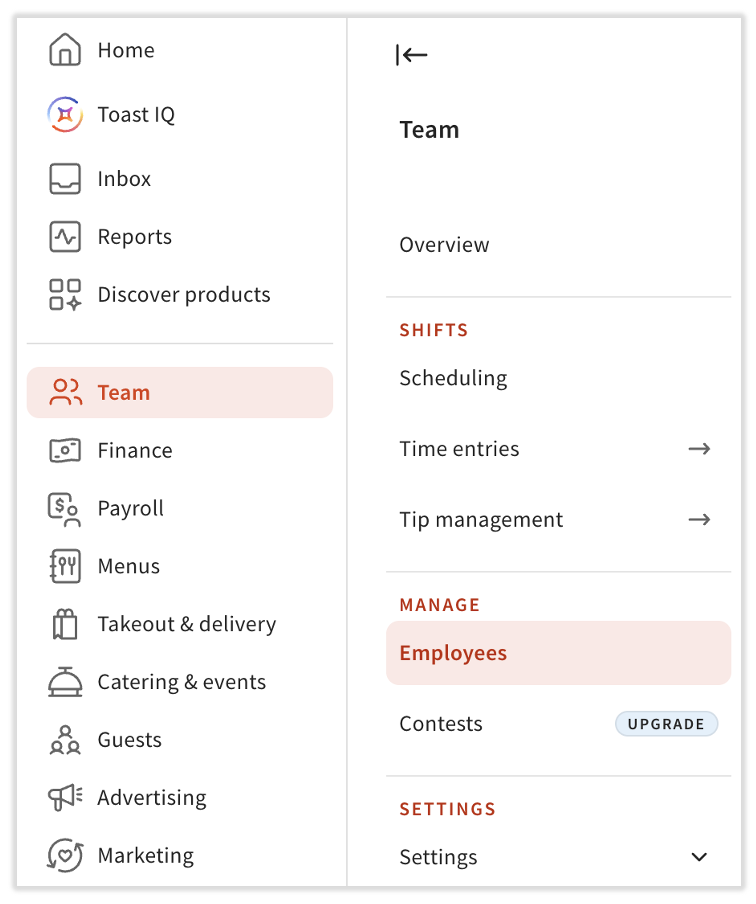
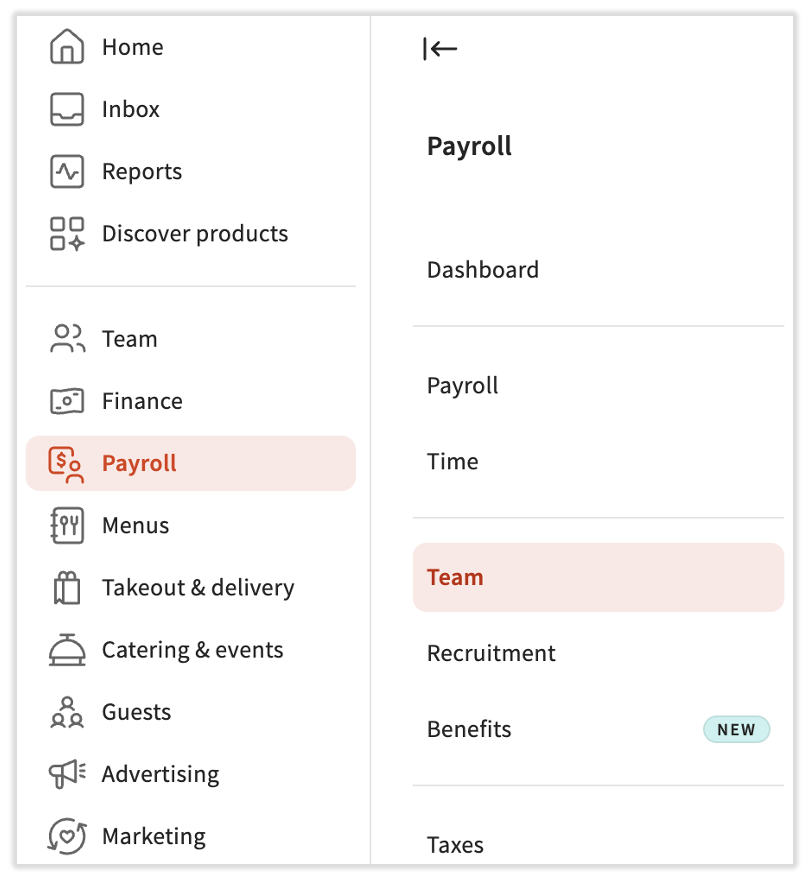
If your business uses Toast Payroll, keep hiring employees, terminating them, and changing their pay in the Toast Payroll employee profile. Now that both profiles are in the same back-end, check which profile you're in before you make a change.
Permissions and Security Roles
Toast Web and Toast Payroll still have separate permissions. Each is managed in its own place:
- Toast Web permissions: Within a Toast Web employee profile. Requires 8.4 Manage Permissions or the Owner/Admin role.
- Toast Payroll security roles: Within a Toast Payroll employee profile, under Employment > Employment Details > Security Role. Requires HR+ access in Toast Payroll.
What each person can see in Toast Payroll still depends on their Toast Payroll security role. What they can see in Toast Web still depends on their Toast Web permissions.
What Stays the Same in Toast Payroll
Toast Payroll in Toast Web improves the navigation, but does not change the functionality and workflows that you've become accustomed to. These items work the same way they did before:
- Payroll tasks, such as running payroll, managing taxes, and viewing pay stubs.
- Logins. Most people use the same login for Toast Web and Toast Payroll, and security settings haven't changed.
- Employee mapping and syncing between Toast Payroll and Toast Web.
- Two employee profiles, two sets of permissions, and two sets of reports.
- Toast Payroll URLs.
Note: If several people use the same back-office computer, consider logging out of Toast Web when you're done. This can help prevent someone else from opening Toast Payroll pages by mistake.
Related Articles
- Toast Payroll: Toast Payroll and Toast POS Integration Guide
- New Team Navigation Coming to Toast Web
This content is for informational purposes and is not intended as legal, tax, HR, or any other professional advice. Please contact an attorney or other professional for advice.