New Team Navigation in Toast Web
Last updated: Nov 25, 2026, 11:30 AM
Toast Web's Employees menu is becoming the Team menu with a simpler layout for scheduling, time entries, tips, and more.
- What's Changing
- Before and After
- Where Each Page Lives Now
- Approve Shift Pickups, Swaps, and Time Off
- The Team Overview Page
- Related Articles
What's Changing
The left navigation menu in Toast Web is getting a new look. The menu item currently called Employees is becoming Team and selecting it now takes you straight to the Team Overview page. A few related menu items are also moving to keep things organized.
Before and After
Use this image to compare the old Employee navigation and the new Team navigation:
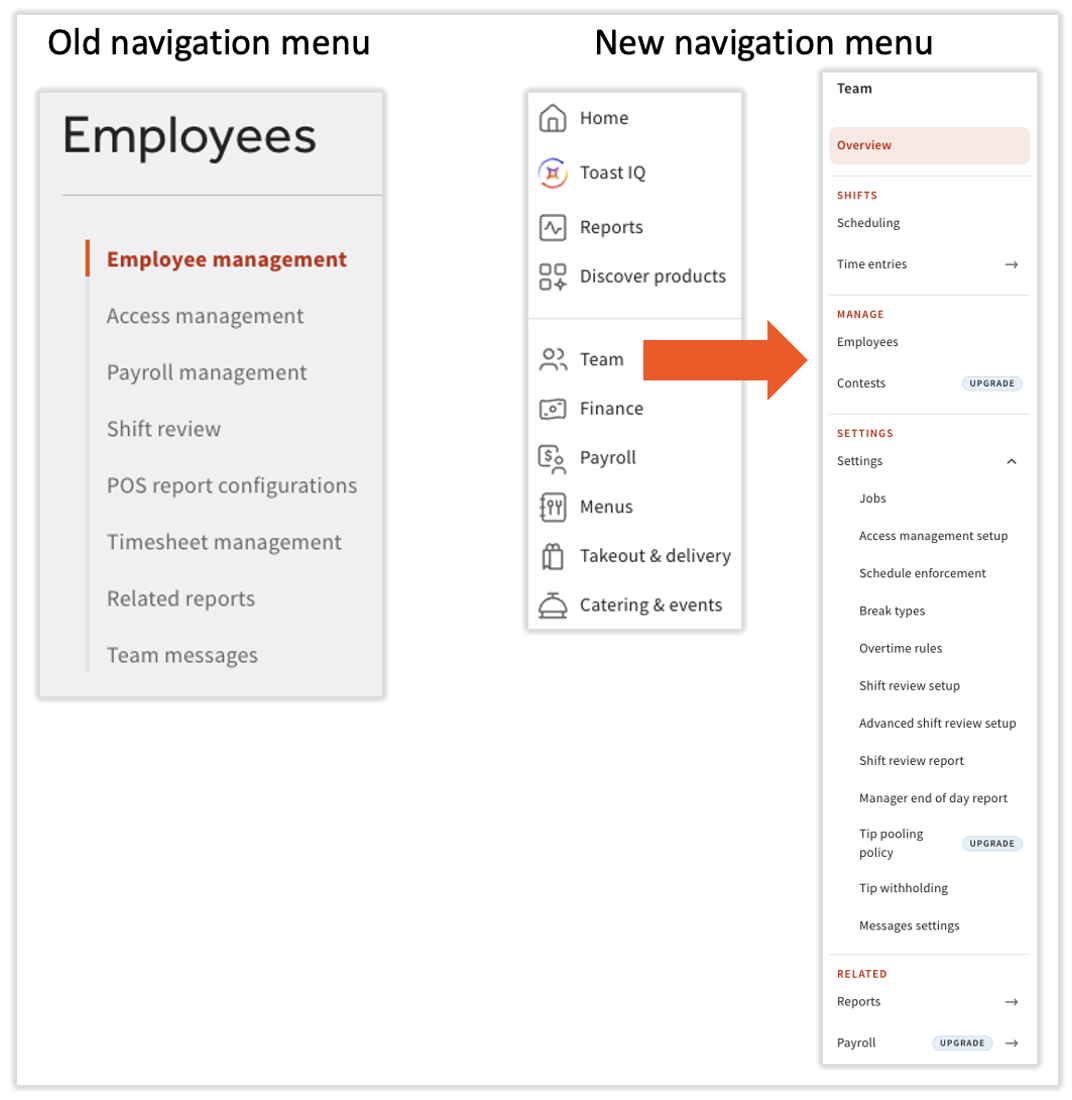
- The Employees menu in Toast Web is now called Team.
- In Toast Web, selecting Team takes you directly to the Team Overview page.
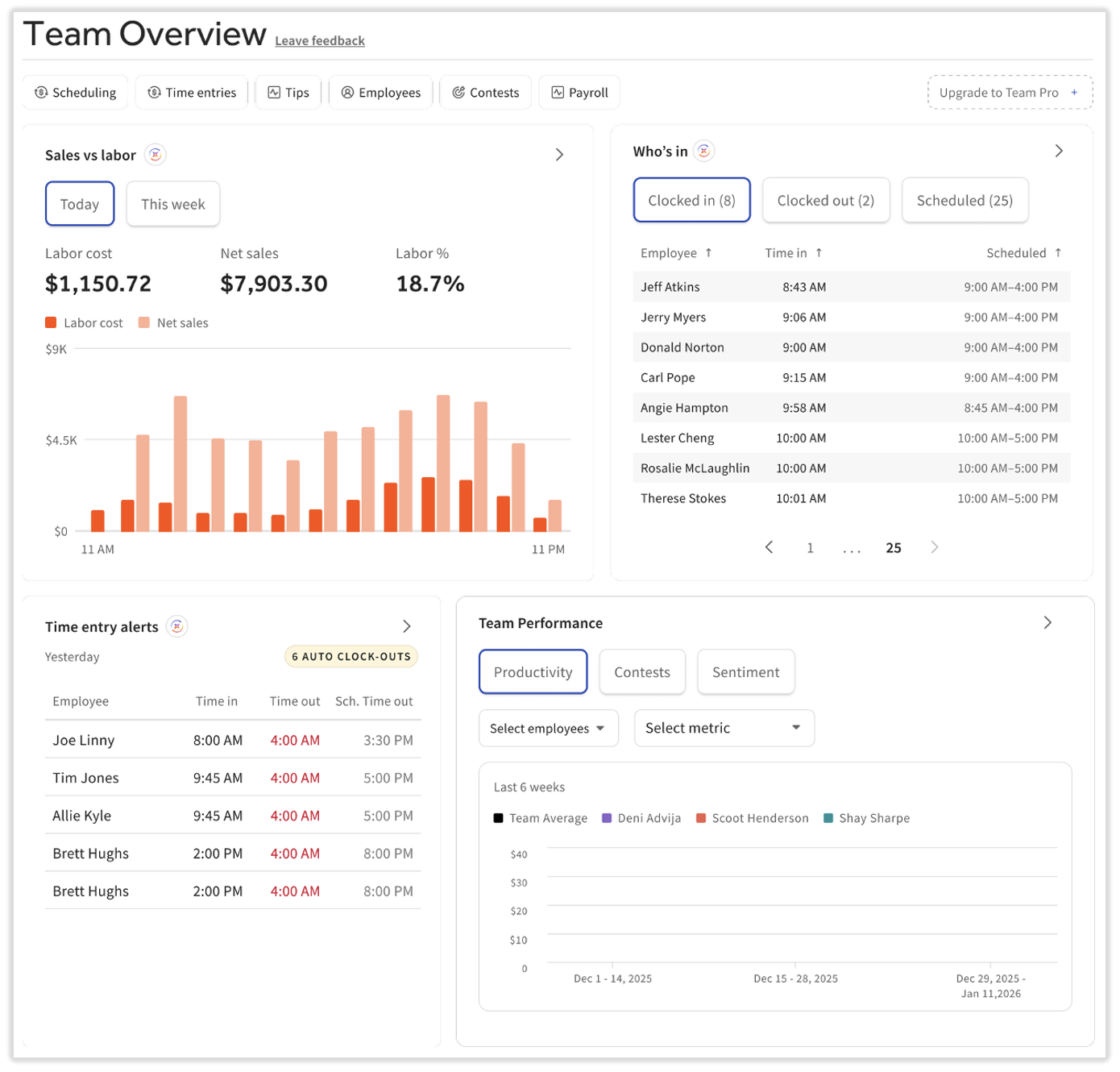
- Review the Team Overview page for data related to your employees and labor. There’s a handful of buttons at the top for quick navigation too.
- Scheduling is no longer a separate item in the main menu. You'll now find it within this new Team menu.
- The new Team menu groups related tools together — including scheduling, time entries, tip management, and “one-time” setup options like jobs and access management. These one-time settings will be nested in the Settings submenu since they shouldn’t need to be accessed on a regular basis.
- After navigating to Team > Related > Reports, you'll be brought to the Labor submenu of the Reports main menu. This helps you quickly find the reports that contain information for employees, jobs, tips, and more.
Where Each Page Lives Now
This list is not conclusive, but it references the most popular pages accessed through this menu.
| Previous Navigation | New Navigation | Related Article |
| Employees > Employee management > Employees | Team > Employees | Add and Manage Employees in Toast Web |
| Employees > Employee management > Jobs | Team > Settings > Jobs | Create and Edit Jobs (Roles) for Toast POS |
| Employees > Employee management > Scheduling -OR- Scheduling (directly from the navigation menu) | Team > Scheduling (Scheduling will be removed from the main navigation menu) | Get Started With Scheduling in Toast Web |
| Scheduling > approve shift swaps, open shift pickups, and time off requests | Team > Scheduling | Manage Scheduling in Toast Web (for Employers) |
| Employees > Employee management > Contests | Team > Contests | Get Started With Contests in Toast |
| Employees > Payroll management > Tip pooling policy | Team > Settings > Tip pooling policy | Get Started With Toast Tips Manager |
| Employees > Shift review > Shift review setup | Team > Settings > Shift review setup | Customize Shift Review Settings |
| Employees > Timesheet management > Time entry management | Team > Time entries | Time Entry Management Overview |
Approve Shift Pickups, Swaps, and Time Off
Managers approve or deny shift swaps, open shift pickups, and time off requests from Toast Web.
To approve or deny a shift swap or open shift pickup:
- In Toast Web, navigate to Team > Scheduling.
- Open the Full schedule view.
- Select a shift marked Needs approval at the bottom of the shift.
- Select Approve or Deny.
To approve or deny a time off request:
- In Toast Web, navigate to Team > Scheduling.
- From the Full schedule view, select Filters.
- In the Types drop-down menu, select Time off, then select Apply filters.
- Select a request marked Needs approval.
- Select Approve or Deny.
Approved time off appears on the Full schedule view. Denied time off is removed. The employee is notified either way.
Note: Shift swaps and open shift pickups need approval only when the Automatically approve setting is disabled. You can't approve requests from the Toast Now or MyToast apps. Use Toast Web instead.
The Team Overview Page
After selecting Team from the main navigation menu in Toast Web, you'll land on the Team Overview page. Use this page to quickly view employee and labor-related stats and use the buttons at the top to navigate to important Toast product and feature pages. Check out Get Started With the Team Overview for more information.
Related Articles
- Add and Manage Employees in Toast Web
- Manage Scheduling in Toast Web (for Employers)
- Get Started With the Team Overview
- Get Started With Toast Tips Manager