Toast Payroll: Use and Troubleshoot Toast Pay Card - Employee Guide
Last updated: Apr 8, 2026, 2:26 PM
| Order and activate your Toast Pay Card first. Learn more about the MyToast Account and Pay tabs. |
- Toast Pay Card Overview and Eligibility
- Your Toast Pay Card
- How Toast PayOuts Work
- Troubleshoot and FAQ
- Leave the Toast Pay Card Program
Toast Pay Card Overview and Eligibility
If you are a non-salaried employee of a restaurant that offers Toast Pay Card and Payout, you are 18 or older, you're in an eligible state, and you have a smartphone and an email address, then you qualify for Toast Pay Card and PayOut.1,2 Signing up for Toast Pay Card and PayOut doesn't require:
- Personal information like your social security number
- A credit check
- A bank account (it is an alternative to paper checks or direct deposit)
Your Toast Pay Card
The Toast Pay Card has a variety of features:
- It is a free prepaid debit card that you can use anywhere Mastercard® is accepted.3
- You can transfer money from your Toast Pay Card to an external bank account with up to two (2) free transfers per calendar month. It is not possible to exceed two transfers per month, even for a fee.4
- If you need cash, you can withdraw cash from over 37,000 ATMs within the MoneyPass® Network at no cost to you.5 Here is a map of the MoneyPass ATM network, which you can also find on the MyToast app. Details on limits can be found here.
- You will have access to over-the-counter withdrawals at a bank but may be charged a fee at banks that are not Mastercard member banks.
- You can also provide your Toast Pay Card's routing and account numbers to third parties (e.g., your cell phone provider) to pay bills. Find your routing and account numbers in the MyToast app by navigating to the Account tab and selecting Manage Card.
- Your card is enabled with contactless technology, allowing you to tap for even faster checkouts.
- Your card includes a range of benefits, including Mastercard ID Theft Protection, Extended Warranty, Price Protection, and Mastercard Airport Concierge™. See the Mastercard Guide to Benefits for a full list of card benefits with details about how to redeem and use them.
- The Toast Pay Card supports digital wallet functionality, such as Apple Pay, Google Pay, Venmo, and Cash App.
How Toast PayOuts Work
Toast PayOut2 is a feature that may be made available by your employer that gives you instant6 access to a portion of your earned tips and wages before payday. Check with your employer if they offer Toast PayOuts. If so, you can request them in the MyToast app.
- Toast PayOuts are loaded onto your Toast Pay Card where you can spend, withdraw, or transfer the money.
- Any available portion of your paycheck that you did not receive via Toast PayOuts will generally be deposited to your Toast Pay Card on payday.
- If your restaurant tip pools, Toast PayOuts for tips become available after your manager has approved and sent the tip pool, typically the next calendar day.
- Access to Toast PayOut varies by employer. Your employer may elect settings that either adjust or do not adjust tip PayOuts received by employees for estimated tax withholdings and deductions. This is why the system might not present your full amount as eligible for a Toast PayOut. Find directions to see your employer's Toast PayOut settings here.
Troubleshoot and FAQ
Who should I contact for help with my Toast Pay Card transfers, transactions, or withdrawals?
There are many situations where Toast will not be able to assist employees. However, you can call (866) 218-6688 for assistance with these issues. These scenarios include, but are not limited to:
-
-
- Funds transfers
- Toast Pay Card transaction questions, such as a purchase you're unsure about
- Withdrawal issues
- Lost/stolen/damaged/broken Toast Pay Cards
- Transaction history
- Questions about the balance of your Toast Pay Card (current amounts and last paid amounts)
-
Will any smartphone be able to run the MyToast app?
The MyToast app is compatible with iPhone and Android devices that meet our OS requirements. To use the app, your Apple devices must have iOS 16.0 or later installed, and your Android devices must have Android 11 or later. You can use the links provided to easily check your smartphone's OS version to ensure it is compatible.
What if I'm having trouble logging into the MyToast app?
Refer to the Logging In for the First Time and Login Troubleshooting sections in The MyToast App: Account.
I think my Toast Pay Card should have been delivered already. How long does it take to ship?
Once the Toast Pay Card has been requested from the MyToast app, it typically takes 8-10 business days to arrive. From time to time, shipping delays may occur, but if you suspect the card is taking longer than it should, reach out to us at (312) 252-7341 for more details.
How quickly will I be able to access my pay after I clock out? And once I elect to receive a Toast PayOut?
Toast PayOuts are typically accessible after you finish your shift.6 Once you elect to receive a Toast PayOut, these funds are generally available on your card within seconds. If you work multiple days in a row, the amount eligible will be cumulative for that pay period.
Any remaining net wages and tips may be available on your Toast Pay Card through your paycheck once the pay period is complete. Your Toast PayOut amount will revert back to $0 once the new pay period begins.
Why don't I see the Toast PayOut offer I expected?
There are several different reasons this may occur:
-
-
- Your employer may have limited access to Toast PayOuts for wages, tips, or both.
- To check if your employer has limited access to Toast PayOuts, open the MyToast app and select Card from the bottom, then select Get Paid. Tap the ? icon next to Available Toast Payout and read the details.
- Your employer may have elected to have Toast PayOuts for tips adjusted for estimated tax withholdings and deductions.
- To check if your employer has made such an election, open the MyToast app and select Card from the bottom, then select Get Paid. Tap the ? icon next to Available Toast Payout and read the details.
- Your time entries and/or tip amounts may not have been entered into the Toast Payroll system. Verify with your manager that your time entries and tip amounts are correctly entered into Toast Payroll.
- If your restaurant tip pools, confirm that your manager has approved the tip pool and sent it to payroll. Once approved, you will typically see your tips the next calendar day.
- A time entry or tip amount attributed to you was adjusted by your employer, in which case, subsequent Toast PayOut offers would be adjusted to account for the correction.
- You may have just started a new pay period. If a pay period just ended and it is the start of a new one, but you have not worked during this new one yet, you may not see a Toast PayOut offer. Keep in mind this references the pay period and not your payday.
- Toast PayOut offers are available within a pay period. If not claimed, Toast PayOut amounts from a past pay period will be paid on the corresponding pay period.
- You may have reached the per day or per pay period limits of earned tips (max $500 per day) and a portion of earned wages before payday (max $500 per pay period).
- Your employer may have limited access to Toast PayOuts for wages, tips, or both.
-
Do Toast PayOuts include my earned tips?
Toast PayOut settings are established by your employer. There are four different options: tips only, wages only, both tips and wages, or none.
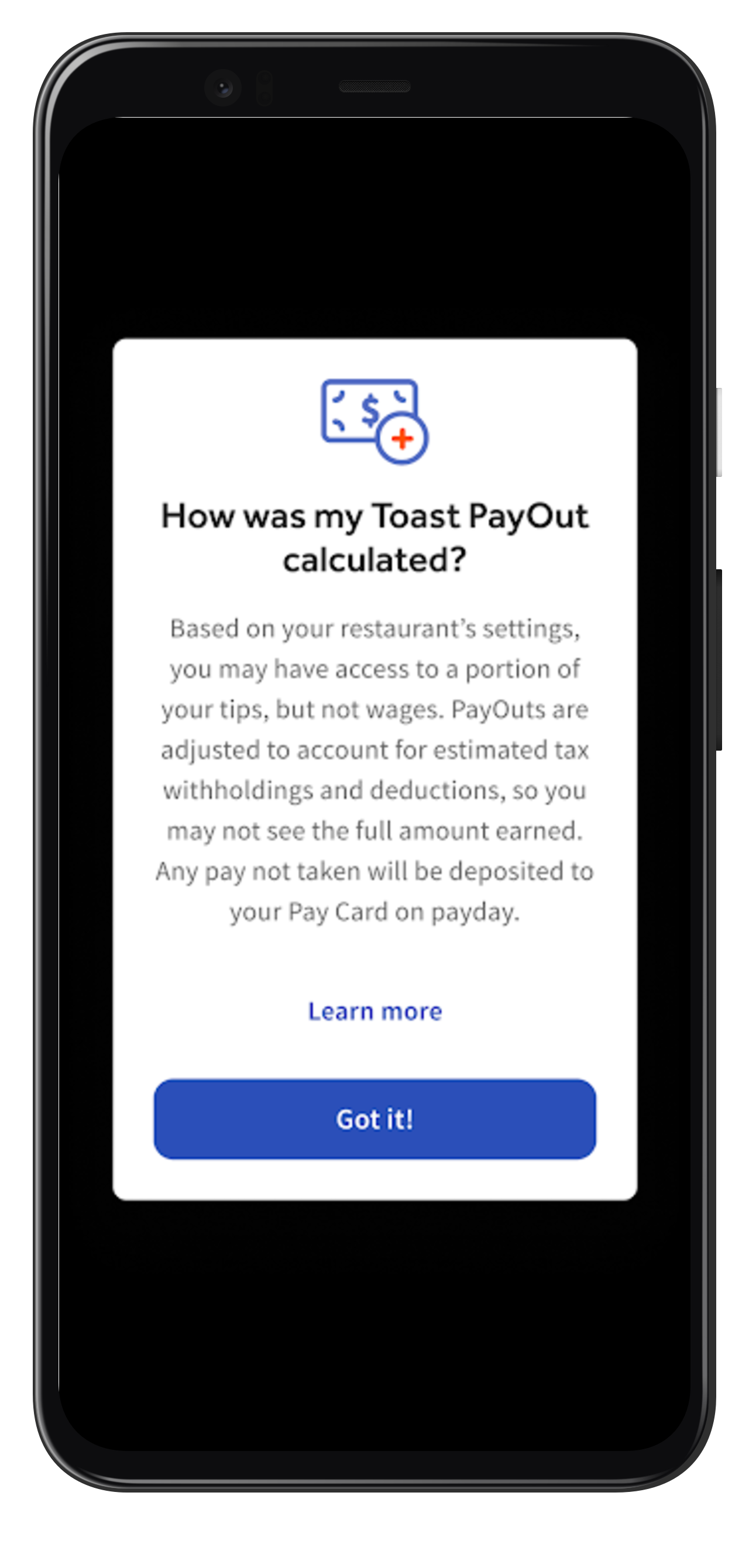
To view the Toast PayOut settings for your employer, open the MyToast app and select Card from the bottom, then select Get Paid. Tap the ? icon next to Available Toast Payout and read the details. You will see an information screen similar to the one below that will provide details on how Toast PayOuts are set for your restaurant.
Where are my gratuities and service charges?
Gratuities and service charges are considered as wages for Toast PayOut purposes.
How are my Toast PayOut amounts for wages calculated?
If your employer offers Toast PayOuts for wages, this is how they are calculated:
-
-
- Take 50% of your cumulative wages to date in the pay period
- Subtract any recurring deductions
- Subtract 30% of cumulative tips to date from the pay period as estimated tax withholdings
- Subtract previous Toast PayOuts for wages taken during the pay period
- The remaining amount, if greater than $0 but less than the $500 limit for Toast PayOuts for wages per pay period, is your currently available Toast PayOut for wages
- If this amount is less than or equal to $0, your wages alone are not enough to cover estimated tax withholdings and recurring deductions. As such, you will not see a Toast PayOut offer for wages at that time.
-
How are my Toast PayOuts for tips calculated?
If your employer offers Toast PayOuts for tips, this is how they are calculated:
-
-
- If your employer has the All Tips setting turned on, your cumulative Toast PayOut amounts for tips in a pay period will be equal to your earned tips to date in that pay period. Tax withholdings and recurring deductions will be applied on payday.
- If your employer has the All Tips setting turned off, we will adjust your Toast PayOuts for tips for estimated tax withholdings and recurring deductions in an amount equal to any negative amount from the wage calculation. If you do not have a negative amount from the wage calculation, then your cumulative Toast PayOut for tips in a pay period will be equal to your earned tips to date in that pay period. Any overestimated tax withholdings not needed when payroll is run will be paid out on payday.
- Whether your employer has turned the All Tips setting on or off, Toast PayOuts for tips are limited to a max of $500 per day.
-
Are there limits to how much cash I can withdraw from an ATM transaction?
There are three different limits that apply here:
-
-
- Per transaction ATM withdrawal limit of $1000
- Daily ATM withdrawal limit of $1000
- Monthly ATM withdrawal limit of $5500
-
View your cardholder agreement for the latest information on your maximum card balance and other transaction and account limits.
What if I need help with my Toast Pay Cards or Toast PayOuts?
For questions about your pay, you should still go to your employer. For questions or support for your Toast Pay Card (card balance, transaction history, etc.), log in to My Toast or call (866) 218-6688.
If you think your Toast Pay Card is lost or stolen or if your card becomes damaged or broken, call (866) 218-6688. It is important that you call as soon as you think your card may be missing or stolen to avoid liability for unauthorized charges. If you lose your Toast Pay Card, a replacement is free. In the meantime, Toast advises you to change your payment method to either a paper check or direct deposit until you receive your new card; however, once you receive your new card, activate it, and change your payment method back, you'll be able to transfer your wages and/or tips into your bank account on file (if your restaurant allows for it). Toast does not have a way to track or locate a lost Toast Pay Card.
How do I view my Toast Pay Card transaction history?
To view your Toast Pay Card transaction history in the MyToast app, select the Card tab and then select See All Transactions. This will show your card's transactions and you have the option to download them as a PDF by selecting Export as PDF from the upper-right corner.
What do I do if I notice an error or unauthorized transaction in my Toast Pay Card transaction history?
Find information for reporting unauthorized transactions or errors in your cardholder agreement, as well as within the MyToast app transaction history. In case of errors or questions about your electronic transfers on the Toast Pay Card:
-
-
- Call (866) 218-6688
- Write to Processing Center, P.O. Box 71337, Salt Lake City, UT, 84171-0337
- Email issuing@toasttab.com
-
If you think a transaction is wrong or you need more information about it, you must reach out within 60 days after we sent you the first statement on which the error or problem appeared. When you reach out, please provide:
-
-
- Your name and account number
- The dollar amount of the transaction or suspected error
- All relevant details regarding the error or the transaction you're concerned about. Explain as clearly as possible why you believe it is an error or why you need more information.
-
We will investigate your concern and will correct any errors promptly. If we take more than 10 business days to do this, we will credit your account for the amount you think is in error so that you may use this money during the time it takes to complete the investigation, but only if you have submitted a written confirmation of your notice of error.
If I accept a Toast PayOut, how will that affect my pay?
On payday, your pay statement will reflect your total net pay, including your total wages and tips earned, and will display the applicable Toast PayOuts that you received along with any applicable amounts withheld for taxes, withholdings, and deductions.
Toast PayOut for tips is not a wage deduction, but reflects already received payment. Toast PayOut for wages is structured as wage advances; these are wage deductions.
Leave the Toast Pay Card Program
If I would like to cancel my Toast Pay Card, who do I contact?
First, call (866) 218-6688 and request your card be canceled/deactivated. Then log into Toast Payroll and update your payment method. If you do not update your payment method in Toast Payroll, it will default to a paper check.
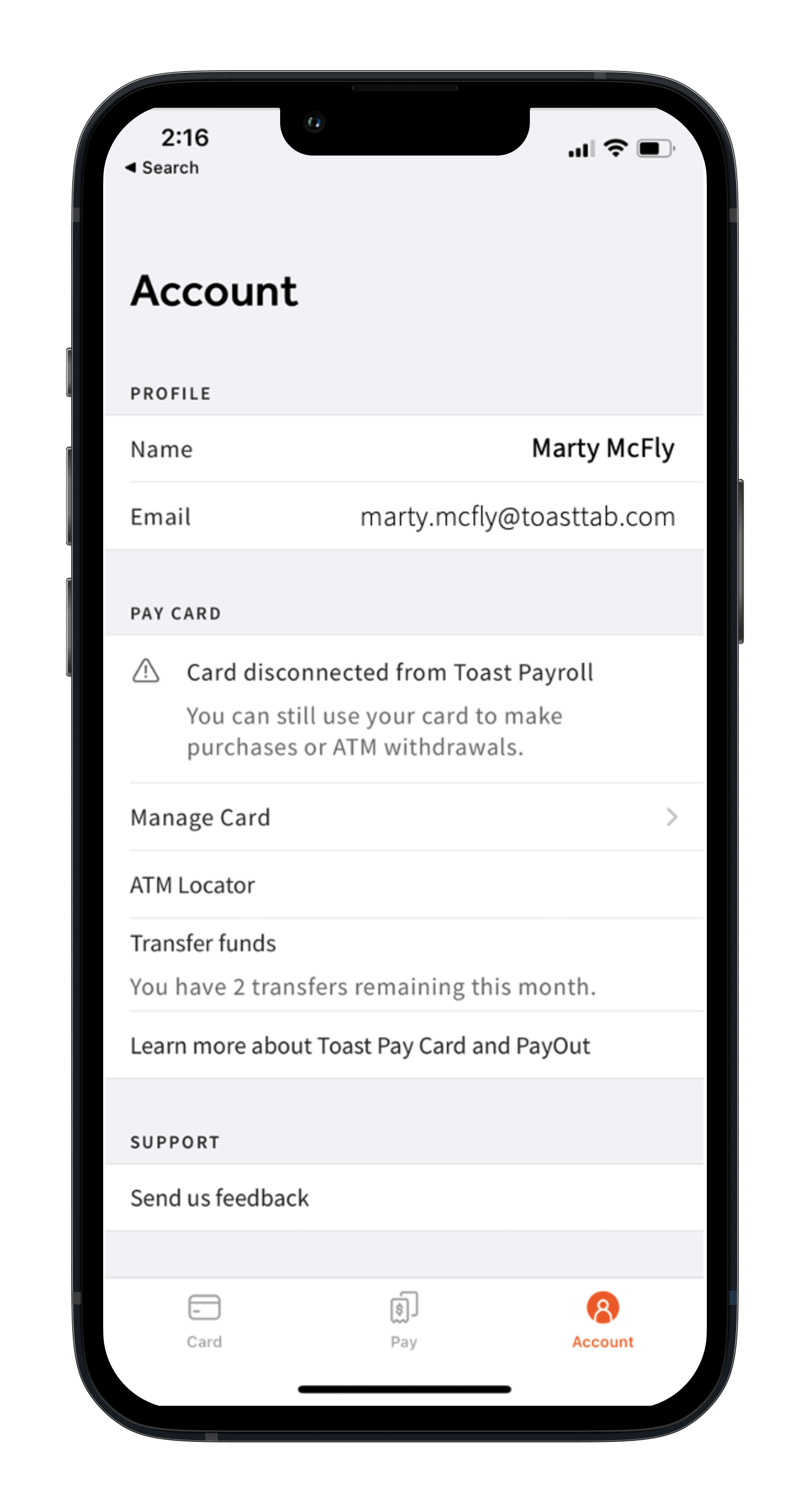
You can access your funds by spending on the Toast Pay Card, transferring to an external account, making an over-the-counter withdrawal at a bank, or withdrawing from ATMs until the funds are depleted.7 You will receive the following message in the middle of the screen when you have successfully canceled your card:
What happens if I decide to leave my job?
You can access your funds by spending on the Toast Pay Card, withdrawing from ATMs, or making over-the-counter withdrawals until the funds are depleted.7 You'll continue to have access to the MyToast app; however, Toast PayOuts will be disabled. You can also obtain the remaining funds by requesting to receive them via paper check. Your employer will be responsible for delivering any final wages earned which had not been loaded to your Toast Pay Card before termination.
What should I do if my employer discontinues the Toast Pay Card program while I'm still employed?
Your employer should inform you of this decision. Any questions regarding the basis for discontinuation should be addressed with your employer. Your MyToast app will reflect that the card that has been issued has been disconnected from Toast Payroll. The Toast PayOuts feature will no longer be available. The MyToast app and the card balance will still be available for you to access, use, and spend until all funds are exhausted. You will need to update your payment method in Toast Payroll before your next pay period; otherwise, your payment method will default to a paper check.
Back to top
1 Toast Pay Cards are issued by Sutton Bank, Member FDIC, pursuant to license by Mastercard®. Mastercard and the circles design are registered trademarks of Mastercard International Incorporated. Toast PayOuts are funded by a 0% line of credit issued to employers by Toast, Inc., as set forth in the employer's Credit Agreement. Toast reserves the right to change or discontinue this program at any time. Toast Pay Card and PayOut is not available in all jurisdictions and is available to Toast Payroll customers only.
2 Availability of Toast PayOuts varies by employer. Visit the MyToast app to see if your employer offers Toast PayOuts. Tip PayOuts may be limited to a portion of pay to help account for estimated taxes, withholdings, and deductions. Tip PayOuts are not available at restaurants that tip pool without using Toast Tips Manager. Employees must receive wages via the Toast Pay Card in order to access Toast PayOuts. Tips will be paid to employees on their Toast Pay Card as though you were receiving them in cash. Wages will be advanced by employers during the pay period and deducted from your total wages paid to you on payday.
3 Toast Pay Cards do not have any associated ATM withdrawal or other fees; however, third-party ATM operators may charge a fee unless the cardholder uses an ATM within the MoneyPass® Network, and third-party financial institutions may charge a fee for over-the-counter withdrawals unless the institution is a Mastercard member bank. MoneyPass is a registered trademark of Fiserv, Inc.
4 Fees charged by the receiving financial institution are uncommon but may apply. Employees will receive two (2) free ACH transfers per calendar month. It is not possible to exceed that limit, even for a fee. Employees cannot schedule transfers for future dates. There is a limit of $2500 per transaction, $5000 per day, and $5500 per month. Limits are subject to change. Employees should see their Cardholder Agreement for details.
5 MoneyPass is a registered trademark of Fiserv, Inc.
6 Access is typically available instantly after the employee's shift; however, if restaurants tip pool using Toast Tips Manager, Toast PayOuts of tips are available after the tip pool is approved and sent to Toast Payroll, typically the next calendar day.
7 Third party financial institutions may charge a fee for over-the-counter withdrawals unless the institution is a Mastercard® member bank.
This content is for informational purposes and is not intended as legal, tax, HR, or any other professional advice. Please contact an attorney or other professional for advice.