Remote & Onsite Onboarding Guide
Last updated: Aug 20, 2026, 12:08 PM
Learn what to expect during Toast onboarding, from your kickoff call through go-live, plus appointment reminders and rescheduling.
- About Toast Onboarding
- Who Guides Your Onboarding
- The Onboarding Journey at a Glance
- Kickoff Call
- Build Your Back-End
- Train Your Staff
- Install Hardware
- Go-Live
- After You Go Live
- Activation Appointments and Reminders
- Reschedule an Appointment
- Onboarding Fees
- Frequently Asked Questions
- Related Articles
About Toast Onboarding
Onboarding is the guided process that takes your restaurant from a signed contract to a live Toast system that processes payments. A typical remote or onsite implementation takes four to six weeks. If your location is under construction, plan your onboarding timeline around that schedule.
Your onboarding includes a kickoff call, back-end and menu setup, staff training, hardware installation, and a go-live day. Many of these activities can be worked on at the same time, so you do not have to finish one before starting the next.
Note: Onboarding for the Toast point of sale (POS) is different from employee onboarding in Toast Payroll. This guide covers setting up your restaurant on Toast. To add new employees, see Add and Manage Employees in Toast Web.
Who Guides Your Onboarding
Your main point of contact throughout onboarding is your Toast Onboarding Consultant. Think of them as your general contractor. They schedule your appointments with specialists and guide your team to a successful go-live.
You can reach your Onboarding Consultant directly to ask questions, confirm appointment details, or reschedule. After you go live, your point of contact becomes the 24/7 Toast Customer Care team rather than your Onboarding Consultant.
The Onboarding Journey at a Glance
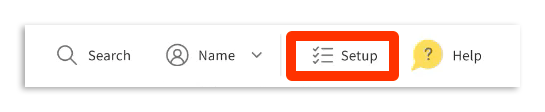
You can track every task and upcoming appointment in your setup checklist in Toast Web, your restaurant's back-end. Open the checklist at any time using the setup icon in the top right corner of the page.
The onboarding journey moves through these phases:
- Kickoff call with your Onboarding Consultant
- Build your back-end and menu
- Train your staff
- Install your hardware
- Go live and start processing payments
- Settle in with ongoing Customer Care support
The activities are listed in order, but many can be completed at the same time. Completing your setup checklist tasks before each appointment keeps your onboarding on schedule.
Kickoff Call
The kickoff call is where your Onboarding Consultant sets the stage for your implementation. After you sign your contract and complete your account setup, your Toast salesperson books this call. Once it is booked, the task appears in your setup checklist on Toast Web.
To prepare, select Kickoff call in your setup checklist to see a list of items to complete before the call.
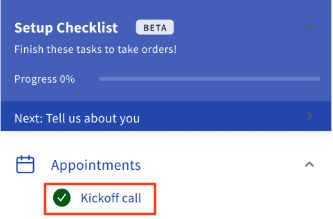
During the kickoff call, your Onboarding Consultant reviews the following:
- Confirm business information, including your business name, important contacts, location, opening timeline, banking information, and contract start date.
- Review and ship your hardware. Depending on your location, hardware takes 7 to 14 business days to arrive. Someone must be on-site to sign for your Toast hardware on delivery. When it arrives, check each box to confirm everything is included and in good condition.
- Set up American Express (Amex). OptBlue is an Amex program that lets you process Amex cards through Toast with consolidated statements and faster deposits. If you have an Amex Direct Merchant ID, your Onboarding Consultant requests it before your installation date. Learn more in Accepting American Express.
- Review site readiness. Your Onboarding Consultant confirms that the cabling, internet speeds, and power sources at your site are ready before installation. See Networking & Devices Site Readiness Guide for the full checklist.
- Set dates and deliverables for your menu review, manager training, go-live readiness call, hardware installation, activation, and go-live support.
To prepare for your kickoff call, plan to:
- Log in to your Toast Web account and start your setup checklist.
- Start filling out your menu templates and review the Build Your Menu Template article.
- Review the Networking & Devices Site Readiness Guide so you are ready with information about your business operations.
- Assign someone on your team to manage onboarding.
- Plan to be at your business for the appointment with a computer that has internet access.
Note: If you purchased Toast through the online platform, the kickoff call is not available, and you lead your own setup. See Self-Service Onboarding Guide.
Build Your Back-End
In the build phase, you configure your software and build your menu so your business is ready for go-live. This is also when your hardware arrives and a good time to complete any remaining site readiness tasks.
- Build your menu. Toast configures your menu from customizable templates that you then edit. Before your menu review, complete the Get Started With Toast Menus course in Toast Classroom, which is required before the review.
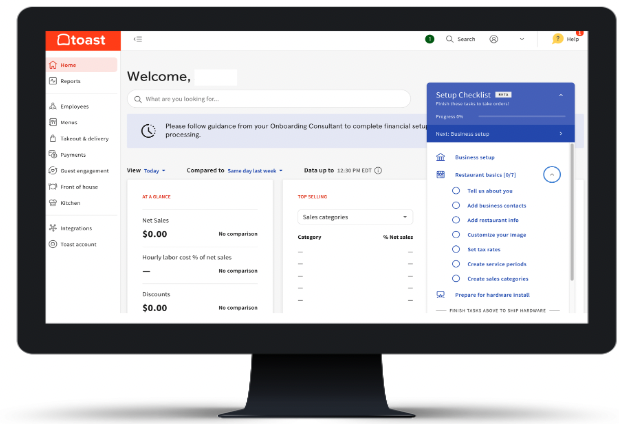
- Configure Toast Web. Use the setup checklist that appears in Toast Web to complete a basic configuration before your training. See Complete Your Toast Business Setup Tasks for help. Specific device configuration happens during your installation appointment.
- Activate your software. Depending on the modules you purchased, additional configuration is required. Your Onboarding Consultant covers these tasks during your kickoff call. Some tasks can be done now, such as importing gift cards (see Import Gift Cards) or creating your table layout for Toast Mobile Order and Pay (see Create Service Areas and Table Setup). Others, such as third-party delivery integrations, come later. See Get Started with the DoorDash Integration and Get Started With the Uber Eats Integration.
To prepare for your menu review and configuration sessions, plan to:
- Complete the Get Started With Toast Menus course and finalize your menu template.
- Complete your setup checklist tasks in Toast Web.
- Start any remaining site readiness tasks.
- Schedule your staff for training and go-live days.
- Send your staff to the Training Your Team on Toast video library to get familiar with Toast.
- Contact any integration partners so they can help set up the connection before go-live. See Add or Remove an Integration with Toast Partner Integrations.
Train Your Staff
POS Foundations training prepares your staff and managers for day one with Toast. Both the Support Center and Toast Classroom offer on-demand and live training.
- Get Started With Toast Menus. Complete this course before your menu review. It covers menu basics, including menu hierarchy, pricing strategy, and menu reporting.
- Get Started with Toast POS and Get Started with Toast Web. These courses cover configuring Toast Web and your purchased products with managers and operators, reviewing reporting, and building a to-do list before activation day. They can be completed over Zoom or in person.
- Staff Training. This is a 60-minute session with a Toast specialist, over Zoom or in person based on your onboarding package. With at least one terminal powered on, you review POS Foundations, time clock, order taking, shift review, and end of day.
You can access all of these trainings after logging in to Toast Classroom.
To prepare for your training appointments, plan to:
- Encourage managers and staff to attend the scheduled sessions.
- Create a training manual for your managers and staff.
- Power on at least one terminal or handheld for hands-on training.
- Add employees into Toast before training. See Add and Manage Employees in Toast Web.
Install Hardware
Your installation appointment is conducted over Zoom, by phone, or on-site, depending on the onboarding package you purchased. The Networking & Devices Site Readiness Guide lists all site readiness requirements.
To prepare for your installation appointment, plan to:
- Review the Networking & Devices Site Readiness Guide.
- Hire a certified low-voltage technician, if needed, to run Cat5e or Cat6 network cables and install power outlets to match the site readiness recommendations.
- Order printer paper rolls and ink. Only one roll and one ink cartridge arrive with your hardware. See Printer Paper Rolls and Ink Ribbons.
For step-by-step setup help, see the Toast Hardware Hub and Set Up Your Toast Network for guidance on connecting your router.
Note: Toast-trained installation resources do not run Ethernet cables, perform wall-mounting, or build menus on-site. If cabling work is needed, hire a local low-voltage IT technician. See Onboarding Rates and Fees for the full list of restrictions.
Go-Live
Go-live day is the day you take your devices out of test mode and begin using Toast to process credit card payments. Your team supports you through it.
- Go-live readiness call: This 60-minute Zoom session with your Onboarding Consultant happens before activation day. You review all configurations in Toast Web, complete any outstanding tasks, and ask remaining questions.
- Go-live support: The name, length, and format of your go-live support depend on your onboarding package.
- First Day Support: Included with the 4-course onboarding package, this is remote support scheduled to cover your restaurant's full hours of operation on activation day, plus one additional hour after closing. If your hours run longer than a single specialist's shift, additional appointments are booked back-to-back to cover the full day, depending on specialist availability. Standard service hours are 7 a.m.–9 p.m. local time; support scheduled outside that window incurs a fee.
- Post-live check-in (other packages): Your Onboarding Consultant checks in with you after activation day — this may be a phone call, text, or email rather than a dedicated live session, and there isn't a set block of hours reserved for it.
To prepare for your go-live support session, plan to:
- Confirm your tax rates are correct and mapped to your menu items and groups. See Set Up Tax Rates and Adjust Tax Options.
- Be ready to exit test mode. See Test Mode Overview.
- Familiarize yourself with end-of-day activities and shift review.
- Review offline mode procedures with managers and staff. See Prepare to Operate in Offline Mode During Service Disruptions or Outages.
- Confirm your bank account on file and review your deposit schedule. See Update or Add a new Bank Account in Toast Web and Deposit Schedules Overview.
Note: Do not start taking live payments before your devices are out of test mode and your payment processing is fully set up. Opening before setup is complete can cause card readers to fail on your first day. Confirm your go-live readiness with your Onboarding Consultant first.
After You Go Live
After your go-live support session ends, you have access to the 24/7 Toast Customer Care team. Start a live chat from Toast Web or Payroll Web using the blue support button in the bottom right of every page, or from the Support tab in the Toast Now app. For more ways to reach the team, see Contact Customer Support.
To activate more software modules or add hardware or software, see Order New Products on Toast Shop.
Activation Appointments and Reminders
Communication and preparation are key as you move toward go-live. Stay in close contact with your Onboarding Consultant and attend all activation appointments. A complete list of your scheduled appointments is sent in a recap email after your kickoff call, and you can track upcoming appointments and prep instructions in your setup checklist.
Note: Appointment reminders appear in your setup checklist only for single locations and for appointments hosted by a Toast specialist. Reminders typically do not appear for your install, manager training, staff training, or go-live support appointments.
Reschedule an Appointment
To reschedule an appointment such as a kickoff call, site survey, install, training, or go-live, contact your Onboarding Consultant directly, or use your setup checklist if the option is available. When you reschedule through the setup checklist, your original appointment is canceled and replaced with the new date, so only the new appointment remains active.
Reschedule with at least seven days' notice to avoid rescheduling fees and delays to your other appointments. The following fees apply to late changes:
- A $300 fee applies to cancellations or reschedules made with less than seven days' notice.
- A $500 fee applies to cancellations made the day of, which are often due to site readiness.
For full details, see Onboarding Rates and Fees.
Onboarding Fees
Onboarding service rates and fees vary by country and by the type of service. Charges can apply to onsite or remote installation days, non-standard hours, cable termination, cancellations, and post-live services. For the current rates in your country, see Onboarding Rates and Fees.
Frequently Asked Questions
How long does Toast onboarding take?
Toast onboarding typically takes four to six weeks for a remote or onsite implementation. If your location is under construction, plan your timeline around the construction schedule. Self-service onboarding is a faster, self-led process; see Self-Service Onboarding Guide.
Also asked as:
- How long is the implementation process?
- When will I be live on Toast?
- What is the onboarding timeline?
How do I contact my Onboarding Consultant?
To contact your Onboarding Consultant, reach out to them directly using the contact information they shared with you. Your Onboarding Consultant is your main point of contact for questions, appointment details, and rescheduling throughout onboarding. After you go live, contact the 24/7 Toast Customer Care team instead. See Contact Customer Support.
Also asked as:
- I need to talk with my onboarding consultant.
- Who do I contact during onboarding?
- How do I reach the onboarding team?
I have not received the link for my onboarding meeting. What do I do?
If you have not received the link for your scheduled onboarding meeting, check your setup checklist in Toast Web, where booked appointments appear, and contact your Onboarding Consultant directly to have the meeting details resent.
Also asked as:
- I haven't received the link for my kickoff call.
- Where is my onboarding meeting link?
- I'm supposed to meet the onboarding team but have no link.
Where do I find my onboarding tasks?
You find your onboarding tasks in the setup checklist in Toast Web. Open it at any time using the setup icon in the top right corner of the page. The checklist shows your tasks and upcoming appointments and is tailored to the products you purchased.
Also asked as:
- Where do I find my onboarding work that needs to be completed?
- Where is my setup checklist?
- What do I need to finish for onboarding?
How do I reschedule an onboarding appointment?
To reschedule an onboarding appointment, contact your Onboarding Consultant directly or use your setup checklist if the option is available. Rescheduling through the setup checklist cancels your original appointment and replaces it with the new date. Reschedule with at least seven days' notice to avoid a fee. See Onboarding Rates and Fees.
Also asked as:
- How do I change my install date?
- Can I move my go-live appointment?
- Does rescheduling cancel my old appointment?
My practice orders from test mode are showing in my sales summary. How do I remove them?
Practice orders placed during onboarding can appear in your sales summary if they were entered before you exited test mode. To review how test mode works and how to move into live processing, see Test Mode Overview. If practice transactions still appear after you go live, contact Toast Customer Care.
Also asked as:
- How do I remove test orders from my sales?
- My onboarding practice orders are in my reports.
- How do I clear test mode transactions?
Can I add Toast Payroll during or after onboarding?
You can add Toast Payroll during or after onboarding, but it is not a self-service step. Adding or resuming Toast Payroll starts with Toast sales and your Onboarding Consultant, who schedules the setup. Contact your Onboarding Consultant or Toast Customer Care to begin.
Also asked as:
- How do I add payroll?
- Can I set up Toast Payroll later?
- How do I resume payroll posting?
Related Articles
- Self-Service Onboarding Guide
- Onboarding Resource Center
- Onboarding Rates and Fees
- Networking & Devices Site Readiness Guide
- Contact Customer Support