Toast Payroll: Tax Management in South Carolina
Last updated: Sep 21, 2026, 4:42 PM
To be successful with Toast Payroll and Team Management, register for all applicable tax accounts and supply the tax information to Toast Payroll.
| Many tax jurisdictions no longer accept electronic filings and/or deposits with account information in an Applied For status. If not remedied, customers may be assessed penalties, interest, fees, and/or additional repercussions by governing agencies. |
- Tax Management Overview
- Register for Your ID - Withholding and Unemployment Taxes
- Find Your ID and Rate
- Third-Party Administrator (TPA) Linking
Tax Management Overview
If you have questions regarding payroll taxes, reach out to our Customer Care team via the blue chat button in the lower-right corner of any Toast Payroll page for assistance.
Taxes and Forms Toast Payroll Supports/Remits in South Carolina
Payroll tax liability largely depends on where an employee is working and where the employee lives. More information on assigning a work tax location within the Toast Payroll system can be found in Toast Payroll: View and Update Work Tax Locations.
State Income Tax (SIT)
State Unemployment (SUTA)
- Quarterly - UCE-101 (Summary)
- UCE-120 (Employee Detail)
Other
Employee name, social security number (SSN), gross wages, and taxable wages for all employees are listed on the applicable filings done by Toast Payroll.
Taxes We Don’t File
See Toast Payroll: Taxes We Do Not Process for a listing of some taxes our system doesn’t currently support.
Where to Find Copies of Tax Filings Processed in Toast Payroll
Quarterly tax packages are found within the Toast Payroll System under Reports > Tax Filing. These reports are typically available the third full week of the month following each quarter-end. Toast Payroll will only generate tax packages for quarters in which a customer was actively processing payroll within the Toast Payroll system.
Note: Toast Payroll & Team Management may not be able to complete and/or submit tax filings where the Toast Payroll system reflects missing, erroneous, or incomplete information in a customer’s account. It is the customer’s responsibility to ensure that they have provided Toast Payroll & Team Management with all requisite tax information in a timely manner. Copies of tax return submissions do not guarantee that a return was submitted to or accepted by an applicable agency.
Register for Your ID - Withholding and Unemployment Taxes
Registration with the state sets up your tax account, identified by an Employer Identification Number (EIN). This number enables Toast Payroll to file electronically on your behalf. Failure to provide this information risks Toast Payroll’s ability to remit/file on your behalf which may result in financial penalties for your company.
Information You’ll Need to Register
- Federal Employer Identification Number (FEIN)
- Legal business name and DBA
- Business structure (e.g., LLC, Corporation)
- Physical and mailing addresses
- Date wages were first paid in South Carolina
- Officer/Owner information (including SSNs and home addresses)
- NAICS Code
How to Register
South Carolina income tax withholding registration and unemployment tax registration are done on separate websites. Follow both sets of instructions below to get set up with the respective tax agencies. Both account IDs are needed for payroll purposes.
Income Tax Withholding
- Register online on the MyDORWAY Business Tax Application website.
- Select Business Tax Application and follow the step-by-step instructions on the registration portal to provide your FEIN and business details to complete your application for your state tax account.
- Customers typically receive a Withholding File Number immediately or within 24 hours after registering online.
- The account number format is: ######### (9 digits)
- Provide the following information to Toast Payroll by entering it into the Tax Accounts page via Settings > Payroll > Tax Accounts:
- Withholding number
- Payment frequency, also referred to as the withholding schedule
- If a customer has not gone live in the Toast Payroll system, this information should be entered in the onboarding platform or sent to an Onboarding Consultant.
Unemployment Tax
- Register online on the SC SUITS Registration website.
- Select Employers under Register for an Account and follow the step-by-step instructions on the registration portal to complete your application for your state unemployment tax account.
- Customers typically receive an Employer Account Number 2-4 business days after registering online. This is frequently referred to as a South Carolina SUTA Employer Identification Number (EIN).
- The account number format is: ###### or ######## (6 or 8 digits)
- Provide the following information to Toast Payroll by entering it into the Tax Accounts page via Settings > Payroll > Tax Accounts:
- SUTA EIN (Employer Registration Number)
- Unemployment tax rates, listed as Assigned Contribution Rate on the Contribution Rate Notice
- If rates are not provided, the Toast Payroll system will apply state-designated new employer rates to a customer's account settings.
- If a customer has not gone live in the Toast Payroll system, this information should be entered in the onboarding platform or sent to an Onboarding Consultant.
Find Your ID and Rate
The Employer Identification Number (EIN) identifies a tax account to the state and enables Toast Payroll to file returns electronically on a company’s behalf. Failure to provide this information risks Toast Payroll’s ability to remit/file on your behalf which may result in financial penalties for your company.
Income Tax Withholding
If you’ve already registered for a South Carolina income withholding account, the EIN and payment frequency can typically be found by:
- Accessing the MyDORWAY portal
- Reviewing notices sent by the South Carolina Department of Revenue (SCDOR)
- Calling the agency at 803-898-5000
- Emailing the agency at withholdtax@dor.sc.gov
A South Carolina income tax withholding account number is typically in a ######### (9-digit) format. Add your employer identification number and any payment frequency (annual, quarterly, or monthly) to Toast Payroll by navigating to Settings > Payroll > Tax Accounts. See Toast Payroll: Get Help With Tax Accounts to learn more about this page.
Unemployment Tax
If you’ve already registered for a South Carolina SUTA account, unemployment account ID numbers and tax rates can typically be found by:
- Accessing the SUITS portal
- Reviewing the Contribution Rate Notice sent by the Department of Employment and Workforce (DEW)
- Calling the agency at 803-737-2400
A South Carolina account number is typically in a ###### or ######## (6 or 8 digits) format. Add your employer identification number and any payment frequency information by navigating to Settings > Payroll > Tax Accounts. See Toast Payroll: Get Help With Tax Accounts to learn more about this page.
Unemployment Tax Rate
An unemployment withholding tax rate is determined by the state and can change each year based on a number of factors. Visit the SC DEW website for more information on the calculation of a South Carolina unemployment withholding tax rate.
Add your unemployment tax rate and other tax account information by navigating to Settings > Payroll > Tax Accounts. See Toast Payroll: Get Help With Tax Accounts to learn more about this page.
Third-Party Administrator (TPA) Linking
Income Withholding Account TPA Linking
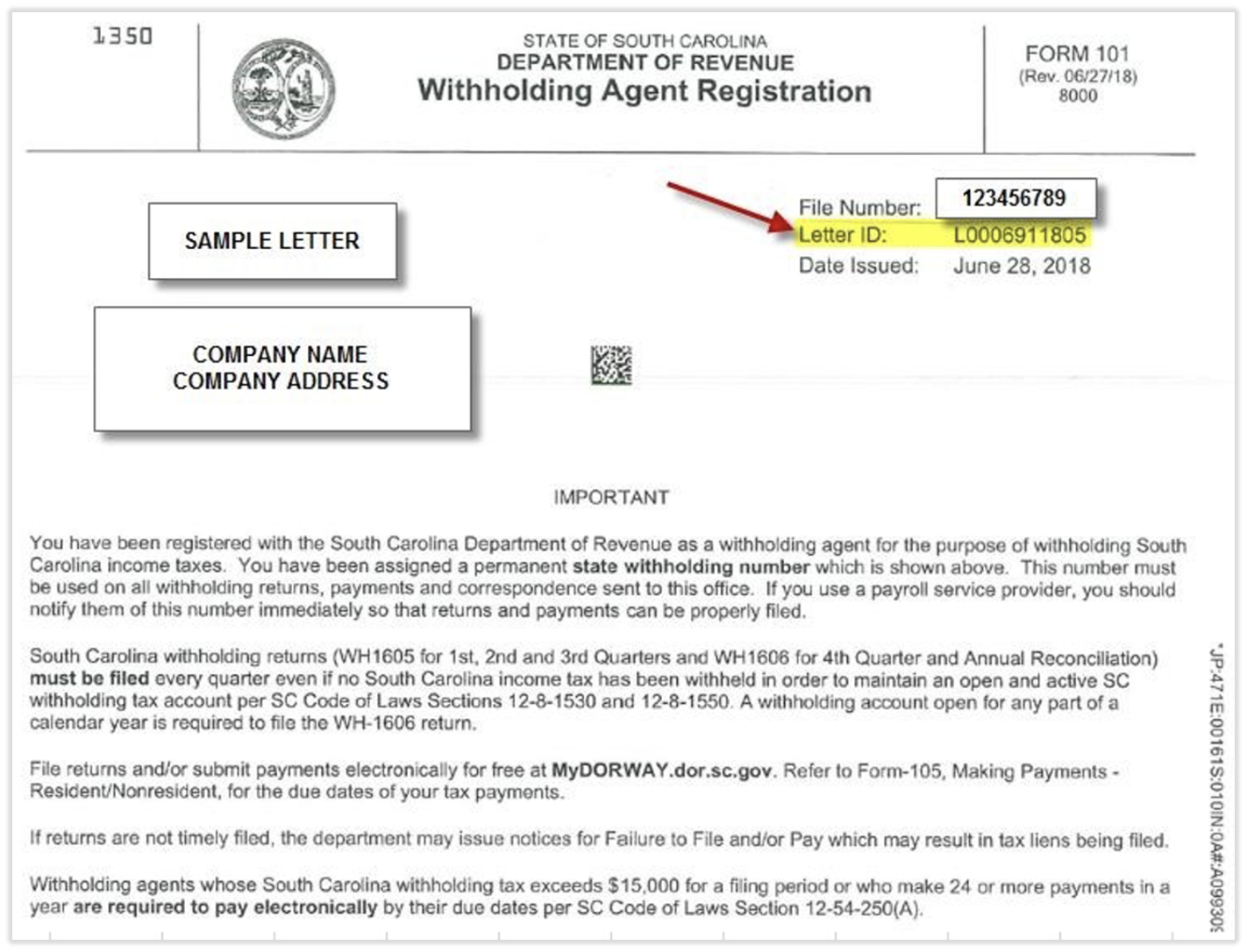
The tax agency requires we obtain and provide a Letter ID associated with your account. This Letter ID can be found on any official correspondence from the state. If you do not have access to South Carolina correspondence, please contact the agency directly to obtain this information. Below is a sample letter for reference.
Unemployment Account TPA Linking
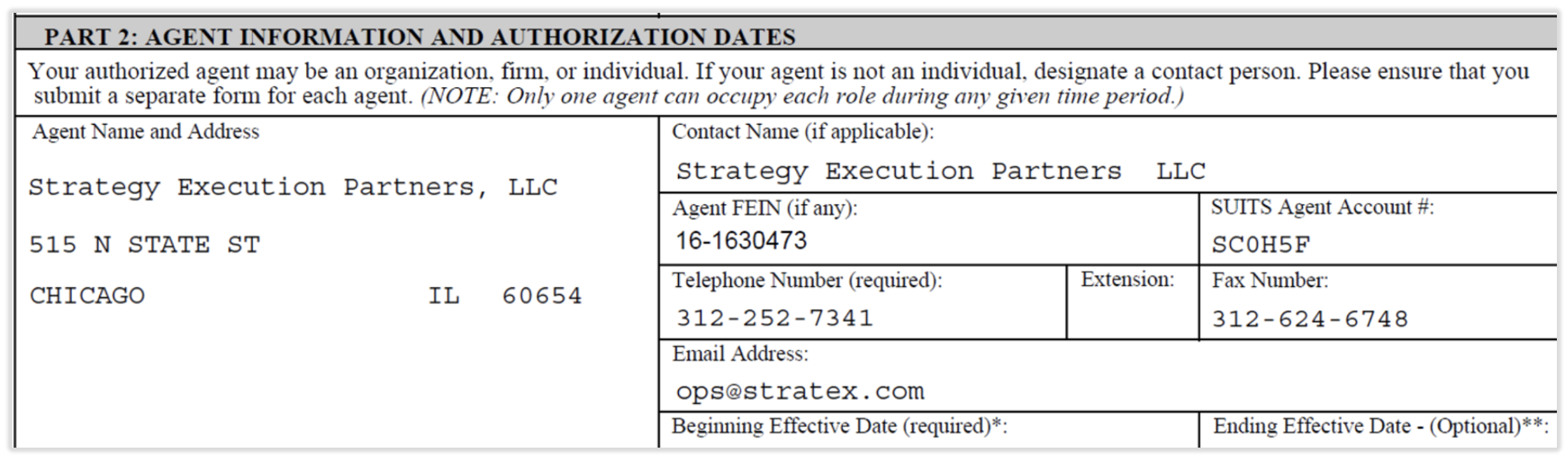
- Begin by downloading and completing the UCE-1010 Written Authorization form. Add the following details:
- Navigate to the SUITS website.
- Select the Employer portal and then select Employers under Login to my Account.
- Select the Agent Assignment icon under the Account Maintenance topic.
- Select Add Agent.
- Search for Toast's Agent Account number: SC0H5F.
- Next to Authorization Document, select Choose File.
- Browse and select the signed UCE-1010 Written Authorization form and upload the POA.
- Select the following roles:
- Payment Submission
- Wage Submission (Original and Amended)
- Account Maintenance
- Select the date you want Toast to start processing payroll in South Carolina in the Access Begin Date field.
- Leave the Access End Date field blank.
This content is for informational purposes and is not intended as legal, tax, HR or any other professional advice. Please contact an attorney or other professional for advice.