Toast Payroll: View and Update Work Tax Locations
Last updated: Oct 13, 2026, 12:56 PM
Work Tax Locations
Employee taxation is different depending on where they are located. A work tax location (WTL) identifies where an employee works and how they will be taxed. WTLs must be set up in Toast Payroll in order for these taxes to accrue on an ongoing basis. An employee's address is what drives which state Form W-4 will auto-populate on their Tax Forms page, but their WTL will influence the options for what they might need to fill out in the W-4 tool if they live outside the state of the WTL (i.e. non-resident forms).
Employers must be registered in each state where an employee works in order for taxes to accrue and be sent to the respective agencies on payroll. Each state has a different registration process for their state tax account numbers.
These state IDs are what we use to set up tax accounts in our database. In order to set up a WTL correctly, the location must have a corresponding state EIN. Once these state (or local) tax account numbers are provided to you, open Toast Payroll and navigate to Taxes. This is the Tax Center where you can add your tax account number. Maintain this page on a regular basis to contribute to successful tax filings and a smooth year-end season. (If you do not see Taxes on the left side of the screen, select Payroll from the Toast Web navigation rail on the left to make the Toast Payroll navigation rail appear.)
If you need a new work tax location in Toast Payroll, fill out this form and send it to us via the blue chat button in the lower-right corner of any Toast Payroll page.
Update an Employee's Work Tax Location
- Begin by opening an employee's Toast Payroll profile and selecting the > carat icon to the right of the employee's primary job.
- Learn how the new Toast Payroll navigation works by visiting Navigate Toast Payroll Within Toast Web.
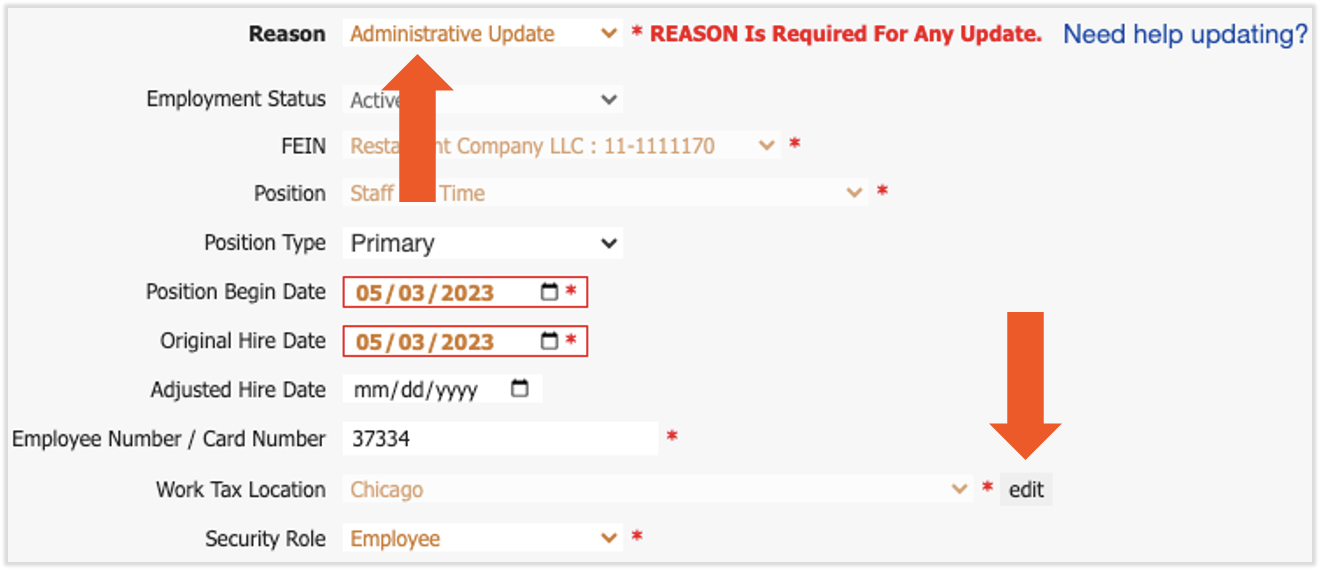
- Select the yellow Edit button to open the Position Details page.
- Add a Reason at the top (Administrative Update is a good option for this scenario).
- Once the page has subtly reloaded, select the Edit button next to Work Tax Location.
- If you do not see the intended work tax location, you can fill out this form and submit it to Toast Payroll via the blue support button in the lower-right corner of any Toast Payroll page. Once we've confirmed it has been set up, you can return to this step to complete it.
- If you do not see the intended work tax location, you can fill out this form and submit it to Toast Payroll via the blue support button in the lower-right corner of any Toast Payroll page. Once we've confirmed it has been set up, you can return to this step to complete it.
- Select Submit at the bottom of the page to save your changes. Learn more about the Position Details page in this article.
If an employee believes this WTL change will affect their taxes, they might decide to fill out a new state Form W-4. Employees can log in, navigate to their profile, and select Taxes & Documents > Tax Forms > Fill Out State W-4. The video and instructions in this guide can provide more details.
Additional Resources
- Toast Payroll: Manage Payroll Taxes
- Toast Payroll: Register for State Tax Accounts
- Toast Payroll: Review Missing Data
- Toast Payroll: Update Positions
- Toast Payroll: Update Form W-4 Information
This content is for informational purposes and is not intended as legal, tax, HR, or any other professional advice. Please contact an attorney or other professional for advice.