Transfer Items, Checks, and Payments
Last updated: Sep 16, 2026, 3:32 PM
Move items, checks, payments, or servers between checks and tables on Toast POS — including combining (merging) open checks and handling closed-check edge cases.
- Before You Begin
- Check Statuses
- Combine Checks
- Move a Check to Another Table
- Transfer a Check to Another Server
- Transfer an Item to a Different Check
- Transfer a Payment to Another Check
- What Happens After You Transfer a Check
- Frequently Asked Questions
- Related Articles
Before You Begin
Applies to: Toast POS
Permissions needed:
- 1.1 Table Service Mode or 1.2 Quick Order Mode
- 1.17 Change Server (for transferring a check to another server)
- 1.9 Edit Other Employees' Orders (for transferring a check to another server)
- 3.4 Bulk Transfer Checks (for bulk check transfers)
- 1.20 Split Checks (for splitting checks and moving items between checks)
What you'll accomplish: Move a check, an item, or a payment to a different check, table, or server. Combine (also called "merge") two or more open checks into one.
Staff without these permissions should ask an on-duty manager for an override.
Check Statuses
Toast checks have one of three statuses, and the status of a check affects what you can do with it:
- Open check — No payment has been applied. The check is still active with a balance due.
- Paid check — A credit card has been swiped, but the check has not been closed. You can still adjust the payment (for example, to add a tip) before closing the check.
- Closed check — The check has been adjusted to its final amount. This is what is charged at the end of the day.
Only Open checks can be combined. Closed checks can be transferred to another server only after reopening the original server's shift review (see Transfer a Check After Shift Review).
Combine Checks
Combining checks (also called "merging checks," "merging tabs," or "combining orders") moves all items from one or more checks onto a single destination check. Use this when guests at separate checks want to pay as one party.
Important: You can only combine checks that are in Open status. Checks with payments already applied (Paid or Closed) cannot be combined. If checks are Open but have pre-authorized cards attached, you must run a new payment method after combining — the pre-authorized cards only apply to the original checks.
To combine checks:
- From the main menu of the Toast app, select Payment Terminal. The first screen shown is All Checks, listing every open check.
- Select the three-dot overflow menu in the top-right corner of the screen, then select Combine Checks.
- Select the checks you want to combine. The first check you select is the destination check — all other selected checks will merge into it. A banner at the top of the screen shows the destination (for example, "Combine into #10").
- Select the Combine Checks button in the top-right corner of the screen to confirm.
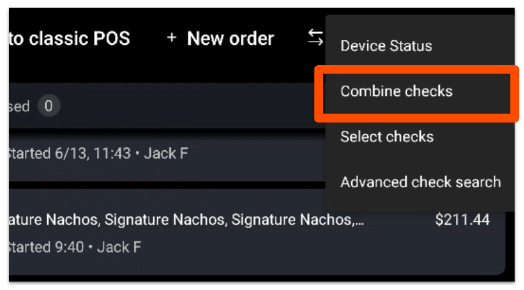
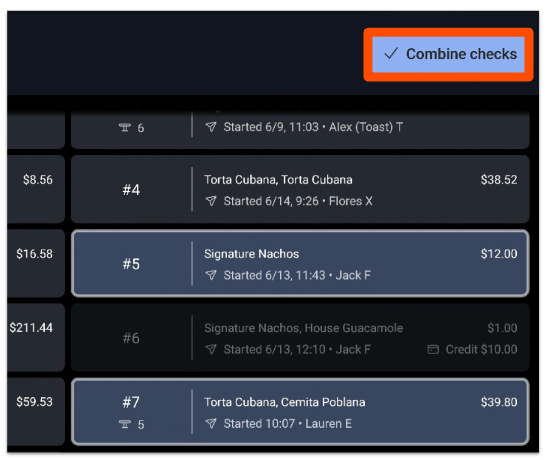
Expected outcome: All items from the selected checks now appear on the destination check, and the merged checks are closed. Any tip associated with the combined check is attributed to the new server.
Important: Combine Checks and orders that have been paid is currently a limited release feature. It is enabled at the system level by Toast Customer Care. If Combine Checks is not available at your location, contact Customer Care to request enablement. There is currently no setting in Toast Web to disable Combine Checks or require a manager code for it — see Can I disable Combine Checks or require a manager code to use it? in the FAQ.
Move a Check to Another Table
You can move an open check from one table to another in either Table Service or Quick Order mode.
In Table Service mode:
- On the POS, select the current table number.
- Select the new table number where the check should be transferred.
- On the confirmation pop-up, select Move Check.
In Quick Order mode:
- Open the check on the POS.
- From the overflow menu, select Transfer to Table.
- Select the table where the check should be moved.
- On the confirmation pop-up, select Move Check.
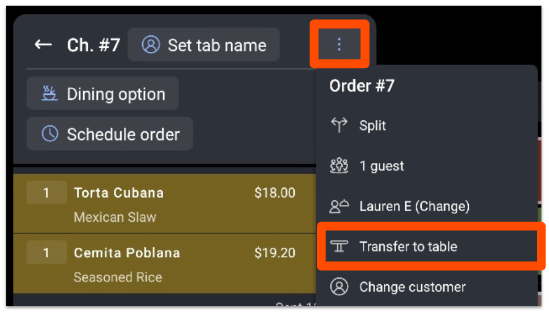
Expected outcome: The check now appears at the new table number.
Transfer a Check to Another Server
Transferring a check moves ownership from one server to another. Use this when a server's shift is ending, when a check is assigned to the wrong server, or when servers are swapping sections.
Before you start:
- Both the current server and the new server must be clocked in.
- The user performing the transfer must have permission to edit other employees' orders and change server ownership (see Before You Begin).
- Only open checks can be transferred directly on the POS. To transfer a closed check, see Transfer a Check After Shift Review.
- Transfers must be performed on the Toast POS interface — they cannot be done in the Toast Tables app.
To transfer an open check:
- Open the check from Table Service or Quick Order mode on the Toast POS.
- Select the overflow menu at the top-right of the check, then select the current server's name listed there (for example, "Lauren E (Change)").
- Select the server you want to assign the check to. Only currently clocked-in employees appear in the list.
- Select Send or Hold to commit the change, depending on whether items still need to be sent.
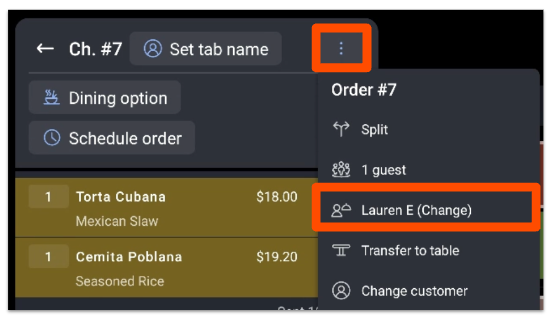
Expected outcome: The check is now owned by the new server. Managers can view or access the check through the Payment Terminal.
Transfer a Check After Shift Review
If the original server already completed their shift review, you must reopen their shift before transferring the check:
- Reopen the shift for the original server by removing their clock-out time. See Reopen an Employee's Shift From Previous Days for steps.
- Follow the steps in Transfer a Check to Another Server above.
- Once the transfer is complete, clock-out the original server and complete their shift review again.
Note: There is currently no feature to accept, review, or reject a server transfer before it is completed. The transfer takes effect as soon as you select Send or Hold. If the closed check was paid in cash, that cash should also be handed off to the new server, or shift review data may be inconsistent.
Transfer an Item to a Different Check
Transfer an individual item when it was added to the wrong check. You must know the check number of the destination check before you start.
To find a destination check number, open All Checks from the POS.
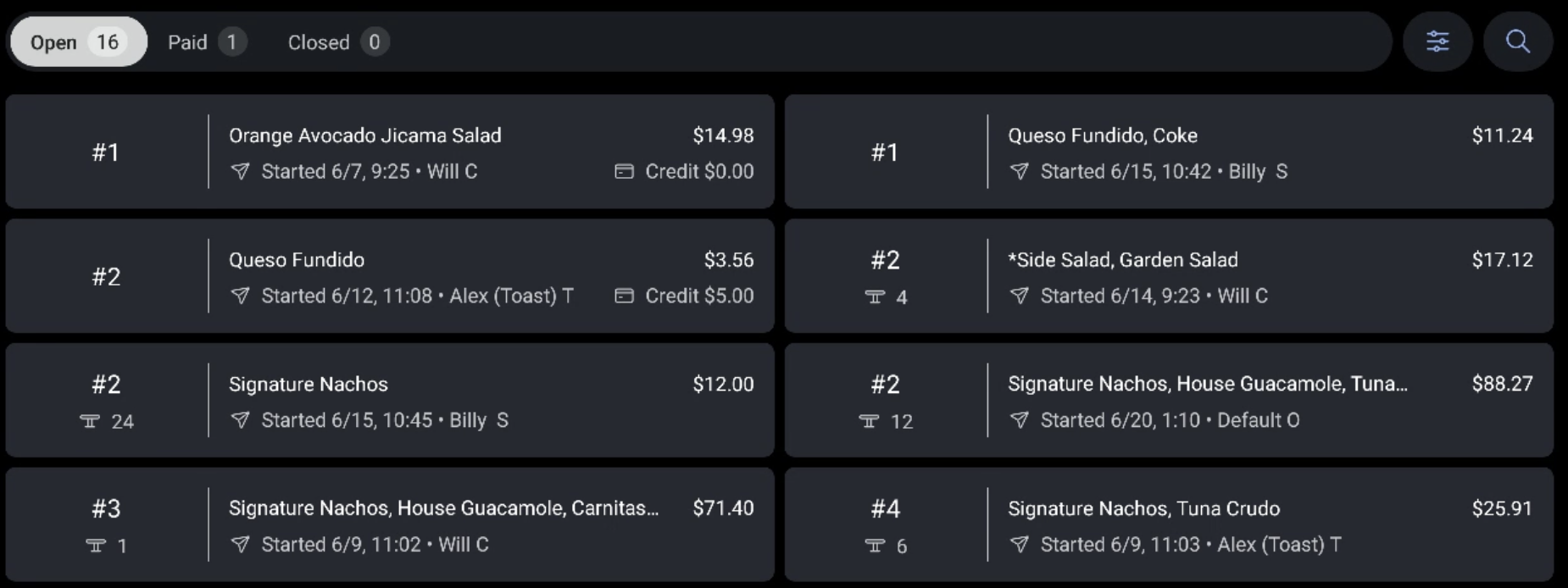
To transfer an item:
- On the source check, select the item you want to move.
- From the check's overflow menu, select Split.
- Select Look Up Check, then enter the check number where the item should be transferred. The destination check appears next to the original check.
- Select the item that needs to be transferred, then select Add next to the destination check number.
- Select Done to complete the transfer.
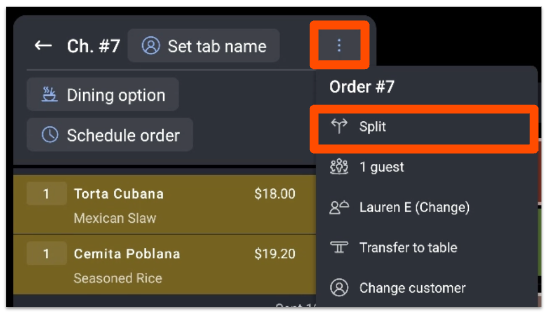
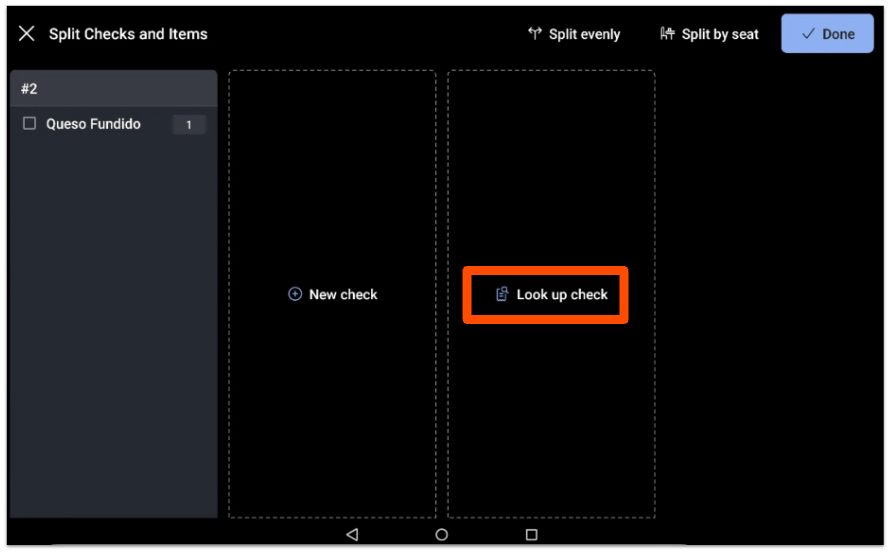
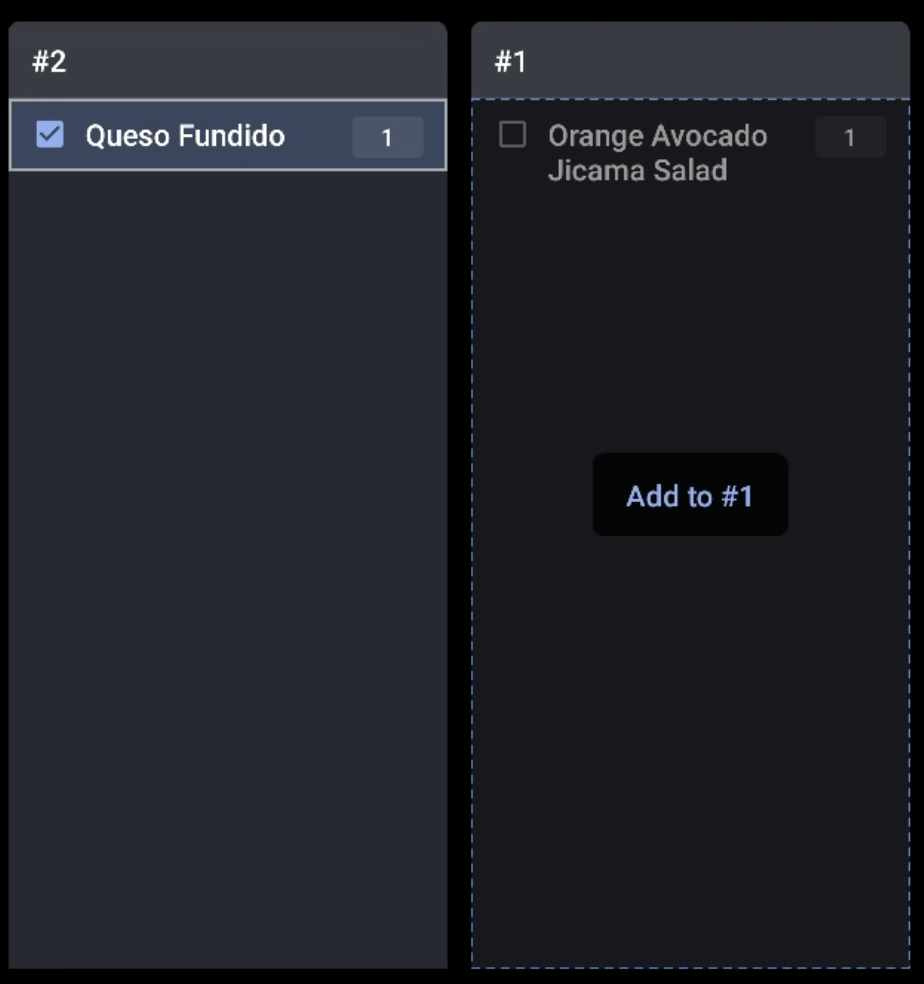
Expected outcome: The transferred item now appears on the destination check.
Transfer a Payment to Another Check
Move a payment from one check to another when the payment was applied to the wrong check or a customer needs to apply their payment across multiple checks.
Find previous checks and payments.
Correct a payment made on the wrong check.
To transfer a payment:
- Locate the check that contains the payment from the Payment Terminal.
- Select Pay ($) to view the check's payment.
- Select the payment you want to move, then select Adjust at the bottom-right corner of the check.
- On the pop-up, select Move Payment to a Different Check.
- Enter the check number where the payment should be moved.
- Confirm the transfer. You can then stay on the current check or navigate to the check where the payment was moved.
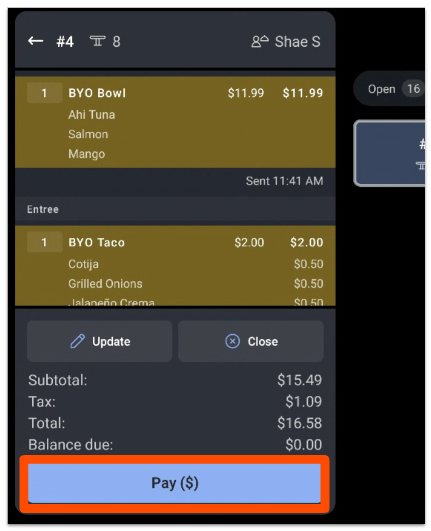
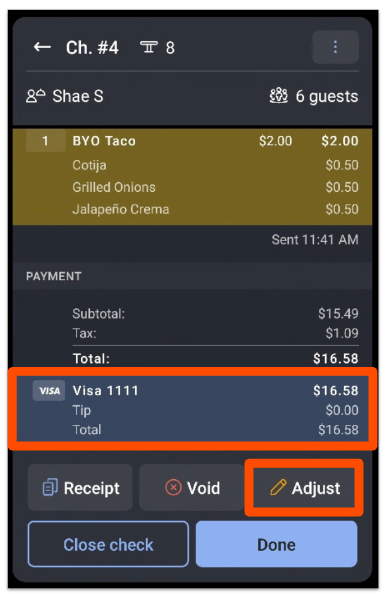
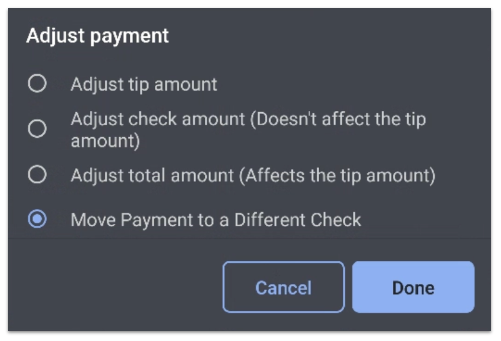
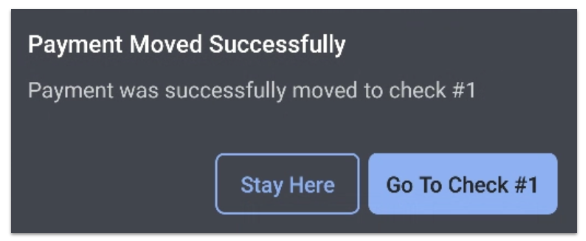
Expected outcome: The payment is now applied to the destination check. Open the destination check from the Payment Terminal to verify.
Note: Credit card payments that have already been captured cannot be transferred. If the destination check has a smaller balance than the payment, the excess remains on the original check or requires a refund — contact Customer Care if you are not sure how to proceed.
What Happens After You Transfer a Check
Transferring or combining a check has reporting and accounting consequences:
- Transfers count toward the current business day's end-of-day reports.
- Revenue and tips associated with the transferred check are attributed to the server who finalized it.
- Transfers do not retroactively change previously finalized reports.
- Credit card payments that have already been captured cannot be transferred.
- If a closed check was paid in cash, that cash should be handed off to the new server along with the transfer, or shift review data may be inconsistent.
Frequently Asked Questions
Can I combine a closed check with an open check?
You cannot combine a closed check with an open check directly. Only checks in Open status can be combined. Checks that have already been paid or closed cannot be merged into another check. To combine a closed check, it must first be reopened, which requires the appropriate permission. To reopen a closed check, please use the steps below or Contact customer care for assistance.
Also asked as:
-
- "how can I combine 2 checks after its closed?"
- "I have a closed check I need to combine with an open check"
Can I combine a check after I have split it?
Yes, you can combine checks after splitting, as long as the resulting split checks are still in Open status. After splitting, each new check remains Open until a payment is applied. Use the steps in Combine Checks to merge them. If a discount was applied to one of the split checks, the discount may need to be reviewed or re-applied after combining.
Also asked as:
-
- "Is there a way to combine something after you split in 1/2 and then add a discount?"
What permission do I need to combine checks?
Combine Checks does not have a dedicated user permission. Any employee with access to the Payment Terminal can combine open checks if the feature is enabled at your location. There is currently no permission or location-level toggle in Toast Web to restrict who can combine checks. To restrict access, contact Toast Customer Care to request that Combine Checks be disabled for your location.
Also asked as:
-
- "What job permission do I need to be able to combine checks from multiple tables"
Can I disable Combine Checks or require a manager code to use it?
There is currently no setting in Toast Web to disable Combine Checks across all areas or require a manager code for it. Combine Checks is not controlled by user permissions or location-level toggles you can manage yourself. The only way to fully turn off Combine Checks for your restaurant is to have it disabled at the system level by Toast Customer Care.
If accidental combines are a recurring problem at your location, contact Toast Customer Care to request that the feature be disabled.
Also asked as:
-
- "Hello is there a way to disable combine checks or ensure a manager code has to be put in to do so"
My location does not have Combine Checks. How do I enable it?
Combine Checks after the order is paid is currently a limited release feature, so it is not available at every location. It can only be enabled or disabled by Toast Customer Care. If you would like Combine Checks enabled at your location, contact Customer Care to request enablement.
Also asked as:
-
- "I wanted to have merge check feature enabled for my location and it is not done yet"
Why does the POS crash when I try to combine checks across devices?
The crash is caused by a sync issue when two devices try to change the same check before they have synced with each other. To prevent it:
- Combine all checks for the party from one device, from start to finish.
- If you must use multiple devices, wait 20 to 30 seconds between actions to let the system sync between devices.
- Briefly check the second device to confirm it shows the newly combined check before continuing.
If a check will not reopen after a crash, the fastest fix is to recreate it. See Payment System Crash When Trying to Combine Multiple Checks for more.
Can I transfer a closed check to a different server?
Yes, but only after reopening the original server's shift review. See Transfer a Check After Shift Review above for steps. If the closed check was paid in cash, that cash should be handed off to the new server, or shift review data may be inconsistent.
Also asked as:
-
- "Is it possible to transfer a check from one server to another after it has been closed"
Can I require manager approval to transfer an item to another check?
Moving an item to a different check uses the Split flow, which is controlled by permission 1.20 Split Checks. There is no separate approval prompt for an item transfer. To require a manager, remove 1.20 Split Checks from the jobs that should not have it — staff without the permission will then need an on-duty manager to enter an override before they can move an item between checks.
Also asked as:
- Can I stop staff from transferring items to another check without manager approval?
How do I undo combined checks?
Use the Split Checks feature to separate items back onto new checks. See Split Checks on the POS for steps.
Related Articles
- Split Checks on the POS
- Find Checks
- Combine Checks
- Payment System Crash When Trying to Combine Multiple Checks
- Toast Tables: Move a Check to Different Server After Party Is Sat