Update Debit Card for Instant Deposit
Last updated: Oct 8, 2026, 11:48 AM
Question
How do I update my debit card for instant deposit?
Answer
| Please note that some customers or locations may not yet have access to instant deposit. Customers new to Toast, or newly opened locations, may not have access right away when they first begin accepting card payments through Toast. |
Notes:
- You can only have one U.S.-issued fast funds-enabled, Visa, or Mastercard debit card tied to instant deposit at a time. If you wish to change the associated debit card, see the instructions below.
- If you update your card to a new one that has not been used before, the maximum available amount may be less than the previous maximum to help protect you and your restaurant from fraud. This amount will increase as you continue to use instant deposit with your newly entered debit card, up to a maximum of $10,000 per 24-hour period.
- Log in to Toast Web and select Finance > Payments > Instant deposit.
- If prompted, enter your One-Time Password (OTP).
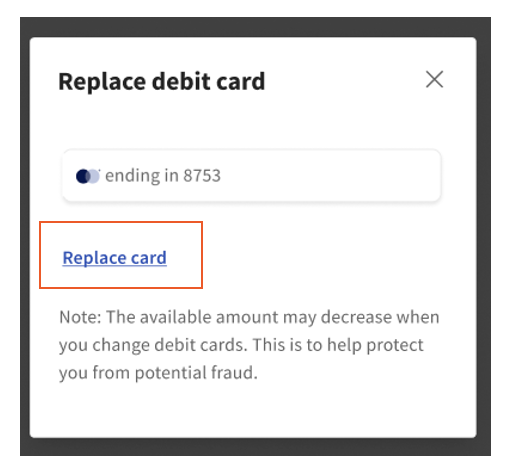
- In Instant Deposit, select the pencil icon to the right of Deposit To. This will show the last four digits of the currently connected debit card.
- Select Replace card.
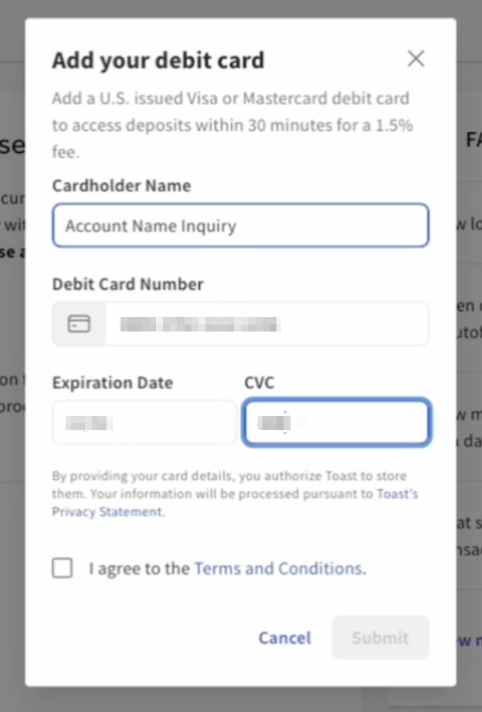
- Enter the new debit card information, following the same process as when onboarding and setting up instant deposits. This includes:
- Cardholder Name (full name as reflected on the physical debit card)
- Card Number
- Expiration Date
- CVV/CVC (3-digit security code on the back or front of the physical card)
- Once all card info has been entered, you must select I agree to the Terms and Conditions.
- Select Submit.
- You might then be prompted to enter your one-time password (OTP) and/or to verify your identity. If you still need to verify your phone number to set up OTP, you will be prompted to do so. Identity verification validates your identity and the phone number connected to the user's OTP account.
- Note: Identity verification is a one-time process that a user will complete when prompted and/or when first setting up OTP, which is a necessary security step. After confirming your identity, you can access and use OTP for any financial permission needs, including instant deposit. See Verify Your Identity in Toast Web or Set Up One-Time Password Verification articles in Support Center for more information.
The newly inputted debit card details will now be saved, and you will see the last 4 digits of the new card reflected on the main instant deposit page next to the Deposit To section.