Get Started With Instant Deposit
Last updated: Oct 2, 2026, 3:28 PM
| Instant deposit is only available to United States customers. Users must have the 8.7 Instant Deposit permission to access this feature. To learn morem see the Permissions Reference Guide. US customers new to Toast (or newly opened locations) may need to wait 3-5 business days for access to instant deposit. |
- Instant Deposit Overview
- Add a Destination for Instant Deposit Funds
- Initiate an Instant Deposit
- Schedule Instant Deposits
- Additional Resources
Instant Deposit Overview
Want to receive your card payouts daily, including holidays and weekends? Instant deposit gives you control over your restaurant’s cash flow by allowing you to access your funds typically within 30 minutes of making a request, for a fee.
Businesses may experience Instant deposit in three ways:
- Deposit to card: On-demand deposits to a manually linked debit card, typically within 30 minutes.
- Direct to bank account: On-demand deposits to your linked bank account. Payment generally arrives moments after you send it. Real-time settlements use the Clearing House network or the FedNow system to process and settle payments
- Deposit to Toast Checking Account: On-demand deposits to your linked Toast Checking Account.
Instant deposit will only be available to users in the United States, with the 8.7 Instant Deposit in Toast Web. To learn more about setting up these permissions, visit Permissions Reference Guide and Assign User Access Permissions.
- Instant Deposit is available for use at any time, on any day of the year that you have closed, uncaptured sales at your location.
- Please be aware that when capture occurs, the available amount resets to zero, and your card payments will go through the normal settlement payout process. In rare cases, Instant Deposit may not be available due to technical difficulties or unforeseen circumstances.
- Funds typically arrive within 30 minutes of initiating the transaction. In rare cases, they could be delayed by things like service interruptions of third parties outside of Toast's control. If you do not see your funds in your bank after 30 minutes, contact Toast Customer Care. You will receive an email once the transaction has been successfully sent.
Eligibility Requirements and Key Limits of Instant Deposit
- Bank accounts must support real-time settlements; if ineligible, use a Fast Funds-enabled debit card.
- Only US customers are supported.
- Your restaurant group must qualify as a small to medium business (SMB) — fewer than 11 locations.
- No active lien or levy on the account. If a lien or levy is in place, Instant Deposit is unavailable until it is fully resolved.
- No fraud history on the account.
New customers or locations may experience a 3–5 business day delay for system activation.
For debit card instant deposits:
- Maximum deposit per 24 hours: $10,000 (per location).
- Limit of 9 instant deposits per user per 24 hours.
- New cards start with a $2,500 daily limit, increasing incrementally over approximately one week until it reaches the full $10,000 maximum.
- If you remove your card and add a new (or the same) one later, your limit ramp history is retained — your card will not restart at the base limit.
- Works only with US-issued Visa or Mastercard debit cards that are Fast Funds-enable.
- 99.8%+ of US-issued debit cards are Fast Funds-enabled. Please reach out to your issuer or try another card if your card is not Fast Funds-enabled.
- Funds typically arrive within 30 minutes, depending on card eligibility.
- You can only have one debit card on file for instant deposit at a time
For direct-to-bank account instant deposits:
- No additional admin permission required.
- No limits on the number of deposits per day, per location.
- Up to $10,000 per day. Limits are based on your account history and may start lower, increasing as you continue using the feature.
- Sent directly to your settlement bank account — no card required.
- Only available to accounts that support real-time payment (RTP) or FedNow payment rails.
- Users are unable to change the settlement bank account via Instant Deposit.
- Funds typically arrive within 30 minutes, depending on your bank's real-time payment support.
- Additional limits may apply based on your bank’s policies.
For Toast Checking Account instant deposits:
- Requires an active Toast Checking Account. If you haven't set one up, visit the Toast Checking Account signup page.
- Allows payouts to three account destinations.
- Subject to the same $25 minimum deposit and full-balance-only rules as other destinations.
- Fee: Same Instant Deposit fee as all other destinations (currently 1.75%) — having a Toast Checking Account doesn't waive or reduce this fee.
All instant deposits:
- Minimum deposit amount: $25
- You must deposit the full amount shown; partial deposits are not supported.
- The available balance reflects deductions for Toast Capital, Easy Pay, and other withholding products. It also excludes American Express transactions for American Express Direct merchants.
- Sales where you used the Capture button on the POS CloseOut page are also excluded from your available balance. This does not make those sales ineligible — Toast simply loses visibility into them for this calculation.
- Catering invoice payments are only included once the invoice has been paid by the diner and the corresponding check is fully closed.
- Deposits are deducted from your next scheduled settlement payout.
- Additional limits may apply based on your bank or card issuer.
- Fee: 1.75% deducted from available amount
- Available amount dynamically updates based on uncaptured, closed card payments (excluding American Express transactions for American Express Direct merchants)
Add a Destination for Instant Deposit Funds
If you plan to pay out instant deposits directly to a bank account, the bank account you have configured for ordinary card payouts will already be listed under Linked Accounts if it's eligible to receive instant deposits. No additional setup is needed beyond a verified bank account. Go to Initiate an Instant Deposit for next steps.
If you want to add a new bank account specifically for instant deposits, see Update or add a New Bank Account in Toast Web.
If you want to use your Toast Checking Account as a destination, no additional setup is required beyond having an active account — it will appear automatically as a destination option. If you don't yet have a Toast Checking Account, visit the Toast Checking Account signup page to get started.
To add a debit card for instant deposit payouts, follow these steps. You must hold the Instant Deposit Admin role (the business owner on file) — the 8.7 Instant Deposit permission alone (Financial Admin access) does not allow adding or changing a card. If you need to change who holds the Instant Deposit Admin role, contact Toast Customer Care.
- In Toast Web, navigate to Finance > Payments > Instant deposit.
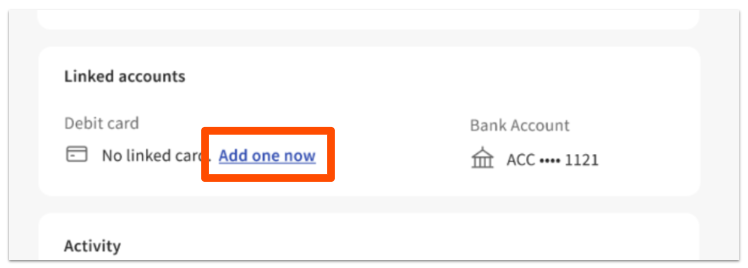
- Select Add one now in the Linked accounts section.
- Follow the prompts to add your debit card. If you receive a red error message that says “The card details you have entered are incorrect...”, try the following three solutions:
- Confirm that the information you entered in each field is correct.
- The card may not be "Fast Funds-enabled." Contact your debit card issuer/ bank, or try another debit card. Most US-issued debit cards are Fast Funds-enabled.
- The card may not be supported. Instant deposits can only be used with Visa or Mastercard debit cards issued by US banks that are FDIC-insured.
- The card may be expired. Use a valid, unexpired card.
- There may be a CVV mismatch. Re-enter your card details carefully.
- Card authentication may have failed. Try again, or contact your card issuer.
- Agree to the instant deposit Terms and Conditions if you are prompted.
- Select Submit.
- Complete identity verification and one-time password setup if prompted. Note: Identity verification is a one-time process a user will complete when prompted and/or when first setting up instant deposit, which is a necessary security step. After confirming your identity, you can access instant deposit. See Verify Your Identity in Toast Web or Set Up One-Time Password Verification articles in Support Center for more information.
- Upon success, you'll see Card Added Successfully and your Available Amount screen. The screen will show the amount currently available and eligible for instant deposit.
| For customers with Easy Pay leases or Toast Capital loans, available funds reflect deductions for daily withholding. American Express guest transactions are not currently eligible for instant deposit for American Express Direct merchants. Instant Deposit FAQ |
Initiate an Instant Deposit
To initiate an instant deposit, follow these steps:
- In Toast Web, navigate to Finance > Payments > Instant deposit.
- Select Deposit Now.
- Choose an account.
- Select the Instantly Deposit button. A confirmation screen will appear showing total available, fee amount (1.75%), linked debit card, and settlement bank account eligibility.
- Select the destination: linked debit card, settlement bank account, or Toast Checking Account.
- Agree to the instant deposit Terms and Conditions if you are prompted.
- Confirm by selecting Instantly Deposit $xxx.xx.
- Complete one-time password verification if prompted.
- Upon success, you'll see a confirmation screen with "deposit in progress" messaging, and the transaction listed as Pending under the Activity section.
Notes:
- If you're a Toast Checking customer with the Finance tab in the Toast Now app, you can also view your available amount and select Deposit now from the Finance tab. See Get Started With the Toast Now App.
- Funds typically arrive in the linked debit card or account within 30 minutes. The instant deposit fee and transaction amount will be deducted from your next scheduled card settlement.
- Instant deposit transactions are final and may not be reversed, canceled, or otherwise adjusted in amount or in any other way.
- You can see a summary of your instant deposits in the Activity section of the Instant Deposits homepage. You can also find reporting on your Instant Deposit transactions on the Reconciliation report in Toast Web. See Instant Deposit Reporting Overview for more information.
Schedule Instant Deposits
Instant deposit scheduling lets you automate deposits so you don’t have to log in each day. Once enabled, Toast will initiate your instant deposit at your scheduled time, using the available amount at that moment. It works like this:
- Toast will check your available instant deposit amount at the scheduled time.
- If the amount is $25 or more, a deposit will be initiated automatically.
- If the available amount is below $25, no deposit will be initiated at that time.
- The applicable fee is deducted from the deposit amount.
- Funds typically arrive on your linked debit card, direct-to-bank account, or Toast Checking Account within 30 minutes.
To set up scheduled instant deposits, follow these steps:
- In Toast Web, navigate to Finance > Payments > Instant deposit.
- Locate the section labeled Schedule a Deposit (or “Set Up a Deposit Schedule” if not yet configured).
- If this option isn’t available, it means you don’t have an eligible bank account, card, or Toast Checking Account set up. See the section above to Add a Destination for Instant Deposit Funds.
- Select Set Up a Schedule.
- Confirm the toggle at the top is set to Scheduling Enabled. This toggle can be used in the future to temporarily disable this schedule during holiday breaks, temporary closures, etc.
- Set your preferred destination for scheduled deposits under Deposit to:
- This is based on your available instant deposit payout methods already created.
- Schedule deposits are subject to the same limits as manual deposits.
- Choose your Preferred Time for the deposit.
- Time is set in your restaurant’s local time zone.
- Certain times overnight are unavailable as they may intersect with key processing times where your funds may not be available. If your preferred time is unavailable, you should choose the next closest time. This gives your payment schedule a better chance of running successfully without delays or errors and ensure you receive your deposit.
- Note: To ensure the maximum offer is available to you, ensure you have closed all checks prior to the scheduled time and have not used manual capture on the PoS device. If there is less than $25 available, the scheduler will not run and a notification will be sent to all financial admins.
- Select Save to activate your schedule.
You’ll see a confirmation screen, and the instant deposit homepage will now show your active deposit schedule. Changes take effect immediately. You can still make a manual instant deposit at any time.
- If the scheduler does not run for any reason, a notification is sent to all financial admins to inform you of the reason the deposit could not be made. You then have the option to go to the Instant Deposit page in Toast Web and manually initiate an instant deposit, provided the amount available is above the $25 minimum.
- If you ever need to make changes or cancel your instant deposit schedule, you can select Edit Schedule or Cancel Schedule any time. Changes take effect immediately.