Manage Order with Google
Last updated: Oct 27, 2026, 9:30 AM
- Order with Google Overview
- Use Order with Google
- Order with Google Restaurant Experience
- Order with Google Guest Experience
- Revenue Center
- Frequently Asked Questions
- How can I set Toast as my preferred partner on Google?
- How can I manage my order volume to ensure my kitchen is not overloaded?
- Google is using different images for my menu items. How can I update my menu images on Google?
- How does Order with Google calculate prep times and quote times?
- How do I change my hours for Order with Google?
- How do scheduled overrides work?
- How do I 86 an item?
- What happens when I need to 86 an item? Do I need to do anything for Order with Google when I 86 an item in Toast?
- What happens if I update my menu?
- Does Order with Google respect manual approval or approval rules in Online Ordering?
- How do I pause Order with Google?
- Does Order with Google allow scheduled orders?
- Do Orders Hub and kitchen ready messages work on Order with Google?
- Are tips accepted with Order with Google?
- How can I set up my Dining Options?
- Can I market to guests who order through Order with Google?
- Can guests make special requests through Order with Google?
- How does Order with Google orders display on the Kitchen Display Screen (KDS)?
- Can I gather guest data from Order with Google orders?
- Does Order with Google work with delivery?
- What if I want my restaurant to still show on Google searches?
- Do I need to log in to my Google My Business account to use this?
- Additional Resources
Order With Google Overview
Order with Google is a free integration included with Toast Online Ordering that allows guests to order directly through you from Google Search and Maps, commission-free. Guests can search for restaurants near them, discover your Toast first-party ordering link, and order directly from your Toast Online Ordering page. Some of the benefits of using Order with Google:
- Unlock a new commission-free channel for more orders
- Get up and running easily and manage your orders in one place
- Offer a seamless ordering experience for guests
Use Order with Google
Order with Google is automatically enabled in your Toast account when Online Ordering is turned on. However, to ensure that you can process orders via Order with Google, check that you have:
- A Google Business Profile
- Confirm that you have not opted out of food ordering on your Google Business Profile. If previously opted out, view Set up, turn on, or turn off the "Order online" button on your Google Business Profile help page.
- Visible Online Ordering menus
- The Online Ordering toggle enabled in Toast Web (see Get Started with Online Ordering)
Enable or Disable Order With Google
There are three ways you can disable Order with Google if needed:
Note: This will remove Toast from your Google business profile.
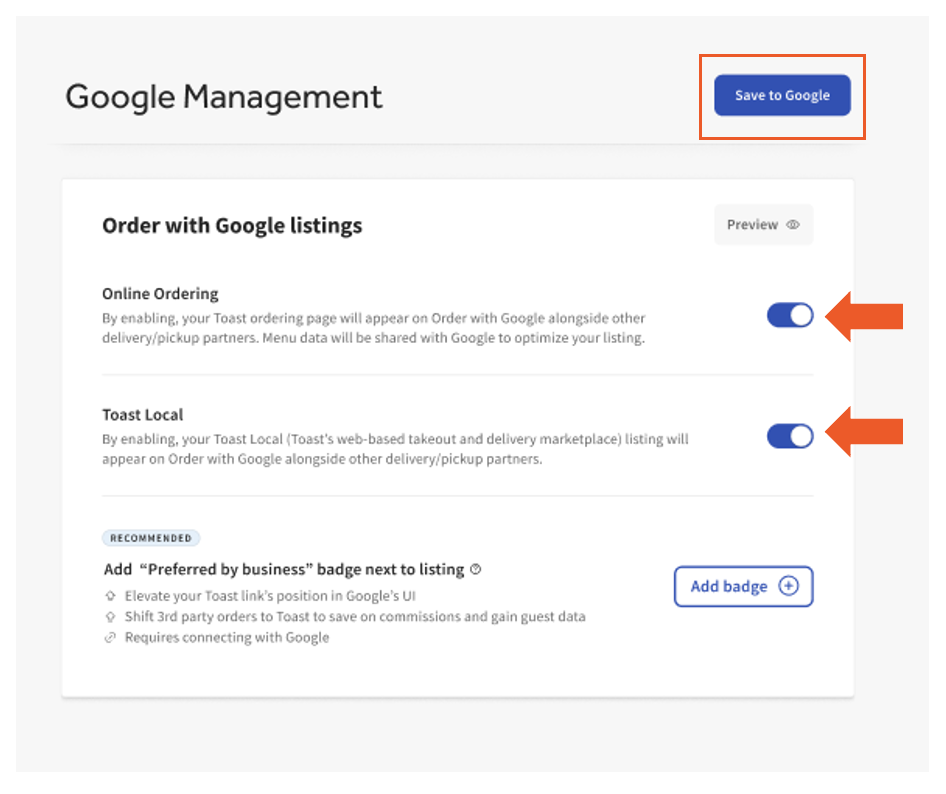
- Navigate to Takeout & delivery > Google Management > Google Listings. Here, you will be able to enable or disable the Order with Google feature for Online Ordering or Toast Local.
- Once all selections have been made, select Preview to view how your guests will see your listing for Toast Local and Online Ordering.
- Select Save to Google to publish changes.
Google My Business Profile Opt-out
To disable Online Ordering options and/or Order with Google using your Google My Business profile, navigate to Food ordering, then use the toggle to the left of Accept orders on your profile to disable.
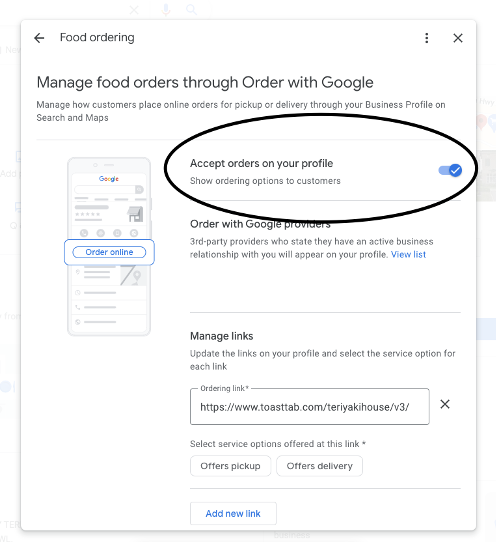
Note: This will remove the “order online” button from your restaurant's Google Maps/search results and override Toast Web settings.
- In Toast Web, navigate to Takeout & delivery > Toast online ordering.
- From the drop-down menu, select Off.
- Save and publish changes.
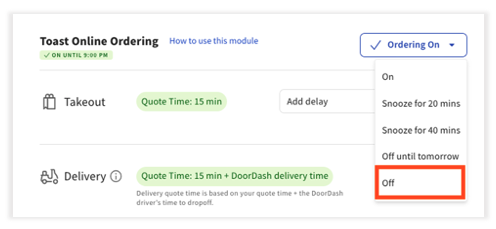
Note: Enabling or disabling Order with Google can take 48 hours to reflect. Contact Toast Customer Care if you experience issues after 48 hours have passed.
Configure Order with Google Preferred Business Badge
Note: Order with Google Preferred Business badge is not available in Ireland.
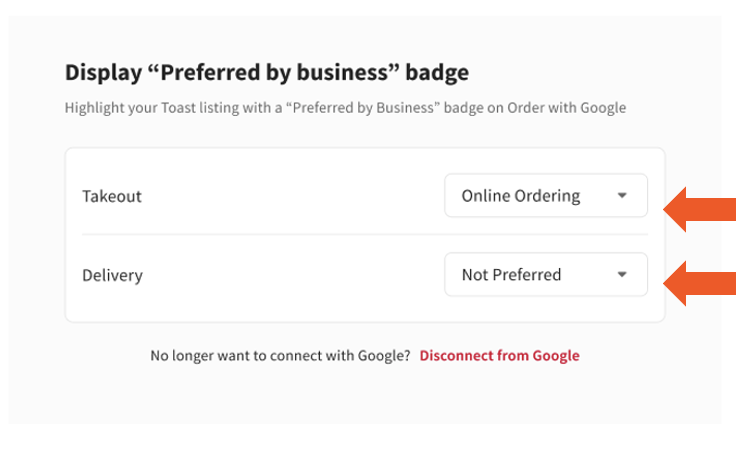
By adding a preferred business badge to your listing, you can elevate your Toast link's position in the Google UI and shift third-party orders to Toast to save on commission.
Note: Adding a Preferred Business badge requires connecting with Google.
- Navigate to Takeout & delivery > Google Management.
- Select Add badge to add Preferred by business badge next to your listing.
- Once all selections have been made, select Preview to view how your guests will see your listing for Toast Local and Online Ordering.
- Select Save to Google to publish changes.
Order with Google Restaurant Experience
Order with Google Fulfillment
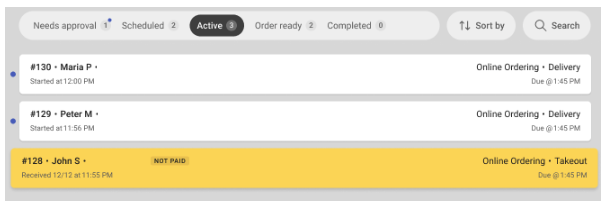
During the day-to-day operations, your restaurant will have many orders coming in, and you will be able to see all of your off-premise orders, including orders with Google on the Orders Hub.
Order with Google Reporting
Within your Toast Toast Web reporting, Order with Google volume is included within Online Ordering.
- Order Source: Online
- Dining option: Shared with Online Ordering “Online Ordering - Takeout” and “Online Ordering - Delivery”
1. Using the left-hand navigation in Toast Web, select Reports.
2. Next, select Online as the Source.
Order with Google Guest Experience
When guests find your restaurant on Order with Google, they can order from your Toast Online Ordering website or your restaurant’s page on Toast Local if it is listed there. Guests will receive an updated quote time after they place their order.
Revenue Centers for Order with Google
Order with Google shares the same Revenue Center settings as Online Ordering. Online orders can be mapped to a new or existing revenue center, which is useful if you would like online orders to be reported independently from other areas of revenue generation. Since Revenue Centers help you segment your sources of revenue in the restaurant, we recommend you create a Revenue Center called "Online Ordering." For more information on Revenue Centers, see Creating and Assigning Revenue Centers in Support Center.
Frequently Asked Questions for Order with Google
How can I set Toast as my preferred partner on Google?
See the Order with Google Preferred Business Badge section of this article for the steps to add a preferred business badge on your listing. Note: The preferred business badge feature is not available in Ireland.
How can I manage my order volume to ensure my kitchen is not overloaded?
If you are a third-party integration user, you can toggle off DoorDash and Uber Eats during peak times.
Here is a checklist to ensure your restaurant is listed on Order with Google:
- You are live on Toast.
- Your restaurant is not in test or demo mode.
- You have the Toast Online Ordering product.
- Toast Online Ordering is not paused or snoozed.
- You have Accept Orders on your Google Profile in the food ordering section toggled on.
- You have not opted out of Google food ordering on your Google Business Profile.
- Your restaurant hours are set to on - check your online ordering hours. (video)
- You have scheduled orders on - check your scheduled order settings. See this article for more information.
Google is using different images for my menu items. How can I update my menu images on Google?
If no menu item image is uploaded, Google may use User Generated Images and machine learning to associate a photo with a menu item. To request the removal of a User Generated Content (UGC) image, you should follow the steps in the Google My Business Help Center. Be sure to provide a valid reason for the takedown request (poor photo quality is a valid reason). Upon review and approval of the request, Order with Google selects a different UGC image related to your menu item. If restaurants do not want this to happen, the best way to avoid it is for them to upload their own images to Toast.
Note: Images can take 24 hours to show after being uploaded.
How does Order with Google calculate prep times and quote times?
Prep times and quote times for Order with Google follow the same applied settings as Online Ordering. For more information, visit Online Ordering: Advanced Settings.
How do I change my hours for Order with Google?
Order with Google uses the same hours you set for Toast Online Ordering. It doesn't have separate hours. To change when guests can order through Google, including holiday or special hours, update your Online Ordering hours. See Get Started With Online Ordering. The hours displayed on your Google Business Profile listing are managed in Google, not in Toast. Changing your hours in Toast doesn't update your Google listing. If your Google listing shows the wrong hours, update them directly in your Google Business Profile.
How do scheduled overrides work?
Scheduled override follows the same settings as Online Ordering to accommodate holidays, staff meetings, private parties, and more. For more information, visit Manage Your Takeout and Delivery Schedule.
How do I 86 an item?
For additional information on how to 86 items in Toast, visit How to 86 an Item.
What happens when I need to 86 an item? Do I need to do anything for Order with Google when I 86 an item in Toast?
No, you don’t need to do anything different with Order with Google to ensure 86’d items are not ordered. To learn more on how to 86 an item across channels, see How to 86 an Item.
What happens if I update my menu?
Google uses all of the same menus as Online Ordering. Menu syncs and 86s that are done in Toast are reflected on Google in near real-time.
Does Order with Google respect manual approval or approval rules in Online Ordering?
Yes, Order with Google will follow the same behaviors as Online Ordering. For more information, see Approval Mode Options.
How do I pause Order with Google?
To “pause” Order with Google, pause your Toast Online Ordering, by following the steps outlined in this Manage Online Order Volume article.
Does Order with Google allow scheduled orders?
Yes, orders can be scheduled as long as Online Ordering Future Order Setup is enabled.
Do Orders Hub and kitchen ready messages work on Order with Google?
Currently, guest messages for Orders Hub and kitchen ready are unavailable.
Are tips accepted with Order with Google?
How can I set up my Dining Options?
Can I market to guests who order through Order with Google?
Can guests make special requests through Order with Google?
How does Order with Google orders display on the Kitchen Display Screen (KDS)?
Can I gather guest data from Order with Google orders?
Does Order with Google work with delivery?
Yes, Order with Google guests can place delivery orders as long as you have delivery enabled on your Toast Online Ordering page.
What if I want my restaurant to still show on Google searches?
If you have disabled Order with Google in the past or have yet to enable it, you can enable Google Search/Maps linking via the Toast order sources configuration page.
Do I need to log in to my Google My Business account to use this?
No. You do not need to log into your Google My Business account in order to utilize Order With Google’s integration features.
Additional Resources for Order with Google