Nómina Toast: Agregar un empleado al paso Ganancias del empleado
Última actualización: 28 abr 2026, 4:23 p.m.
Pregunta
¿Cómo puedo agregar un empleado faltante a una nómina?
Respuesta
Ten en cuenta lo siguiente:
- Si un empleado fue contratado recientemente o recibió una licencia por ausencia, es posible que inicialmente no aparezca en una nómina.
- Un empleado debe estar dentro de las fechas del período de pago o antes de la fecha de inicio del período de pago para ser elegible para esa nómina.
- Los empleados con una LOA que abarca todo el período de pago tampoco son elegibles para una nómina. Para obtener más detalles, consulta LOANómina Toast: Haz un cambio de estado en la LOA.
- Además, no olvides verificar que la persona esté empleada en el mismo grupo de pago que la nómina; los empleados no son elegibles para una nómina si el grupo de pago en su página Detalles del puesto no coincide con el grupo de pago de la nómina.
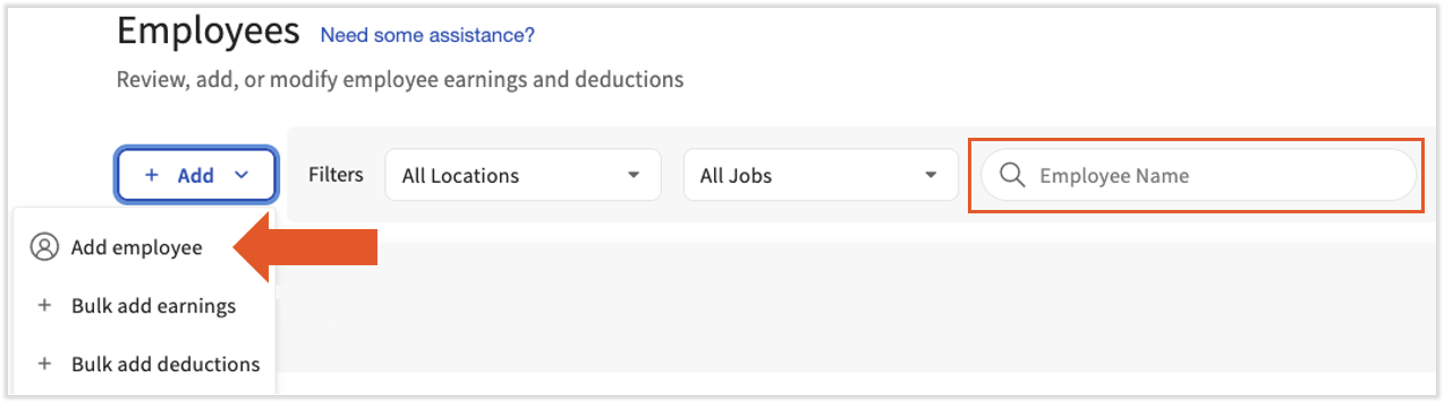
Para comenzar, busca al empleado en esta nómina usando el campo Nombre del empleado. Si aún no puedes localizar a esta persona, selecciona + Agregar > Agregar empleado.
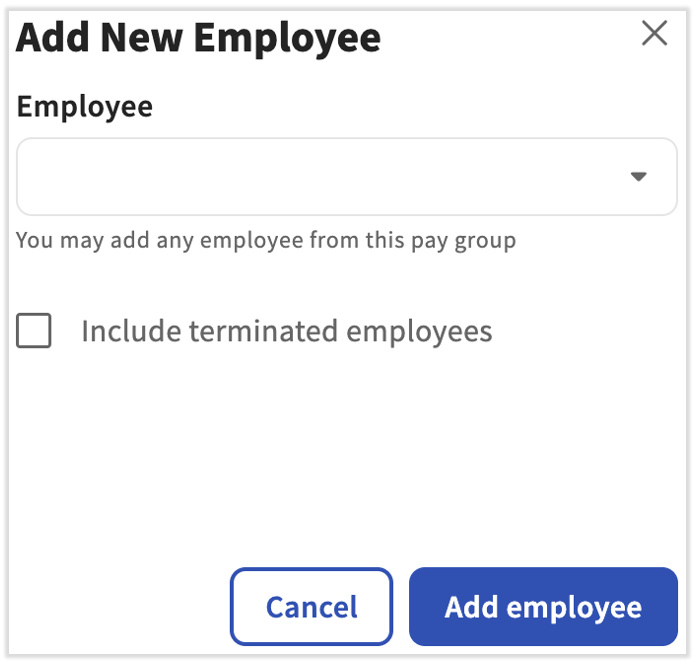
Localiza al empleado en el menú desplegable y selecciona Agregar empleado en la parte inferior. Si el empleado ya fue despedido, marca la casilla para incluir empleados despedidos en tu búsqueda. Selecciona Agregar empleado para agregar a esta persona a la ejecución de la nómina.
Este contenido se publica con fines informativos y no tiene como propósito brindar asesoramiento legal, fiscal ni referido a recursos humanos, ni constituye ningún otro tipo de recomendación profesional. Para recibir asesoramiento, comunícate con un abogado u otro profesional.
Información adicional
- Nómina Toast: Hacer un cambio de estado de LOA
- Nómina Toast: Revisar grupos de pago
- Nómina Toast: Paso de ganancias del empleado
terminado, denominado, empleado