xtraCHEF: Facturas con acción obligatoria
Última actualización: 8 abr 2026, 10:10 a.m.
- Cuando faltan facturas con datos críticos
- Ver facturas con datos faltantes
- Motivos que pausan el procesamiento de facturas
- Otras acciones necesarias
- ¡NUEVO! Resolver facturas que requieren acción en dispositivos móviles
Cuando a las facturas les faltan datos críticos
Para que los datos de la factura estén disponibles para estadísticas de costos, listas de recuento de inventario o recetas, los datos de la factura deben estar completos. Si faltan datos, el procesamiento de la factura se pausará y se te pedirá que tomes medidas con respecto a la factura para ayudar a resolver los datos faltantes. Los datos más comunes que a menudo faltan (o son ilegibles) son el monto de la factura, la fecha de la factura o el número de factura.
En este video de 5 minutos de duración, que se muestra a continuación, se incluyen las facturas que requieren acción y los diferentes motivos por los que fueron marcadas.
Ver facturas con datos faltantes
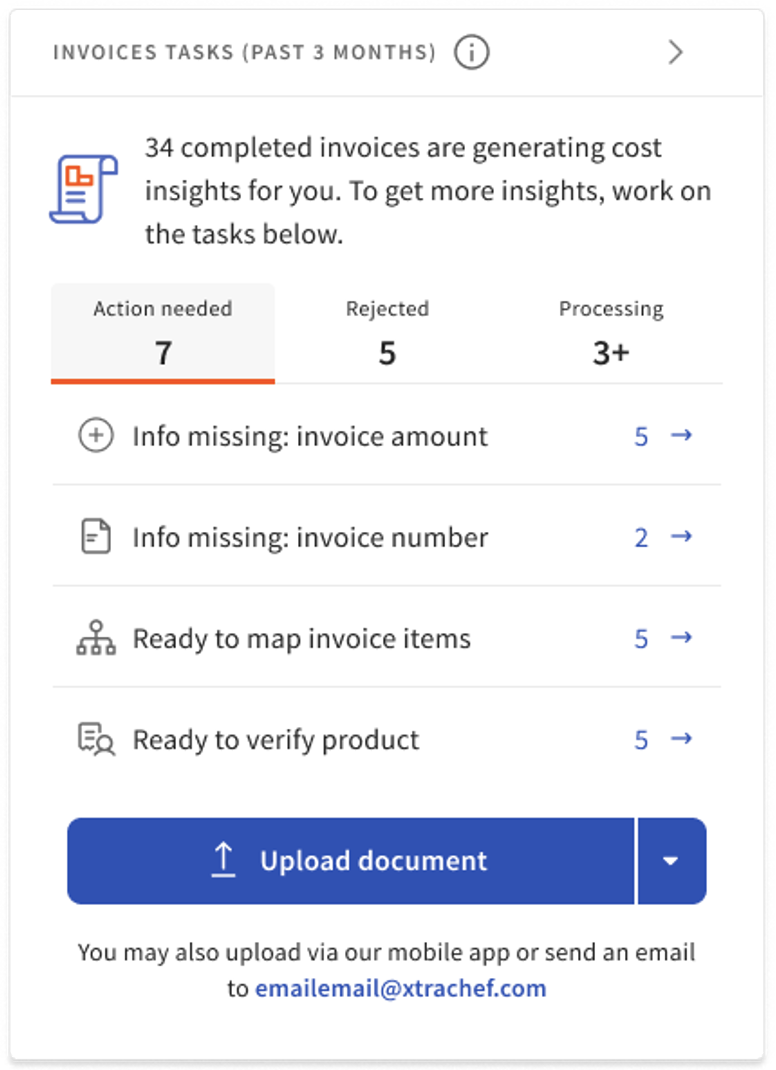
El primer lugar donde verás facturas que carecen de datos críticos es en tu panel en el mosaico Facturas. La pestaña Acción necesaria en el mosaico destaca todas las facturas que requieren tu atención. Las acciones que comienzan con Información faltante representan facturas que no se procesaron en su totalidad debido a que faltan datos críticos. Selecciona el artículo del widget para dirigirlo a las facturas que están atascadas.
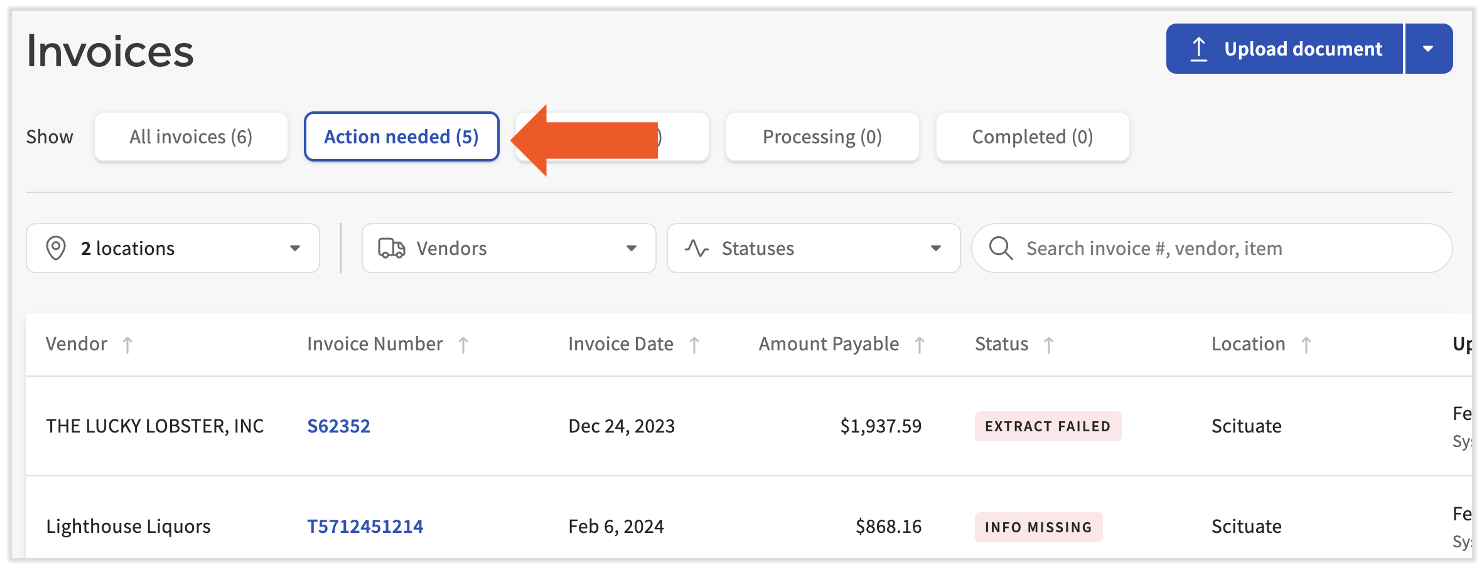
Como alternativa, puedes ver todas las facturas que necesitan tu atención yendo a Facturas y seleccionando Acción necesaria en la parte superior de la página.
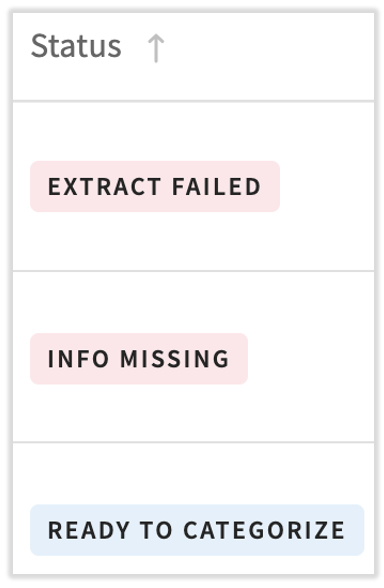
Aquí verás una columna de estado que indica el motivo por el que se marcó una factura. Selecciona un rubro (no el número de factura) para abrir la página Detalles de la factura.
La página Detalles de la factura te permitirá profundizar en los detalles individuales de la factura y hacer ajustes en los datos.
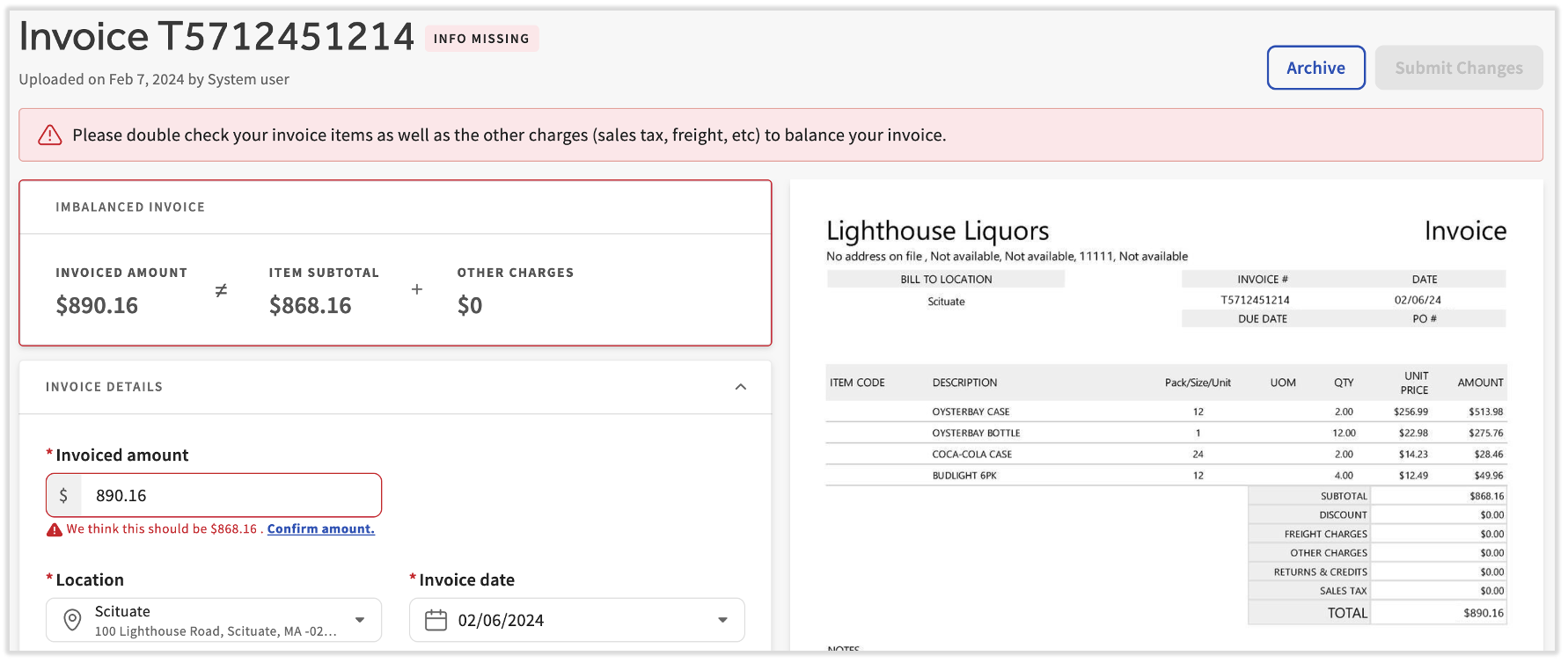
Sigue leyendo para aprender a editar los detalles de las facturas y resolver los problemas más comunes.
Volver al inicio
Motivos que pausan el procesamiento de facturas
Al ver la páginaFacturas > Acción necesaria, xtraCHEF proporcionará el motivo específico por el que se marcó y se pausó el procesamiento. Esos motivos se pueden encontrar en la columna Estado.
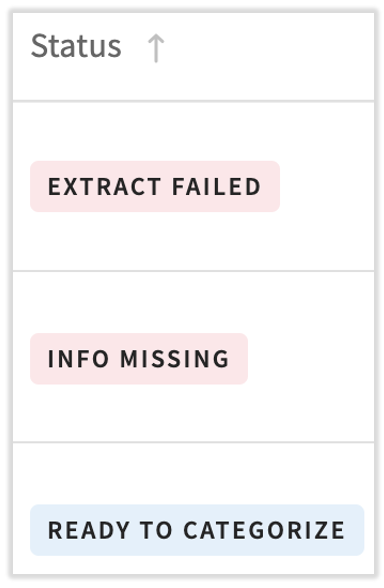
Las siguientes son estatuas específicas para facturas en esta página:
- Falta fecha de factura: Si la factura o el recibo no tienen fecha, deberás proporcionarlos. Cuando se generan informes, la fecha es una forma fundamental de identificar qué información de precios usar.
- Falta número de factura: Si a la factura le falta un número de factura, deberás proporcionarlo. Los números de factura ayudan a garantizar que no se lean ni procesen facturas duplicadas.
- Si el proveedor no proporciona un número de factura o deseas que el recibo se trate como una factura, puedes optar por Asignar siempre automáticamente números de factura a este proveedor. Cuando se seleccione esta opción, xtraCHEF generará automáticamente un número de factura único para este proveedor.
- Los recibos no requieren número. Si el documento era realmente un recibo, puedes actualizar el tipo de documento y el error desaparecerá.
- Factura faltante total: Si a la factura le falta un total, se te pedirá que verifiques el total. xtraCHEF compara automáticamente la suma de tus rubros con el total de la factura para asegurarse de que no haya problemas al procesar los rubros individuales. Sin este campo, xtraCHEF te pedirá que verifiques que la factura se haya leído correctamente antes de procesarla.
- Los totales de las facturas o líneas no coinciden: Cuando xtraCHEF detecte una inconsistencia entre la suma de tus rubros y el total de la factura capturado de la factura cargada, se te pedirá que revises la información. Para asegurarte de que tus rubros y tu factura se procesen con el monto correcto en dólares, xtraCHEF te solicitará que verifiques o edites la factura antes de procesarla. Si olvidaste cargar una página, deberás rechazar la factura y volver a cargarla.
- Método de pago obligatorio: Verás este error si tienes una extracción de QuickBooks Online activada con “procesamiento de métodos de pago”. El procesamiento de métodos de pago te permite procesar recibos como gastos. Para hacerlo, debes indicar el método de pago utilizado en el momento de la compra, y este método de pago debe asignarse correctamente al método de pago correspondiente en tu sistema contable.
- Factura de usuario no registrado: Las facturas solo pueden comenzar a procesarse en xtraCHEF si la dirección de correo electrónico del remitente está vinculada a un usuario registrado en el sistema. Si una factura que requiere acción se etiqueta con este estado, debe verificarse antes de poder procesarse. Si decides verificarla y aceptarla, la dirección de correo electrónico se registrará como usuario de captura de facturas, de modo que este estado no ocurra en futuras facturas de esta dirección de correo electrónico.
El código de proveedor faltante ya no impedirá que se procese tu factura. Si falta el código de proveedor, verás el estado Extraer pendiente de la factura.
- Falta código de proveedor: Si tienes un extracto contable habilitado y xtraCHEF no tiene un código de proveedor correspondiente para el proveedor, se te pedirá que proporciones el código de proveedor para que la factura termine de procesarse. Un código de proveedor es el nombre que se muestra a la empresa y que usas para el proveedor en tu contabilidad de terceros.
Otras acciones necesarias
Una vez que se procesa una factura, es posible que aún debas categorizar la información de la factura antes de poder obtener estadísticas. Puedes ver los siguientes estados adicionales en Acción necesaria:
- Lista para categorizar: La primera vez que xtraCHEF procesa un nuevo artículo, debes categorizarlo. Si algún artículo de una factura aún no se categorizó, esa factura estará en este estado.
- Todo listo para aprobar: Si tienes configuradas las aprobaciones, las nuevas facturas que aún no se hayan aprobado tendrán este estado. Para obtener más información sobre las aprobaciones, visita xtraCHEF: Aprobaciones.
- Extracción pendiente o Extracción fallida: Si faltan datos que impidan que tu factura se exporte correctamente a tu sistema contable, la factura estará en el estado Extraer pendiente o Extraer con error. Las razones más comunes para esto son el código de proveedor (que indica cómo asignar proveedores de xtraCHEF al sistema contable) o un error de asignación de código de LM. Obtén más información sobre los problemas relacionados con la extracción en la sección Extraer errores y soluciones de xtraCHEF: Extraer monitor.
Resolver facturas que requieren acción en dispositivos móviles
Hemos escuchado muchos comentarios sobre la capacidad de resolver facturas que se marcan como acciones necesarias o rechazadas. Los usuarios de xtraCHEF ahora pueden revisar, editar y continuar procesando la mayoría de estas facturas directamente desde la aplicación xtraCHEF.
Desde la pantalla de inicio, verás un mosaico que indica que tienes tareas. Esto ahora incluye facturas que requieren una acción, así que toca ese mosaico.
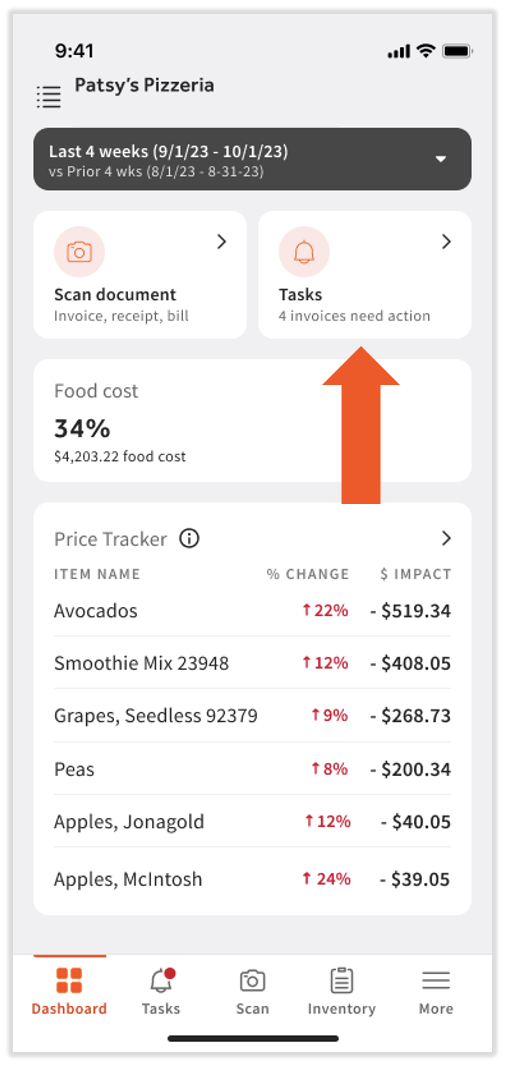
Al tocar el mosaico Tareas, puedes ver tus tareas pendientes. Hay algunas cosas que debes tener en cuenta en esta pantalla:
- Muchos tipos de acciones necesarias y facturas rechazadas ahora se pueden gestionar desde la aplicación.
- Algunas tareas agruparán facturas similares para que se puedan gestionar todas a la vez (en la imagen a continuación, Extracción pendiente: Mapear proveedor a QuickBooks Online muestra 4 facturas afectadas).
- Algunas tareas solo se pueden gestionar desde un dispositivo de escritorio o portátil (en la imagen de abajo, falta información: factura desbalanceada no se puede resolver desde el móvil).
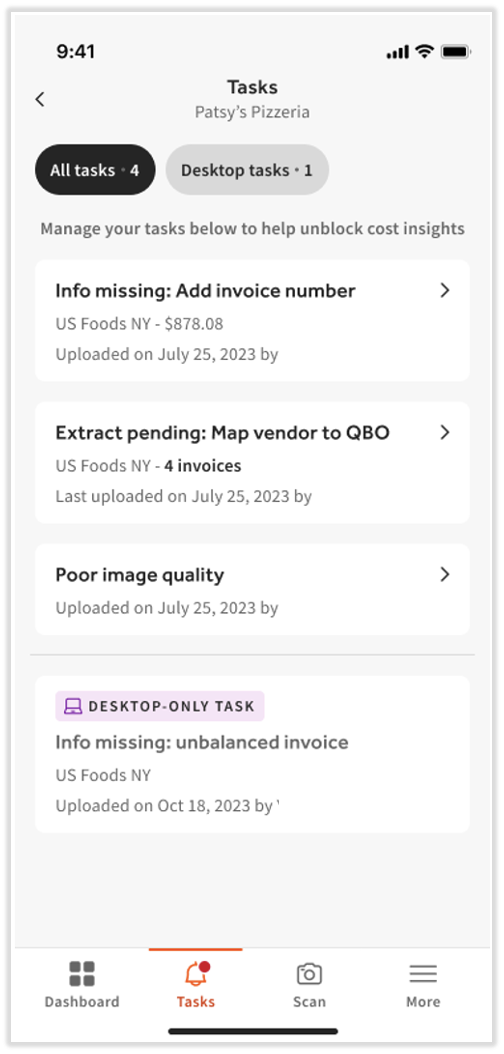
Selecciona una tarea de la pantalla para abrirla. Según la acción que necesites, verás una pantalla diferente. Por ejemplo, si la tarea involucra un código de proveedor faltante, xtraCHEF puede proporcionar sugerencias o preguntar si deseas crear un nuevo nombre de proveedor. En cualquier caso, también podrás buscar en una lista de proveedores:
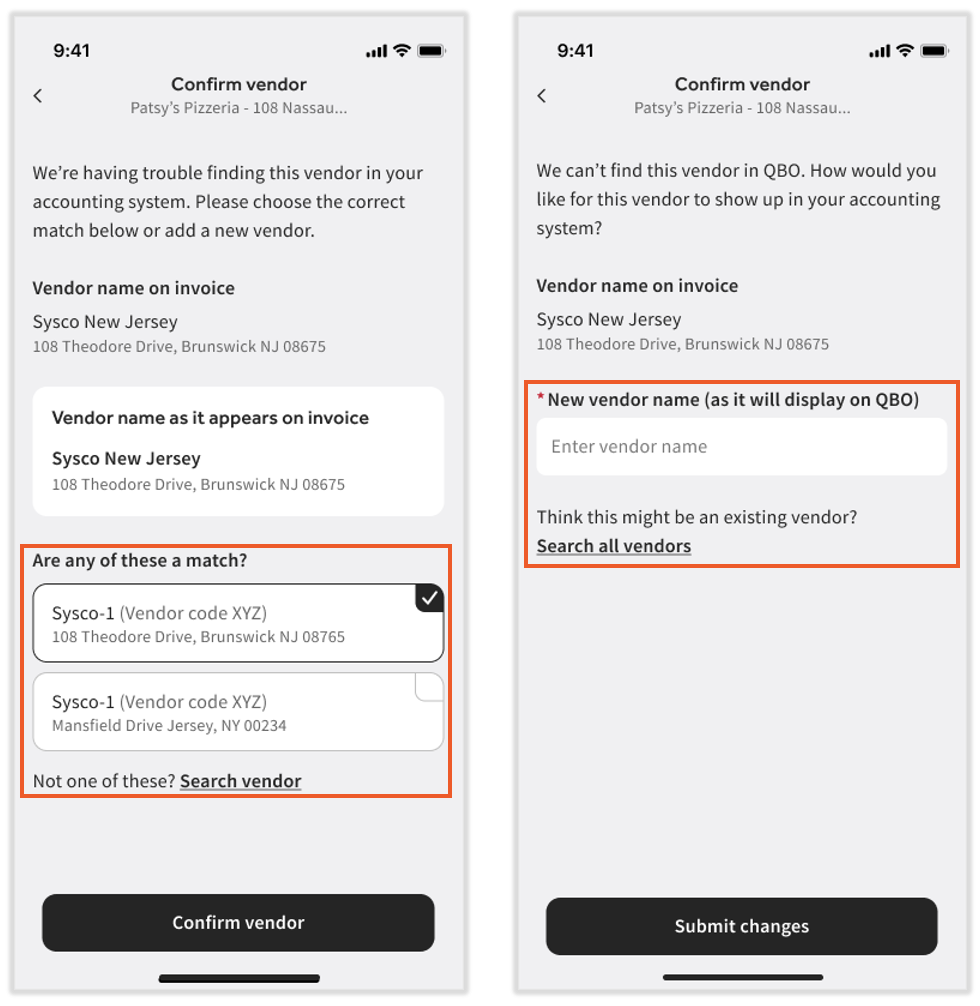
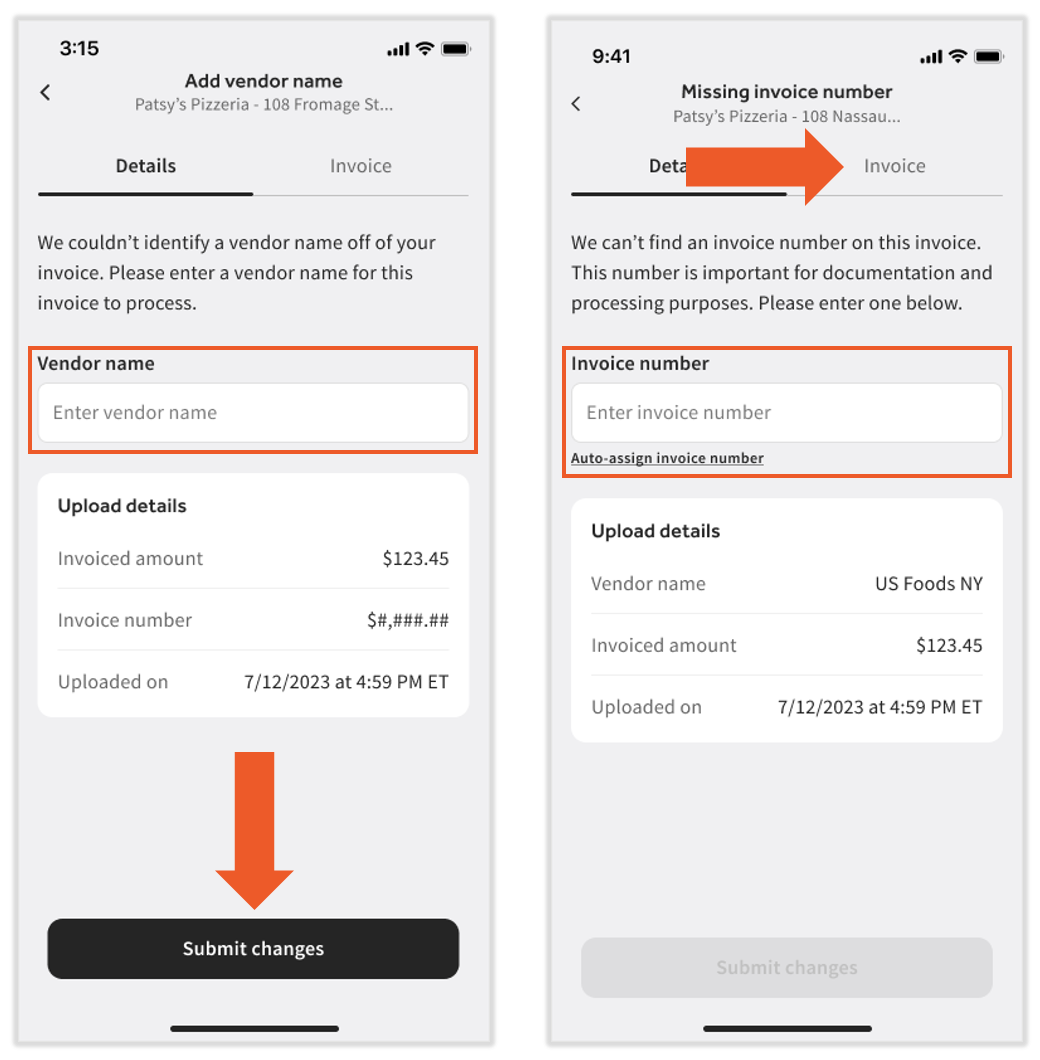
En otros casos, podrás ingresar un nombre de proveedor o un número de factura directamente en la aplicación. Selecciona la pestaña Factura para ver la factura cargada. Una vez que hayas corregido los motivos de la acción necesaria, selecciona Enviar cambios para comenzar a reprocesar esta factura.