Toast Payroll: Add an Employee to the Employee Earnings Step

上次更新时间:2026年4月8日 10:13

问题

How can I add a missing employee to a payroll run?

回答

Keep these things in mind:


  • If an employee was recently hired or put on leave of absence (LOA), they may not initially appear on a payroll run.
  • Additionally, don't forget to verify the person is employed in the same pay group as the payroll; employees are not eligible for a payroll if the pay group on their Position Detail page does not match the pay group of the payroll.


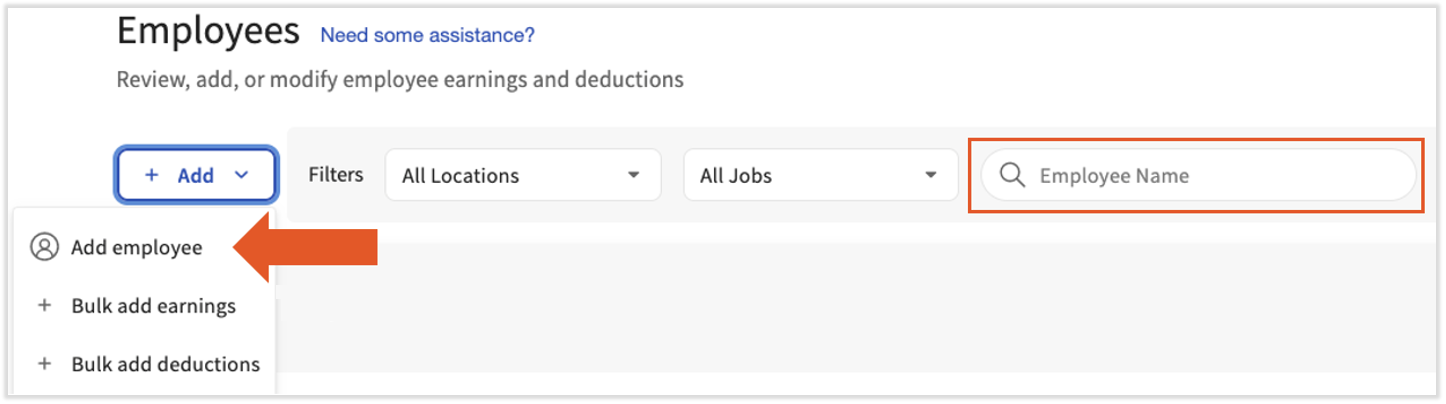
Begin by searching for the employee on this payroll by using the Employee Name field. If you still cannot locate this individual, select +Add > Add Employee.


Select +Add > Add Employee. 
  

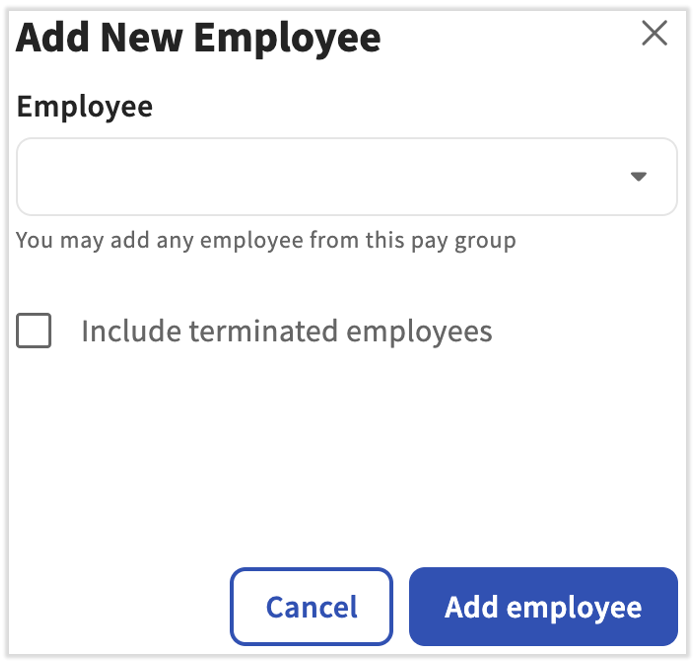
Locate the employee in the drop-down menu and select Add Employee at the bottom. If the employee has been previously terminated, check the box to include terminated employees in your search. Select Add employee to add this individual to the payroll run.
 

Select Add employee.


This content is for informational purposes and is not intended as legal, tax, HR, or any other professional advice. Please contact an attorney or other professional for advice.
​​​​​​​