Toast Payroll:工资单中漏发员工或漏发工资
上次更新时间:2026年9月24日 14:49
如果已提交的 Toast 工资发放中遗漏了员工或工时,请使用快速计算、非周期工资发放或未来工资发放来支付遗漏的工资。
如果已提交的工资单中漏发了员工或工时,Toast Payroll 有三种方式来支付漏发的工资:快速计算、周期外工资单或添加到未来的工资单中。
- 开始之前
- 快速修复:选择如何支付漏发工资的员工
- 这是解决我问题的正确文章吗?
- 漏发员工或漏发工资概述
- 选项 1:运行快速计算并手动支付员工工资
- 选项 2:运行周期外工资单
- 选项 3:将漏发的工资添加到未来的工资单中
- 特殊情况:遗漏小费、佣金或工资费率变更
- 常见问题解答
- 在联系客户服务之前
- 相关文章
开始之前
适用范围:Toast Payroll
所需权限:
- HR+ 用户 — 运行快速计算、请求非周期工资单以及向未来工资单添加收入所必需
- 工资单管理员 — 也可以执行上述所有操作
您将完成以下任务:员工将获得此前提交的工资单中遗漏的工资、工时或小费,Toast Payroll 将记录正确的收入、扣除额和税款,以确保 W-2 报告的准确性。
| 重要:工资单一旦提交,Toast Payroll 便无法再向其中添加收入、工时或小费。请使用本文中的三个选项之一来支付遗漏的工资。 |
快速修复:选择如何支付遗漏的员工
使用此表选择适合您情况的选项。本文将在下方详细介绍每个选项。
| 症状 | 最常见原因 | 快速修复 | 自助服务? |
|---|---|---|---|
| 一名员工需要立即(今天或明天)获得报酬 | 一名员工被遗漏在已提交的工资单中,且无法等到下一个发薪日 | 选项 1:快速计算。在 Toast Payroll 之外向员工支付报酬(现金、支票或支付应用程序),然后在下一次工资单中通过“快速计算”进行记录。 | 是 |
| 多名员工被遗漏,或需要进行大额调整 | 对已提交的工资单、离职员工、遣散费或奖金进行较大更正 | 选项 2:非周期性工资单。将非周期性请求表提交给客户服务;从提交到支票日期预计需要 4 个工作日。 | 部分 — 表格处理需要客户服务 |
| 错过的工资可以等到下一个预定的工资单周期发放 | 不紧急,首选最少的交易次数 | 选项 3:添加到未来的工资单。将错过的收入添加到下一个标准工资单运行中,并可选择添加“工资待办事项”作为提醒。 | 是 |
| 整个工资单未运行(不仅仅是一名员工) | 错过了提交截止日期;工资单从“工资周期仪表板”中消失了 | 这是另一个问题。请参阅 Toast Payroll:缺失工资单。 | 部分 — 客户服务必须恢复工资单 |
| 员工的直接存款失败或被退回 | 员工档案中的银行账户信息无效 | 通过任何 Toast Payroll 页面右下角的蓝色聊天圆点联系客户服务。 | 否 |
这是解决我问题的正确文章吗?
这两个问题听起来很相似,但需要不同的解决方法。在继续之前,请确认哪一个符合您的情况。
- 在以下情况下使用本文:薪资已运行并提交,但遗漏了一名员工,一名或多名员工的工时或小费被遗漏,或者在您提交之前未添加工资率或佣金。
- 使用 Toast Payroll:遗漏薪资 当:整个薪资不再显示在您的薪资周期仪表板上,您错过了提交截止日期且薪资消失,或者您需要 Toast Payroll 恢复具有新支票日期的薪资。
遗漏员工或遗漏薪资概述
偶尔,员工或某些收入或小费会被错误地遗漏在薪资运行之外。Toast Payroll 无法将收入或小费添加到已提交的薪资中,但有三种选项可以支付您的员工:
- 选项 1:快速计算 — 在 Toast Payroll 之外立即支付员工薪资,然后记录该付款,以便其出现在税务记录中。
- 选项 2:非周期薪资 — 在正常周期之外运行单独的薪资,在 4 个工作日内处理。
- 选项 3:未来薪资 — 将遗漏的薪资添加到下一个预定的薪资中。
正确的选择取决于员工需要支付的紧迫程度、受影响的员工人数,以及您是否希望减少员工收到的单独工资单数量。
选项 1:运行快速计算并手动支付员工薪资
最适合:需要立即获得报酬且无法等到下一个标准薪资发放日的单一员工。
时间表:准备好后立即支付员工薪资(现金、手动支票或支付应用程序)。在同一季度的下一个薪资周期内通过快速计算记录收入,以确保税收和 W-2 记录保持准确。
也称为:“如何为漏记工时开具手动支票”、“我需要为上周漏记工时的员工开具支票”、“我昨天在工资单中漏掉了一名员工,需要向她支付工资——我今天可以只为她运行工资单吗?”
这意味着什么:快速计算不会为员工生成资金——您需要在 Toast Payroll 之外向他们支付工资。快速计算会记录用于税务目的的工资、扣款和税款,然后附加到未来的工资单中,以便总额反映在 W-2 表格和工资单汇总报告上。
步骤:
- 在 Toast Payroll 中,导航至员工个人资料。
- 从页面左侧选择 快速计算。
- 选择 开始。
- 选择屏幕右侧的 操作 星号。
- 您可能已经在该表格中看到了收入或扣款。当个人拥有适用于每个工资发放周期的经常性收入或扣款代码时,这些内容会自动显示(例如,受薪用户将看到其工资发放周期的总薪资金额)。
- 选择 添加收入,然后选择 提交。
- 使用以下字段添加漏发的工资:
- 支票类型:保留为 手动支票。
- 收入类型:选择一个收入代码。
- 工时:输入按小时计算的收入的工时数。
- 金额:输入薪资或固定费率收入的金额。
- 注意:输入小时数或金额,但不能同时输入两者。您使用哪一个取决于您选择的收入类型。
- 周:对于双周工资单,请输入收入适用的周。
- 选择添加收入以完成。选择保存并添加可以让您一次添加多个条目。
- 添加完所有必要的收入或扣除额后,再次选择操作星号,然后选择计算税前到税后,接着选择提交。
- 向您的员工支付显示的净工资金额。此数字反映了 Toast Payroll 将应用于该员工的扣除额和税款。
- 向下滚动并选择要应用此快速计算的工资单。
- 如果适用,请输入支票号码。
- 选择提交。
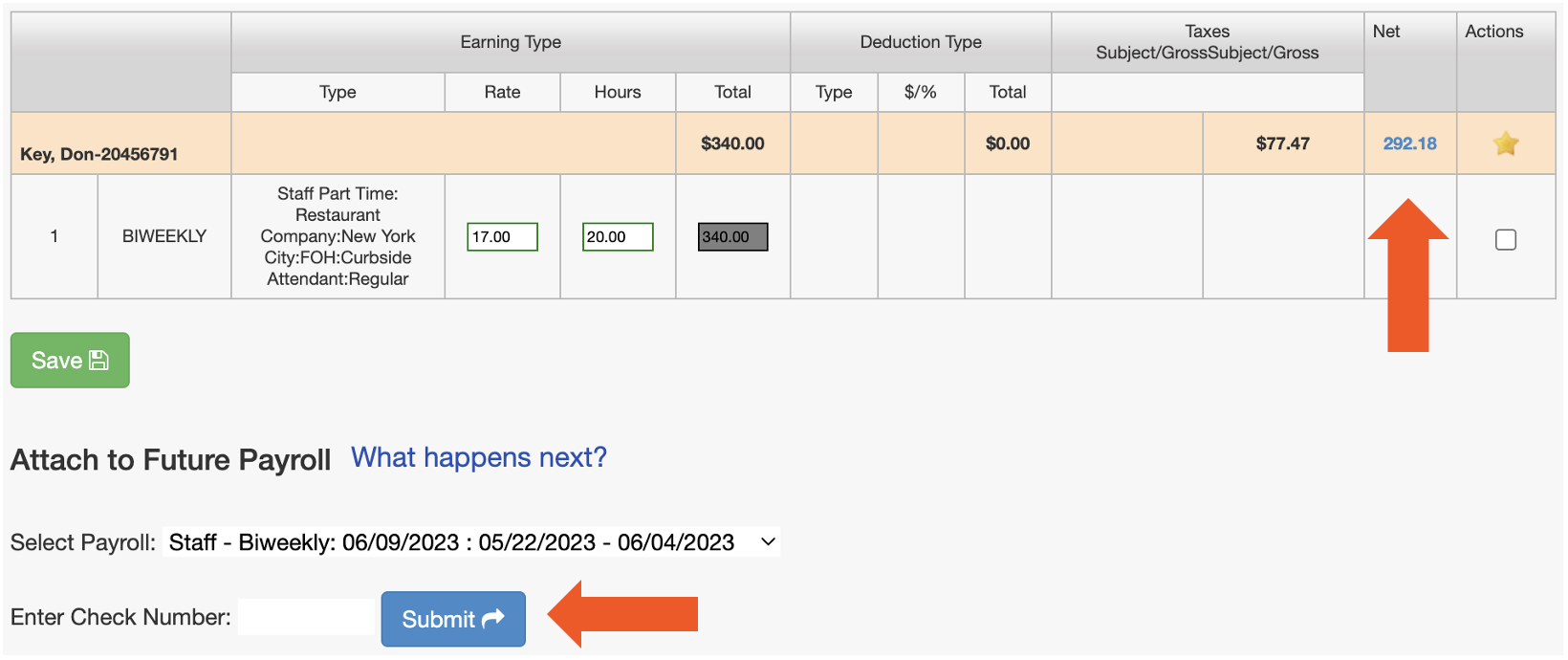
预期结果:快速计算已记录在 Toast Payroll 中并附加到所选工资单上。当该工资单过账时,工资、扣除额和税款将显示在员工的工资单上,并显示在“工资单摘要”报告中净工资部分的手动支票下。
有关完整的快速计算参考(计算税前到税后、附加到工资单、删除快速计算、在工资单报告中查找快速计算、小费池指南),请参阅Toast Payroll:签发手动支票(快速计算)。
选项 2:运行非周期薪资
最适合:遗漏了多名员工,或者需要进行大规模更正。
时间表:从提交表格到支票日期为 4 个工作日。请在下午 4:00 前提交非周期请求。截止日的东部时间,以保持 4 个工作日的窗口期。
也称为:“我需要运行一次非周期薪资”,“我可以为我遗漏的人运行额外的薪资吗?”,“我需要为遗漏的工时运行一次非周期薪资。”
这意味着什么:非周期薪资是您标准薪资周期之外的一个独立薪资日历。在您向客户服务部提交非周期请求表后,Toast Payroll 会对其进行设置。此后,您可以像运行正常薪资一样运行它。
步骤:
- 下载并填写非周期请求表。注意:Toast Payroll 目前在魁北克省不可用。当产品在您所在地区推出时,将提供此表格的法语版本。
- 在 Toast Payroll 中,选择页面右下角的蓝色聊天圆点以打开 Toast 支持模块,然后选择给我们发送消息。
- 选择聊天窗口左下角的曲别针图标以上传填写好的表格。客户服务专员将在您的非周期薪资准备就绪时予以确认。
- 处理并创建完成后,登录 Toast Payroll 并选择薪资。
- 在您的薪资周期仪表板上找到该非周期薪资,并专门为其选择预览。通过查看其名称来确认您正在运行正确的薪资。
- 进入员工收入步骤。
- 如有需要,请通过选择 + 添加 > 添加员工 来添加员工。只有来自此工资组的员工才会出现在列表中。
- 选择 + 添加收入 以输入每位适用员工的收入。所有信息必须手动输入。
- 您可能需要打开 高级选项 下拉菜单来编辑诸如 收入费率 之类的字段。
- 准备好后提交工资单。
预期结果:如果您遵循了标准工资单协议(在下午 4:00 之前提交),非周期性工资单将过账,资金将在支票日期交付。东部时间,支票日期前四个工作日)。收入显示在与标准工资单分开的工资单上。
注意:非周期性工资单需要 4 个工作日的处理窗口。如果员工需要更快收到付款,请使用选项 1(快速计算)并在 Toast Payroll 之外向其付款,然后在下一次工资单中记录该付款。
有关完整的非周期性参考(非周期性政策、取消非周期性、奖金非周期性),请参阅 Toast Payroll:设置和配置非周期性工资单。
选项 3:将错过的工资添加到未来的工资单中
最适合:不紧急,且您希望为员工保留最少的独立工资单。
时间表:下一次预定的工资单运行。
也称为:“如何将上一个工资周期漏掉的 8 小时工作时间添加到此工资单中?”,“我可以在工资单上为员工添加漏掉的小时数吗?”
这意味着什么:错过的收入将直接添加到下一次标准工资单的“员工收入”步骤中。员工将在其该工资周期的标准收入的同一工资单上收到错过的工资。
步骤(当前 — 设置提醒):
- 在 Toast Payroll 仪表板上,选择 + > 添加工资待办事项。
- 填写以下内容:
- 联邦雇主识别号 (FEIN):选择遗漏该员工的 FEIN。
- 相关:选择一名员工。
- 工资周期:选择应添加工资待办事项的工资单。
- 您可以跳过 职位 字段,但 Toast Payroll 建议添加一个包含更多背景信息的 标题 或 消息。
- 填写其余字段:
- 收入类型:选择适用的收入代码。
- 工时:如果该收入基于员工的时薪,请输入工时数。
- 金额:如果该收入为固定金额,请输入该金额。
- 选择 提交 以完成。
注意:如果您不需要提醒,可以跳过“工资待办事项”,并在下一个工资单开启时直接执行以下步骤。
步骤(未来 — 将收入添加到开启的工资单中):
- 打开下一个工资周期的工资单运行。
- 在 预览工资单 步骤中,您将看到您的工资待办事项(如果您已创建)。
- 在 员工收入 步骤中,找到该员工并选择 + 添加收入。
- 选择正确的 收入代码,然后根据您选择的收入类型,添加 金额 或 工时。
预期结果:遗漏的收入会与该工资周期内员工的标准收入一起出现在下一个标准工资单上。
有关“工资单待办事项”和“添加收入”的更多详细信息,请参阅 Toast Payroll:开始使用工资单待办事项 和 Toast Payroll:添加或编辑收入与扣除项。
特殊情况:遗忘了小费、佣金或薪资费率变更
如果您提交的工资单中未包含您打算应用的小费、佣金、一次性奖金或薪资费率变更,则同样适用这三种选项——请根据紧急程度进行选择:
- 对于在已提交工资单中遗漏的小费:如果员工需要立即获得小费,请使用选项 1(快速计算)并配合“应付小费”或“已付小费”收入代码。否则,请使用选项 3 将小费添加到下一个标准工资单中。
- 对于被遗忘的佣金、奖金或一次性收入:如果必须立即支付,请使用选项 1;如果涉及多名员工,请使用选项 2;或者使用选项 3,在下一个标准工资单中使用相应的收入代码进行添加。
- 对于被遗忘的薪资费率变更:将新的薪资费率应用到员工档案中,以便在下一个标准工资单中生效。若要补足遗漏工资周期内旧费率与新费率之间的差额,请使用选项 1(快速计算)并将差额记录为一次性收入,或使用选项 3 在下一个标准工资单中添加该差额。
注意:已提交的工资单在提交后无法撤回或编辑。客户服务部门无法撤销已提交的工资单,除非在极少数情况下(例如,错误创建且尚未到达银行的非周期性工资单)。如果您需要询问您的情况是否可以撤回,请通过任何 Toast Payroll 页面右下角的蓝色聊天圆点联系客户服务部门。
常见问题解答
员工会将此视为单独的付款,还是与标准工资单合并在一起?
如果您使用了选项 1(快速计算)或选项 2(非周期工资单),员工会将此视为单独的付款,因为每种方式都会生成各自的工资单。如果您使用了选项 3(添加到未来工资单),员工会将漏发的工资与他们的标准收入合并在同一张工资单上看到。
我可以为多名员工使用快速计算吗?
您可以为多名员工使用快速计算,但如果您有多名员工漏发了工资,通常创建并运行非周期工资单会更简单。快速计算一次只能处理一名员工,而非周期工资单允许您在一次运行中添加多名员工。
如果工资单已经提交给银行怎么办?
如果工资单已经提交,您将无法对其进行修改。请使用选项 1(快速计算)、选项 2(非周期工资单)或选项 3(添加到未来工资单)来支付任何漏发的工资。已提交的工资单无法撤回或编辑。
快速计算需要多长时间才能到达员工手中?
具体时间取决于您支付给员工的方式和时间——快速计算本身并不涉及资金划转。快速计算是您在 Toast Payroll 系统之外手动进行的付款记录(以现金、企业银行账户支票或支付应用程序的形式)。一旦您将支票、现金或支付应用程序转账交给员工,员工就会收到资金。快速计算本身会附加到下一次工资单中,以便将工资、扣除额和税款记录在案,用于税务申报。
我忘记在提交工资单之前添加小费了。我该怎么办?
如果您忘记在已提交的工资单中添加小费,则该工资单无法编辑。要支付小费:如果员工需要立即收到款项,请使用选项 1(快速计算)并选择“应付小费”或“已付小费”收入代码;如果涉及多名员工,请使用选项 2(非周期工资单);如果员工可以等到下一个发薪周期,请使用选项 3(添加到未来工资单)。
也称为:
-
- “我忘记发送工资单的小费了”
- “我忘记批准小费并运行了工资单”
我忘记添加工时、佣金或薪资费率变更了。我可以编辑已提交的工资单吗?
您无法编辑或撤回已提交的工资单。要补上漏掉的工时、佣金或薪资费率变更:为一名紧急员工选择选项 1(快速计算),为多名员工或较大更正选择选项 2(非周期),或在时间允许时选择选项 3(下一次工资单)。
也称为:
-
- “我可以撤回我提交的工资单吗?”
- “我忘记在此工资单中为员工添加某些内容了——我该如何编辑?”
- “忘记更改员工的薪资费率,但已经提交了工资单。”我该如何在不等到下一次运行的情况下将错误添加到工资单中?”
我该如何为漏掉的受薪员工进行快速计算?
快速计算对于受薪员工和时薪员工的操作方式相同,但有一个区别:在 收入类型 下,选择薪资收入代码,然后在 金额 字段中输入美元金额(而不是输入工时)。员工的工资期总薪资可能已经出现在快速计算表中,因为它是一项经常性收入。在添加额外收入之前,请核实金额。
也称为:
-
- “我该如何为受薪员工漏掉的工时进行快速计算并将其附加到下一次工资单中?”
我的快速计算附加到了错误的工资单上。我该如何移动它?
如果快速计算被附加到了错误的工资单上(例如,它关联到了您即将运行的当前工资单,导致您无法添加新的收入),请删除该快速计算,然后创建一个新的并将其附加到正确的工资单上。要删除已附加到工资单的快速计算:导航至右侧 快速操作 菜单中的 工资单 > 手动支票,从 选择工资单 下拉菜单中选择工资单,然后选择快速计算右侧的垃圾桶图标并选择 删除。这仅在它所附加的工资单开始运行之前有效。
我漏掉了一名员工——我可以只为一个人运行非周期薪资发放吗?
您可以为单个员工运行非周期薪资发放。提交一名员工的非周期请求表,方式与提交多名员工的请求表相同。如果员工需要在 4 个工作日内收到付款,请改用选项 1(快速计算),因为非周期薪资发放需要 4 个工作日的处理窗口。
也称为:
-
- “我需要为一名员工因漏发工时而运行非周期薪资发放”
- “我在上次薪资发放中漏付了一名员工——我可以运行非周期薪资发放吗?”
在您联系客户服务之前
在通过 Toast Payroll 页面右下角的蓝色聊天圆点联系我们之前,请准备好:
- 员工姓名、员工 ID 或职位。
- 漏发薪资适用的薪资周期(开始和结束日期)。
- 漏发薪资的金额和类型(标准工时、加班费、小费、佣金、奖金、薪水)。
- 您已经尝试过的选项(快速计算、非周期、未来薪资),如果有的话。
- 对于非周期请求:已填写的非周期请求表,准备好通过聊天窗口中的回形针图标上传。
- 对于直接存款失败:员工姓名和直接存款失败的日期。
在以下情况下需要客户服务协助:
- 非周期薪资发放请求。非周期请求表必须先由客户服务处理,然后您才能在 Toast Payroll 中运行非周期薪资发放。注意:Toast Payroll 目前在魁北克省不可用。当产品在您所在地区推出时,将提供此表格的法语版本。
- 直接存款失败。如果员工的直接存款信息无效且他们未收到工资,请联系客户服务以确定后续步骤。
- 关于哪种选项适合您情况的指导。如果您不确定是该使用快速计算、非周期工资发放还是未来工资发放,客户服务部门可以为您评估情况。
- 已提交工资发放的撤回。已提交的工资发放通常无法撤回。在极少数情况下(例如,银行尚未处理的非周期工资发放),客户服务部门或许能够提供帮助。
相关文章
- Toast 工资发放:签发手动支票(快速计算)
- Toast 工资发放:设置和配置非周期工资发放
- Toast 工资发放:工资发放缺失
- Toast 工资发放:工资发放与工资单常见问题解答
- Toast 工资发放:创建一次性实物(纸质)支票
此内容仅供参考,不作为法律、税务、人力资源或其他任何专业建议。请联系律师或其他专业人士以获取建议。