Get Started With Payroll Accounting Sync
Last updated: May 20, 2026, 2:43 PM
Toast now offers a direct sync to QuickBooks Online from Toast Web and Toast Payroll.
| Third-party products like QuickBooks Online are provided solely according to the warranty and other terms specified by the third party provider, who is solely responsible for service and support for its product. Looking for Sales Data Accounting Sync? See Get Started With Sales Data Accounting Sync. |
- Payroll Accounting Overview
- Changes to QuickBooks Online Payroll Accounting Syncing
- Connect Toast Payroll to QuickBooks Online via Toast Web
- Connect xtraCHEF to QuickBooks Online
- Additional Resources
Payroll Accounting Overview
Syncing your payroll data with your accounting software can mean several things depending on what Toast products and accounting systems you have.
- xtraCHEF customers who have completed setup prior to spring 2026 can sync their payroll data to many different types of accounting software using the Sync Monitor feature.
- This feature is no longer supported as of March 2026 and will not be available to new customers.
- Customers who use Sync Monitor in xtraCHEF will be migrated to the Toast Web version of Payroll Accounting Sync later in 2026. Stay tuned for more information.
- Beginning in spring 2026, Toast Payroll customers can sync their payroll data with Quickbooks Online exclusively using the new Payroll Accounting Sync feature described in this article.
- Some customers were a part of a pilot that exists in a separate platform from Toast Web. If you were a part of this pilot group, you should continue to use the sync in that system. You will be migrated over to this Payroll Accounting Sync feature later in 2026.
- Toast Payroll customers without QuickBooks Online can manually export their payroll or accounting data.
- Toast Payroll Pro customers can instead configure their general ledger (GL) to connect with their accounting software.
- Toast customers without Toast Payroll can refer to Accounting Reports Overview for more guidance regarding GL configuration.
Changes to QuickBooks Online Payroll Accounting Syncing
Historically, Toast customers would need to use xtraCHEF's Sync Monitor feature to connect their Toast system to QuickBooks. Beginning in spring 2026, Toast Payroll now has its own integration to QuickBooks Online via Toast Web. This is known as the Payroll Accounting Sync. Consider the following regarding eligibility for the Payroll Accounting Sync in Toast Web feature:
- You must be a Toast payroll customer with HR+ security role access.
- You must have an account to access Toast Web and permission 8.1 Financial Accounts.
- Customers must be using QuickBooks Online and the user must have the Admin role in QuickBooks Online.
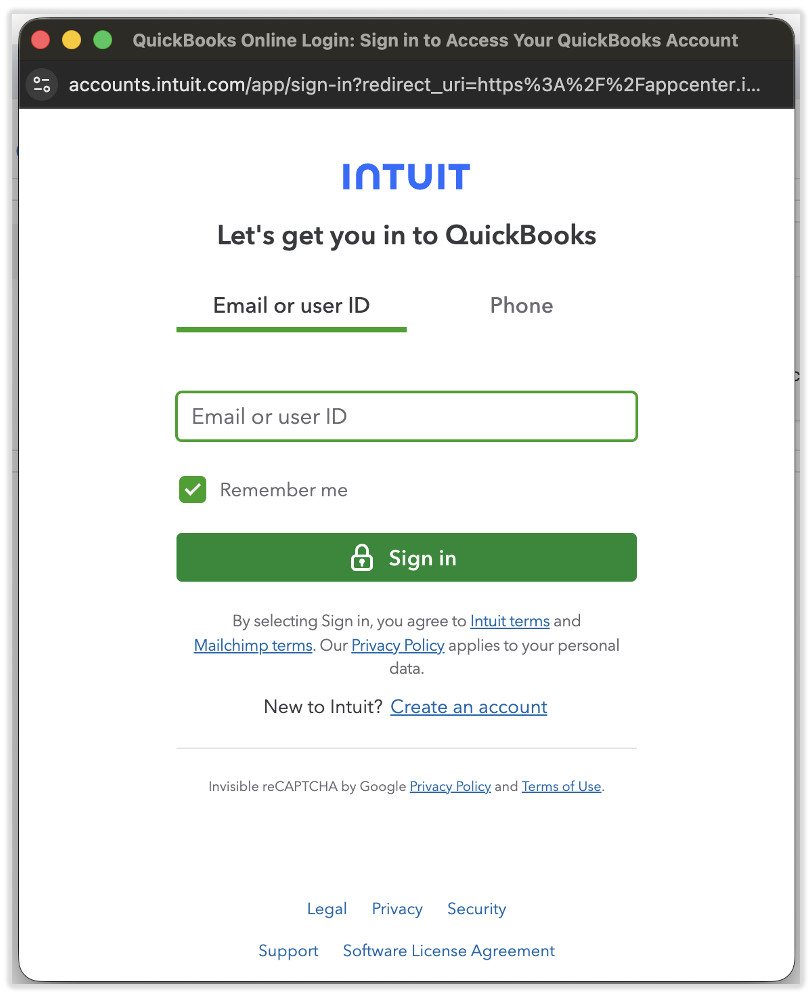
- To determine which version of QuickBooks you have, navigate to accounts.intuit.com and enter your QuickBooks login information. Check out this QuickBooks link for a video on this process.
- See this article for more information on QuickBooks user roles.
If you do not use QuickBooks Online and you'd still like to bring your Toast Payroll data into your accounting system, we recommend the payroll GL module in Toast Payroll (Pro only). A GL by Level report can be exported and uploaded to accounting software systems outside of QuickBooks Online. Contact Toast Payroll Customer Care via the blue chat dot in the lower-right corner of any Toast Payroll page to chat more about the GL module.
Connect Toast Payroll to QuickBooks Online via Toast Web
This video helps customers connect their QuickBooks account(s) to their pay groups in Toast Payroll. See steps 1-8 below.
This video helps customers map GL codes from QuickBooks Online to the payroll expenses and liabilities in Toast Payroll. See step 9 below.
| Toast recommends reviewing and cleaning up your chart of accounts in QuickBooks Online prior to beginning this integration. To do this, deactivate unused or duplicate GL codes, confirm naming conventions, and, if applicable, ensure your accountant has reviewed your structure. Toast cannot provide accounting advice, so if you’re unsure how your accounts should be structured, consult your CPA or an accounting professional before proceeding. |
- Verify that you have the correct access in each product:
- In QuickBooks Online, users must have the Primary Admin role.
- In Toast Payroll, users must have the HR+ security role.
- In Toast Web, users must have an account with permission 8.1 Financial Accounts.
- There are three different ways to access the Payroll Accounting Sync feature in Toast.
- Log into Toast Web and navigate to Finance > Accounting > Connections in the left-hand navigation rail.
- Log into Toast Payroll and select Accounting from the left-hand rail.
- Select Connect to QuickBooks on the Confirmation step of payroll (the page after you submit/post a payroll).
- Prior to the next step, make sure you are logged out of any QuickBooks Online accounts. Check each window or tab in your browser.
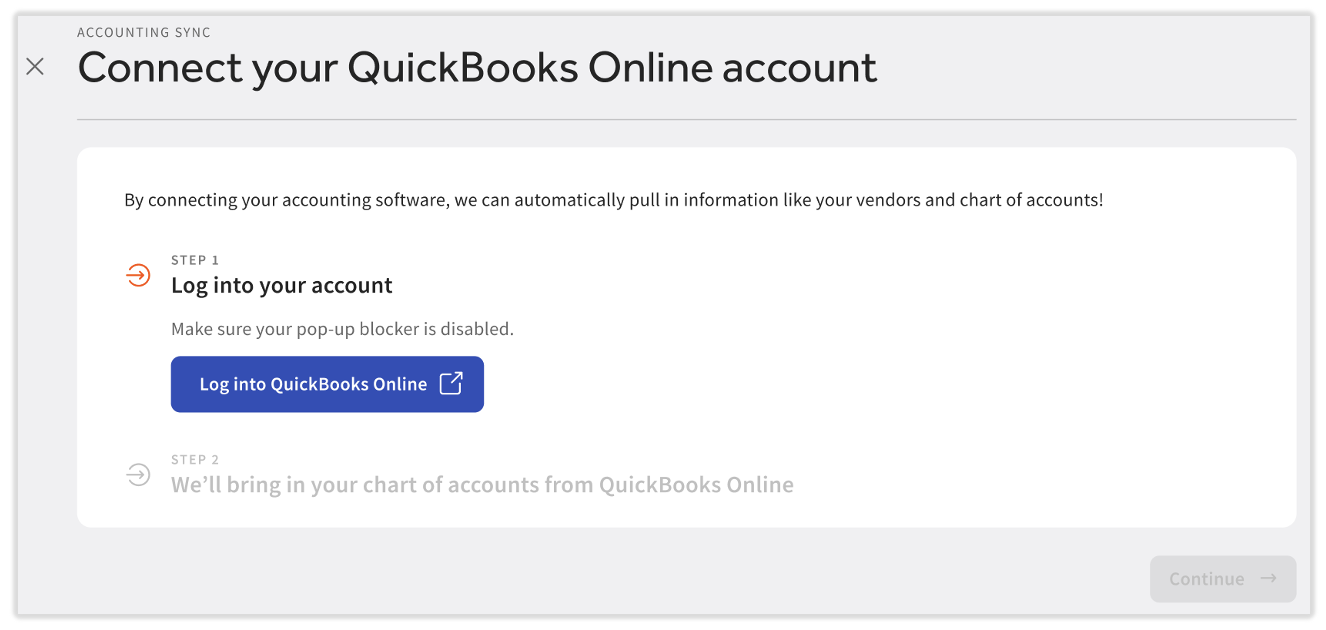
- Begin by selecting Log into QuickBooks Online.
- In the secure pop-up, enter your login information for your QuickBooks Online account.
- If there are multiple locations within that QuickBooks Online account, make sure to select the location that you are trying to connect to.
- If you do not see this pop-up, disable your pop-up blocker and select Log into QuickBooks Online again.
- Check the box for the Toast Payroll pay group(s) you'd like to connect to this QuickBooks Online account and select Continue. The pay groups listed in this step match the pay groups that Toast has mapped.
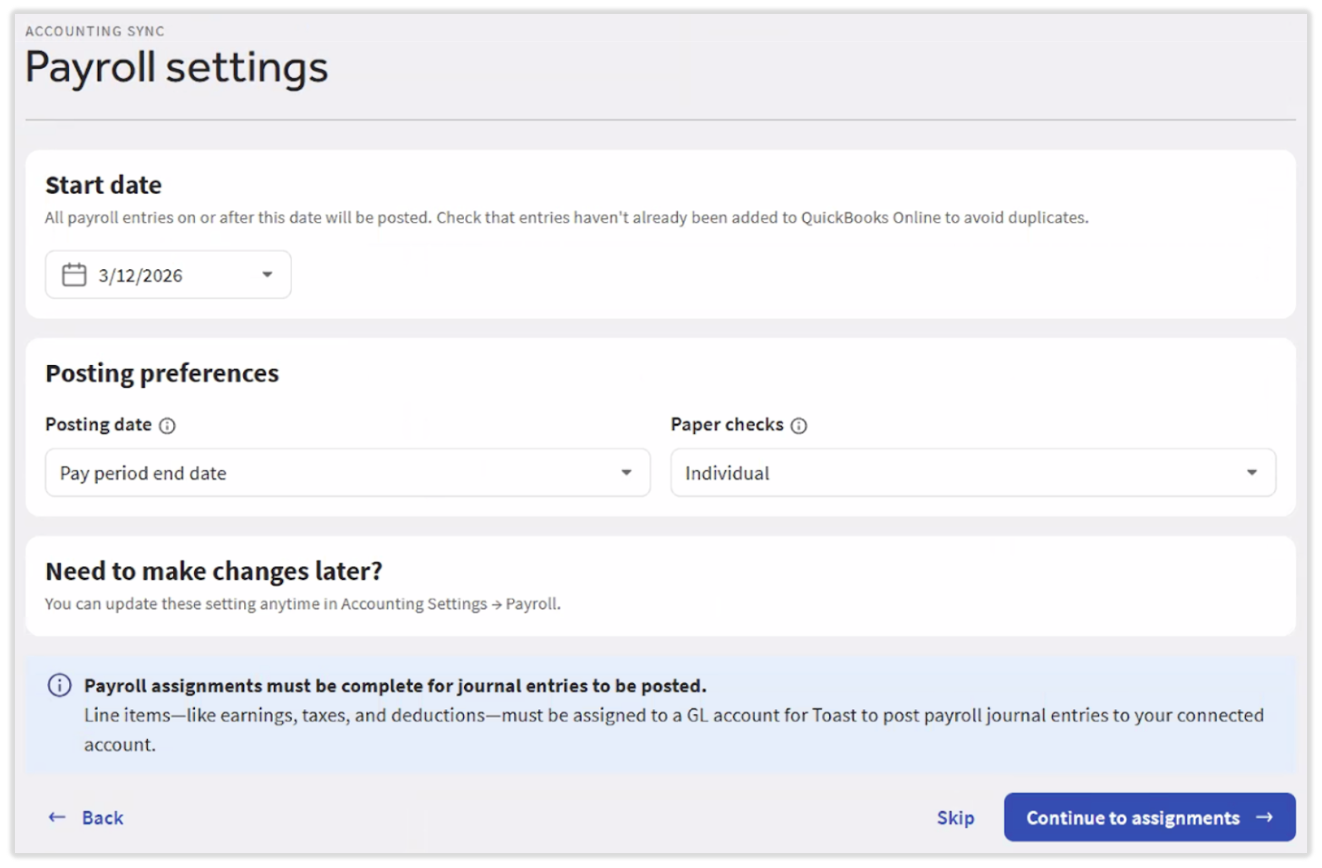
- Next, you'll enter three quick settings. These settings will apply to all pay groups and QuickBooks Online accounts that you sync in Toast:
- Start date: Enter the date that you'd like Toast Payroll to begin syncing data with QuickBooks Online.
- This date can be up to one year in the past. If you choose to set this date in the past, you can initiate a manual sync for multiple payrolls at once to "catch up" the data in your QuickBooks Online account.
- Posting date: Often, customers will select Check date when they use cash-based accounting and they will select Pay period end date when they use accrual-based accounting. Cash-based accounting records when cash related to payroll is actually dispensed whereas accrual-based accounting records when transactions occur rather than when cash is actually dispensed.
- Paper checks: If a small number of employees are paid via paper check, you might select Summary. If many employees receive paper checks, selecting Individual might help you keep track of each check status (cashed or not).
- Start date: Enter the date that you'd like Toast Payroll to begin syncing data with QuickBooks Online.
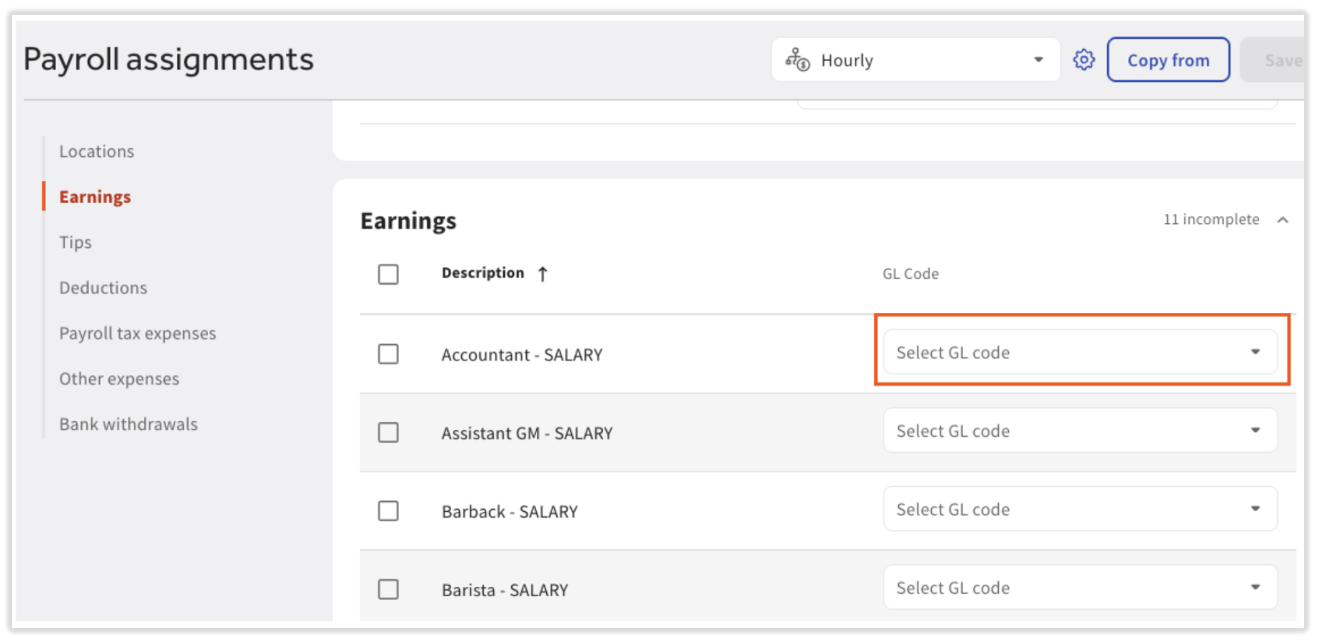
- After you've made your choices above, select Continue to assignments. You'll now map your Toast Payroll expenses and liabilities to your QuickBooks GL and/or classes (if classes are configured in your QuickBooks Online account).
- The Toast Payroll Descriptions you see here are from the most recent Payroll Summary report. If you do not see all your earnings, deductions, or other payroll expenses and liabilities here, you can expect to see messages pop up when those missing expenses and liabilities occur on future payrolls. Note: Descriptions cannot be edited.
- Visit Match Toast Payroll Categories to Your Accounting System's GL Codes for a review of the Toast Payroll categories and how you might map them to your GL codes.
- Customers who do not operate restaurants may see less effectiveness with this sync due to the Payroll Summary report being restaurant-centric (i.e. it's split up by job).
- Once Payroll Accounting Sync setup has been completed, journal entries will not sync until a payroll is run.
Connect xtraCHEF to QuickBooks Online
xtraCHEF customers who purchased the software prior to spring 2026 can connect their payroll to their accounting software. Below are the instructions to specifically connect to QuickBooks Online.
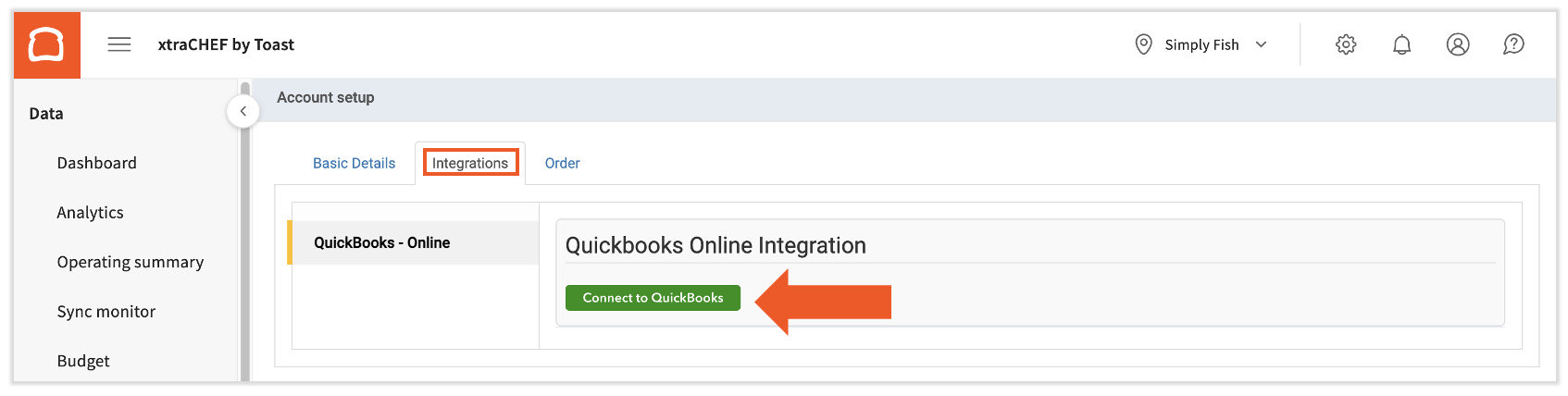
- In the upper-right corner of xtraCHEF, navigate to the gear icon > Account setup.
- Select the Integrations tab and then select Connect to QuickBooks.
- You'll begin the integration wizard. The first step asks you to log into your QuickBooks Online account, so select that button.
- A pop-up will ask you to enter your QuickBooks Online login details. Enter your email, user ID, or phone number password before selecting Sign In and choosing the company you'd like to integrate with xtraCHEF.
- A new window will ask you to authorize Intuit to share your QuickBooks Online data with xtraCHEF. Select Authorize.
- You're finished when Step 2 says your account is connected successfully. Select Continue.
- At this point, continue syncing QuickBooks Online and xtraCHEF with sales data. Follow the steps in the Sync GL Codes, Vendors and More section of xtraCHEF: Get Started With QuickBooks Online Sales Syncing. There is no way to skip the sales data steps.
- Once you've finished integrating your sales data, vendors, etc. with xtraCHEF, navigate to the gear icon > Payroll setup. Continue reading to see the remaining steps in the setup.
- Note: This integration will be initiated automatically if you utilize both Toast Payroll and xtraCHEF. If you do not see the Payroll Setup option in this menu, please contact support@xtrachef.com to get connected.
- Note: This integration will be initiated automatically if you utilize both Toast Payroll and xtraCHEF. If you do not see the Payroll Setup option in this menu, please contact support@xtrachef.com to get connected.
General Configuration in xtraCHEF
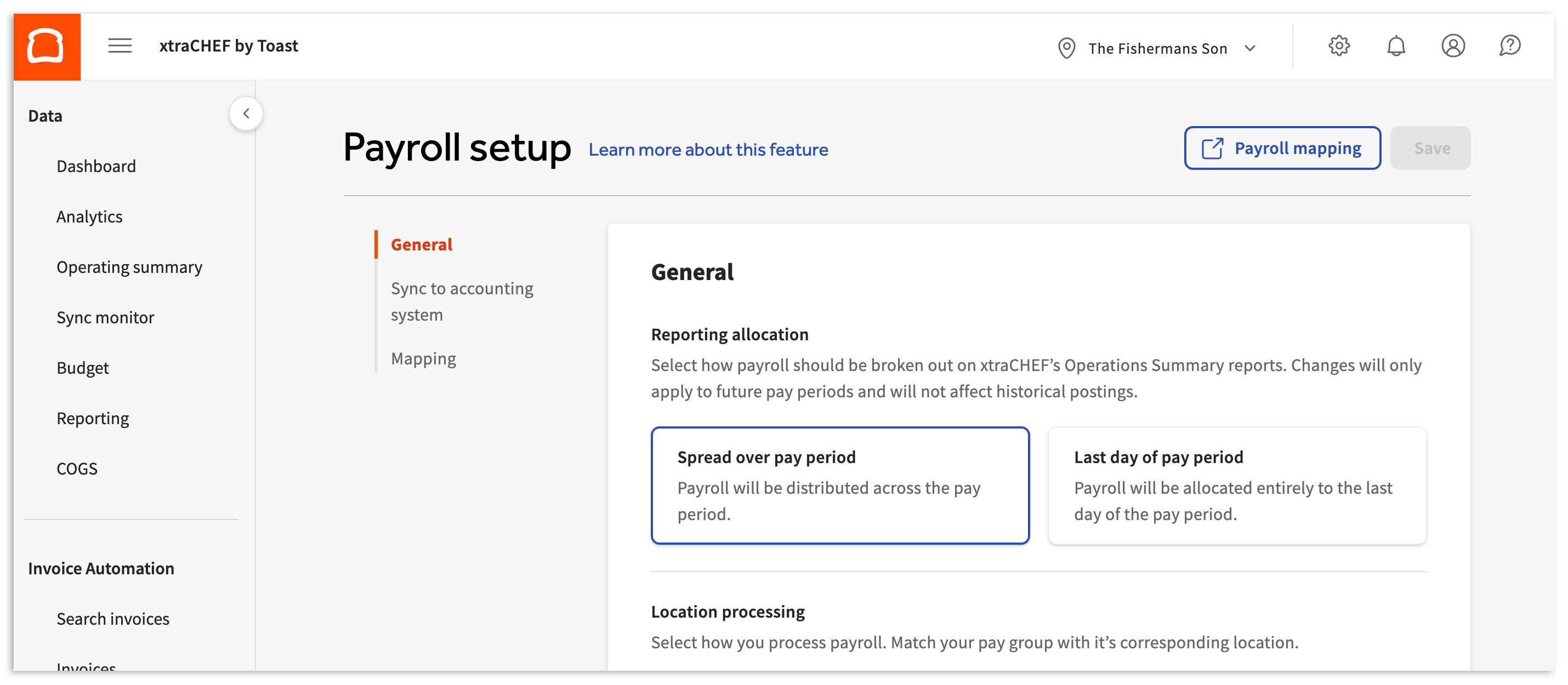
The selections made in the General configuration section dictate how payroll should be broken out on your Operating Summary report in xtraCHEF.
- First, select your Reporting allocation.
- If you process your payroll every two weeks or every month, choose Spread over pay period. This will distribute the expenses and liabilities over a period of time to better gauge your business health. The amount distributed will be an average per week for the duration of the pay period.
- If you would rather have your payroll expenses and liabilities appear on your Operating Summary on the week they were paid, choose the Last day of pay period instead.
- Note: If your check frequency is biweekly, and you select Last day of pay period, one week will look "heavier" than the other on account of the payroll total being allocated entirely to the last day of your period.
- Next, complete Location processing by matching your pay group with its corresponding location. Toast Payroll uses pay groups to group and sort employees to be paid at different pay frequencies and out of different company accounts. Once location processing is complete, continue reading to see the remaining steps in the setup.
- Location processing refers to how you process your payroll within the Toast Payroll system, regardless of how many locations you have. Pay groups from Toast Payroll should be assigned to their corresponding Locations in xtraCHEF. More than one pay group may be assigned the same xtraCHEF location, if applicable. However, a single pay group cannot be split into more than one xtraCHEF location. Journal entries will be created for each pay group.
Sync to Accounting System in xtraCHEF
Review and select each setting below:
- Payroll sync: Enabling the Payroll sync toggle allows us to post payroll journal entries to QuickBooks Online. We recommend enabling this setting.
- The following options only appear if you turn on Payroll sync.
- Start date: Upon connecting your Toast Payroll account to xtraCHEF, we will automatically pull in all payroll data from the current year. In many cases, you've already posted previous cycles to your accounting system and only need us to begin posting journal entries to your accounting system on a specific date. Select that date here.
- Post by class: If you have class tracking enabled in your accounting software and would like us to assign a class to your payroll journal entries, enable this feature. Class is a dimension that can be defined by the company and set on transactions to expand report functionality and insight. Learn more from QuickBooks here and how it works with xtraCHEF here.
- Journal entry posting date: Some customers prefer to date their payroll journal entries to match the last date of the pay period it represents (to keep in line with their fiscal calendar). If you'd rather match the check date, choose that option.
- Summaries: To make the bank reconciliation process easier, xtraCHEF defaults to summarizing your Taxes Paid, Employer Tax Expenses, and Other Expenses. Before you opt to summarize Payments, too, consider how your Toast Payroll is funded and reconciled:
- If you fund your own checks, your account will be drawn on for each check separately, per posting. In this case, only having a summary of your payments could complicate payroll reconciliation.
- On the other hand, If Toast funds your checks, your account will only be drawn on once per period. Here, a summary would simplify payroll reconciliation.
- Before leaving this page, select Save at the top of the page to finalize your choices here. Then finish the steps in the Payroll Mapping section below to finish setup.
Payroll Mapping in xtraCHEF
Payroll mapping in xtraCHEF is where you'll assign GL codes and labor groups to all the line items xtraCHEF pulled from your Toast Payroll account. To begin, select the Payroll mapping button at the bottom or top of gear icon > Payroll setup in xtraCHEF. Note: If you made any changes to the settings on this page, select Save before selecting Payroll mapping.
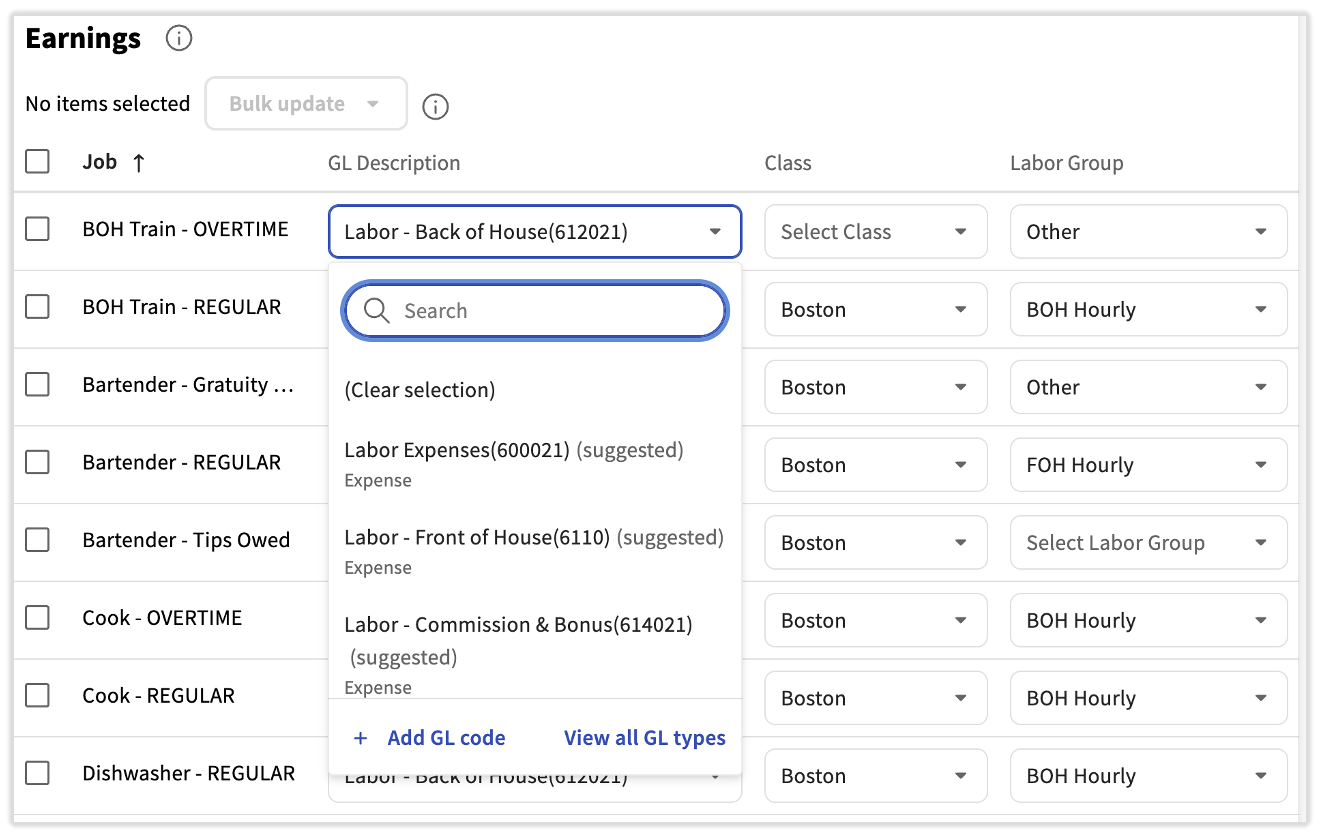
- There are multiple categories of payroll mapping; navigate between them by using the tabs on the left. Each of these sections and every line item requires a GL Description, Class (if enabled on the previous step/page), and Labor Group (if applicable). These items will be used to compile the payroll journal entry posted to your accounting software and will also appear on your Operating Summary within xtraCHEF.
- Select the top-most checkbox in a category (next to either Job or Description) to automatically select all items in this category. You may now use the Bulk update drop-down menu to assign GL Descriptions, Classes, and/or Labor Groups to each of the selected line items.
- Select a GL Description for each line item. xtraCHEF takes into account what section you're in and what line item you're looking at and tries to offer the best match available. Select the GL you think is accurate or select View all GL descriptions to see your full chart of accounts.
- You can select + Add GL code to add a new code directly from this menu. It will sync to your QuickBooks Online account.
- You can select + Add GL code to add a new code directly from this menu. It will sync to your QuickBooks Online account.
- If enabled, assign a Class to each job or description.
- Assign a Labor Group. You only need to assign labor groups to line items that are an expense to your business. The only way for labor to appear on the Operating Summary within xtraCHEF and to be considered in your Prime Costs calculations is to assign it to a labor group.
- You can select + Create to add a labor group directly from this menu. It will sync to your QuickBooks Online account.
- Select Save when every line item has values in each drop-down menu.
- If you have multiple locations under one tenant (account) and you have finished and saved Payroll setup for one location, you can copy your work to another location. To do this, revisit Payroll setup from your unfinished location and select Copy from. This allows you to import all your mapping from a selected location into the current location.
- You have now successfully set up an integration between xtraCHEF, Toast Payroll, and QuickBooks Online.
Additional Resources
- Match Toast Payroll Categories to Your Accounting System's GL Codes
- Manage the Payroll Accounting Sync
- Get Help With Payroll Accounting Sync