Configurar catering y pedidos anticipados
Última actualización: 8 abr 2026, 10:14 a.m.
- Catering y eventos de Toast
- Enviar una factura a tus clientes
- Configurar pedidos programados
- Usar un artículo de menú abierto
- Habilitar modo estricto
- Informar y organizar datos de catering
Catering y eventos de Toast
Ahorra tiempo y aumenta la eficiencia con Catering y eventos de Toast. Hemos facilitado la planificación y ejecución de eventos utilizando las mismas herramientas que ya usas hoy.
Enviar una factura a tus clientes
Con el nuevo producto de Toast, ahora puedes crear y enviar una factura a tus clientes por grandes pedidos de catering. Aprende más sobre esto aquí: Enviar una factura a tus clientes.
Volver al inicio
Configurar pedidos programados
Optimiza tus operaciones de catering y permite que tus clientes programen pedidos y seleccionen fechas futuras con modo Retiro, envío automático, configuración de pedidos futuros en línea y tiempos de entrega mínimos.
Modo Retiro
- Personaliza la configuración de tus pedidos futuros, inicia sesión en Toast Web, y navega a Para llevar y entrega > Disponibilidad > Para llevar/entrega.
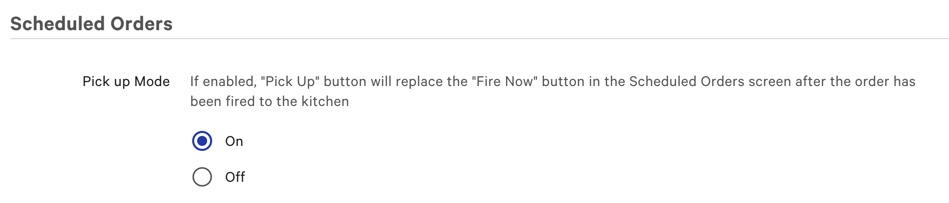
- Desplázate hacia abajo hasta la sección deÓrdenes Programadas. ActivaModo de RecogidaaActivado.Laconfiguración de Modo de Recogidate permitirá marcar las órdenes programadas en la pestañaVerificaciones Futurascomorecogidas.
- Al activarModo de Recogida,unBotón de Recogida reemplazará elBotón de Enviar Ahora en la pestañaVerificaciones Futuras después de que la orden haya sido enviada a la cocina.
Ten en cuenta que elBotón de Recogida solo aparecerá en órdenes elegibles después de que la orden cumpla con los siguientes criterios:- La orden está pagada en su totalidad
- La orden está programada para el día actual
- La orden ha sido enviada a la cocina de una de las siguientes cuatro maneras:
- Enviada automáticamente a través de la funcionalidad deAuto-enviar Órdenes Futuras (ver Comenzar con la Configuración de Órdenes Futuras: Modo de Recogida y Auto-enviar para más información)
- Enviada manualmente a través de la funcionalidad deImprimir Ticket de Cocina en Masa (ver Comenzar con la Configuración de Órdenes Futuras: Modo de Recogida y Auto-enviar para más información)
- Auto-enviada según la configuración de tiempo de preparación existente
- Enviada manualmente usando elBotón de Enviar Ahora
Auto-enviar Órdenes Futuras
La funcionalidad de auto-enviar permite que las órdenes programadas sean enviadas a la cocina tan pronto como se crean. Esto es útil para cualquier restaurante de estilo catering que sirva artículos con un tiempo de preparación más largo, como masa o productos horneados.
- Inicia sesión en Toast Web y navega a Recogida y entrega > Disponibilidad > Recogida/entrega.
- Desplázate hacia abajo hasta la sección de Órdenes Programadas y elige una de las tres opciones bajo Enviar órdenes programadas a la cocina cuando se creen.

Si Enviar pedidos programados a la cocina al crearlos está configurado en:
- Enviar a la cocina tan pronto como sean creados. Los pedidos no se imprimirán nuevamente- Los pedidos programados se enviarán a la cocina inmediatamente al crear el pedido, independientemente de cuándo sean creados.
- Enviar a la cocina tan pronto como sean creados, dentro de un período de tiempo.Esto no afectará a los pedidos creados y vencidos fuera de este tiempo - Los pedidos programados se enviarán a la cocina inmediatamente al crear el pedido solo si el tiempo de creación se encuentra dentro del umbral configurado.
- Una vez que esta opción esté seleccionada, podrá elegir cuántas horas de anticipación enviar los pedidos programados a la cocina. Si el umbral está configurado en 0, todos los pedidos programados se enviarán inmediatamente; de lo contrario, el pedido solo se enviará de acuerdo con el rango de umbral de la cocina.
-
- No enviar tan pronto como sean creados - Los pedidos programados no se enviarán a la cocina al ser creados y se activarán según el tiempo de preparación configurado.
Configuración de pedidos futuros de pedidos en línea
Esta función permitirá a sus invitados programar sus pedidos en línea para una fecha o hora futura.
- Para habilitar la configuración de pedidos futuros de pedidos en línea, inicie sesión en Toast Web y navegue a Para llevar y entrega> Disponibilidad> Para llevar/entrega.
- Elija Sí, los invitados pueden programar pedidos en la sección Habilitar programación.
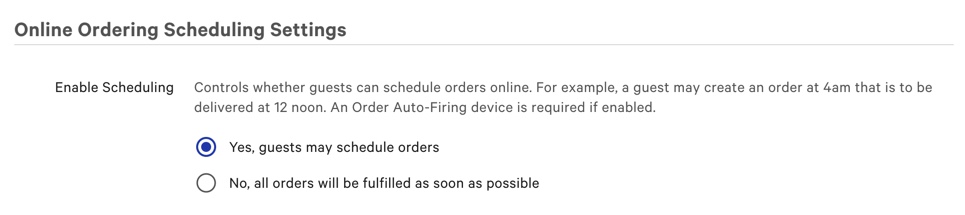
Una vez que seleccione Sí, los invitados pueden programar pedidos. Más opciones estarán disponibles para personalizar su programación de pedidos en línea.
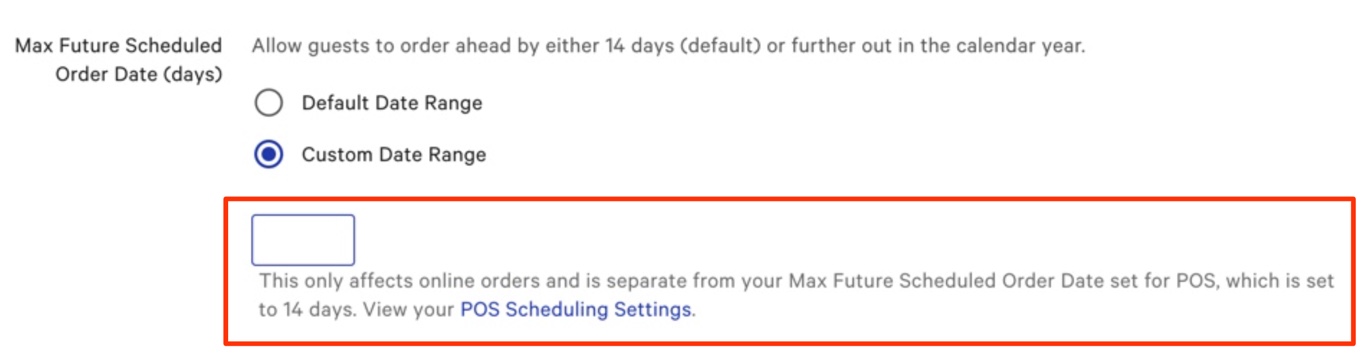
Se puede establecer un límite personalizado en Datos de pedidos programados futuros máximos (días) seleccionando un rango de fechas personalizado e ingresando el número de días que le gustaría que sus invitados pudieran programar pedidos (nuevamente, hasta 12 días de anticipación).
Configurar tiempos de espera mínimos
Usar la configuración de tiempos de espera mínimos permitirá a los invitados programar su pedido en línea hasta 12 días de anticipación. Esta función solo aparecerá una vez que seleccione Rango de fechas personalizado en la sección Fecha máxima de pedidos programados futuros (días).
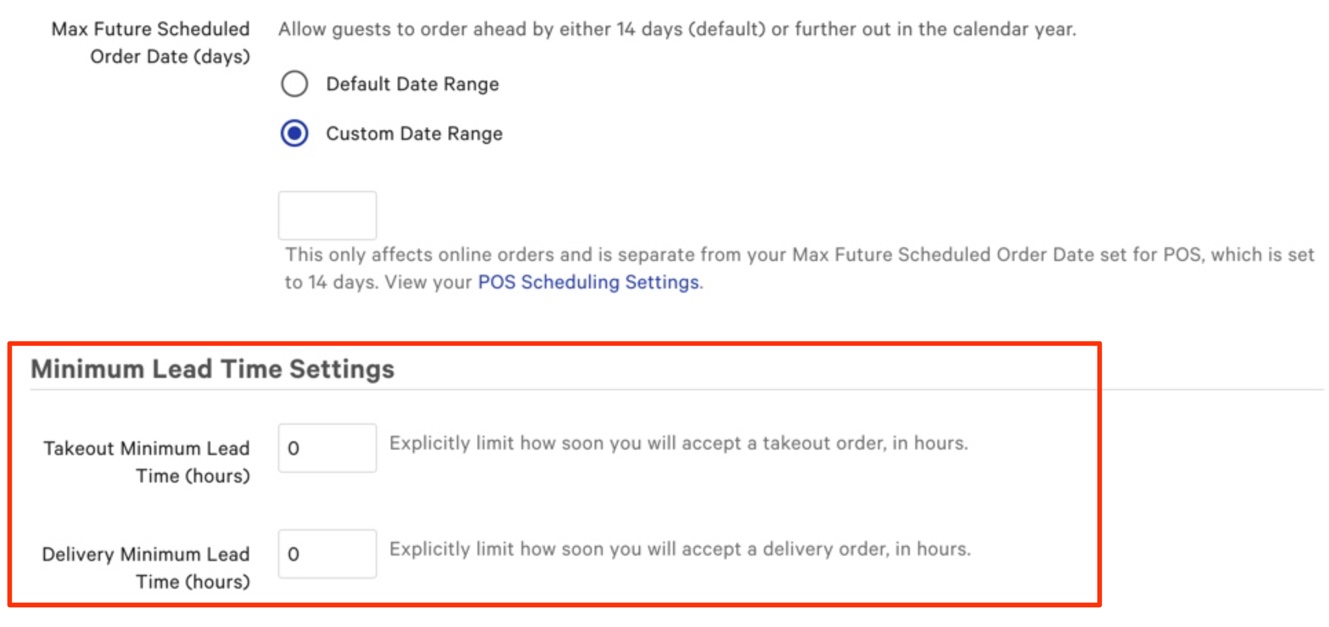
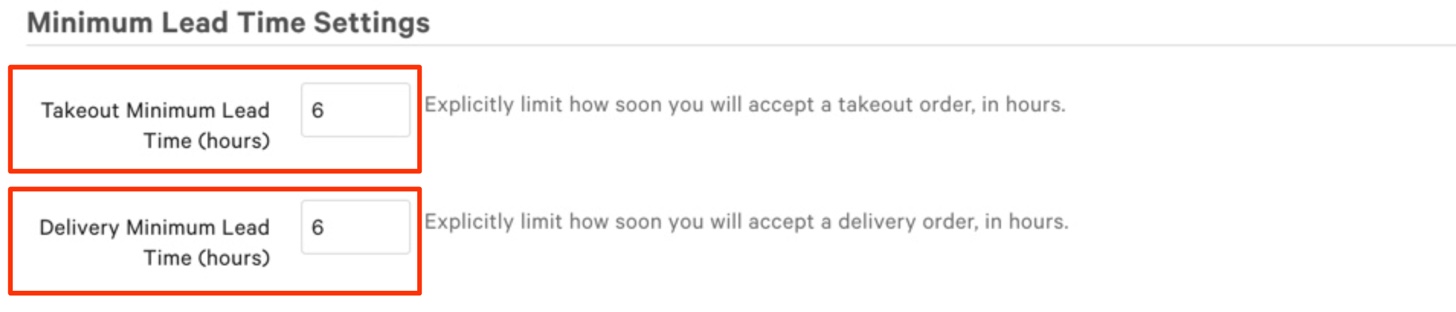
Supongamos que tu restaurante establece el Tiempo Mínimo de Entrega en 6 horas. Si un cliente desea un pedido de entrega a las 4:00 pm, la hora más temprana en la que puede hacer ese pedido es a las 10:00 am.
Puedes ingresar tus configuraciones de tiempo de anticipación deseadas para pedidos de comida para llevar en el campo de texto para Tiempo Mínimo de Anticipación para Comida para Llevar (horas) y ingresar tus horas de tiempo de anticipación deseadas para entrega en el campo de texto para Tiempo Mínimo de Entrega (horas).
Usar un Artículo de Menú Abierto
Un artículo abierto se puede usar para registrar artículos o servicios que no están incluidos en el menú de tu restaurante. Para agregar un nuevo artículo de menú abierto dentro de Catering y Eventos:
- Navega a Toast Web > Catering y Eventos.
- Selecciona Crear pedido.
- Completa los detalles del pedido, y cuando llegues a la sección Detalles del Pedido, selecciona +Agregar artículo.
- En la siguiente ventana, selecciona Menús.
- Selecciona Artículos Abiertos.
- Selecciona Comida Abierta o bebida Abierta.
- Completa los detalles del artículo como nombre, cantidad, precio y cualquier instrucción especial necesaria.
- Selecciona Agregar al pedido.
Habilitar Modo Estricto
El Modo Estricto es una medida preventiva para evitar que los pedidos ASAP y futuros cambien su fecha después de ser enviados a la cocina. Esto permite que los informes de ventas y contabilidad reflejen el monto de venta correcto para la fecha apropiada, lo que puede mejorar significativamente las operaciones de catering de tu restaurante.
Cuando el Modo Estricto está habilitado, la fecha programada de un pedido que contiene artículos enviados no puede ser cambiada, y los pedidos no pueden ser colocados retroactivamente en modo estricto. Para asegurar que la fecha programada de un pedido existente no cambie, te sugerimos que lo anules, habilites el Modo Estricto y luego recrees el pedido para la fecha apropiada.
- Para habilitar el Modo Estricto, inicie sesión en Toast Web y navegue a Frente de casa > Configuración de pantalla de pedidos > Opciones de interfaz de usuario.
- Desplácese a la sección Gestión de Pedidos. En la sección Modo Estricto, seleccione Habilitado.

Puede utilizar algunas de las funciones de Toast para organizar mejor los datos de ventas de catering.
Las Categorías de Ventas se utilizan para desglosar sus Ventas según las categorías del menú. Entre algunos ejemplos comunes se encuentran “Comida”, “Alcohol” y “Venta minorista”. Sin embargo, puede agregar una categoría llamada 'Catering' para filtrar ventas y ver datos específicamente de los servicios de catering de su restaurante. Para obtener más información sobre cómo crear categorías de ventas, consulte Configurar Categorías de Ventas.
También puede agregar sus servicios de catering a sus informes de ventas en el back-end de Toast para ver desgloses detallados de sus servicios de catering. Para obtener más información sobre informes de ventas, consulte nuestra Descripción General de Informes de Ventas!