Nómina Toast: Registrar beneficios vitalicios a plazo del grupo
Última actualización: 7 jul 2026, 10:46 a.m.
| Este artículo solo debe ser utilizado por empresas que no gestionan beneficios a través de SimplyInsured. Si usas SimplyInsured para gestionar tu cobertura de beneficios, envíales un correo electrónico a toastsupport@simplyinsured.com para hablar sobre la vida útil del grupo. |
- Conceptos básicos de beneficios vitalicios a plazo grupal
- Calcular y agregar el seguro de GTL como ganancia
Conceptos básicos de prestaciones vitalicias a plazo de grupo
Un beneficio de vida útil del grupo (GTL) es un beneficio pagado por el empleador en caso de que un empleado muera mientras estaba cubierto.
No hay consecuencias fiscales si el monto total de dichas pólizas no supera los USD 50 000. El costo imputado de cobertura superior a USD 50 000 debe incluirse en los ingresos utilizando la Tabla de Primas del IRS y está sujeto a los impuestos del seguro social y Medicare. La cobertura que supera los USD 50 000 se convierte en ingresos imputados imponibles. Por ejemplo, si un empleado elige USD 75 000 de cobertura, solo tributa sobre USD 25 000 de la cobertura. Los ingresos ingresados se consideran una ganancia imponible que no es en efectivo y deben registrarse y tributarse en una nómina con ganancias en efectivo. Fuente: IRS
Nota: Las primas de seguro de vida a término (GTL) del grupo son un artículo que tal vez necesites agregar a la nómina como salario para aparecer en el formulario W-2. Beneficios marginales imponibles y primas de salud para propietarios de S-Corp son algunos otros. Consulta con un CPA u otro profesional para asegurarte de grabar todo lo que necesites. Los beneficios de GTL deben registrarse en Nómina Toast antes de la última nómina del año.
Calcular y agregar seguro de GTL como ganancia
Para calcular por empleado, descarga una copia de esta hoja de cálculo. Necesitarás la siguiente información:

Los impuestos se calculan en función de la edad del empleado. Factores de edad en el bruto imponible mensual y plazos de cobertura.
Una vez calculado, agrega el valor de la columna Bruto imponible anual a la nómina como ganancia imponible que no sea en efectivo usando el paso Ganancias del empleado de ejecutar la nómina. Consulta la sección Ganancias únicas de Nómina Toast: Agrega o edita ganancias y deducciones para obtener más información sobre cómo agregar una ganancia a tu nómina.
Esto significa que estás registrando los impuestos, pero no estás pagando el valor (neto). Estos deben registrarse en una nómina con ganancias en efectivo. Esto se debe a que un ingreso que no es en efectivo aumenta el salario bruto y los salarios imponibles del empleado, pero, como no se paga nada realmente, solo se registra un valor, el pago neto del empleado no aumenta y la retención de impuestos se tendrá que extraer de las ganancias en efectivo.
Nuevo código de ingresos
Si necesitas que se cree un código de ganancia de GTL, completa este formulario de solicitud. Luego, selecciona el punto de chat azul en la esquina inferior derecha de cualquier página de Nómina Toast para enviarlo al servicio de atención al cliente y poder implementarlo. Si decides que este código de ingreso debe estar vinculado al formulario W-2, recuadro 12c, especifícalo en el formulario. Nota: Nómina Toast no está disponible en Quebec en este momento. Una versión en francés de este formulario estará disponible cuando el producto se lance en tu región.
Importación masiva
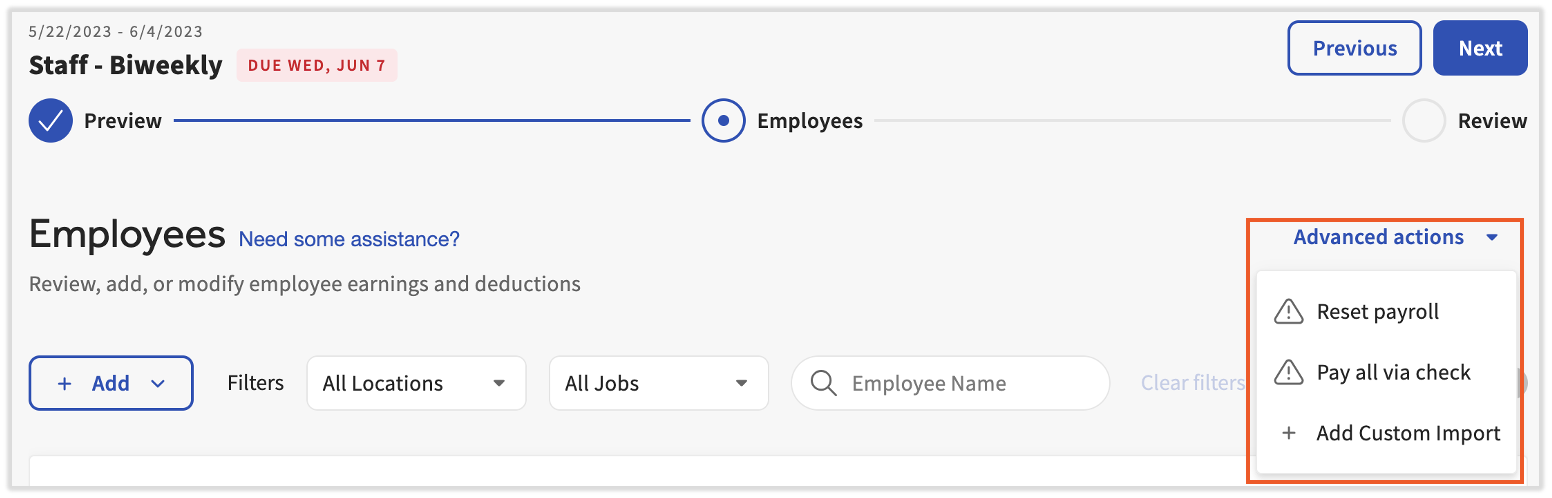
Si hay varios empleados para registrar, el monto de ingresos de la calculadora de hojas de cálculo anterior se puede agregar mediante importación personalizada usando una plantilla CSV. Ponte en contacto con nosotros a través del punto de chat azul en la esquina inferior derecha de cualquier página de Nómina Toast para configurar una plantilla de importación. Esto te permite importar varias ganancias de beneficios de GTL durante el paso Ganancias del empleado en Acciones avanzadas > + Agregar importación personalizada.
Grabación para empleados
Para calcular los impuestos, los beneficios de GTL deben registrarse a través de Quick Calcs para los empleados despedidos o que no tienen ingresos en efectivo en nómina. Hay dos formas de registrar las ganancias:
- El empleador cubre los impuestos sobre el beneficio
- El empleado está sujeto a impuestos sobre el beneficio
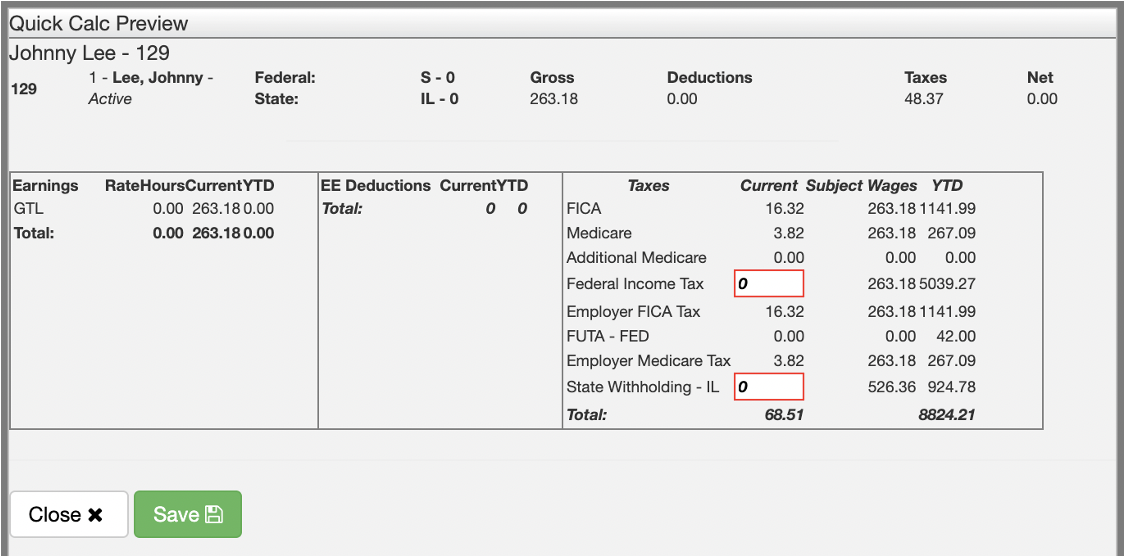
Como empleador, si eliges cubrir los impuestos, agregarás una ganancia para el empleado despedido y ajustarás la retención del “Impuesto Federal sobre la Renta (FIT)” y el “Impuesto Estatal sobre la Renta (SIT)” a cero. Los siguientes pasos se pueden utilizar para competir en esta tarea:
- Suma el monto de los ingresos usando un cálculo rápido. Nómina Toast: Emitir cuentas manuales (Quick Calcs) tiene las instrucciones para hacerlo.
- Una vez que hayas seleccionado Calcular bruto a neto, ajusta las retenciones FIT y SIT a cero en la ventana emergente. SeleccionaGuardarantes de seleccionarCerrar en esta pantalla.
- Sigue las instrucciones del artículo hasta el final de la sección Adjuntar un cálculo rápido a Nómina.
- Una vez enviada la nómina, verás algo similar a la siguiente entrada en el informe de detalles del empleado:
- Si el empleado despedido está sujeto a impuestos por el ingreso, agrega el ingreso a una nómina en el paso Ganancias del empleado. Los impuestos del Seguro Social (FICA), las retenciones FIT y las retenciones SIT entrarán en mora.

Este contenido se publica con fines informativos y no tiene como propósito brindar asesoramiento legal, fiscal, de recursos humanos ni ningún otro tipo de recomendación profesional. Ponte en contacto con un abogado u otro profesional para recibir asesoramiento.