Nómina Toast: Guía para nuevos empleados importados
Última actualización: 9 oct 2026, 11:16 a.m.
Cuando un empleado se importe en Nómina Toast, tendrá que abordar puntos, como los detalles del depósito directo y la información fiscal crítica antes de que se le pague.
- Iniciar sesión
- Agregar y verificar información personal
- Agregar o verificar número de seguro social
- Cambiar o actualizar dirección de correo electrónico o contraseña
- Cambiar o actualizar contraseña
- Método de pago
- Ingresar información del formulario W-4
- Recursos adicionales
Iniciar sesión
¡Te damos la bienvenida a Nómina Toast! Cuando inicies sesión por primera vez, tendrás credenciales de inicio de sesión preestablecidas, pero puedes actualizarlas después de iniciar sesión. Nota: Sigue todos los pasos de esta página para asegurarte de que Nómina Toast tenga todos los detalles necesarios, como tu número de Seguro Social (SSN), información del Formulario W-4 y números de cuenta de depósito directo.
- Ve a payroll.toasttab.com.
- Ingresa tu dirección de correo electrónico en el campo Correo electrónico o Nombre de usuario. Si no tienes una dirección de correo electrónico, pregúntale a tu gerente o equipo de RR. HH. qué debes ingresar. Selecciona Siguiente.
- Como empleado importado, tu Contraseña se configurará automáticamente en tu primera inicial escrita con mayúscula, tu apellido en minúscula, los últimos 4 dígitos de tu número de seguro social y, luego, el signo del dólar, sin espacios.
- Por ejemplo, si el número de seguro social de Will Smith era 123-45-6789, su contraseña sería Wsmith6789$. Selecciona Siguiente una vez más.
- Si tienes problemas para iniciar sesión con estas credenciales, ponte en contacto con tu gerente. Nómina Toast no puede ver tu contraseña y no puede ayudar a los empleados en esta situación.
Agregar y verificar información personal
Tu información demográfica, de contacto y de contacto para emergencias se mantienen en tu perfil.
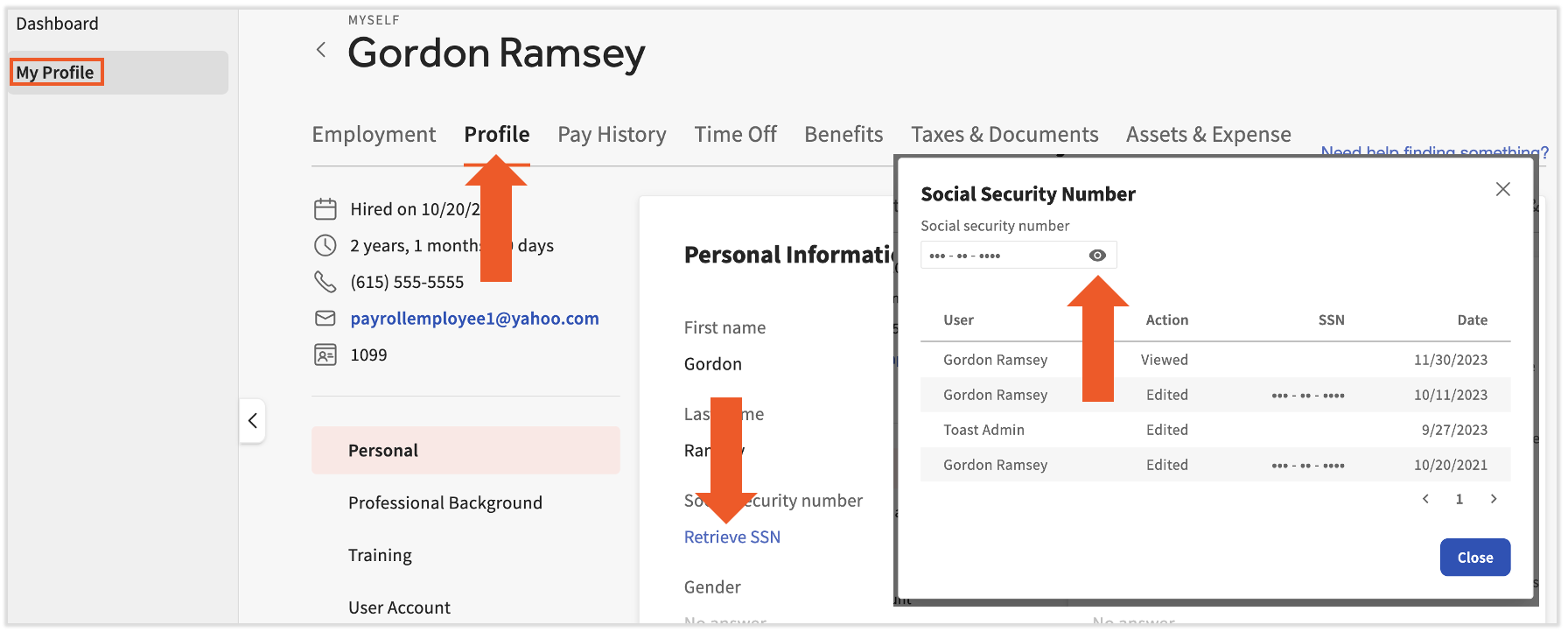
- Inicia sesión en payroll.toasttab.com y selecciona Mi perfil en la esquina superior izquierda.
- Si no ves Mi perfil en el lado izquierdo de la pantalla, selecciona Nómina en la barra de navegación de Toast Web a la izquierda para que aparezca la barra de navegación de Nómina Toast.
- Selecciona Perfil en la parte superior.
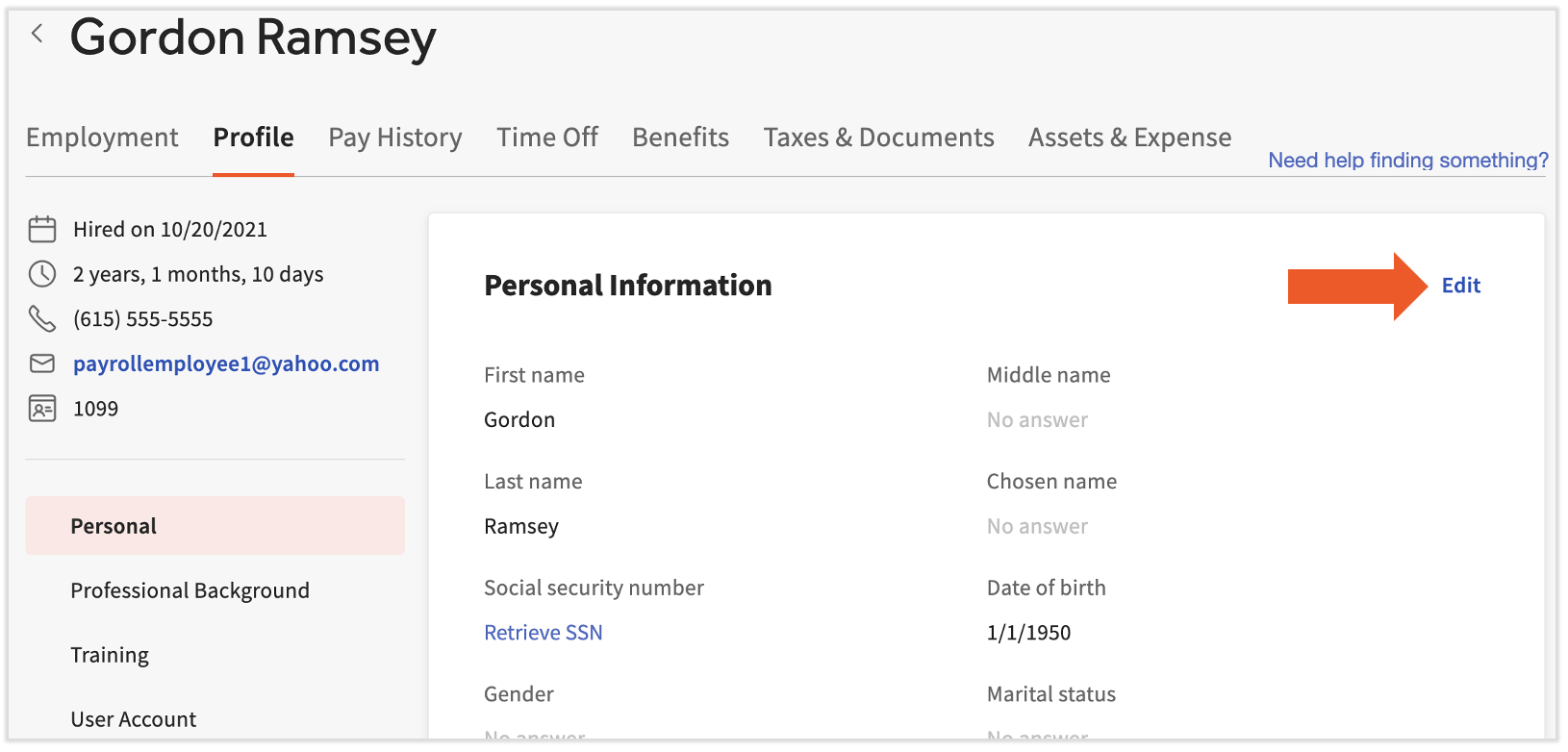
- Hay cuatro mosaicos en esta página; desplázate hacia abajo para ver más. Comenzando con Información personal, selecciona Editar en cada mosaico y completa la información solicitada.
- Es vital agregar la dirección correcta. Delega qué formulario(s) de impuestos estatales debes completar.
- Guarda los cambios a medida que avanzas la página
Agregar o verificar número de seguro social (SSN)
Durante el proceso de importación de empleados, no se requería tu número de seguro social. Sin embargo, esta es otra información fundamental que Nómina Toast necesita para presentar correctamente los impuestos por ti. Los SSN inexactos o faltantes pueden resultar en declaraciones de impuestos inexactas, declaraciones de impuestos no aceptadas por las agencias y/o penalizaciones financieras.
- Es posible que ya hayas completado tu número de seguro social, pero te recomendamos verificarlo seleccionando Recuperar SSN. Selecciona Sí en la ventana emergente.
- Selecciona el ícono de globo ocularpara ver el número de seguro social que Nómina Toast tiene para ti.
- Si es preciso, selecciona Cerrar; todo listo. Pero si no es precisa o está en blanco, continúa con estos pasos.
- Si es preciso, selecciona Cerrar; todo listo. Pero si no es precisa o está en blanco, continúa con estos pasos.
- Selecciona Cerrar y, luego, Editar en el mosaico Información personal.
- Localiza el campo Número de Seguro Social e ingresa un número de Seguro Social exacto aquí.
- Selecciona Guardar cambios en la parte inferior para finalizar tu número de seguro social antes de avanzar.
Cambiar o actualizar dirección de correo electrónico o contraseña
Tu dirección de correo electrónico se usa para iniciar sesión, recibir comunicaciones de Nómina Toast y confirmar tu identidad (más información en la sección Método de pago). Si necesitas cambiarla o actualizarla, sigue estos pasos (de lo contrario, puedes omitir actualizar tu contraseña):
- Mientras inicias sesión en Toast Web o Nómina Toast, selecciona el ícono de avatar en la esquina superior derecha de la página y, luego, selecciona Perfil.
- Si tienes problemas para iniciar sesión, consulta la sección Iniciar sesión de arriba. Si eso no soluciona el problema, visita Iniciar sesión en Toast: Solucionar inicio de sesión.
- En la sección Información personal, puedes actualizar tu nombre, apellido o nombre elegido.
- En la sección Inicio de sesión y seguridad, puedes actualizar la dirección de correo electrónico o la contraseña de tu cuenta según sea necesario. También puedes hacer actualizaciones en la autenticación multifactor.
- Si necesitas más ayuda para actualizar tu correo electrónico o contraseña, inicia sesión en Toast: Actualizar tu cuenta tiene más detalles.
- En la sección Acceso mejorado, puedes actualizar el número de teléfono verificado donde recibirás el código de acceso único para habilitar permisos elevados y obtener acceso a ciertas páginas restringidas, si se te permite.
- Selecciona Guardar cada vez que realices cambios.
Método de pago
Si deseas recibir el pago mediante depósito directo, sigue estos pasos. Si quieres recibir un cheque en papel, puedes omitir esta sección, ya que el cheque en papel es el método de pago predeterminado.
- Inicia sesión en payroll.toasttab.com y selecciona Mi perfil en la esquina superior izquierda.
- Si no ves Mi perfil en el lado izquierdo de la pantalla, selecciona Nómina en la barra de navegación de Toast Web a la izquierda para que aparezca la barra de navegación de Nómina Toast.
- Selecciona la pestaña Empleo en la parte superior.
- Elige la pestaña Método de pago de la izquierda y, luego, selecciona el mosaico Depósito directo.
- Selecciona + Agregar cuenta bancaria.
- Selecciona Verificarcuando se te solicite confirmar tu identidad. Un código de seis dígitos se enviará por mensaje de texto a tu número de teléfono registrado en tu cuenta de Toast. Ingresa este código de seis dígitos en la ventana emergente de Nómina Toast.Nota: Los representantes de Toast nunca te pedirán este código, así que no lo compartas ni proporciones a nadie.
- Si no ves la ventana emergente, es posible que debas desactivar el bloqueador de anuncios y volver a intentar esta acción. Puedes volver a activarla una vez que hayas terminado con estas instrucciones.
- Nómina Toast: Obtener ayuda con las cuentas de depósito directo puede ayudarte con los pasos para configurar el depósito directo con Plaid. No olvides volver a esta página una vez que hayas terminado; queda un paso importante.
Ingresar de información del formulario W-4
Este es el último paso, pero es muy importante completar estos documentos para retener correctamente los impuestos estatales y federales de tu salario.
- Selecciona Impuestos y documentos en la parte superior de la pantalla.
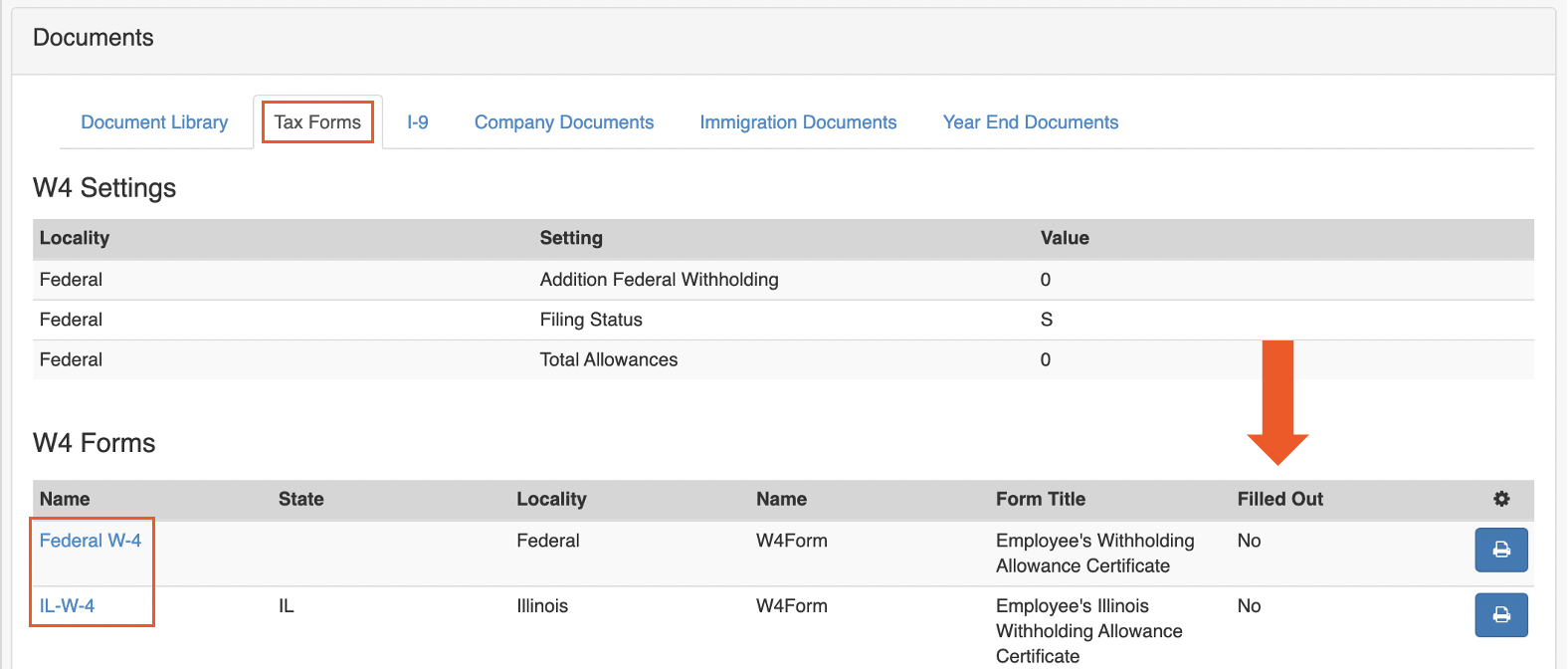
- Selecciona la pestaña Formularios de impuestos hacia la parte superior.
- Desplázate hacia abajo para ver los formularios W-4 federales, estatales y (a veces) locales hipervinculados que puedes completar. Selecciona cada hipervínculo para comenzar con el asistente de formularios W-4, que te guiará a través de cómo completar cada formulario.
- Todos los formularios presentes son obligatorios para tributar correctamente tu salario. Los formularios se basan en las direcciones que Nómina Toast tiene archivadas para ti y tu empresa. Puede ser mejor consultar a un contador o profesional de impuestos si tienes preguntas. Nómina Toast no puede ofrecer consejos sobre qué ingresar.
- Una vez que todos los documentos estén completos, la columna Completos dirá Sí para cada formulario.
¡Ya terminaste! A continuación, incluimos más artículos del Centro de asistencia que pueden ser útiles para usar este sistema.
Recursos adicionales
- Nómina Toast: Obtener ayuda con los recursos para empleados
- Nómina Toast: Obtener ayuda con los depósitos directos
- Nómina Toast: Actualizar información del formulario W-4
Este contenido se publica con fines informativos y no tiene como propósito brindar asesoramiento legal, fiscal, de recursos humanos ni ningún otro tipo de recomendación profesional. Ponte en contacto con un abogado u otro profesional para recibir asesoramiento.