Nómina Toast: Completar formulario I-9
Última actualización: 9 oct 2026, 12:20 p.m.
Descubre cómo los empleados pueden completar este formulario I-9 simplificado y adaptado para dispositivos móviles durante su incorporación en este artículo.
- Formulario I-9 secciones
- Completa el formulario I-9 durante la incorporación del empleado
- Localizar y descargar formulario I-9
- Información electrónica del sistema del formulario I-9
- Auditoría del formulario I-9
Formulario I-9 secciones
El formulario I-9 consta de tres secciones principales:
- Sección 1: El empleado debe completar esta información, que incluye su información personal, como nombre, dirección y número de Seguro Social (SSN), junto con su certificación sobre la autorización de empleo.
- Sección 2: Completado por el empleador, implica verificar y certificar los documentos de identidad y autorización de trabajo del empleado.
- Suplemento B (anteriormente conocido como sección 3): Esta sección es opcional y se utiliza para actualizaciones, como cambios legales de nombre o contrataciones, que necesitan revisitaciones a medida que ocurren cambios.
- Cuando un empleado es recontratado en Nómina Toast, su lista de verificación de recontratación advierte la necesidad de revisar su Formulario I-9 para confirmar su exactitud o hacer actualizaciones.
Completa el formulario I-9 durante la incorporación del empleado
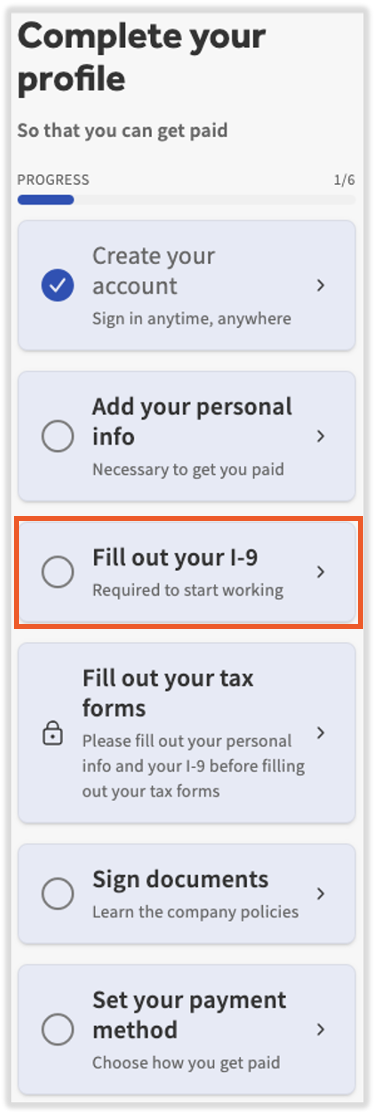
- Se les pide a los empleados que completen el Formulario I-9 directamente desde su lista de verificación durante la incorporación de nuevos empleados. Los empleados deben completar esta información dentro de los tres días posteriores a su empleo para cumplir con las normas. Si un empleado existe en más de un código de empresa, debe completar un formulario I-9 (y un formulario W-4, si corresponde) en cada código de empresa.
- También puede encontrar el formulario directamente iniciando sesión en payroll.toasttab.com y yendo a Mi perfil > Impuestos y documentos > I-9. Así es como pueden editarlo en caso de un cambio de dirección o nombre. Si no ve Mi perfil en el lado izquierdo de la pantalla, debe seleccionar Nómina en la barra de navegación de Toast Web a la izquierda para que aparezca la barra de navegación de Nómina Toast.
- Los clientes y sus empleados pueden optar por usar una copia en papel del formulario I-9 en lugar de esta versión electrónica. Si se toma esta ruta, recomendamos que el empleador agregue una copia del Formulario I-9 completamente completado al perfil del empleado en Nómina Toast. Desde su perfil, ve a Impuestos y documentos, selecciona Agregar más y carga el archivo. Selecciona I9para la categoría.
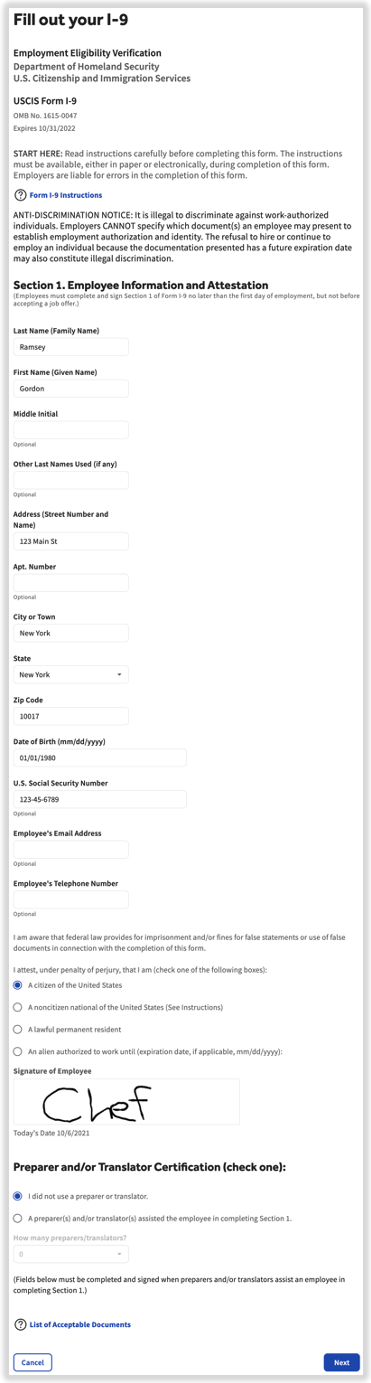
- Los empleados deben completar todas las preguntas y completar todos los campos de la sección 1 del formulario I-9. Selecciona el enlace Formulario I-9 Instrucciones en azul para obtener ayuda con la cumplimentación del formulario.
- Una vez ingresada la información, los empleados firmarán el formulario y certificarán la exactitud de la información que proporcionaron.
- Selecciona el botón Siguiente para guardar esta información y volver a la lista de verificación de incorporación.
- Después de que los empleados hayan completado su lista de verificación de incorporación, los empleadores tendrán la tarea de aplicar la sección 2 del formulario I-9. Deben ir al perfil del empleado > Impuestos y documentos > I-9 y seleccionar Editar. (Descubre cómo funciona la nueva navegación de Nómina Toast visitando Navegar por Nómina Toast dentro de Toast Web). Selecciona el botón azul Instrucciones en la parte superior paraobtener orientación del USCIS.
- Puedes cargar cualquier documento o material respaldatorio seleccionando la pestaña Biblioteca de documentos, seleccionando Agregar + y siguiendo los pasos en Nómina Toast: Carga un archivo en la biblioteca de documentos de un empleado. Toast recomienda encarecidamente que mantengas estos documentos o materiales respaldatorios archivados en tu negocio, pero no es necesario que los cargues en Nómina Toast.
- Los nuevos empleados con el rol de seguridad de RR. HH.+ no podrán completar la sección 2 de su propio formulario I-9 según las directrices del IRS. Otro usuario de RR. HH.+ deberá completar esta sección por él.
No hay forma de desverificar, eliminar o eliminar un I-9 una vez que hayas completado estos pasos. Sin embargo, puedes actualizar un formulario previamente verificado yendo al perfil del empleado y seleccionando Impuestos y documentos > I-9, desplazándote hacia abajo hasta la sección 2 y seleccionando Editar.
Nota: Para los empleados, el formulario I-9 y el formulario W-2 no son el mismo tipo de documento, y solo completas una parte del formulario I-9. También debes completar el formulario W-4
- Formulario I-9:Completa tú mismo la sección 1. Inicia sesión en payroll.toasttab.com y ve a Mi Perfil > Impuestos y documentos > I-9. Completa todos los campos, firma y selecciona Siguiente. Tu empleador completa la sección 2. Deberían hacerlo dentro de los tres días posteriores a la fecha de inicio. Si trabajas bajo más de un FEIN, completa un formulario I-9 en cada uno.
- Si no ves Mi perfil en el lado izquierdo de la pantalla, selecciona Nómina en la barra de navegación de Toast Web a la izquierda para que aparezca la barra de navegación de Nómina Toast.
- Formulario W-4: Este es el formulario de retención fiscal que los empleados completan. Ve a Mi perfil > Impuestos y documentos > Formularios de impuestos, selecciona el hipervínculo Federal W-4, completa el formulario y selecciona Enviar en la parte inferior de la página para aprobar tus actualizaciones. La guía para completar tu formulario federal W-4 está disponible en el sitio web del IRS. Si trabajas bajo más de un código de empresa, completa uno en cada uno. Consulta Nómina Toast: Actualiza la información de W4 para obtener más información.
- Si no ves Mi perfil en el lado izquierdo de la pantalla, selecciona Nómina en la barra de navegación de Toast Web a la izquierda para que aparezca la barra de navegación de Nómina Toast.
- Formulario W-2:No debes completar este formulario. Nómina Toast lo genera a partir de tus datos de nómina después de que finalice el año impositivo, y el nombre y la dirección en tu formulario I-9 y perfil son los que aparecen en él. Para verlo o descargarlo, ve a Mi perfil > Impuestos y documentos > Documentos de fin de año. Consulta Nómina Toast: Gestiona la experiencia con el formulario W-2 para obtener más información.
- Si no ves Mi perfil en el lado izquierdo de la pantalla, selecciona Nómina en la barra de navegación de Toast Web a la izquierda para que aparezca la barra de navegación de Nómina Toast.
Localizar y descargar formulario I-9
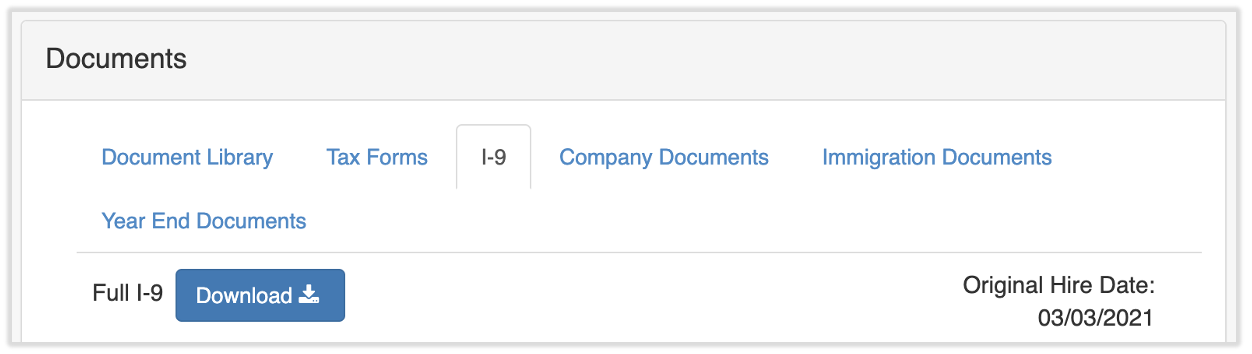
Una vez que el empleado se haya incorporado por completo, se podrá descargar una copia del formulario I-9. Para encontrar el formulario I-9 de un empleado, ve al perfil del empleado y selecciona Impuestos y documentos > I-9, luego selecciona el botón Descargar en la parte superior de la página. Para conocer cómo funciona la nueva navegación de Nómina Toast, visita Navegar por Nómina Toast dentro de Toast Web.
Información electrónica del sistema del formulario I-9
Ocasionalmente, se le puede pedir a los empleadores que proporcionen determinada información sobre el sistema electrónico del formulario I-9 que utilizan. La información solicitada puede incluir:
- El nombre del sistema
- Las prácticas/protocolos comerciales internos relacionados con la generación, el uso, el almacenamiento, la seguridad, la inspección y los programas de garantía de calidad de tus formularios I-9 generados/modificados/almacenados electrónicamente.
- El sistema de indexación que identifica cómo se vincula la información electrónica contenida en los formularios I-9 con cada empleado.
- Documentos que describan el sistema utilizado para capturar la firma electrónica, incluida la identidad y la certificación de la persona que firma el Formulario I-9.
- La pista de auditoría para cada formulario I-9 generado/modificado/almacenado electrónicamente.
Si necesitas información relacionada con lo anterior, ponte en contacto con el servicio de atención al cliente seleccionando el botón de chat azul en la esquina inferior derecha de cualquier página de Nómina Toast.
Auditoría del formulario I-9
En caso de una auditoría del formulario I-9, o si buscas una pista de auditoría del formulario I-9, ponte en contacto con el servicio de atención al cliente seleccionando el botón de chat azul en la esquina inferior derecha de cualquier página de Nómina Toast.
Este contenido se publica con fines informativos y no tiene como propósito brindar asesoramiento legal, fiscal, de recursos humanos ni ningún otro tipo de recomendación profesional. Ponte en contacto con un abogado u otro profesional para recibir asesoramiento.