Primeros pasos con la integración con Stayntouch
Última actualización: 22 sept 2026, 4:57 p.m.
| Esta integración requiere una suscripción a Integración de sistemas de gestión de hoteles, que se puede comprar en la Tienda de Toast. |
¿Cómo activo y uso Stayntouch con Toast? Activa Stayntouch para simplificar y automatizar las operaciones de pago de cargos de habitación de los restauranteros que operan dentro de hoteles y sus clientes.
- Funciones de Stayntouch
- Activar la integración de Stayntouch con Toast
- Artículos de configuración de Toast Web
- Solución de problemas y asistencia de Stayntouch
- Recursos adicionales
Funciones de Stayntouch
El Sistema de Gestión de Propiedades (PMS) de Stayntouch Hotel es todo lo que necesitas para gestionar tu propiedad. Puedes agilizar las operaciones de tus hoteles, mejorar tus fuentes de ingresos, gestionar activos con una flexibilidad inigualable, conectarte con todo tu ecosistema tecnológico con facilidad y reimaginar la experiencia de tus clientes en la propiedad.
Características clave:
- Buscar registros de clientes del hotel en el POS de Toast
- Cuentas en pozo cerradas mediante pagos con cargo a la habitación al folio de clientes en Stayntouch
- Ingresos totales contabilizados en pagos no relacionados con el hotel, como efectivo, tarjetas de crédito y cuentas
Para obtener más información sobre lo que puedes hacer con Stayntouch en tu hotel, consulta la descripción general del producto aquí.
Activar la integración de Stayntouch con Toast
Nota: Si ya eres cliente de Stayntouch y deseas solicitar esta integración, puedes abrir un Ticket a través del Centro de asistencia de Stayntouch.
Para los nuevos clientes de sistemas de gestión de la propiedad que deseen activar las integraciones de Toast y Stayntouch, comunícate con el equipo de ventas de Stayntouch en EE. UU. escribiendo a sales@Stayntouch.com o al (301) 358-1356.
- Para activar Stayntouch con Toast, inicia sesión en Toast Web y ve a Integraciones > Gestión de integraciones > Explorar y comprar integraciones.
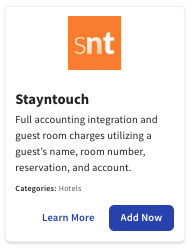
- Ingresa Stayntouchen la barra de búsqueda y selecciona Agregar ahora.
- Nota:Esta integración requiere una suscripción a Integración de sistemas de gestión de hoteles. Trabaja con tu contacto de ventas de Toast para suscribirte al producto de integración de sistemas de gestión de hoteles.
- Nota:Esta integración requiere una suscripción a Integración de sistemas de gestión de hoteles. Trabaja con tu contacto de ventas de Toast para suscribirte al producto de integración de sistemas de gestión de hoteles.
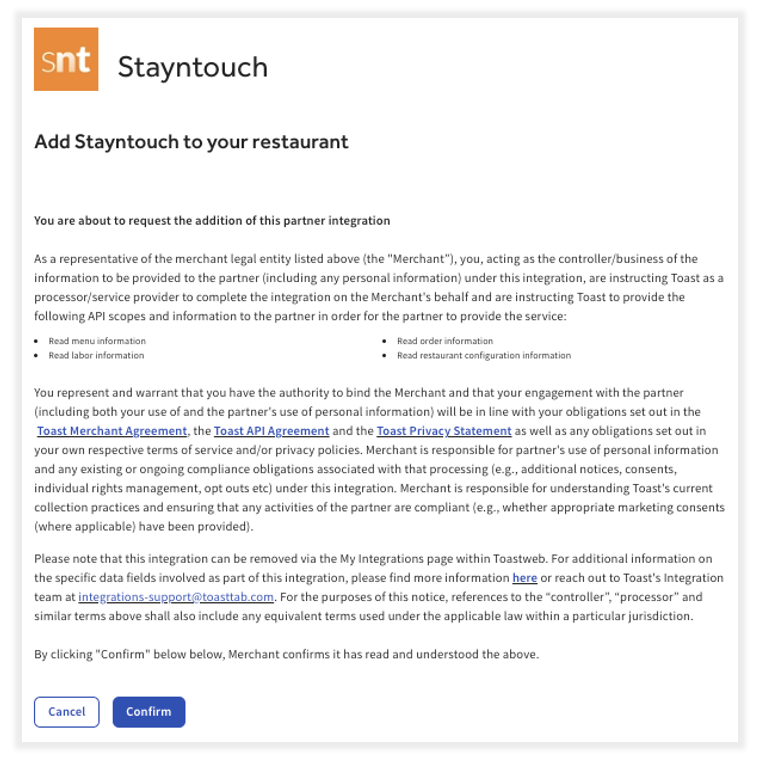
- Revisa los términos y condiciones de visibilidad del alcance de los datos y selecciona Confirmar para aceptar. Para obtener más información, consulta elartículo Visibilidad del alcance de los datos.
- Nota: Si tienes varias ubicaciones, selecciona qué ubicaciones utilizarán esta integración en el menú desplegable antes de confirmar.
- Nota: Si tienes varias ubicaciones, selecciona qué ubicaciones utilizarán esta integración en el menú desplegable antes de confirmar.
- Después de agregar la integración de Stayntouch al restaurante, ve a Integraciones una vez más en Toast Web y selecciona Examinar y comprar integraciones.
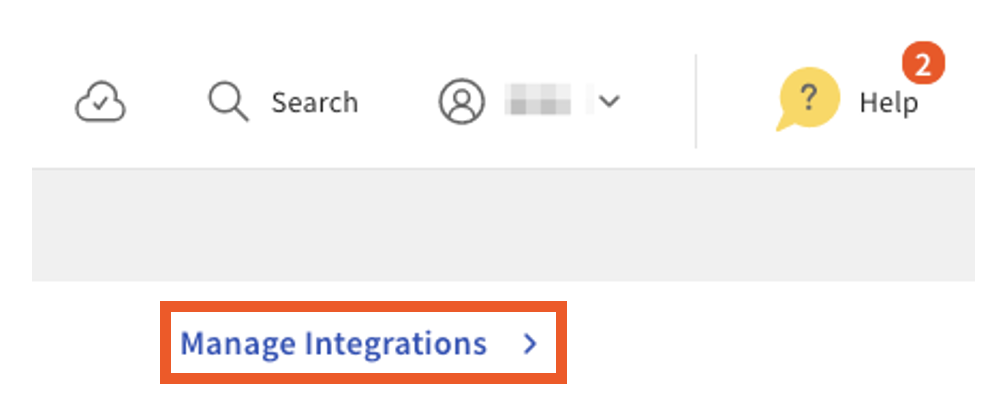
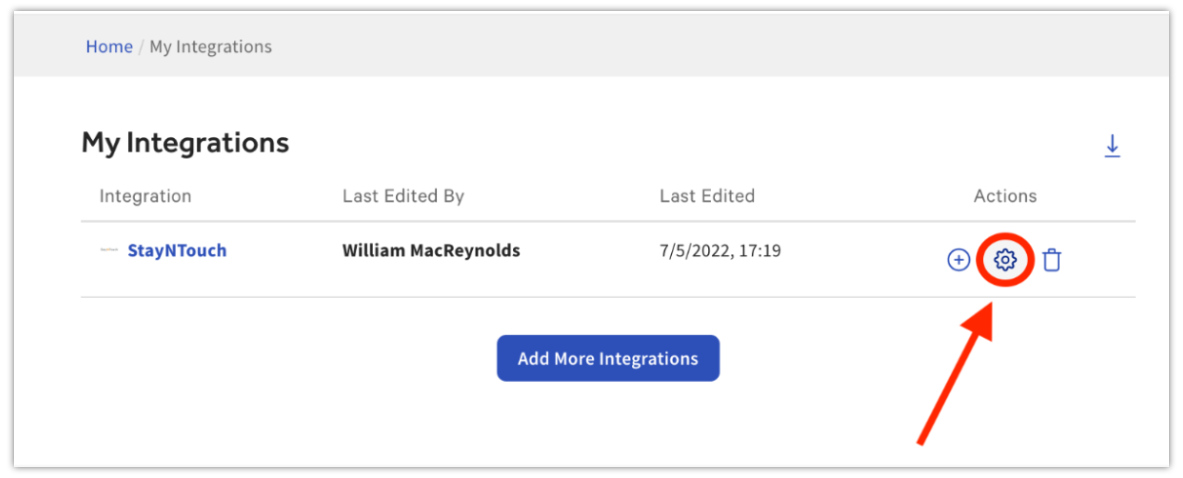
- A continuación, selecciona Gestionar integracionesen la parte superior derecha de la pantalla.
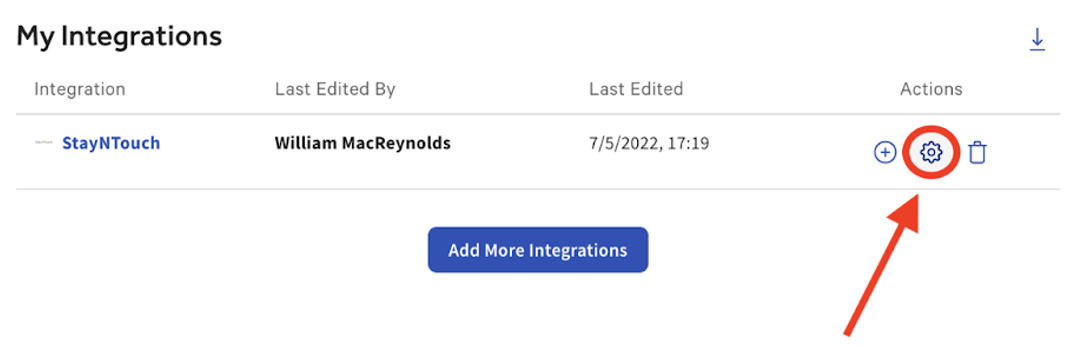
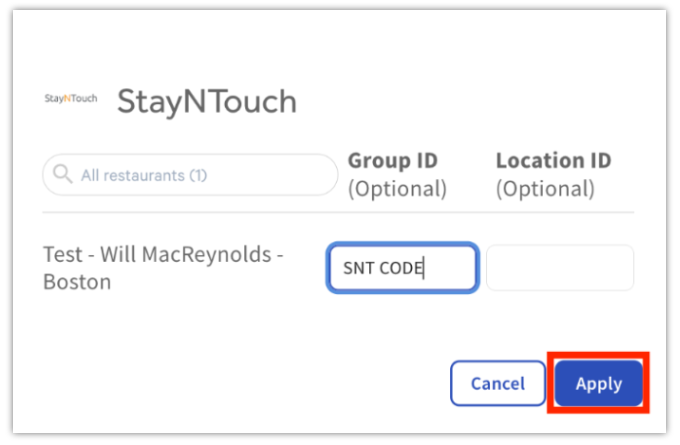
- Selecciona el ícono de engranaje en Acciones e ingresa el Código de hotel proporcionado por el equipo de implementación de Stayntouch en el campo ID del grupo. Luego, selecciona Aplicarpara completar el proceso de incorporación.
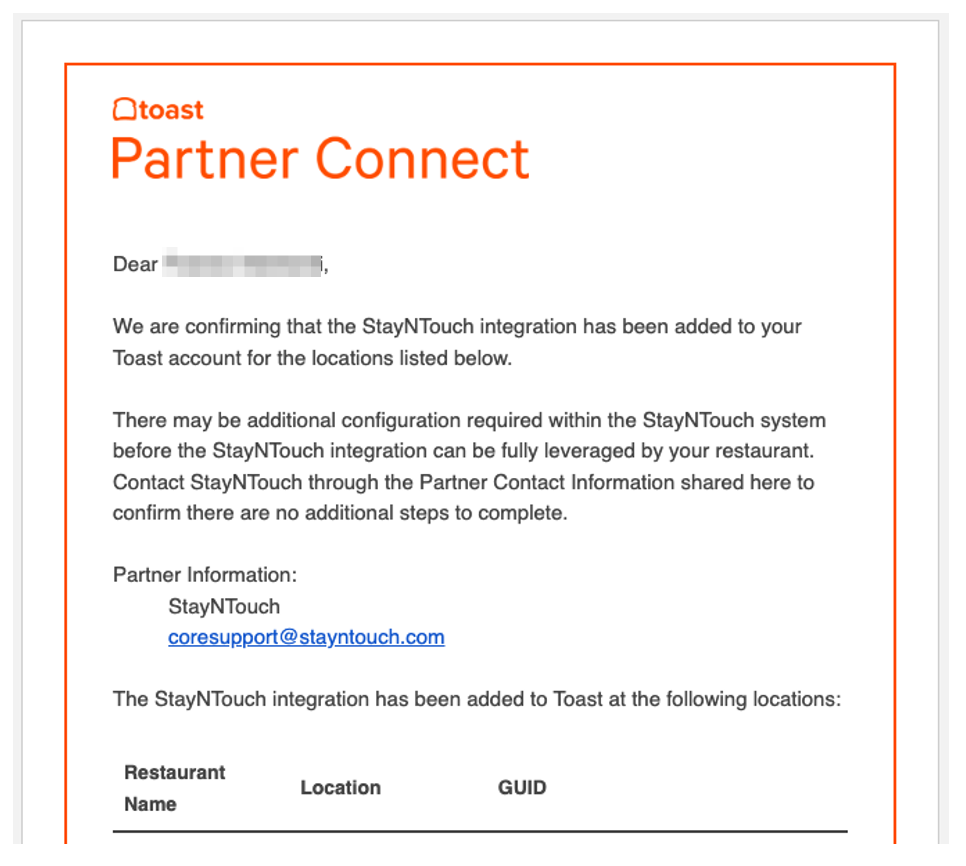
- Una vez confirmada, recibirás un correo electrónico de confirmación de Stayntouch confirmando la activación de la integración. Recibirás un correo electrónico de confirmación de Stayntouch en el que se confirmará la activación de la integración.
- Después de que se haya finalizado la asignación de integración con Stayntouch, el equipo de asistencia de Integraciones de Toast agregará la Otra Opción de Pago “Cargo a la Habitación” a tu en Toast Web. Para obtener más información sobre las opciones de pago, consulta Configurar otras opciones.
- Toast recomienda que los clientes que utilicen la integración Stayntouch activen las siguientes configuraciones dentro de las opciones de IU en el backend de Toast en cada restaurante:
- Activar estas opciones garantiza que las transacciones grandes, como los pedidos de banquete, no se agoten al publicar a través de la interfaz.

Configuración adicional de mosaico TPI de Stayntouch
Después de agregar la integración de Stayntouch al restaurante en TPI, deberás ingresar tu código de hotel de Stayntouch en el campo ID del grupo de la integración dentro de Toast. El equipo de incorporación e implementación de Stayntouch te proporcionará el código de hotel Stayntouch.
Si no tienes tu Código de Hotel, deberás enviar un Ticket al equipo de Stayntouch solicitando su Código de Hotel, aquí: https://Stayntouch.freshdesk.com/support/home
Nota: Esto se puede hacer en el memento de añadir el mosaico Stayntouch en TPI, siguiendo las instrucciones a continuación, o en un memento posterior yendo a Integraciones en la barra de menú de la izquierda en Toast Web, y luego seleccionando Configurar integraciones.
En el momento de agregar el mosaico en TPI:
- Después de seleccionar Confirmar, se te redirigirá a la página Mis integraciones en Toast Web.
- Selecciona la rueda dentada en Acciones a la derecha de la integración.
- Ingresa el código de hotel de Stayntouch proporcionado por el equipo de implementación de Stayntouch en el campo ID del grupo junto a cada ubicación que deseas conectar.
- Selecciona Aplicar
- Una vez que se hayan completado los artículos anteriores y se haya finalizado la asignación de integración con Stayntouch, ponte en contacto con nosotros para que podamos agregar la Otra opción de pago de cargo en tu nombre en Toast Web.
Después de que se complete la configuración de Toast anterior, el cliente completará todos los pasos de configuración y conexión restantes para Stayntouch dentro de Stayntouch. Los clientes pueden acceder a los pasos de configuración de la integración de Stayntouch aquí: Guía de configuración de clientes de Stayntouch para Punto de venta de Toast
Artículos de configuración de Toast Web
Al igual que con todas las integraciones de PMS/hoteles, Stayntouch requiere que se configuren los siguientes elementos de configuración en Toast Web:
- Categorías de ventas
- Otras opciones de pago
- Configuración de recibos
Categorías de ventas
Para que los ingresos generados por el POS de Toast se contabilicen con precisión dentro de la integración de Stayntouch Hotel/Sistema de gestión de propiedades, se deben asignar categorías de ventas de Toast a cada artículo del menú, ANTES de que la integración del PMS se pueda configurar por completo.
Ya sea que las categorías de ventas se hereden del nivel de menú o grupo de menús, o se apliquen individualmente a una categoría de ventas específica, esto se puede configurar en Propiedades avanzadas o en la herramienta Generador de menús.
Dentro del sistema hotelero Stayntouch, las categorías de ventas se asignan a las categorías de ingresos de Stayntouch, lo que permite que la integración contabilice con precisión los ingresos generados por la venta de cada artículo del menú publicado en el folio de un cliente. Si no se aplican categorías de ventas, no se contabilizan ventas con la integración.
Las categorías de ventas deben configurarse y asignarse a menús, grupos de menús y/o artículos de menús en Toast Web para cada ubicación que aproveche la integración de cualquier hotel/PMS, ANTES de que pueda configurarse por completo la integración de PMS.
Configuración de recibos
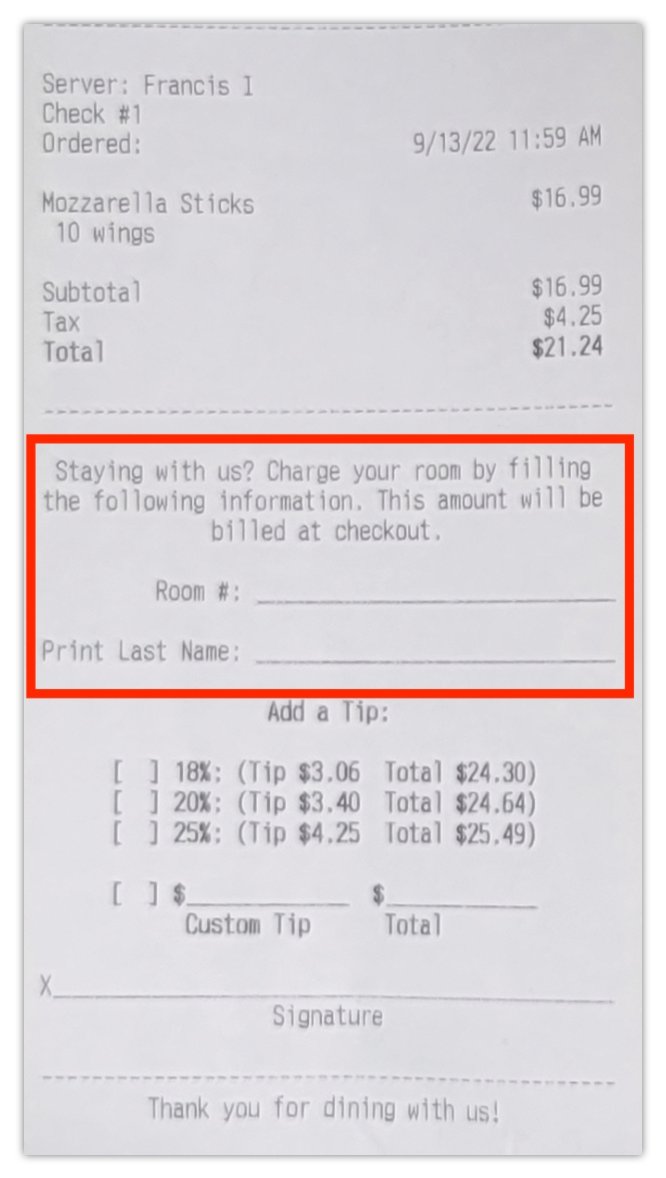
Los cambios en la configuración de recibos de una ubicación permiten a los clientes del hotel proporcionar la información de su habitación de hotel directamente en su recibo, para que los meseros y administradores del restaurante puedan actualizar la información de su hotel. Lo más probable es que esta información incluya el nombre, la habitación y la firma del cliente.
Para configurar recibos de integraciones de sistemas de gestión de propiedades de hoteles:
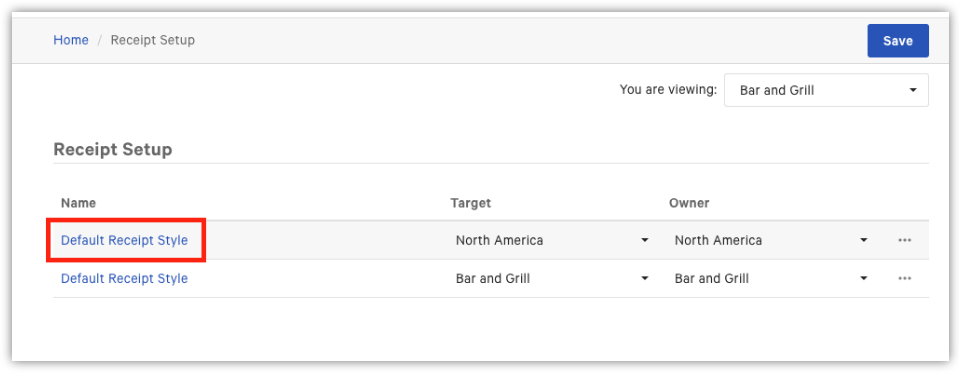
- Inicia sesión en Toast Web y ve a Configuración del recibo de cliente.
- Selecciona el nombre del recibo.
- Desplázate hacia abajo hasta la sección Configuración avanzada.
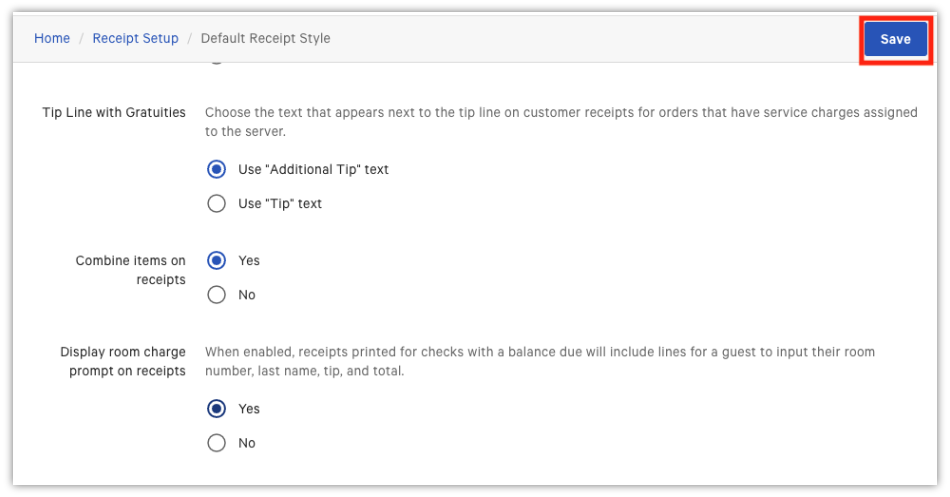
- Junto a la instrucción Mostrar cargo en los recibos, selecciona Sí para agregar líneas para el número de habitación y el nombre de un cliente del hotel a los recibos impresos.
- Selecciona el botón Guardar azul en la parte superior derecha.
- Selecciona Publicar ahora.
- Una vez hecho esto, los recibos ahora se Imprimirán con la línea de número de habitación y el apellido del cliente.
- Si un cliente desea eliminar las líneas de cargo de la habitación de sus recibos, seguirá los pasos uno a cuatro anteriores.
- Selecciona No junto a laindicación Mostrar cargo a la habitación en los recibos.
- Selecciona Guardar y publicar ahora.


Solución de problemas y asistencia de Stayntouch
- Si tienes preguntas o problemas técnicos relacionados con las integraciones de Stayntouch, abre un Ticket en el centro de asistencia de Stayntouch.
- Si tienes preguntas sobre la configuración y asignación de la integración Stayntouch y el POS de Toast, consulta el artículo del servicio de asistencia del PMS: Configuración de Stayntouch para POS de Toast.
- Correo electrónico de ventas de Stayntouch EE. UU.: sales@stayntouch.com
- Contacto de ventas de Stayntouch en EE. UU.: (301) 358-1356