设置您的菜单定价策略
上次更新时间:2026年9月30日 14:27
Toast 优惠多种定价策略,让您可以灵活地为商品和分组定价。本文介绍了您可以从菜单管理器页面配置的定价策略(分组定价、商品级(基础)定价、特定时间定价和规格定价),并帮助您为菜单选择合适的策略。 如需批量编辑价格,请参阅 使用价格编辑器工具。
选择定价策略
每种定价策略都能满足不同的需求。请参考下方的摘要来决定哪种策略适合您正在定价的商品或分组,然后按照相应的章节进行操作。
分组定价适用于一组价格相同的商品,例如一组开胃菜或饮料。
商品级(基础)定价是为单个商品设置特定的价格。这是最常见的策略,也是大多数菜单项所使用的策略。
特定时间定价会根据一天中的时间或一周中的某一天自动更改商品或商品组的价格,这对于“欢乐时光”非常有用。
尺寸定价为同一商品或商品组的不同尺寸设置不同的价格,例如 6 件装与 12 件装的鸡翅订单。
菜单特定定价会根据订购的菜单更改商品价格,例如较低的“欢乐时光”或午餐价格。
注意:并非所有 Toast 订购渠道都支持所有定价策略。例如,Toast 线上点餐和餐饮线上点餐不支持开放价格,且尺寸定价在线上点餐上的支持有限。
要开始使用本文中的策略,请登录 Toast Web 并导航至 菜单 > 菜单管理 > 菜单管理器。
商品组定价
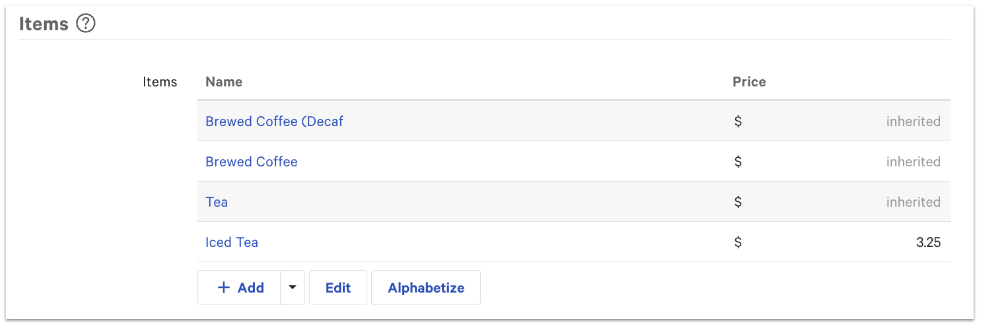
商品组定价将统一价格应用于整个商品组。当商品组中的商品(例如开胃菜或饮料)价格相同时,请使用此功能。
设置商品组定价:
- 在“菜单管理器”中,选择您想要定价的菜单组名称。
- 在屏幕右侧的设置面板中,选择菜单组名称旁边的 更多设置。
- 滚动至 定价 部分,并为 菜单组提供定价? 选择 是。
- 在 基础价格 字段中输入价格。
- 保存并发布您的更改。
添加到此组的任何新商品都将继承该组价格。您仍然可以通过为单个商品输入不同的价格来覆盖该组价格——单个商品定价优先于商品组定价。
项目级(基础)定价
项目级定价(也称为基础定价)为单个项目设定一个特定的价格。大多数菜单项目使用基础定价。基础价格仅在应用折扣时才会更改。
您可以通过以下任一方式设置基础价格:在菜单管理器的项目详情页面上,或使用价格编辑器(请参阅使用价格编辑器工具)。
要从菜单管理器页面设置基础价格:
- 使用菜单名称左侧的箭头图标打开菜单组和子组,直到看到该项目,然后选择项目名称。
- 在屏幕右侧的设置面板中,滚动到定价部分。
- 对于定价策略设置,选择基础价格。
- 在基础价格字段中输入一个值。
- 保存并发布所有更改。
特定时间定价
特定时间定价会根据一天中的时间或一周中的某一天自动调整项目或组的价格。它适用于欢乐时光和每周特惠。您设置一个默认适用的基础价格,然后定义覆盖该价格的时间窗口。
要设置特定时间定价:
- 使用菜单名称左侧的箭头图标打开菜单组和子组,直到看到该项目,然后选择项目名称。
- 在屏幕右侧的设置面板中,滚动到定价部分。
- 对于定价策略设置,选择特定时间价格。
- 输入基础价格。
- 在时间价格表中,选择+ 添加以创建一个价格应发生变化的时间窗口,然后为该窗口选择时间和日期设置。
- 为每个额外的时间窗口重复上述步骤。选择垃圾桶图标以删除时间价格规则。
- 保存 并 发布 您的更改。
注意:特定时间定价在产品组合 (PMIX) 报告中显示为商品每次售出价格的平均值。例如,快乐时光期间以 10 美元售出 100 杯啤酒,以 5 美元售出 50 杯啤酒,报告显示的平均价格为 8.33 美元。要了解更多信息,请参阅 产品组合 (PMIX) 报告概述。
批量编辑特定时间定价
在为商品或组配置特定时间定价后,您可以使用价格编辑器批量编辑基础价格和时间价格。请参阅 使用价格编辑器工具。
注意:除非商品已配置为使用特定时间定价策略,否则价格编辑器无法修改该商品的特定时间价格。
尺寸定价
尺寸定价为同一商品或组的不同尺寸设置不同的价格,也可应用于修饰符级别。将其用于鸡翅等商品(按数量定价,如 6 个或 12 个),或按尺寸定价的饮料。
要为组或商品设置尺寸定价:
- 使用菜单名称左侧的箭头图标打开菜单组和子组,直到看到该项目,然后选择项目名称。
- 在屏幕右侧的设置面板中,滚动到定价部分。
- 对于 定价策略 设置,选择 尺寸价格。
- 在基础价格字段中输入一个值。
- 在出现的尺寸定价表中,选择 + 添加尺寸价格 以创建尺寸,然后输入其名称和价格。对每个尺寸重复此操作。要删除尺寸,请选择垃圾桶图标。
- 保存并发布所有更改。
注意:尺寸定价在报告中不会按尺寸细分。以鸡翅为例,报告会显示售出的鸡翅总数,但不会显示每种尺寸各售出了多少。若要在报告中单独跟踪尺寸,请将每个尺寸创建为独立的菜单项——例如,“6 个鸡翅”和“12 个鸡翅”。
注意:尺寸定价具有渠道限制。尺寸定价商品无法像基础定价商品那样通过价格编辑器进行批量价格上涨,这会影响 Uber Eats、DoorDash 和 Grubhub 等第三方订购渠道的价格上涨。定价策略(尺寸定价与基础定价)是在商品级别设置的,因此在复制的商品上更改它可能会影响原始商品。对于单独的第三方菜单,请查看 Configure a Menu-Specific Pricing Strategy 中的复制指南。有关详细的尺寸定价步骤(包括修饰符尺寸定价),请参阅 Configure Size Pricing for Menu Groups and Menu Items。
菜单特定定价
菜单特定定价会根据订购菜单的不同更改商品价格——例如,午餐菜单为 5 美元,晚餐菜单为 7 美元。这是最常用于构建欢乐时光菜单以及为店内与第三方订购设置不同价格的策略。菜单特定定价是在菜单管理器页面中配置的。
有关设置步骤(包括如何创建欢乐时光菜单以及将商品转换为菜单特定定价),请参阅 Configure a Menu-Specific Pricing Strategy。
注意:如果商品当前使用基础定价,则只能在价格编辑器中将其转换为菜单特定定价。使用特定时间定价、尺寸定价或开放定价的商品必须先进行更改,然后才能进行转换。
常见问题解答
为什么我的价格上涨未应用于尺寸定价商品?
价格上涨可能未应用于尺寸定价商品,因为价格编辑器的批量上涨工具是为基础定价商品设计的。尺寸定价商品具有按尺寸计算的价格,而不是单一的基础价格,因此批量上涨(包括针对 Uber Eats 等第三方渠道的上涨)可能无法生效。要提高单独第三方菜单上的价格,请查看 Configure a Menu-Specific Pricing Strategy 中的复制和转换指南,或直接更新商品上的每个尺寸。
我可以在价格编辑器中将商品更改为菜单特定定价吗?
仅当商品当前使用基础定价时,您才能在价格编辑器中将商品更改为菜单特定定价。设置为特定时间定价、尺寸定价或开放定价的商品必须先切换为基础定价,否则转换将不可用。
更改已复制项目的定价策略会影响原始项目吗?
更改已复制项目的定价策略可能会影响原始项目,因为定价策略是在项目级别设置的。如果您为“欢乐时光”菜单创建了菜单组的浅拷贝,然后更改了该副本的定价策略,则此更改可能会延续到原始项目。若要对不同菜单中的同一项目进行不同定价,请使用 配置菜单特定定价策略 中所述的菜单特定定价,而不是更改副本的定价策略。对深度复制项目的更改不会影响原始项目。
特定时间定价会在报告中显示实际价格吗?
特定时间定价不会在报告中显示每个单独的价格。产品组合 (PMIX) 报告显示了项目每次售出时的平均价格。若要查看明细,请直接查看 PMIX 报告。请参阅“产品组合 (PMIX) 报告概述”。
如何设置欢乐时光定价?
您可以通过两种方式设置欢乐时光定价:使用特定时间定价(在设定的时间段内自动更改项目价格),或使用菜单特定定价(使用单独的欢乐时光菜单)。对于单个项目或组,特定时间定价通常最简单。对于完整的欢乐时光菜单,请参阅 配置菜单特定定价策略。
相关文章