翻译仅供参考。您与 Toast 签署的任何法律协议(包括但不限于《商户协议》和《终端用户许可协议》),其订立语言可能不同于以上页面所使用的语言,无论是否提供本页面其他语言的译文,均应以您所签署的协议条款为准
Toast 薪资管理:重置薪资
上次更新时间:2026年10月14日 16:49
重置薪资将从头开始重新进行薪资结算,并删除对“员工收入”步骤所做的任何自定义导入或更改。
重置薪资前
在重置薪资之前,有几点需要注意:
- 对薪资员工收入步骤所做的任何手动更改都将被删除,例如添加的员工或编辑过的扣除项。
- 如果启用了自动批准工时表功能,重置薪资后工时表将变为“未批准”状态,但一旦重新开始薪资处理,它们将“重新批准”。在这种情况下,您可以更改工时条目,这些更改将立即同步到您的薪资中,而无需导航到 Toast 薪资管理中的工时页面。
- 如果禁用了自动批准工时表功能,重置薪资后,已批准的工时表以及经常性收入和扣除项将不会被删除。但是,要更改工时表上的工时条目,需要先将工时表取消批准。
- 这将删除之前添加到薪资中的任何自定义导入。
- 预览薪资步骤上的导入审计仍会显示之前的导入,即使在执行重置后它已不再是薪资的一部分。
- 重置薪资无法撤销。
重置薪资的一些常见原因可能包括:
- 在薪资处理开启时,员工的工资率、职位详情、W-4 表格信息或直接存款信息被编辑过。
- 工时表未被批准或未同步到薪资运行中。
- 您希望在开启薪资处理后禁用自动批准工时表功能。
- 在薪资结算开启后,Toast Web 中的工时表和/或小费已被编辑或更改。
- 某位员工未出现在本次薪资结算中,但他们并未出现在 添加员工 列表中。
- 启动了错误的薪资结算。
- 错误地选择了 通过支票支付全部款项。
- 在薪资结算开启期间添加了扣押款。
重置您的薪资
| 重置薪资时请务必谨慎。这将删除您所做的任何导入或手动更改,且此操作无法撤销。 |
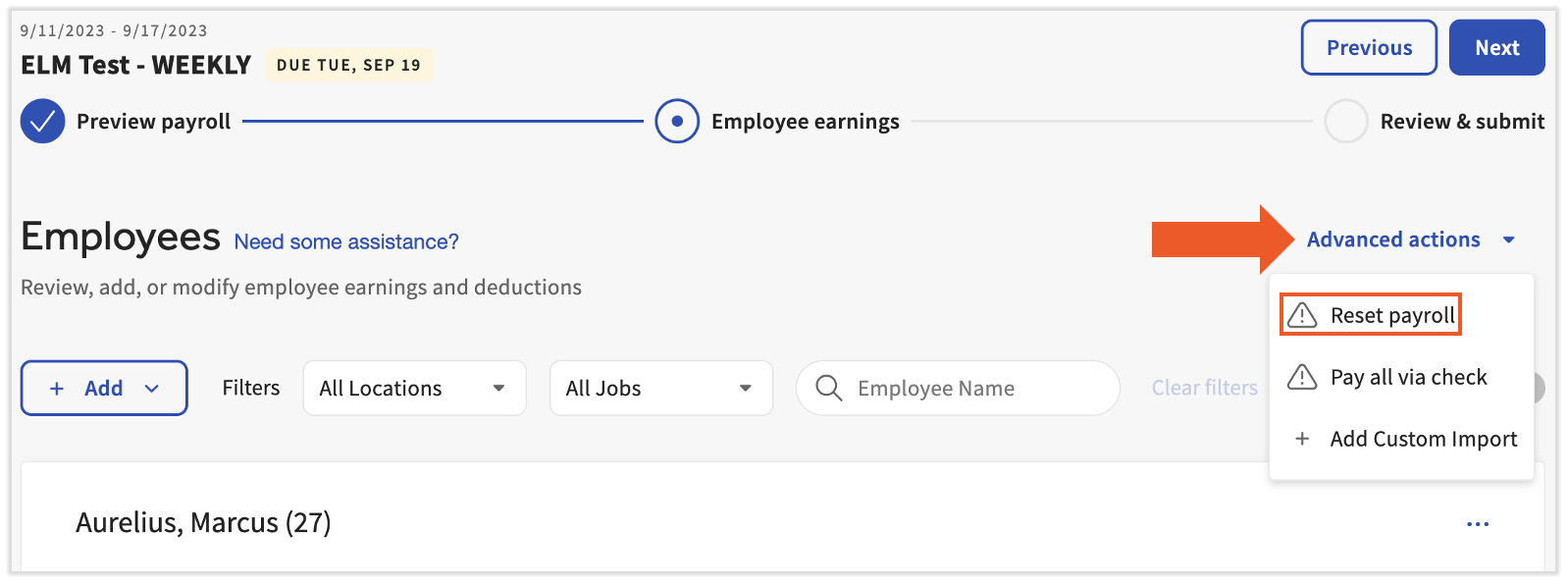
在 预览薪资 步骤中,选择 重置薪资。 在薪资结算的 员工收入 步骤中,选择 高级操作 并选择 重置薪资。如果您处于薪资结算的 审核并提交步骤,请选择 上一步 以返回“员工收入”步骤来重置薪资。
此内容仅供参考,不作为法律、税务、人力资源或其他专业建议。请咨询律师或其他专业人士以获取建议。