Get Started With Toast Retail
Last updated: Sep 28, 2026, 4:02 PM
- Toast Retail Overview
- Set Up Your Item catalog
- Configure Toast Web
- Set Up Hardware
- Keep Learning With Toast Retail
Toast Retail Overview
Toast Retail software works with your Toast POS to provide an all-in-one platform to meet your retail needs. Access powerful inventory management tools that make creating and managing SKUs, adding inventory, and publishing rich product descriptions across all your channels a breeze.
This article covers the steps you’ll take to get started with using Toast Retail:
- Learn how to access & navigate the most commonly used pages and features within Toast Retail.
- Set up your item catalog to get your inventory data into Toast.
- Review your Toast Web configurations to prepare for business operations.
- Install hardware like scanners and scales to support your retail business.
Navigate Toast Retail
Once you’ve created your Toast Web account, you can access Toast Retail by selecting the Retail button on the left-hand navigation menu in Toast Web. Once you’ve built your item catalog in Toast, this will bring you to your Retail Dashboard, which shows you data on top sellers, high-level inventory stats, and links to common actions and helpful resources.
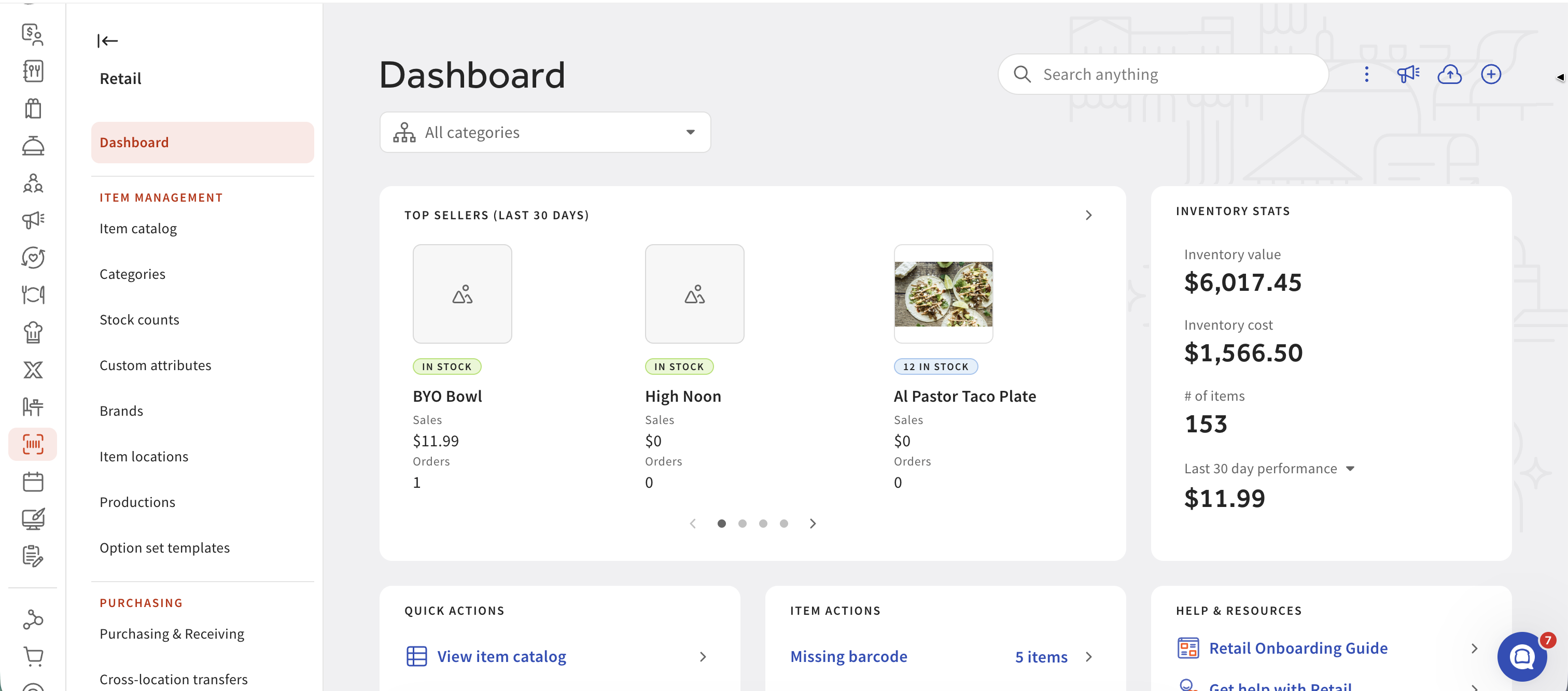
Within the Toast Retail module, a navigation menu will appear on the left side of the screen (select the arrow icon in the top left corner to expand or collapse). Here, you can access the different sections of your retail back-end:
- Reporting contains links to all retail-specific reports. You can also access these reports in Toast Web by navigating to Reports on the main left-hand navigation menu and opening the Retail drop-down.
- Item management includes configuration pages that contain data about your inventory & suppliers.
- Your Item catalog is where you’ll manage your entire list of retail items.
- The Purchasing pages are where you’ll create and manage purchase orders and invoices, and conduct cross-location inventory transfers.
- The Settings pages are where you can adjust online ordering display preferences for retail items, your Shopify integration configuration, and cross-location transfer notifications.
You can also access Toast Retail on your mobile device by logging on to Toast Web on a web browser! This mobile view allows you to use your phone’s camera to scan barcodes and quickly conduct actions like receiving or counting inventory.
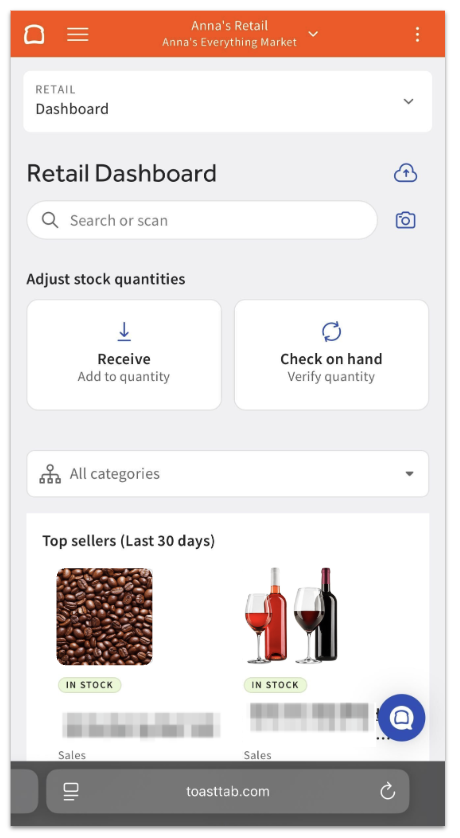
You can also access Toast Retail within the Toast Now app on iOS devices (iPhone and iPad). Log in to the app and navigate to the Inventory tab to see the supported modules.
Key mobile tasks supported include:
- Check your inventory levels on the go within the item catalog.
- Create items with Smart Scan.
- Stock count with offline support.
- Scan in an invoice with your device’s camera.
Note: Toast Retail features are not available in the Toast Now app for Android. If you use an Android device, log in to Toast Web in a mobile browser, such as Chrome, to use Toast Retail on your phone.
Set Up Your Toast Retail Item catalog
Your item catalog in Toast Retail is a searchable grid of your retail inventory with the ability to track additional data about items like suppliers and cost. The first time you visit the Retail page in Toast Web, you’ll be presented with three options for building your item catalog:
- Import items using a spreadsheet
- Select from existing menu(s) - if you’ve got menus set up in Toast Web, you can choose which menus to manage with Toast Retail
- Start a new item catalog by creating items from scratch.
If you choose Select from existing menu(s), you'll still need to complete the Toast Retail import template (see Toast Retail: Build Your Import Template) to map SKUs and finish populating item details in Retail - selecting a menu alone does not fully build out your item catalog. For instructions and recommendations, see Toast Retail: Set Up Your item catalog.
Configure Toast Web for Retail
Toast Web (www.toasttab.com/login) is where you’ll configure general settings for your business, including employee access and permissions, tax rates, payment options, sales reporting settings, and more. There are also some setup and customization steps you’ll want to complete on your POS terminals before you start selling items to guests.
You can find a list of these settings in this Support Center article: Set Up Toast Web and Your POS for Retail.
Set Up Hardware For Toast Retail
In addition to your POS terminals, Toast Go® handhelds (if you’re using them!), and receipt printers, you’ll want to install any other hardware you’ll be using to support your retail operations, including:
- A barcode label printer. When you print a label from the Toast Retail module, it will prompt you to use your computer’s installed printer drivers. Toast does not sell barcode label printers. Any label printer will be installed on and connected to a computer, not to the POS system. Dymo and Zebra have several printer options available that create labels in these supported sizes, including the Dymo LabelWriter 550/450, the Zebra ZSB-12, and the Zebra 410.
- Barcode scanners. For a full list of supported scanners and setup instructions, see this Support Center article: Set up and Use a Scanner.
Scales. If you sell items with prices determined by their weight, you’ll need to purchase and install a scale. For instructions on setting up a Brecknell 6710U, - CAS PD-II, or Zebra MP7000 scale, see this Support Center article: Use a Scale With Toast.
If you need to purchase any hardware from Toast, you can do so by logging in to Toast Web and selecting Shop from the left-hand navigation. Note: Toast Retail is not available on Toast handhelds.
For installation instructions for any other Toast hardware, you can check out the Toast Hardware Hub.
Back to top
What's Next? Keep Learning With Toast Retail
- Toast Retail: Learn Common Terms
- Optimize Toast Retail
- Toast Office Hours - Open-forum sessions that allow you to ask questions and receive personalized guidance and advice from a Toast Trainer.