Toast Payroll: Get Help With Form W-2s
Last updated: Oct 8, 2026, 5:17 PM
Find, distribute, and print Toast Payroll Form W-2s — electronic vs. paper, employee elections, downloads, and what's new.
- What's New for 2026 Tax Filing
- Prepare for Form W-2s
- Locate, Download, and Print Form W-2s
- Where Do My Employees Find Their Electronic Form W-2?
- How Do Employees Who Opted for a Paper Form W-2 Get It?
- Are Employees Notified When Their Electronic Form W-2 Is Available?
- What Is Included on Form W-2? Who Gets One?
- What Are My Options for Distributing Form W-2s?
- How Do I Print and Send a Form W-2 to One Specific Former Employee?
- How Can I Check the Delivery Address for Paper Form W-2s?
- How Do I Download Form W-2s for All My Employees at Once?
- What If I Don't See the 2025 Paper W-2s Button?
- How Can Closed Restaurants Access Form W-2s?
- Where Do I Get a Prior Year's Form W-2?
- Does Toast Automatically File Form W-2s With State and Federal Agencies?
- My Paper Form W-2 Hasn't Arrived as Expected — What Should I Do?
- Related Articles
What's New for 2026 Tax Filing
The One Big Beautiful Act has "no taxes on tips" and "no taxes on overtime" provisions. This means individual employee tax deductions are available for eligible employees when they file their 2025 personal income tax return in 2026. To aid in this personal tax filing, Toast Payroll has indicated these tip amounts and overtime premium amounts on employee profiles in Toast Payroll under My Profile > Taxes & Documents > Year End Documents. (If you do not see My Profile on the left side of the screen, select Payroll from the navigation rail on the left to make the Toast Payroll navigation rail appear.) See Toast Payroll: No Tax on Tips and/or Overtime for more information.
Note: See an accountant or tax professional for advice on your individual tax situation.
Prepare for Form W-2s
What Is an Electronic Form W-2 and Why Use It?
An electronic Form W-2 is the same official IRS form as a paper Form W-2 and can be used to file taxes. Employees can view the form from the MyToast app, but if they need to download or print it, they should use Toast Payroll. See more details in Toast Payroll: Get Help With Employee Resources.
Electronic delivery is more secure than mailing the form because the Form W-2 contains an employee's complete Social Security number (SSN). It also cannot be lost or stolen in the mail.
Employers are required to provide a paper Form W-2 to all employees unless the employer has consent from the employee that they choose to access the form electronically. Toast Payroll provides this consent form during the employee new hiring steps and defaults to electronic Form W-2 distribution for employees who do not make a selection. HR+ users can verify the active employees who have opted into an electronic copy by logging into payroll.toasttab.com and navigating to Reports > Tax Filing > Year End Documents in Toast Payroll.
Customers can always print Form W-2s for any or all employees who opted into electronic copies by navigating to Taxes in Toast Payroll and selecting the download icon in the Employees opting for electronic W-2s tile. (If you do not see Taxes on the left side of the screen, select Payroll from the Toast Web navigation rail on the left to make the Toast Payroll navigation rail appear.) You will receive a PDF file containing all Form W-2s for employees who opted to receive theirs electronically. You can then choose to print all or select Form W-2s from this bulk file.
Also asked as:
-
- What's a digital W-2?
- Why should I use electronic W-2s?
How Do Employees Consent to an Electronic Form W-2?
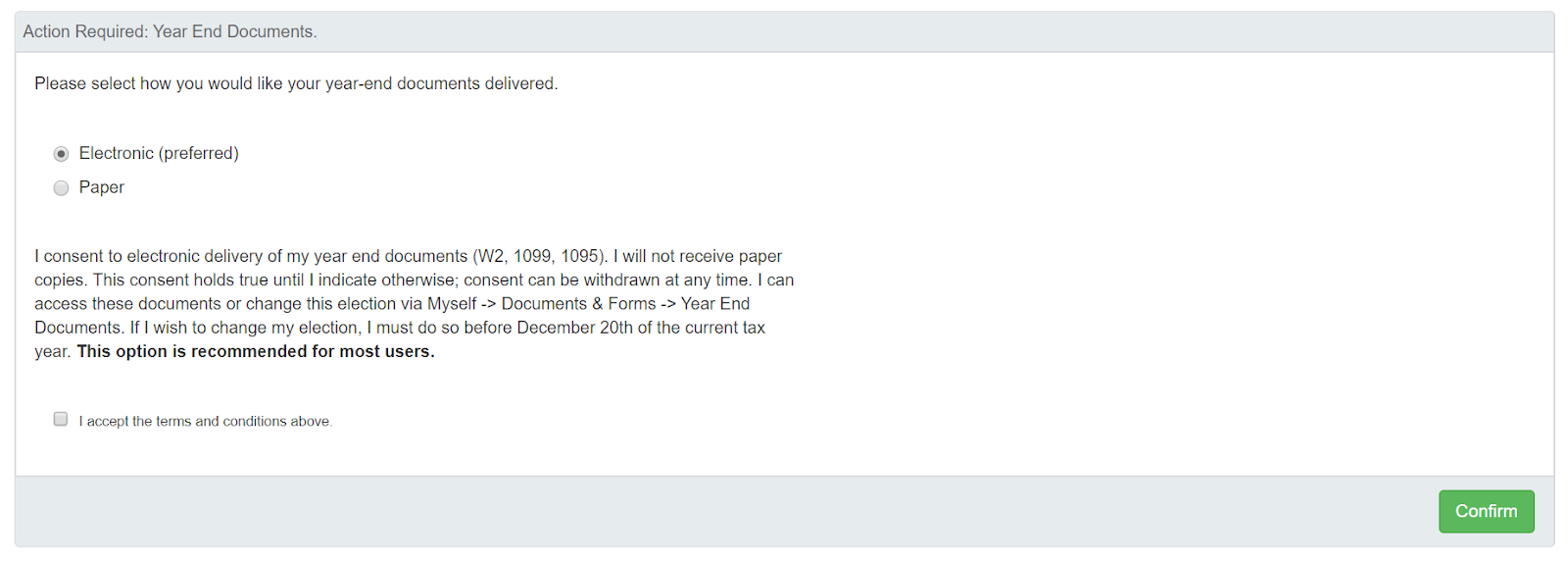
Employees consent to an electronic Form W-2 during the New Hire Checklist when they are hired. Toast Payroll asks them to select how they would like year-end documents delivered. Electronic delivery is the preferred and defaulted selection. Once the employee accepts the terms and conditions and selects Confirm, they continue to the New Hire Checklist steps.
This only needs to be done once. It does not need to be repeated annually unless the employee wants to change their election.
How Do Employees Change Their Form W-2 Election?
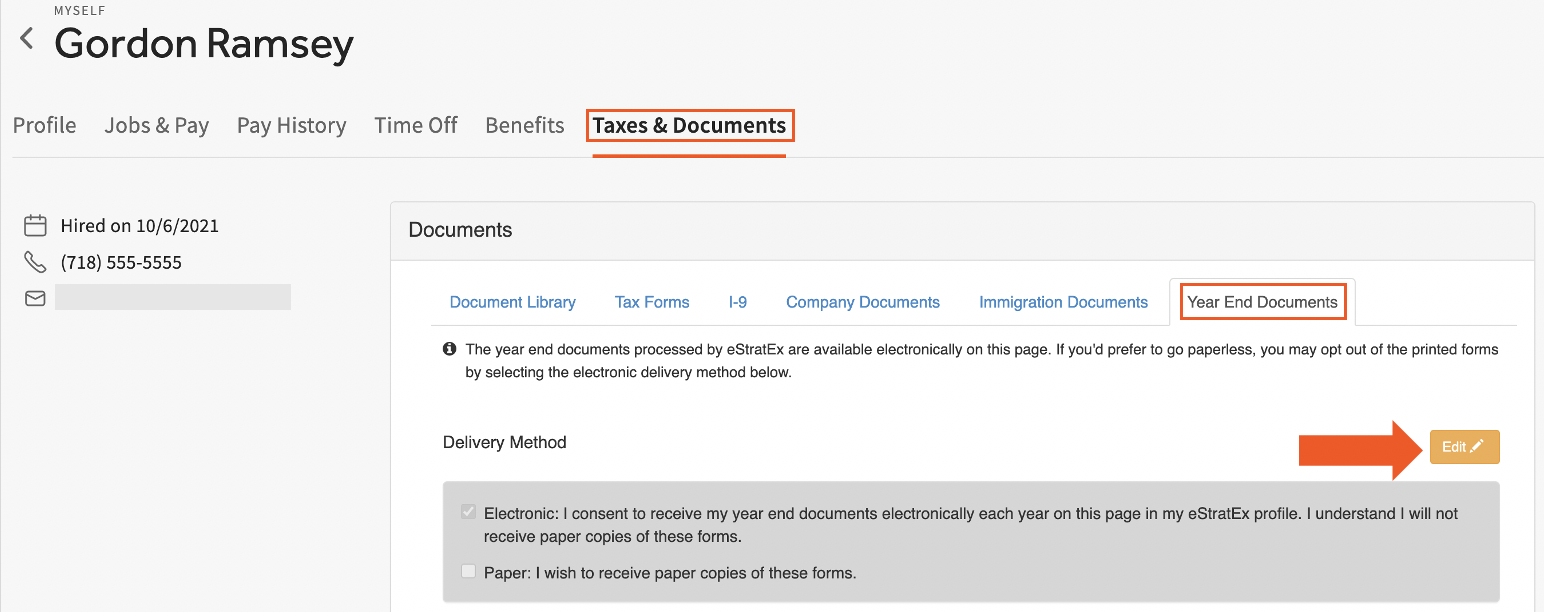
Employees who have filled out the consent form before and want to change their election can do so in Toast Payroll. This must be done before the company submits their last payroll of the year, when Toast collects the Form W-2 settings for each employee and employer.
To change a Form W-2 election:
-
- Log into Toast Payroll and navigate to My Profile > Taxes & Documents > Year End Documents.
- If you do not see My Profile on the left side of the screen, select Payroll from the Toast Web navigation rail on the left to make the Toast Payroll navigation rail appear.
- Select the Edit pencil to change the delivery method.
- Select the intended option, provide an e-signature, and select Save.
- Log into Toast Payroll and navigate to My Profile > Taxes & Documents > Year End Documents.
Expected outcome: The new election is stored in the employee's Document Library tab. Any changes made after the last payroll of the year will not take effect until the following year-end season.
Note: If you want to change how much tax is withheld from your pay (not how your Form W-2 is delivered), that's a Form W-4 update — not a Form W-2 update. See Toast Payroll: Update Form W-4 Information.
How Can I See Who Has Opted Into an Electronic Form W-2?
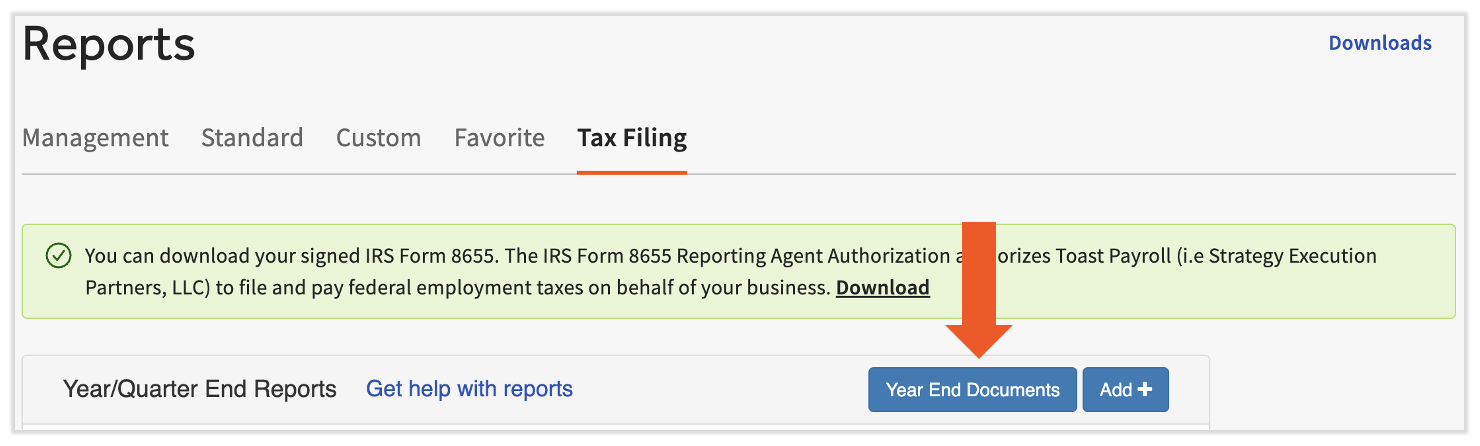
Managers can see which active employees have opted into an electronic Form W-2 by running a report in Toast Payroll. Navigate to Reports > Tax Filing and select the Year End Documents button. (When you select Reports in Toast Payroll, you should see a URL that begins with payroll.toasttab.com. Visit Navigate Toast Payroll Within Toast Web to learn how the new Toast Payroll navigation works.)
In this report, the column labeled Electronic Forms shows which employees have opted into electronic Form W-2s and completed the consent form.
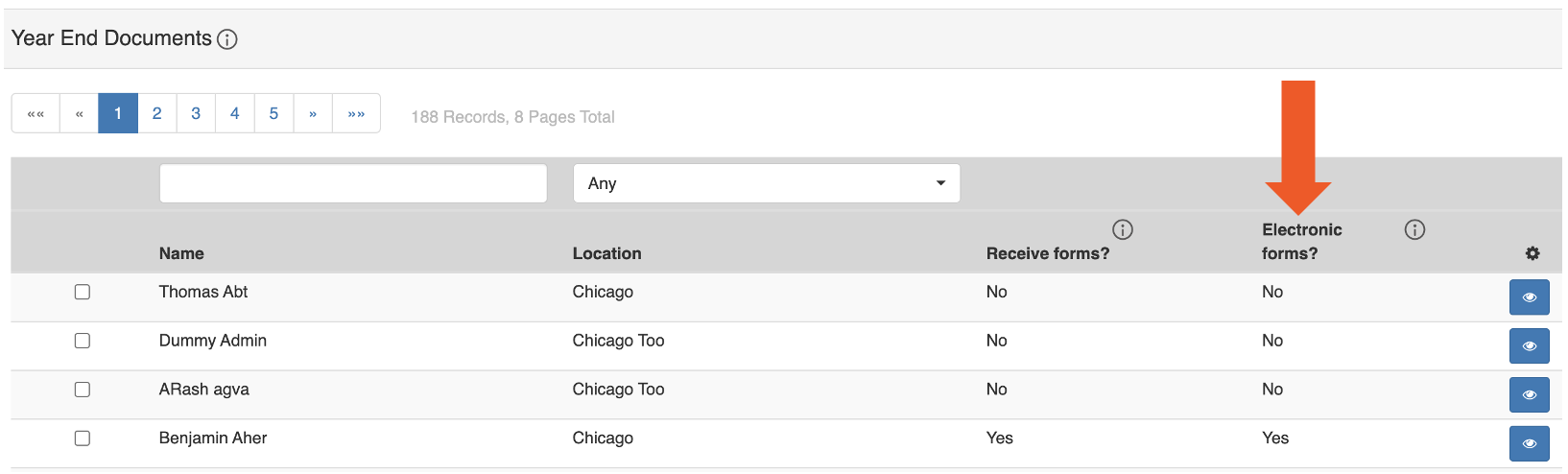
Managers can edit an active employee's election on behalf of the employee. Select the checkbox for the employee or employees you wish to edit and select the Edit button at the bottom of the page.
You can also create a custom report that includes the Electronic Year End Documents field. The custom report shows who has opted into electronic Form W-2s, who has selected paper, and who is "unknown" (the employee has not yet logged into Toast Payroll to make a selection and will receive a paper Form W-2). Use the Employee Attributes template for this custom report.
Also asked as:
-
- Can I run a report that shows how my employees are receiving their W-2s?
- How do I see who chose paper vs electronic?
When Does the Form W-2 Election Need to Be Locked In?
Toast Payroll must have an opt-in from employees requesting paper Form W-2s before the last payroll of the year has been submitted. Any employee who has opted for a paper Form W-2 will have a paper form, either in the Tax Center or shipped from Toast, that needs to be distributed to the employee by the employer.
Locate, Download, and Print Form W-2s
Where Do My Employees Find Their Electronic Form W-2?
There are two ways an employee can get their digital Form W-2: the MyToast app and Toast Payroll. You can post a notice in a high-traffic area of your restaurant so employees know when and where they can access their Form W-2. Note: Toast Payroll is currently unavailable in Quebec. A French version of this notice will be made available when the product launches in your region.
MyToast app (current employees only): In 2026, all currently active employees can use the MyToast app to view their Form W-2 on or after January 19 (if you need to download or print it, use the Toast Payroll method below). Scan the QR code in the source poster to download the app for Apple and Android devices. See Get Started With The MyToast App for details on downloading or logging into the app. After logging in, navigate to Pay > Tax Forms (W2s) and select a Form W-2.

Toast Payroll (current and former employees): If a former or terminated employee needs their Form W-2 or a current employee wants to download or print a Form W-2, they can log into Toast Payroll on or after January 19. They should then select View Taxes & Documents on the homepage to view or download an individual Form W-2 or 1095-C, if applicable.
Employees can watch this video to find their Form W-2 in Toast Payroll and learn how to understand the information on it.
Also asked as:
-
- Where do I get my W2 from Toast?
- How can I have W2 for 2024?
- Where do I find my W-2?
How Do Employees Who Opted for a Paper Form W-2 Get It?
How an employee who opted for a paper Form W-2 receives it depends on which printing method the employer selected:
-
- If your company opted into self-serve Form W-2s, you download, print, and distribute Form W-2s for employees who requested paper forms. See the Receive Form W-2s section of Toast Payroll: Manage the Form W-2 Experience for steps.
- If you opted to have Toast Payroll print Form W-2s, Toast will mail them to your business. You are still responsible for distributing them to individual employees by the SSA deadline of January 31.
Are Employees Notified When Their Electronic Form W-2 Is Available?
Yes. All Form W-2s will be available in the MyToast app and the Toast Payroll system on January 19, 2026. Active employees are notified via the MyToast app once their form is available. Employees who opted into electronic Form W-2s are responsible for accessing their own Form W-2s.
What Is Included on Form W-2? Who Gets One?
Form W-2s include taxable wages earned by employees within a calendar year and any taxes that were withheld from those wages. Employers are required to provide a Form W-2 to each employee that receives wages. The Form W-2 is also filed with the IRS, and employees use the form to file personal taxes.
All employees who have recorded taxable wages within a calendar year will receive a Form W-2. These can be accessed by current and former employees via Toast Payroll. Per the Social Security Administration (SSA), employees who did not consent to an electronic Form W-2 will need a form printed and mailed or distributed to them by January 31 of each year.
What Are My Options for Distributing Form W-2s?
There are three options to distribute Form W-2s through Toast Payroll. Form W-2s will be available on January 19, 2026. To choose how to distribute them, consider the following:
-
- Both current and former employees can always access electronic Form W-2s on Toast Payroll as long as they incurred wages in the last calendar year. Electronic Form W-2s do not require any further action from employers.
- Toast Payroll checks for any employees who opted into a paper Form W-2 at the beginning of each new year. Once Toast does this, elections cannot be changed for the upcoming Form W-2.
- For any employees who elected a paper Form W-2, the forms need to be printed by the employer or by Toast Payroll. This depends on which Form W-2 printing selection is made on the Taxes page before the last payroll of the year has been submitted (the selection becomes available in late October or early November). After that submission, any changes to this setting will be reflected in the next year-end season.
Electronic / Digital Form W-2s
Managers and system administrators can consent to electronic Form W-2s on behalf of an employee by navigating to the employee's profile, selecting Taxes & Documents > Year End Forms, and changing the selection. This applies to active and terminated employees. Learn how the new Toast Payroll navigation works by visiting Navigate Toast Payroll Within Toast Web.
For active employees only, you may also apply bulk consent by navigating to Reports > Tax Filing and selecting the Year End Documents button. (When you select Reports in Toast Payroll, you should see a URL that begins with payroll.toasttab.com. Visit Navigate Toast Payroll Within Toast Web to learn how the new Toast Payroll navigation works.)
Note: The IRS requires employees to consent to receive Form W-2s electronically instead of a paper copy. If an employee prefers to receive a paper copy of their Form W-2, they have the right to request that option from the company. Learn more from the IRS.
Self-Serve Paper Form W-2 Printing
If employees elect a paper Form W-2, customers default to the self-serve method for those forms. This is the recommended option because there are no fees, and you can print and distribute forms immediately as they become available.
With self-serve printing enabled by default, employers are expected to print and distribute Form W-2 forms to employees in accordance with SSA regulations, but only for employees who did not opt into electronic delivery. The Tax Center separates Form W-2s for employees who opted into an electronic copy vs. a paper copy. Form W-2 PDFs become available to print on January 19 and can be found under Taxes.
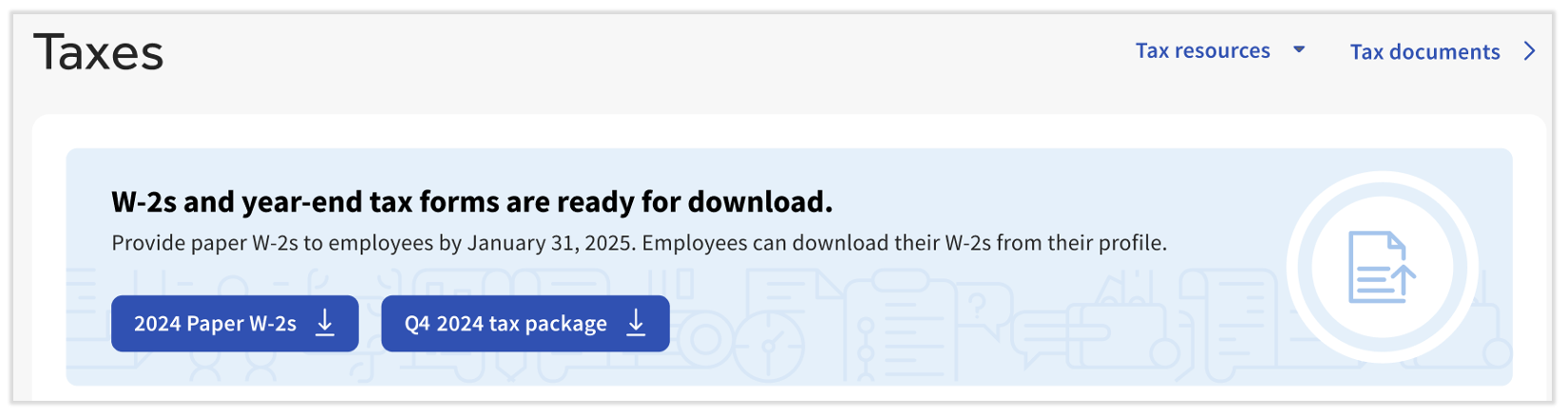
To bulk print your company's paper Form W-2s, navigate to Taxes in Toast Payroll. On and after January 19, you'll see a button labeled 2025 Paper W-2s in the banner at the top of the Tax Center. (If you do not see Taxes on the left side of the screen, select Payroll from the Toast Web navigation rail on the left to make the Toast Payroll navigation rail appear.) Select this button to receive a PDF file containing all Form W-2s for employees who opted into a paper copy. You may have more than one file if you have over 100 paper Form W-2s. You can choose to print select Form W-2s from this bulk file. See Toast Payroll: Download and Print Form W-2s (for Employers) for additional details.
Paper Form W-2s Printed by Toast
Toast Payroll can print and ship Form W-2s for employees who opted into a paper copy or who never logged in to make a Form W-2 selection. Toast Payroll charges $5 per printed form plus standard shipping fees.
To have Toast Payroll print and mail Form W-2s, you must opt out of self-serve printing before the last payroll of the year has been submitted. Navigate to Taxes in Toast Payroll and change the toggle to Mail to business (Paid). (If you do not see Taxes on the left side of the screen, select Payroll from the Toast Web navigation rail on the left to make the Toast Payroll navigation rail appear.) The toggle for self-printing vs. Toast-printing Form W-2s becomes available in late October or early November of each year.
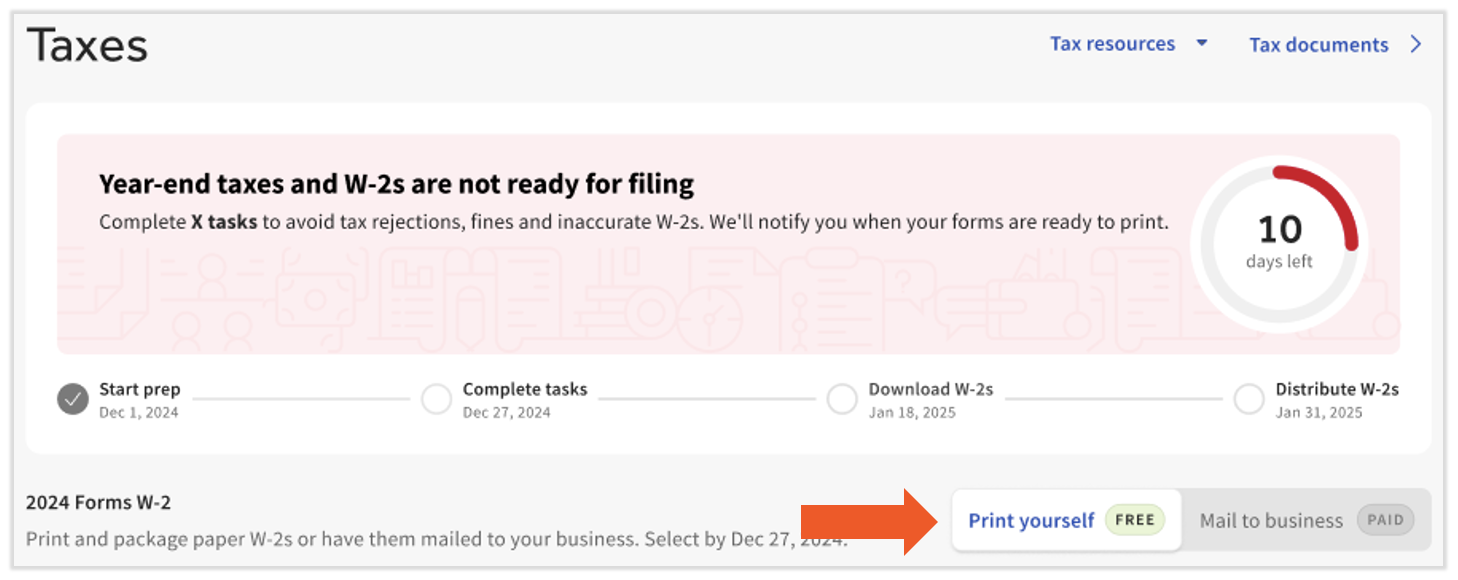
When self-serve printing is disabled (Mail to business is selected), Toast prints and delivers any Form W-2s for employees who opted into paper, for $5 per printed form plus standard shipping fees. One package of printed Form W-2s is delivered per FEIN. Individual Form W-2s in the package need to be distributed to employees in accordance with SSA regulations. Toast Payroll does not mail Form W-2s directly to employees.
How Do I Print and Send a Form W-2 to One Specific Former Employee?
To print a Form W-2 for one specific current or former employee in Toast Payroll:
-
- Navigate to the employee's profile in Toast Payroll.
- Learn how the new Toast Payroll navigation works by visiting Navigate Toast Payroll Within Toast Web.
- Select Taxes & Documents > Year End Documents on the employee's profile.
- Select the Form W-2 link to download the PDF for that employee.
- Print the PDF on standard letter-sized, plain white paper. See Toast Payroll: Download and Print Form W-2s (for Employers) for printer settings if the form prints with formatting issues.
- Hand-deliver, mail, or otherwise distribute the printed Form W-2 to the employee. You can use this style of envelope — the employer and employee addresses on Toast Payroll Form W-2s are left-aligned to fit a double-window envelope.
- Navigate to the employee's profile in Toast Payroll.
Expected outcome: The former employee receives their Form W-2 by January 31 (per SSA deadline). Alternatively, the employee can access their own electronic Form W-2 from Toast Payroll — their login still works after they leave the company.
Important: Toast Payroll cannot email or mail a Form W-2 directly to an employee, because the form contains the employee's complete SSN.
Also asked as:
-
- I need to send a W2 to a former employee. How?
- How do I print one W-2?
How Can I Check the Delivery Address for Paper Form W-2s?
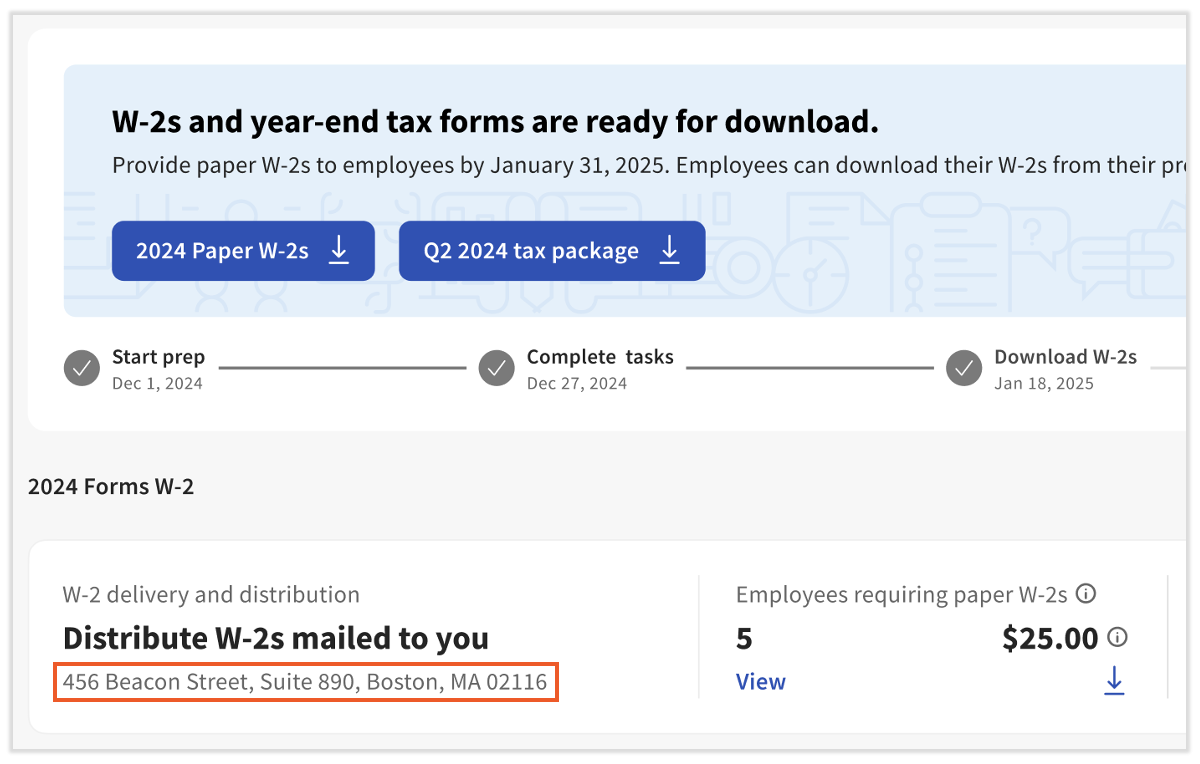
Visit the Tax Center by navigating to Taxes in Toast Payroll. (If you do not see Taxes on the left side of the screen, select Payroll from the Toast Web navigation rail on the left to make the Toast Payroll navigation rail appear.) The address is visible under the shaded banner at the top. If you want to change this address, contact Customer Care via the blue chat button in the lower-right corner of any Toast Payroll page.
How Do I Download Form W-2s for All My Employees at Once?
Whether you chose for Toast or your company to print and mail Form W-2s, the Tax Center has a download arrow for Employees opting for electronic W-2s. Navigate to Taxes in Toast Payroll and select this download arrow to receive PDFs of all Form W-2s for employees who chose the electronic option. If you do not see Taxes on the left side of the screen, select Payroll from the Toast Web navigation rail on the left to make the Toast Payroll navigation rail appear.
Additionally, select the download arrow for the Employees requiring paper W-2s section, or the 2025 Paper W-2s button at the top of the Tax Center. These two files combined represent all the Form W-2s Toast prepared for your company.
Also asked as:
-
- I need a list of W-2 for 2025
- I want to print W-2s for all my employees — how?
What If I Don't See the 2025 Paper W-2s Button?
If you don't see the 2025 Paper W-2s button in the banner at the top of the Tax Center after January 19, one of three things is true:
-
- None of your employees opted into a paper Form W-2. The Tax Center may display a No paper W-2s to distribute message instead. You are not responsible for printing or distributing any Form W-2s in this case.
- Toast Payroll is printing your paper Form W-2s for you. If you toggled Mail to business (Paid) before the last payroll of the year, Toast prints and ships the paper Form W-2s to your business address. You are still responsible for distributing each form to the individual employee.
- You're logged into the wrong account or area. Confirm you are logged into Toast Payroll (at payroll.toasttab.com), not Toast Web or the MyToast app. The Tax Center is only accessible to HR+ users and managers with permissions for tax administration.
Also asked as:
-
- I cannot find the 2025 banner
- I don't see the W-2 button in Taxes
How Can Closed Restaurants Access Form W-2s?
When a restaurant closes, proper account closing procedures need to be followed. If the closure occurs prior to the end of the calendar year, customers should tell Toast Payroll to file for them and generate their year-end tax documents.
If an employee of a closed restaurant is looking for a Form W-2, they can access it from Toast Payroll using the same steps. Their login still works.
If a restaurant uses another payroll service after Toast Payroll, or at the end of the same calendar year, that payroll service is responsible for tax filing and producing Form W-2s for the restaurant.
Also asked as:
-
- My employer no longer uses Toast — how do I get my W-2?
Where Do I Get a Prior Year's Form W-2?
Employees and former employees can access Form W-2s for any prior year in which they earned wages through Toast Payroll. Log into Toast Payroll and navigate to My Profile > Taxes & Documents > Year End Documents. Select the Form W-2 link for the year you need. If you do not see My Profile on the left side of the screen, select Payroll from the Toast Web navigation rail on the left to make the Toast Payroll navigation rail appear.
Note: Prior year Form W-2s are only available for years your employer used Toast Payroll. If your employer used a different payroll provider for that year, contact that provider for the Form W-2.
Also asked as:
-
- W2 2023 not appearing
- How can I have W2 for 2024?
- Where are my old W-2s?
Does Toast Automatically File Form W-2s With State and Federal Agencies?
Toast Payroll generates your Form W-2s for the year (if you used Toast Payroll for the full year and did not switch to another payroll provider later in the year). Toast Payroll also files Form W-2s electronically with the SSA and applicable state agencies where Toast supports state filing.
State filing coverage depends on having accurate tax information on file (tax IDs, SSNs, and current state setup). If you receive a notice from a state agency about a missing or rejected filing, contact Customer Care via the blue chat button in the lower-right corner of any Toast Payroll page so the issue can be reviewed against your account configuration.
Also asked as:
-
- Doesn't Toast automatically file W-2s for us?
- Why did I get a state W-2 filing notice?
My Paper Form W-2 Hasn't Arrived as Expected — What Should I Do?
If your paper Form W-2 hasn't arrived by the date you expected:
-
- Employees: Contact your employer first. Employers (not Toast) are responsible for distributing paper Form W-2s to employees by January 31. You can also download an electronic copy from Toast Payroll at any time.
- Employers expecting Toast-printed Form W-2s: Toast ships printed Form W-2s once per FEIN to the address on file in the Tax Center. Check the delivery address. If the package has not arrived within a reasonable time after January 19, contact Customer Care via the blue chat button in the lower-right corner of any Toast Payroll page.
Also asked as:
-
- I was told I would receive W-2 last Friday and I have not
- Where is my W-2?
Related Articles
- Toast Payroll: Manage the Form W-2 Experience
- Toast Payroll: Find Your Form W-2 (For Employees)
- Toast Payroll: Download and Print Form W-2s (for Employers)
- Toast Payroll: Understand Your Form W-2
- Toast Payroll: Get Help With Form W-2 Amendments
This content is for informational purposes and is not intended as legal, tax, HR, or any other professional advice. Please contact an attorney or other professional for advice.