Nómina Toast: Configurar y configurar nóminas fuera del ciclo
Última actualización: 15 oct 2026, 10:52 a.m.
Solicita una nómina fuera de ciclo al servicio de atención al cliente de Toast, ejecútala en Nómina Toast y paga a los empleados en la fecha de liquidación elegida dentro de los cuatro días hábiles.
| Por el momento, Nómina Toast no está disponible en Quebec. Cuando el producto se lance en tu región, estará disponible una versión en francés del formulario para pedidos fuera de ciclo. |
- Antes de comenzar
- Básicos fuera del ciclo
- Política fuera del ciclo y cronograma de procesamiento
- Crear y enviar una nómina fuera del ciclo
- Planificar un cheque de pago final fuera del ciclo
- Registrar un pago
- Cancelar una nómina fuera del ciclo
- Auditar una nómina fuera del ciclo
- Paga a un empleado menos de cuatro días hábiles
- Preguntas frecuentes
- Artículos relacionados
Antes de comenzar
Se aplica a: Nómina Toast
Lo que lograrás: Puedes crear tu propia nómina fuera de ciclo. Una vez configurado, puedes editarlo, procesarlo y enviarlo, y hacer que los fondos se entreguen en la fecha del cheque que elijas, siempre que sigas el plazo de procesamiento de cuatro días hábiles. Sin embargo, puedes completar el formulario de solicitud y enviarlo a través del botón de chat azul.
Nota: En este momento, no hay cargos adicionales por procesar una nómina fuera de ciclo, pero esta información está sujeta a cambios. Hay un límite de cinco ciclos desactivados por grupo de pago por mes (últimos 30 días). Si superas el límite de ciclos de apagado, podrías considerar usar un cálculo rápido y un pago manual para satisfacer tus necesidades.
Básicos fuera del ciclo
Cuando necesites pagar a empleados fuera de los tiempos de tu ciclo de pago Regular, puedes configurar un calendario de nómina adicional en Nómina Toast. Esto se conoce como una nómina fuera del ciclo. Es posible que ejecutes un ciclo fuera de servicio por los siguientes motivos:
- Pagando a uno o más empleados que fueron extrañados en una nómina anterior.
- Pagar una bonificación por separado de tu Nómina Regular, en particular si quieres pagar impuestos con una frecuencia de cheque diferente.
- Desembolsar los artículos que quieras que tengan una fecha de liquidación diferente a la de tu liquidación Regular.
- Creando una segunda nómina para hacer una corrección o adición a una nómina anterior.
- Pagar una indemnización por despido o pago final.
Puedes incluir contratistas 1099 en una nómina fuera de ciclo.
Política fuera del ciclo y cronograma de procesamiento
Toast requiere un plazo de procesamiento de cuatro días hábiles después de que se envíe el ciclo desactivado. Por ejemplo, un ciclo fuera de servicio enviado antes del barrido del lunes se pagará el viernes, porque de lunes a jueves es el tiempo de procesamiento. Asegúrate de que la fecha del cheque sea, como mínimo, cuatro días hábiles después de la fecha de envío del ciclo de espera.
El envío de nómina para depósitos directos debe publicarse a más tardar a las 4:20 p. m. CST en el día designado para cumplir con el cronograma de procesamiento de cuatro días hábiles. Por ejemplo, una nómina enviada el martes antes de las 4:20 p. m. El CST tendrá una fecha de verificación el lunes siguiente como muy pronto. Envíos realizados después de las 4:20 p. m. Los CST se consideran presentaciones para el siguiente día hábil.
Consulta si necesitas pagarle a un empleado antes de cuatro días hábiles a continuación si este plazo no se ajusta al cronograma que necesitas.
Crear y enviar una nómina fuera del ciclo
A partir de julio de 2026, puedes crear tu propia nómina fuera de ciclo directamente en Nómina Toast. Ya no necesitas enviar un formulario de solicitud al servicio de atención al cliente de Toast y esperar a que nuestro equipo lo configure en tu nombre. Una vez creado, puedes agregar empleados, ganancias o deducciones y enviarlo tan pronto como estés listo.
- En Nómina Toast, ve a Nómina.
- Cuando los menús de navegación de Toast Web y Nómina Toast estén visibles, selecciona Nómina en el submenú de navegación de Nómina Toast. Si no ves el submenú Nómina Toast, al seleccionar Nómina en el menú de navegación de Toast Web, se expandirá.
- Selecciona Pago único en el lado derecho de la pantalla.
- Selecciona Planificar un pago > Fuera del ciclo > Siguiente.
- En la siguiente pantalla, comienza nombrando tu ciclo de apagado en el campo Nombre del pago. Sé específico para poder determinar para qué fue el ciclo de apagado más adelante.
- Si tienes más de un grupo de pago, selecciona el grupo de pago aplicable. Si solo tienes una, ya estará seleccionada para ti.
- Si necesitas un ciclo fuera de servicio para más de un grupo de pago (o para un conjunto de empleados que pertenecen a diferentes grupos de pago), necesitarás crear más de un ciclo fuera de servicio.
- Justo debajo de esos dos campos, elige si quieres incluir a todos los empleadoso seleccionar empleadosen tu ciclo libre. Si cambias de opinión más adelante, puedes agregar o eliminar empleados durante el paso Ganancias del empleado. Lee la sección correspondiente en Nómina Toast: Paso para obtener más información.
- Si eliges Seleccionar empleados, aparecerá un nuevo menú desplegable que te permitirá marcar cada empleado que deba incluirse.
- A continuación, elige Cómo quieres pagarles a los empleados.
- Al seleccionar Pagar a través de Toast, se transferirán los fondos a través de Nómina Toast. Esto puede incluir pagos con cheques en papel (a menos que utilices la opción Envío propio de cheques de pago), depósito directo o la tarjeta Toast Pay Card. Esta opción incluye un plazo de procesamiento de pagos de cuatro días hábiles, es decir, cuatro días hábiles a partir de hoy es la fecha límite para configurar una cuenta. Verás esto reflejado en el siguiente paso.
- Si seleccionas Registrar pagos manuales, no se transferirán fondos. La expectativa es que la empresa pague a los empleados fuera de Nómina Toast, tal vez usando efectivo, una aplicación de pago como PayPal o Venmo, o a través de una forma diferente de compensación como una tarjeta de regalo. Puedes procesar un pago manual de inmediato; no depende del plazo de procesamiento de pagos de cuatro días hábiles.
- Ambas opciones crearán talones de pago y declararán impuestos para cada empleado involucrado.
- Ahora verás un par de campos nuevos. Primero, selecciona la fecha de pago. Si vas a crear el ciclo de apagado después del barrido a las 4:20 p. m. CST, deberás establecer la fecha de pago en cinco días hábiles. El campo Período de pago se configurará automáticamente en función de la fecha de pago seleccionada.
- Nota: Los períodos de pago anteriores no se pueden usar aquí. Solo fechas del próximo período de pago.
- Esto es poco común, pero si el ciclo de apagado debe contener las deducciones recurrentes que se aplican en una nómina Regular, selecciona Configuración avanzada y activa el botón Pagar como nómina Regular. Se importarán todas las deducciones recurrentes estándar para cualquier empleado en este ciclo de descanso.
- Selecciona Siguiente. La página se recargará con la nómina fuera de ciclo que creaste. Llegarás al paso Ganancias del empleado, donde puedes agregar o eliminar empleados y agregar las ganancias o deducciones que necesites procesar.
- Consejo profesional: Considera la función Agregar ganancias en bloque en el menú desplegable + Agregar. Esto te permite agregar el mismo código de ingresos y el mismo monto a todos los empleados que selecciones en la barra lateral.
- Sigue los pasos típicos de la nómina desde aquí para calcular la nómina, revisar tu trabajo y enviar el fuera de ciclo. Si seleccionaste Pagar a través Toast en el paso 7, los fondos se entregan en la fecha del cheque, siempre que hayas seguido el protocolo de nómina estándar, lo que significa que la nómina se envió antes de las 4:20 p. m. CST cuatro días hábiles antes de la fecha del cheque.
Planificar un cheque de pago final fuera del ciclo
Toast a menudo configura ciclos libres para los clientes que quieren pagar a un empleado su cheque de pago final una vez que finaliza su empleo. Anteriormente, podías usar un cálculo rápido para calcular un monto bruto a neto a fin de determinar el monto del salario final del empleado, y este cálculo rápido se puede adjuntar a una nómina futura o fuera de ciclo, pero en su lugar puedes usar este asistente para crear un ciclo simple para el pago final de un solo empleado.
- En Nómina Toast, ve a Nómina.
- Cuando los menús de navegación de Toast Web y Nómina Toast estén visibles, selecciona Nómina en el submenú de navegación de Nómina Toast. Si no ves el submenú Nómina Toast, al seleccionar Nómina en el menú de navegación de Toast Web, se expandirá.
- Selecciona Pago único en el lado derecho de la pantalla.
- Selecciona Planificar un pago > Cheque de pago final > Siguiente.
- Si tienes más de un grupo de pago, selecciona el grupo de pago aplicable. Si solo tienes una, ya estará seleccionada para ti.
- Ahora selecciona el empleado que debería recibir este pago.
- Si deseas pagar un cheque de pago final a más de un empleado, puedes agregar empleados al ciclo de apagado en el paso 9, pero sus ingresos no pagados no se ingresarán automáticamente.
- Después de seleccionar un empleado, aparecerán muchos más campos. Primero, selecciona si quieres pagar manualmente Toast o Record.
- Al seleccionar Pagar a través de Toast, se transferirán los fondos a través de Nómina Toast. Esto puede incluir pagos con cheques en papel (a menos que utilices la opción Envío propio de cheques de pago), depósito directo o la tarjeta Toast Pay Card. Esta opción incluye un plazo de procesamiento de pagos de cuatro días hábiles, es decir, cuatro días hábiles a partir de hoy es la fecha límite para configurar una cuenta. Verás esto reflejado en el siguiente paso. Nota: Algunas normativas estatales exigen a los empleadores pagar a los empleados despedidos de inmediato, así que consulta las leyes y normativas estatales para asegurarte de que cumplan con la normativa. Si el empleado debe recibir su pago de inmediato, lo mejor puede ser seleccionar Registrar pagos manuales aquí y, en función de los salarios netos calculados de este ciclo fuera de servicio, entregar sus fondos fuera de Nómina Toast.
- Si seleccionas Registrar pagos manuales, no se transferirán fondos. Se espera que la empresa pague a los empleados fuera de Nómina Toast, tal vez usando efectivo o una aplicación de pago como PayPal o Venmo. Puedes procesar un pago manual de inmediato; no depende del plazo de procesamiento de pagos de cuatro días hábiles. Sin embargo, asegúrate de enviar esta nómina dentro del mismo trimestre de su terminación para mantener intactas las declaraciones de impuestos trimestrales.
- A continuación, selecciona la fecha de finalización y la fecha de pago. Consulta el texto directamente debajo de los menús desplegables para obtener más detalles sobre las fechas que se deben seleccionar aquí.
- Si seleccionaste previamente Pagar a través Toast, la fecha de pago debe ser al menos cuatro días hábiles en el futuro para permitir el procesamiento.
- Hay un par de opciones adicionales en Configuración avanzada:
- Incluir ganancias no pagadas se activa de manera predeterminada para que cualquier plantilla horaria no pagada que este empleado tenga en Nómina Toast pase al ciclo de apagado.
- Pagar como una nómina Regular incorporará cualquier deducción recurrente estándar que este empleado tenga en su cheque de pago final. Esta opción está activada de manera predeterminada.
- Después de seleccionar Siguiente, la página se recargará con la nómina fuera de ciclo creada. Accederás al paso Ganancias del empleado, donde puedes hacer ajustes en las ganancias y deducciones de este empleado.
- Se recomienda encarecidamente revisar las horas que se introdujeron automáticamente en este ciclo de apagado. Incluso se pueden agregar horas no aprobadas a este ciclo de descanso, así que verifica la cantidad de horas antes de continuar.
- Sigue los pasos típicos de la nómina desde aquí para calcular la nómina, revisar tu trabajo y enviar el fuera de ciclo.
- Si seleccionaste Pagar a través Toast en el paso 6, los fondos se entregan en la fecha del cheque, siempre que hayas seguido el protocolo de nómina estándar, lo que significa que la nómina se envió antes de las 4:20 p. m. CST cuatro días hábiles antes de la fecha del cheque.
- Si seleccionaste Registrar pagos manuales en el paso 6, verás una ventana emergente después de que se haya enviado el ciclo de apagado. Selecciona Ver cheque para abrir el informe Registro de cheques (informe de detalles del empleado) y ver el Monto de cheques que planeas pagarle al empleado.
Registrar un pago
El registro de un pago es un tipo especial de ciclo de apagado. Esta función es muy similar a crear un cálculo rápido, calcular de bruto a neto y adjuntarlo a un ciclo de apagado. Sin embargo, este asistente optimizado puede ayudarte a hacerlo todo a la vez. Solo debes usar esta función de “Registrar un pago” fuera del ciclo cuando planees emitir pagos manualmente (por lo general, en efectivo, una cuenta de la empresa o una aplicación de pago) para que el sistema refleje correctamente el pago en los formularios W-2 y otros documentos fiscales. Con este método, Toast no emitirá fondos a los empleados a través de cheques en papel, depósitos directos o Toast Pay Card. Además, los únicos retiros que hacemos para este tipo de registro son para impuestos aplicables del empleador.
Este trimestre
- En Nómina Toast, ve a Nómina.
- Cuando los menús de navegación de Toast Web y Nómina Toast estén visibles, selecciona Nómina en el submenú de navegación de Nómina Toast. Si no ves el submenú Nómina Toast, al seleccionar Nómina en el menú de navegación de Toast Web, se expandirá.
- Selecciona Pago único en el lado derecho de la pantalla.
- Selecciona Registrar un pago > Este trimestre.
- Antes de seleccionar Siguiente, debes certificar que este pago puede resultar en la recepción de un aviso fiscal. Este aviso fiscal te informa que se realizó un pago a un empleado con fecha de liquidación en el pasado dentro del trimestre actual.
- En la siguiente pantalla, comienza completando el campo Nombre del pago. Podrías incluir por qué no se realizó el pago y/o a quién se le está pagando; sé específico para poder determinar para qué fue el ciclo de apagado más adelante.
- Si tienes más de un grupo de pago, selecciona el grupo de pago aplicable. Si solo tienes una, ya estará seleccionada para ti.
- Si necesitas pagar a más de un grupo de pago (o registrar un pago para un conjunto de empleados que pertenecen a diferentes grupos de pago), deberás crear más de un fuera de ciclo.
- Justo debajo de esos dos campos, elige si quieres incluir a todos los empleadoso seleccionar empleadosen tu ciclo libre. Si cambias de opinión más adelante, puedes agregar o eliminar empleados durante el paso Ganancias del empleado. Lee la sección correspondiente en Nómina Toast: Paso para obtener más información.
- Si eliges Seleccionar empleados, aparecerá un nuevo menú desplegable que te permitirá marcar cada empleado que deba incluirse.
- Ahora verás un par de campos nuevos. Primero, selecciona la fecha de pago. Según la funcionalidad de esta función, solo puedes seleccionar una fecha de pago que sea pasada, pero que aún esté en el trimestre actual. El campo Período de pago se configurará automáticamente en función de la fecha de pago seleccionada.
- Selecciona Siguiente. La página se recargará con la nómina fuera de ciclo que creaste. Accederás al paso Ganancias del empleado, donde puedes agregar las ganancias o deducciones que necesites procesar.
- Sigue los pasos típicos de la nómina desde aquí para calcular la nómina, revisar tu trabajo y enviar el fuera de ciclo.
- Una vez enviado, revisa el informe de detalles del empleado para conocer los montos netos en los que puedes basar tus pagos.
Trimestre pasado
- En Nómina Toast, ve a Nómina.
- Cuando los menús de navegación de Toast Web y Nómina Toast estén visibles, selecciona Nómina en el submenú de navegación de Nómina Toast. Si no ves el submenú Nómina Toast, al seleccionar Nómina en el menú de navegación de Toast Web, se expandirá.
- Selecciona Pago único en el lado derecho de la pantalla.
- Selecciona Registrar un pago > Trimestre pasado.
- Se le comunicará un descargo de responsabilidad que dice que estos deben ser procesos con la ayuda de un agente de atención al cliente. Esto se debe a que los trimestres anteriores ya se cerraron y ya se presentaron impuestos trimestrales. En este caso, lo más probable es que una enmienda deba tramitarse junto con este ciclo fuera de servicio.
- Selecciona Iniciar chat para iniciar una conversación con un agente de atención al cliente y Completar la grabación del último trimestre. Es posible que el agente te pida que completes el formulario de solicitud para poder procesarla
Cancelar una nómina fuera del ciclo
Puedes archivar una nómina fuera del ciclo (o una nómina fuera del ciclo “Registrar un pago”) de la misma manera que archivas una nómina Regular. Ve a Nómina, selecciona los tres puntos para el ciclo de apagado y, luego, selecciona Archivar. El ciclo de apagado desaparecerá del panel de ciclo de pago.
Cuando los menús de navegación de Toast Web y Nómina Toast estén visibles, selecciona Nómina en el submenú de navegación de Nómina Toast. Si no ves el submenú Nómina Toast, al seleccionar Nómina en el menú de navegación de Toast Web, se expandirá.
Auditar una nómina fuera del ciclo
Se puede auditar cualquier nómina fuera del ciclo (o nómina Regular) que se haya enviado. Los usuarios de RR. HH.+ pueden ver quién creó el ciclo de apagado, quién lo editó y quién lo envió.
- En Nómina Toast, ve a Nómina > Nóminas anteriores.
- Cuando los menús de navegación de Toast Web y Nómina Toast estén visibles, selecciona Nómina en el submenú de navegación de Nómina Toast. Si no ves el submenú Nómina Toast, al seleccionar Nómina en el menú de navegación de Toast Web, se expandirá.
- Selecciona Ver para la nómina correspondiente.
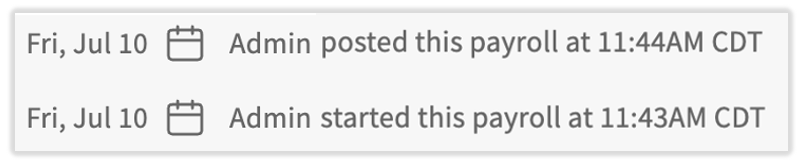
- En la parte inferior de la página Paso de confirmación, verás los nombres de cualquier persona que haya creado, editado o enviado este fuera de ciclo. El administrador indica que el ciclo de apagado fue creado por un representante de Toast (es lo típico para registrar pagos anteriores).
Paga a un empleado menos de cuatro días hábiles
Debido a que un ciclo fuera de servicio requiere un plazo de procesamiento de cuatro días hábiles, no es la opción correcta cuando un empleado debe recibir su pago hoy o mañana. Tienes dos alternativas más rápidas:
- Haz una verificación en vivo (en papel). Si anteriormente optaste por la autoimpresión de cheques en vivo, puedes Imprimir un cheque de inmediato. Toast también puede proporcionar una verificación en vivo que se realiza durante la noche a la dirección comercial registrada (se aplican cargos de envío). Consulta Nómina Toast: Crear cuentas únicas en vivo (en papel).
- Paga al empleado fuera de Nómina Toast y, luego, regístralo. Para un pago inmediato, usa la función “Registrar un pago” fuera del ciclo a fin de determinar el monto neto a pagar (salarios brutos menos deducciones e impuestos) y registrar el pago en una nómina futura. Luego, paga al empleado con cheque de la empresa, efectivo o una aplicación de transferencia de pagos. Consulta Registrar un pago arriba.
Para obtener una comparación completa de cuándo usar la función “Registrar un pago”, un ciclo desactivado o una nómina futura para pagar salarios perdidos, consulta Nómina Toast: Empleado no tomado o Pago no tomado en nómina.
Preguntas frecuentes
¿Cuánto tarda en procesarse una nómina fuera de ciclo?
El procesamiento de una nómina fuera de ciclo tarda cuatro días hábiles, medidos desde que se publica la solicitud hasta la fecha del cheque. Envía tu descanso antes de las 4:20 p. m. CST por lo que publica ese día; envíos después de las 4:20 p. m. El recuento de CST es el siguiente día hábil. Por ejemplo, si no hay feriados federales de por medio, un ciclo libre publicado antes del barrido del lunes tiene una fecha de verificación de ese viernes. Un ciclo libre publicado después del barrido del lunes tendrá una fecha de verificación del lunes siguiente.
¿Puedo ejecutar una nómina fuera del ciclo para un solo empleado?
Puedes ejecutar una nómina fuera del ciclo para un solo empleado. Crea el ciclo de apagado para un empleado de la misma manera que lo harías para varios empleados. Si el empleado necesita recibir un pago en menos de cuatro días hábiles, forzar una cuenta real (si utilizas Envío autoimpreso) o registrar un pago realizado fuera de Toast, ya que el ciclo fuera de servicio requiere un plazo de procesamiento de cuatro días hábiles.
¿Hay una tarifa por una nómina fuera de ciclo?
Actualmente, no hay tarifas adicionales por procesar una nómina fuera de ciclo, aunque esto está sujeto a cambios. Si Toast proporciona un cheque en vivo (en papel) que se envía a la dirección de tu negocio durante la noche, se aplican cargos de envío.
¿Hay un límite en la cantidad de nóminas fuera de ciclo que puedo crear?
Sí, los clientes tienen un límite máximo de cinco nóminas fuera del ciclo por grupo de pago y por mes (últimos 30 días). Cada uno de los métodos de este artículo (cheque de pago final, registro de un pago, etc.) cuenta como un tipo de ciclo de apagado. Si necesitas otra forma de pagar a los empleados fuera de lo programado, te recomendamos usar una forma de pago manual fuera de Nómina Toast y hacer un cálculo rápido para registrar el pago. Consulta Nómina Toast: Emitir cuentas manuales (calculos rápidos) para aprender los pasos de un cálculo rápido y un pago manual.
¿Puedo incluir contratistas 1099 en una nómina fuera de ciclo?
Puedes incluir contratistas 1099 en una nómina fuera del ciclo, junto con empleados W-2 o en su lugar.
¿Cómo ejecuto un ciclo fuera del ciclo para pagar bonificaciones?
Para pagar bonificaciones en un ciclo fuera de él, crea el ciclo fuera de él y, luego, agrega cada bonificación como ganancia única en el paso Ganancias del empleado. Si deseas entregar a los empleados una cuenta física, puedes forzar que realicen comprobaciones en vivo (en papel) de todo el ciclo de descanso en ese paso. Para obtener instrucciones paso a paso sobre la bonificación, consulta Nómina Toast: Crear cuentas únicas en vivo (en papel).
¿Puedo cancelar un ciclo libre después de enviarlo?
Después de enviar un fuera de ciclo, no puedes Recuperarlo tú mismo. Puedes archivar un ciclo desactivado que no se haya enviado usando el menú de tres puntos del panel de ciclo de pago, pero si ya se envió un ciclo desactivado y necesitas que se detenga, ponte en contacto con el servicio de atención al cliente de Toast de inmediato a través del punto de chat azul, ya que el momento depende de si ya se transfirieron fondos.
Artículos relacionados
- Nómina Toast: Empleado no tomado o Pago no tomado en nómina
- Nómina Toast: Gestionar calendarios de nómina
- Nómina Toast: Crear cuentas únicas en vivo (en papel)
- Nómina Toast: Emitir cuentas manuales (calculos rápidos)
- Nómina Toast: Solicitar una anulación
- Nómina Toast: Comprobar frecuencias
Este contenido se publica con fines informativos y no tiene como propósito brindar asesoramiento legal, fiscal, de recursos humanos ni ningún otro tipo de recomendación profesional. Ponte en contacto con un abogado u otro profesional para recibir asesoramiento.