Toast Payroll:阅读您的季度税务包
上次更新时间:2026年10月19日 11:15
在Toast薪资管理中找到您的季度税务包,然后查看并核实每一部分,以确认您的税款已正确申报。
| 如果您在季度结束前未提供我们可能缺失的任何雇主识别号 (EIN) 或社会安全号码 (SSN) 信息,Toast Payroll 可能无法代您申报某些税款。欲了解更多信息,请参阅 Toast Payroll:管理工资税。 |
开始之前
适用范围:Toast Payroll
所需权限:
- 访问 Toast Payroll 中的“报告”区域,并启用税务申报报告功能
您将完成以下操作:查找您最近或历史的季度税务包,然后查看其中的每一部分,以确认您的税款已正确申报。
查找您的季度税务申报包
季度税务申报包是一套文件,其中包含 Toast Payroll 代表您向州和联邦税务机构提交的所有税务文件和申报表。联邦 940、941 以及(在适当情况下)944 表格包含在季度税务申报包中。
当税务申报包可用时,系统会向最后一位提交工资单的人员发送通知电子邮件。季度税务申报包通常在季度结束后的第三个完整周内提供。如果您在季度结束后没有立即看到申报包,则很可能尚未上传。
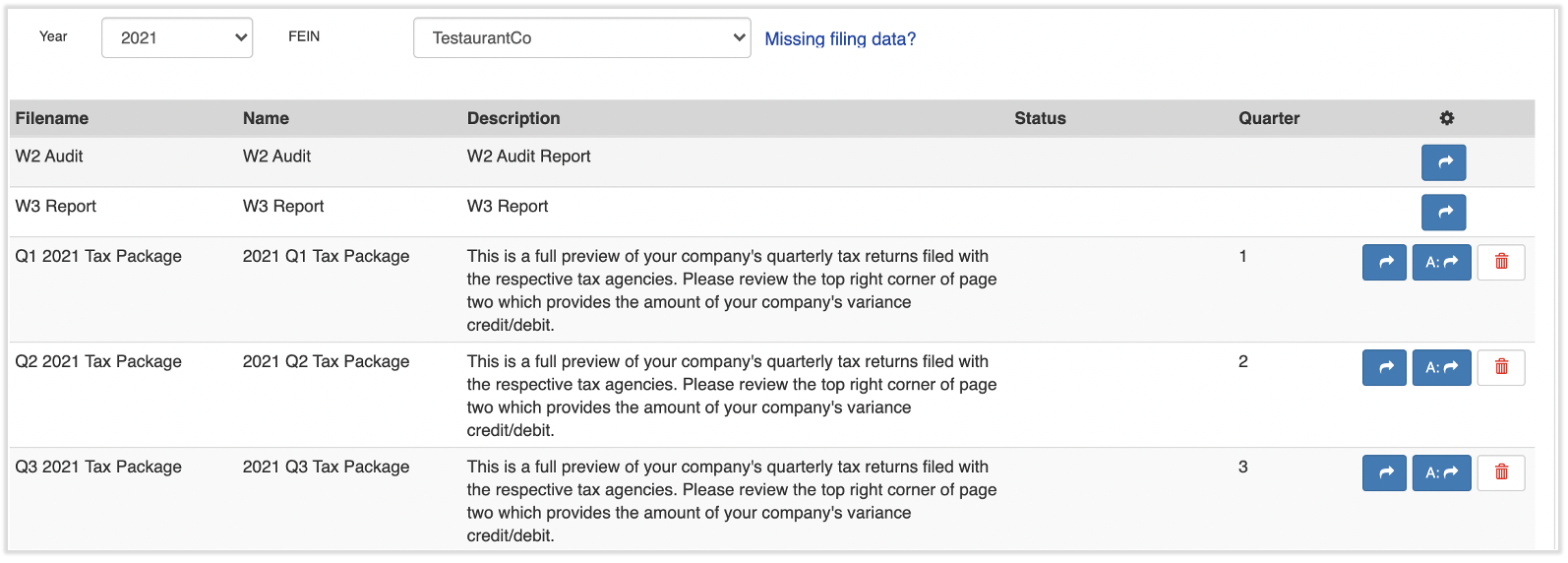
要查找您最近或任何历史季度税务申报包,请登录 payroll.toasttab.com 并导航至 报告 > 税务申报。(当您在 Toast Payroll 中选择 报告 时,您应该会看到一个以 payroll.toasttab.com 开头的 URL。请访问 在 Toast Web 中导航 Toast Payroll 以了解新的 Toast Payroll 导航功能的工作方式。)使用 年份 和 联邦雇主识别号 (FEIN) 下拉菜单设置正确的年份和税号,然后选择您需要查看的季度旁边的 蓝色箭头 按钮以下载文件。
您也可以从税务中心获取您最近的申报包。在 Toast Payroll 中,从左侧导航菜单中选择 税务,然后选择税务申报包下载按钮。有关税务中心的更多信息,请参阅 Toast Payroll:管理工资税。(如果您在屏幕左侧没有看到 税务,请从左侧的 Toast Web 导航栏中选择 工资单,以显示 Toast Payroll 导航栏。)
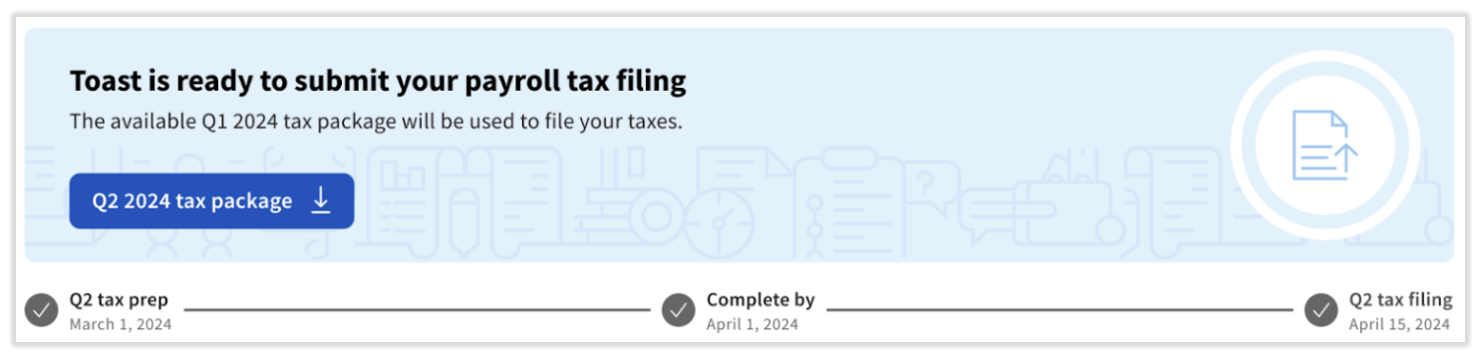
预期结果:所选的季度税务申报包将下载为 PDF 文件,您可以将其保存以供记录。
注意:如果您预期的包裹未出现在 报告 > 税务申报 中,或者根本没有出现包裹,请参阅下方的 常见问题解答部分 中的“为什么我的季度税务包无法下载?”。
查看并核实您的季度税务包
Toast 建议按以下顺序分四个部分查看您的季度税务包:
- 摘要页面
- 对账摘要和差异
- 税务申报和归档
- 公司税务文件(包括申报问题的红色标记)
第 1 步 - 摘要页面
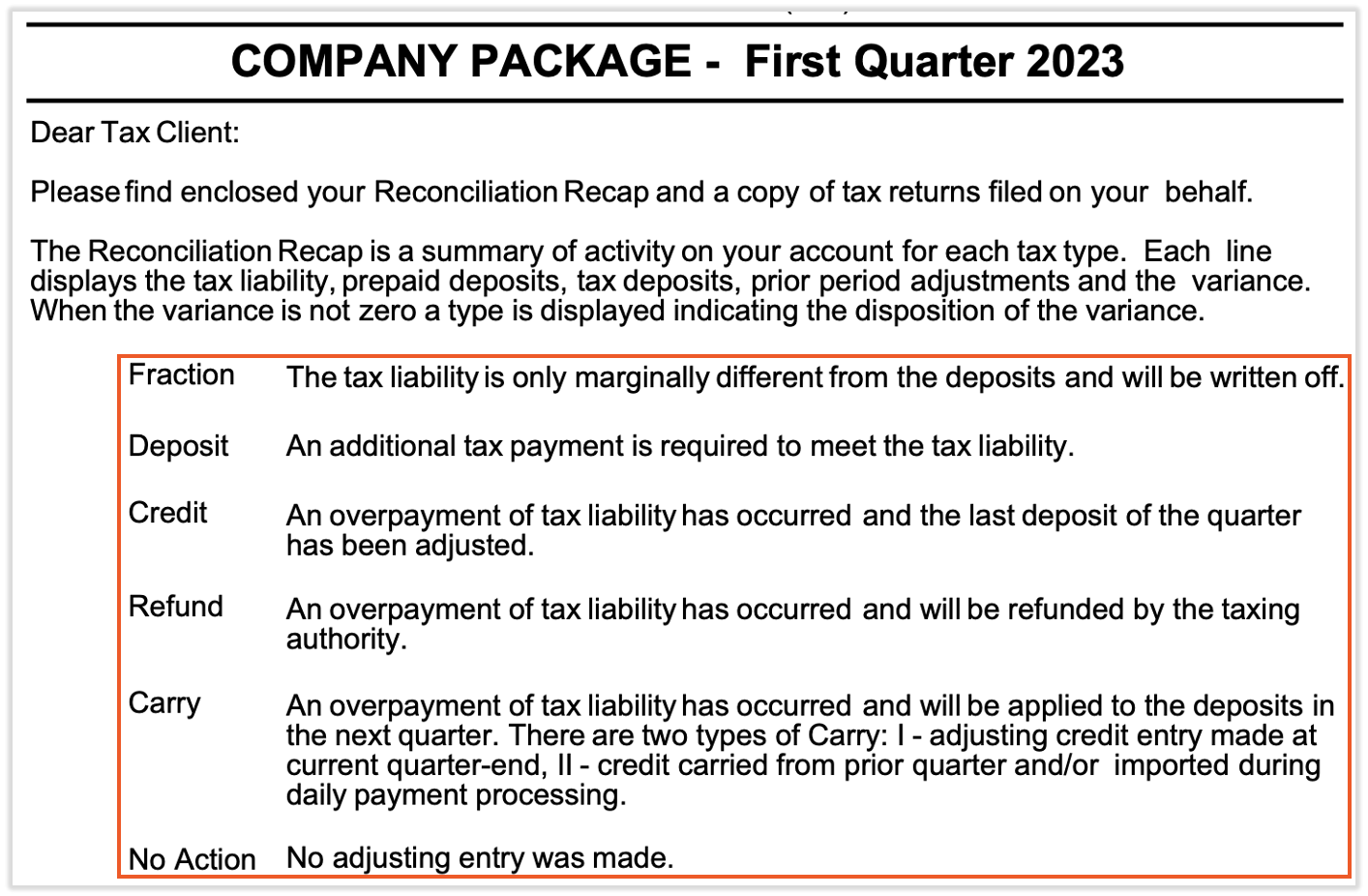
第一页提供了本季度税务活动术语的词汇表。请查看本页中间的说明。后续页面上的数字是可能导致差异的超额支付或欠款指标,这些金额将从您的银行账户中贷记或借记。
第 2 步 - 对账摘要和差异
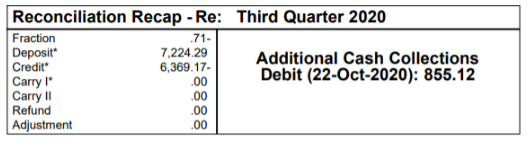
您的总体税务差异位于季度税务包第二页的右上角。差异是指应付给税务机构的金额与标准工资发放期间收取的金额之间的差额。所有税务差异,无论是贷记还是借记,都会在季度结束后的次月中旬(大约在 19 日至 25 日之间)计入您的账户。
如果不需要额外现金,对账摘要将显示收款余额为零。
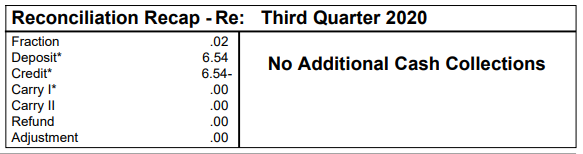
如果需要额外现金,显示的金额将从您的账户中借记。
页面下半部分将您应缴的税款与预扣并汇缴给联邦和州税务机构的金额进行了调节。各列如下:
- 负债 列显示了根据这些税种的工资和税率应缴纳的金额。
- 存款 列显示了本季度通过薪资收集并汇缴给各机构的资金金额。
- 前期调整 列显示了相关税种的任何抵免额或未结余额。
- 差异 列显示了“负债”、“存款”和“前期调整”列之间的差额。
- 存款类型 描述了差异如何包含在整体季度税务差异中,即存入您的银行账户或从您的银行账户中扣除。
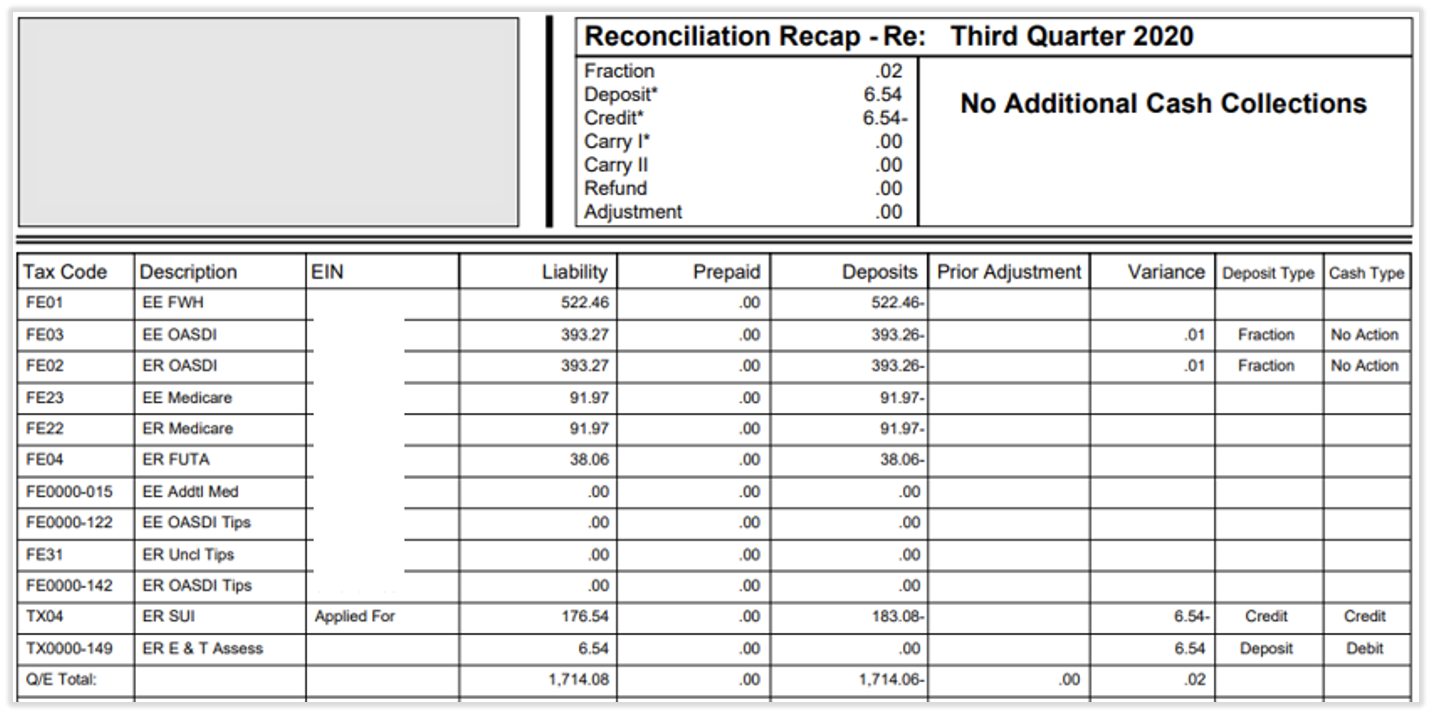
注意:差异通常是由错误的税率引起的,例如与州政府分配给您的税率不同的州失业保险(SUTA/SUI)税率。要查看或更新税率,请导航至 设置 > 薪资 > 税务账户。有关查找税率的更多信息,请参阅 Toast Payroll:查找您的 SUTA/SUI 税率。
第 3 步 - 查看税务申报和备案
调节摘要之后的页面是本季度所有税务申报和备案的副本,按州名首字母顺序排列。联邦申报表排在州申报表之前,这些文件构成了您税务包的主要部分。
这些文件存储在 Toast Payroll 中,但 Toast 建议您下载它们以供自己存档。如果您聘请了会计师,他们可能需要这些文件。
第 4 步 - 公司税务档案
查看此部分以确认您的备案已完成,并且某些列中的信息是正确的。如果不是,可能会导致税务机构的罚款或利息费用。要查看此内容,请滚动到季度税务包中的最后一份文档。
- 查看雇主识别号 (EIN)列。此列提供了有关申报的警示信息。如果此列中出现申请中消息,则表示 Toast 未能成功申报特定税项。
- 如果您已经收到 EIN,请将其添加到您的税务账户页面。有关说明,请参阅Toast Payroll:获取税务账户帮助。
- 如果您尚未收到 EIN,请使用Toast Payroll 中的链接:注册州税账户以找到它,然后将其添加到税务账户页面。
- 添加后,请通过选择任何 Toast Payroll 页面右下角的蓝色聊天点来请求“季度末例外”。请包含有关受影响季度以及处于申请中状态的账户的详细信息。
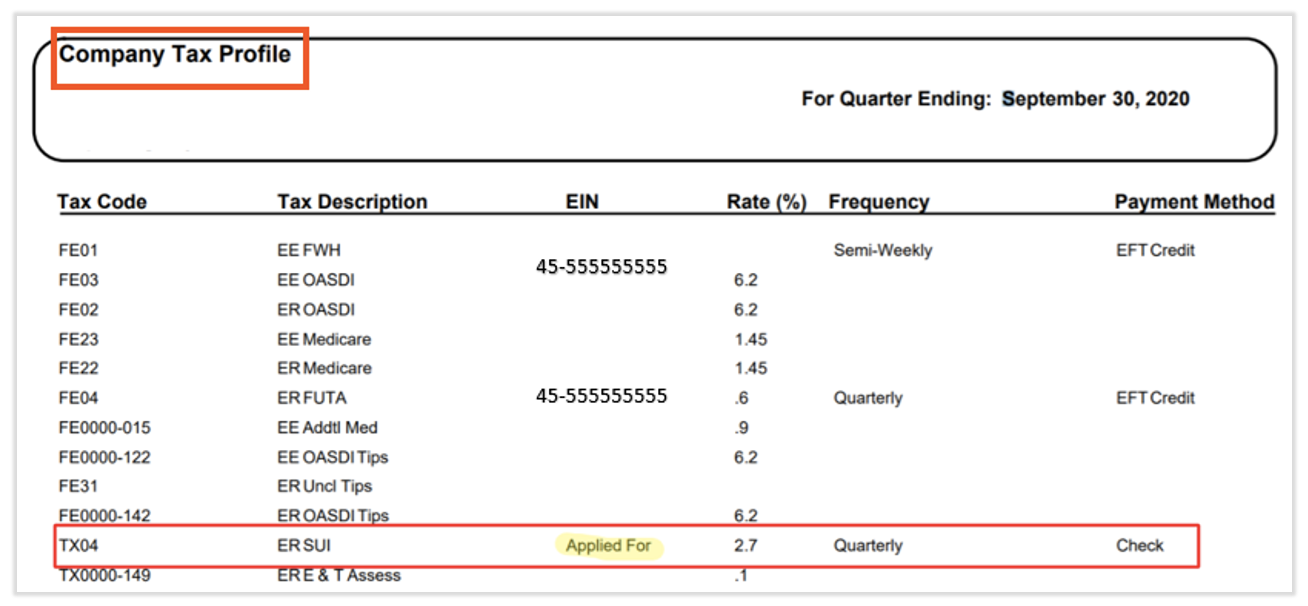
- 查看税率 (%)列,并核实税率是否正确。如需查找税率的帮助,请参阅Toast Payroll:注册州税账户。如果税率不正确,请导航至Toast Payroll中的设置 > 薪资 > 税务账户并编辑相应的税率。
- 查看频率列。这表示 Toast Payroll 向税务机构缴纳预扣税的频率。如果不正确,请导航至Toast Payroll中的设置 > 薪资 > 税务账户以编辑付款频率。
预期结果:您已确认没有Applied For消息,并且您的费率和付款频率正确无误,或者您已采取上述步骤解决了发现的任何问题。
在您的包裹中查找940、941和944表格
联邦税务表格位于季度税务包内,而不是单独的报告中。要找到它们,请导航至Reports > Tax Filing,设置正确的Year和FEIN,然后选择blue arrow按钮以打开该包裹。(当您在Toast Payroll中选择Reports时,您应该会看到一个以payroll.toasttab.com开头的URL。访问Navigate Toast Payroll Within Toast Web以了解新的Toast Payroll导航如何工作。)
- 940表格是年度联邦失业(FUTA)申报表。它仅包含在您的第四季度税务包中,通常出现在第五页左右。
- 941表格是用于所得税、社会保障和医疗保险的季度联邦申报表。它包含在每个季度的税务包中,通常出现在第六至第八页左右。
- 944表格是941表格的年度版本,由规模最小的雇主提交。如果Toast Payroll为您提交944表格,它将包含在您的第四季度税务包中。一家公司要么有941表格,要么有944表格,但不会两者都有。
注意:如果您在某个季度的税务包中找不到941表格,请确认您已打开正确的季度和FEIN,并滚动浏览了Reconciliation Recap页面,找到联邦申报表。有关这些表格的更多详细信息,请参阅Toast Payroll:获取有关940、941和944表格的帮助。
常见问题解答
我在哪里可以找到我的季度税务包?
您可以通过导航至Toast Payroll中的Reports > Tax Filing来找到您的季度税务包。 (当您在Toast Payroll中选择Reports时,您应该会看到一个以payroll.toasttab.com开头的URL。请访问 在 Toast Web 中导航 Toast Payroll 以了解新的 Toast Payroll 导航功能的工作方式。使用下拉菜单设置正确的 年份 和 FEIN,然后选择您需要查看和下载包裹的季度旁边的 蓝色箭头 按钮。您也可以通过从左侧导航菜单中选择 税务 来打开 税务中心,从而找到您最近的包裹。
也问作:
- 我在哪里可以找到我的季度税务报告?
- 我去哪里可以找到季度税务申报包裹?
- 我该如何下载我的季度税务包裹?
为什么我的季度税务包裹无法下载?
您的季度税务包裹可能还无法下载,因为包裹通常在季度末之后月份的第三个完整周上传。如果季度刚结束,请在那个时间点之后再回来查看。如果时间窗口已过,且您处理过工资单的包裹在 报告 > 税务申报 中仍然缺失,请通过选择任何 Toast Payroll 页面右下角的 蓝色聊天圆点 联系 Toast 客户服务部,以便他们确认是否应该已发布包裹。(当您在 Toast Payroll 中选择 报告 时,您应该会看到一个以 payroll.toasttab.com 开头的 URL。)请访问 在 Toast Web 中导航 Toast Payroll 以了解新的 Toast Payroll 导航功能的工作方式。)
也问作:
- 为什么我的第一季度税务包裹不见了?
- 我的季度包裹没有出现在税务申报部分,我该怎么办?
- 包裹不在那里,我该如何获取它?
941 表格在我的季度税务包裹中哪里?
941 表格在您的季度税务包裹内,包含在每个季度的包裹中,通常出现在“调节摘要”部分之后的第六到第八页左右。要打开包裹,请导航至 报告 > 税务申报,设置正确的 年份 和 FEIN,然后选择 蓝色箭头 按钮。如果您需要过去几个季度的 941 表格,请为您需要的期间打开并下载每个季度税务包裹。(当您在Toast Payroll中选择Reports时,您应该会看到一个以payroll.toasttab.com开头的URL。访问Navigate Toast Payroll Within Toast Web以了解新的Toast Payroll导航如何工作。)
也问作:
- 我的季度包裹里没有941表格,它在哪里?
- 我在我们的季度税务包裹中找不到941表格。
- 我如何获取之前季度的941表格?
我的税务差异是什么意思,它何时会进入我的账户?
您的税务差异是您欠税务机构的金额与标准工资发放期间收取的金额之间的差额,它显示在季度税务包裹第二页的右上角。无论差异是贷记还是借记,都会在季度结束后的次月中旬,大约在19日至25日之间进入您的银行账户。差异通常是由错误的税率引起的,例如与您所在州分配的税率不匹配的SUTA/SUI税率。
也问作:
- 我的税务包裹上的额外现金收取是什么?
- 为什么我因为税务差异而被扣款?
- 我在哪里可以看到我的第一季度差异?
如果我收到机构通知或我的申报被拒绝,我该怎么办?
如果您收到州或联邦机构的通知,或者您的季度申报被拒绝,请首先查看季度税务包裹中的公司税务文件部分,查找已申请消息或不正确的税率、账号或频率,并在Toast Payroll的设置 > 工资发放 > 税务账户页面上进行更正。(通过访问在Toast Web中导航Toast Payroll了解新的Toast Payroll导航如何工作。)如果问题无法在“税务账户”页面上解决,请通过选择任何Toast Payroll页面右下角的蓝色聊天点联系Toast客户服务。有关被拒绝申报的更多信息,请参阅Toast Payroll:获取税务申报拒绝方面的帮助。
也问作:
- 我们的季度税务申报被拒绝了,我该怎么办?
- 我收到了国税局关于我的表格的信件。
- 我的申报表填写的地址有误。
相关文章
- Toast薪资管理:管理薪资税
- Toast薪资管理:获取有关940、941和944表格的帮助
- Toast薪资管理:税务申报和年终税务常见问题解答
- Toast薪资管理:优化报告库
- Toast薪资管理:获取有关税务账户的帮助
此内容仅供参考,不作为法律、税务、人力资源或其他任何专业建议。请咨询律师或其他专业人士以获取建议。