Toast Payroll: Unsuccessful Direct Deposits
Last updated: Jun 23, 2026, 2:37 PM
Troubleshoot why a Toast Payroll direct deposit failed — fix incomplete setup, manage returned funds, request an ACH reversal, or get a federal trace.
| This article covers payroll direct deposits for employees paid through Toast Payroll. If you are looking for information about paper checks not yet received, see Toast Payroll: Paycheck Package Delivery Delays and Toast Payroll: Paycheck Delivery FAQ. If you are looking for information about your restaurant's credit card sales deposits or Toast billing charges, this article does not apply — those are separate from payroll. |
- Before You Begin
- Quick Fix
- Identify the Scope of the Issue
- Deposit Setup Was Incomplete or Incorrect
- Deposit Was Returned to Toast Payroll
- Deposit Was Sent to the Wrong Account
- Deposit Cannot Be Located — Request a Federal Trace Number
- Next Steps After Resolving the Issue
- Frequently Asked Questions
- Related Articles
Before You Begin
Applies to: Toast Payroll
Permissions needed:
- HR+ required to contact Customer Care for ACH reversals, federal trace numbers, and return-of-funds resolution
- HR+ required to manually update employee direct deposit accounts
- Manager or HR+ required to view the incomplete direct deposit report
What you'll accomplish: Identify why a direct deposit was unsuccessful and take the appropriate action — correcting account information, managing returned funds, requesting an ACH reversal, or requesting a federal trace number.
Quick Fix
Use this table to identify your situation and jump to the right section.
| Symptom | Cause | Quick Fix | Self-Service? |
| Employee says their direct deposit didn't go through or they haven't received their paycheck | Incorrect routing or account number on file; account closed; banking details added after payroll was opened | Check the Incomplete Direct Deposit Report at Settings > Payroll > Direct Deposit | Yes — see Deposit Setup Was Incomplete or Incorrect |
| Multiple employees didn't receive their direct deposits | Payroll may not have been fully submitted, or payroll was submitted fewer than four business days before the check date | Verify payroll submission in Toast Payroll; check whether employees were issued paper checks instead | Yes — see Identify the Scope of the Issue |
| Deposit shows as sent in Toast Payroll, but employee has not received it and you have not received returned funds | Funds may still be in transit; return of funds takes up to three business days after the check date | Wait up to three business days past the check date before escalating; verify at the finance contact email | Partial — see Deposit Was Returned to Toast Payroll |
| You received returned funds in your bank account from Toast Payroll | Deposit was sent to a non-existent, incorrect, or closed account; funds were returned to Toast and re-deposited to your business | Confirm the employee's banking information is corrected, then contact Customer Care to reissue | Partial — see What Happens After Toast Receives Returned Funds |
| Direct deposit was sent to the wrong but valid bank account | Incorrect account number on employee profile that belongs to a different person or account | Contact Customer Care within five business days of the check date to request an ACH reversal ($25 fee) | No — agent required; see Deposit Was Sent to the Wrong Account |
| More than five business days have passed since the check date and the deposit has not arrived and was not returned | Funds are in an unknown location in the ACH network | Contact Customer Care to request a federal trace number | No — agent required; see Deposit Cannot Be Located |
Identify the Scope of the Issue
When a direct deposit is unsuccessful, the first step is to determine how many employees are affected. The answer helps point to the most likely cause.
If only one employee did not receive their direct deposit:
The issue is likely specific to that employee's bank account or payment setup. Common causes include:
- The routing or account number on file is incorrect or incomplete
- The employee's bank account is closed
- The employee's bank account has a hold on it
- Banking details were added after payroll was opened (after the Preview button was selected for that payroll run)
- The employee's net pay was $0 — employees with $0 net pay do not receive a deposit
- The employee's Form W-4 has excessive withholding amounts
- An employee's pay is set to $0
If multiple employees did not receive their direct deposits:
The issue is more likely with the payroll run itself. Common causes include:
- Payroll was submitted fewer than four business days before the check date — this triggers a paper check instead of a direct deposit due to timing restrictions
- Payroll was submitted on or after the anticipated check date - funds may still be in transit
- The payroll run was not completely submitted to Toast
- Hours or timesheets were unapproved or not recorded
Note: Submitting payroll at least four business days before the check date gives direct deposits the highest chance of arriving on time. If payroll is submitted late, employees may receive delayed direct deposits. See Toast Payroll: Manage Federal Bank Holidays for a list of non-federal holiday business days when payroll sweeps occur.
To verify whether a payroll run was fully submitted, navigate to Payroll > Past Payrolls. If you see your payroll under Past Payrolls, then you have fully submitted it.
Deposit Setup Was Incomplete or Incorrect
If you suspect a single employee's deposit failed due to account setup, start with the Incomplete Direct Deposit Report.
Check the Incomplete Direct Deposit Report
Your employees are invited to select their preferred payment method during new hire onboarding. The Incomplete Direct Deposit Report shows all employees who have not successfully completed their direct deposit setup, and allows you to email them a link to do so. The Manager or HR+ security role is required to view the incomplete direct deposit report.
- In Toast Payroll, navigate to Settings > Payroll > Direct Deposit.
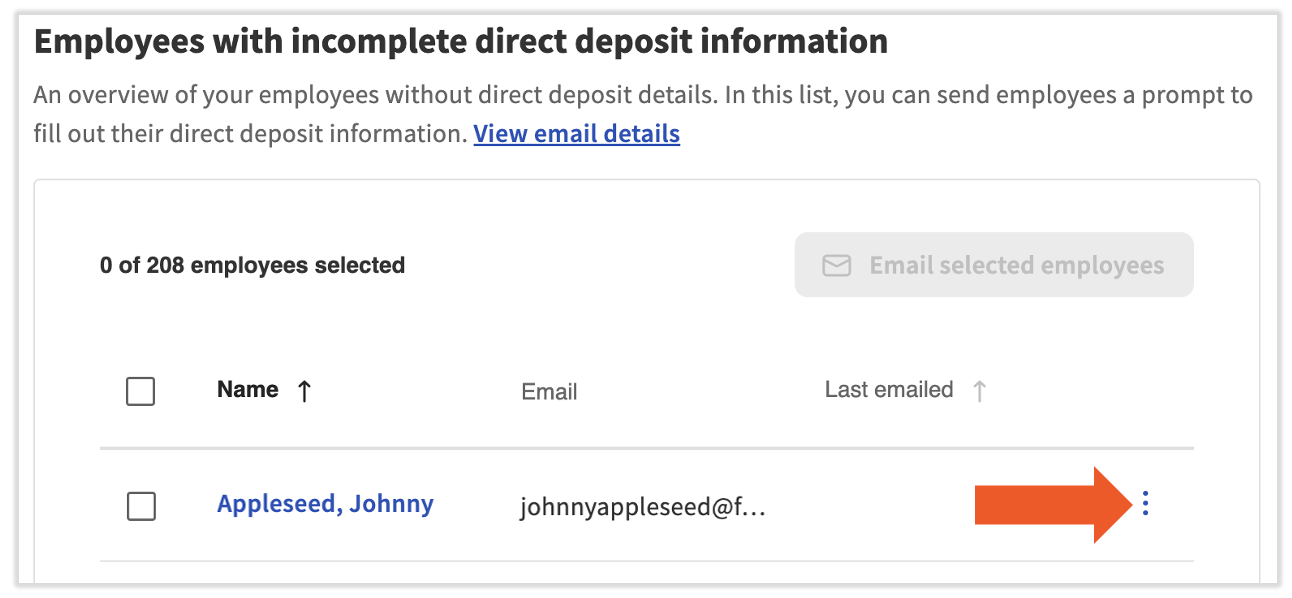
- Review the Employees with incomplete direct deposit information section. This section lists every employee who has not successfully set up a direct deposit or Toast Pay Card account — meaning Toast Payroll cannot digitally deposit wages for them.
- To the right of an employee's email address, select the three dots to access two options:
- Select three dots > Email employee to send an automated email guiding the employee to update their direct deposit information. Select View email details near the top of the section to preview the email template before sending. Note: Toast representatives will never ask employees for their identity verification code. This is stated in the email.
- To email all visible employees at once, select the topmost checkbox (to the left of the Name column), then select Email selected employees. To email all employees in this section (not just those currently visible), scroll down to the View field, select View all, then use the checkbox to select all and send.
- Select three dots > Fill out direct deposit manually to be taken to the employee's Payment Method page. Follow the steps in the Add a Direct Deposit Account Manually (Without Plaid) section of Toast Payroll: Get Help With Direct Deposit Accounts.
- Select three dots > Email employee to send an automated email guiding the employee to update their direct deposit information. Select View email details near the top of the section to preview the email template before sending. Note: Toast representatives will never ask employees for their identity verification code. This is stated in the email.
- Only employees who have a Toast account will receive the automated email. To check whether an employee has a Toast account, navigate to Employees > Employee management > Employees in Toast Web and look for a check mark in the Account Created column.
- The Last emailed column shows when the automated email was last sent to each employee. Once an employee successfully updates their direct deposit information, they move from the incomplete section to the Completed direct deposit section below.
Expected outcome: After the employee updates their direct deposit information and the next payroll run is processed, they should receive their deposit on the check date.
Note: The Incomplete Direct Deposit Report only shows employees who have selected direct deposit or Toast Pay Card as their payment method — not employees set to paper check. If an employee expects direct deposit but is receiving paper checks, confirm their payment method selection is set to direct deposit.
Deposit Was Returned to Toast Payroll
When the routing or account number on file leads to a non-existent or closed bank account, the deposit is returned to Toast Payroll. This is called a return of funds.
How to Check If Funds Were Returned
It takes up to three business days after the check date for Toast Payroll to receive a return of funds. If an employee reports they have not been paid on their check date, the funds may still be in transit — Toast may not know the funds were returned yet. There is no in-app status for a return-of-funds in Toast Payroll.
Once Toast Payroll receives the returned funds, an email is sent to the restaurant's financial contact to indicate that a return of funds was processed. The email includes a breakdown of which employee or employees were affected and the amount involved.
If you are not receiving these emails, review or update your financial contact setting. See Optimize Communication Preferences to view or change the financial contact.
What Happens After Toast Receives Returned Funds
Toast Payroll's banking team deposits the returned funds back to your business bank account. This typically occurs one business day after Toast receives the return.
- An email is sent to your restaurant's financial contact with a breakdown of the affected employee or employees and the amounts involved.
- Your employee's payment method is automatically changed to paper check to prevent the same deposit from failing again.
- After receiving the returned funds, you may choose to write the employee a manual check or pay them in another way. A new payroll calculation is not required — the original payroll record remains correct and should not be voided. Toast Payroll will not void a payroll record unless you direct them to do so.
Expected outcome: The funds are returned to your business bank account and your employee's payment method is updated to paper check. You are notified by email.
Note: If you would prefer that the employee's payment method be returned to direct deposit, work with the employee to correct their banking information before the next payroll run. Use the steps in Toast Payroll: Get Help With Direct Deposit Accounts to update the account.
Deposit Was Sent to the Wrong Account
Sometimes a direct deposit is sent to a wrong but valid bank account — one that exists but belongs to a different person, or was entered incorrectly. In this case, Toast does not automatically receive the funds back.
When an employee or employer believes this may have occurred, Toast Payroll can perform an ACH reversal. An ACH reversal is an attempt to retrieve the funds from the incorrect account and return them to Toast Payroll, which then returns them to the restaurant. A successful ACH reversal will result in a net payment recovery. Depending on the specific circumstances, remaining taxes may be voided, which reduces the employer's tax liability on the next payroll.
Important: An ACH reversal costs $25 and must be requested within five business days of the check date. Toast Payroll cannot guarantee the success of an ACH reversal. The success of an ACH reversal depends on there being sufficient funds in the incorrect account when the reversal is attempted.
Before You Contact Customer Care — ACH Reversal
ACH reversals require Customer Care to initiate on your behalf. To request an ACH reversal, contact Customer Care by selecting the chat button in the lower-right corner of any Toast Payroll page.
Gather this information before contacting Customer Care:
- Employee name and employee ID
- Check date for the affected payroll
- Net payment amount
- Confirmation that the request is within five business days of the check date
Important: Due to the sensitivity of this matter, an HR+ user must contact Customer Care — not the employee.
Expected outcome: Customer Care will initiate the ACH reversal request. Results typically take approximately three business days. Customer Care will follow up with the results.
Deposit Cannot Be Located — Request a Federal Trace Number
If the deposit has not been located, no return of funds has been received, and more than five business days have passed since the check date, an ACH reversal is no longer possible. In this case, request a federal trace number.
Every electronic deposit has a federal trace number, which banks use to locate where funds have moved in the ACH network. Once you have the trace number, contact the employee's bank directly and provide it — the bank can use it to investigate the payment.
Before You Contact Customer Care — Federal Trace Number
Federal trace numbers are retrieved by Customer Care and typically take approximately one business day to obtain. To request one, contact Customer Care by selecting the chat button in the lower-right corner of any Toast Payroll page.
Gather this information before contacting Customer Care:
- Employee name and employee ID
- Check date for the affected payroll
- Net payment amount
- Confirmation that more than five business days have passed since the check date
Expected outcome: Customer Care retrieves the federal trace number within approximately one business day and provides it to you. You or your employee then contacts the employee's bank with the trace number to locate the funds.
Next Steps After Resolving the Issue
Once a direct deposit issue has been resolved, take the following steps to prevent it from happening again.
- Verify with the employee and their bank that their account is open, active, and able to receive ACH deposits.
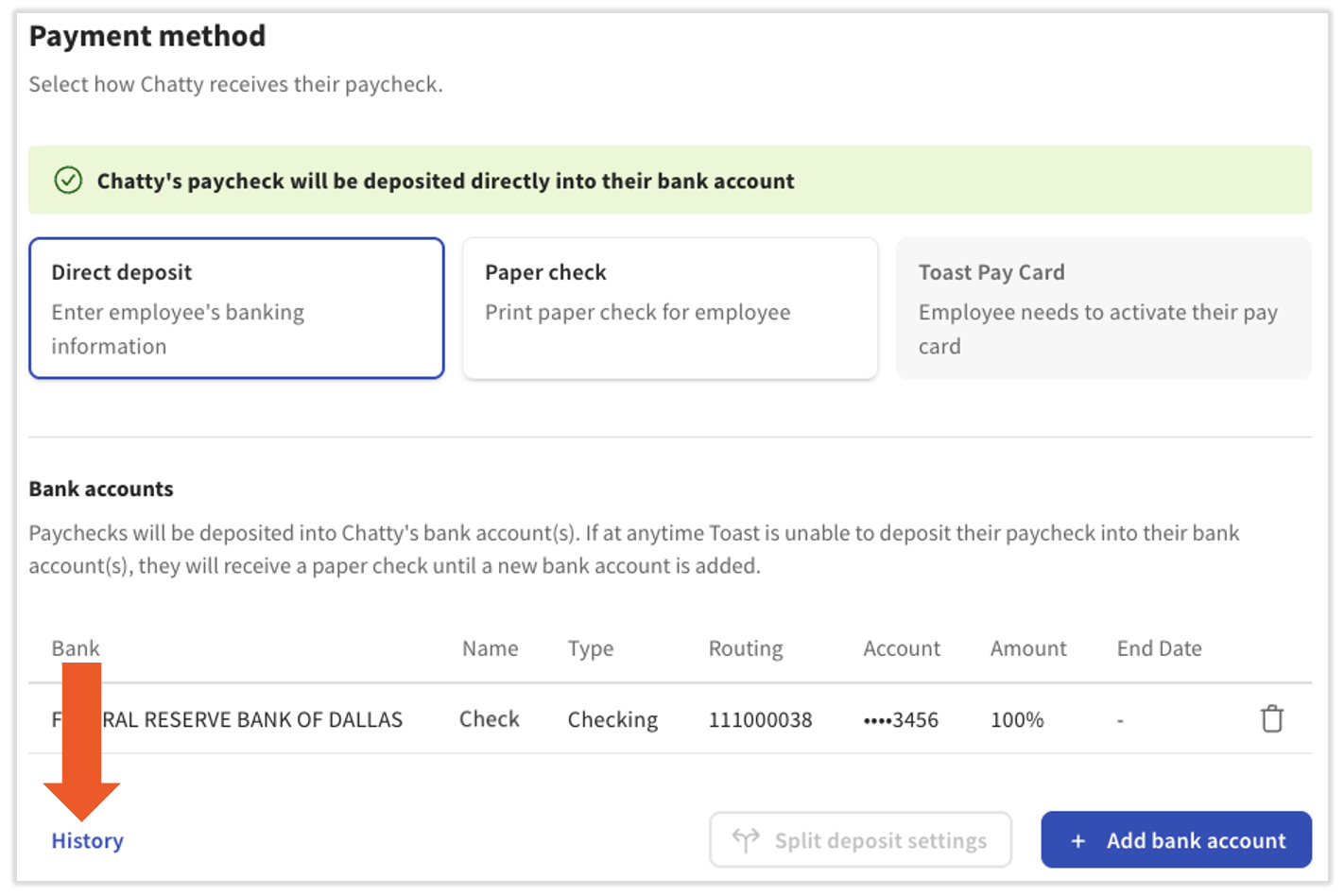
- Since full routing and account numbers cannot be viewed by anyone — including Toast admins — use the History button on the employee's Payment Method page to review all changes or additions made to their direct deposit account. This can help determine whether the routing or account number was changed recently. HR+ users can contact Customer Care to learn the name of the person who made each change.
- Once the employee's banking information is confirmed as correct, contact Customer Care by selecting the chat button in the lower-right corner of any Toast Payroll page so Customer Care can attempt to move the funds back to the employee. Due to the sensitivity of this matter, an HR+ user must reach out — not the employee.
- If a return of funds applies, Toast Payroll will deposit the funds to your bank account one business day after they are received by Toast. Toast Payroll's banking team will email your finance contact with a breakdown of which employees were affected and what amounts were involved. The business can then apply the funds in their own way and work with the employee to update their bank account, if needed.
- If an ACH reversal was requested, Customer Care will contact you with the results. This takes approximately three business days.
Frequently Asked Questions
Why does Toast Payroll say the deposit was sent, but the employee has not received it?
When Toast Payroll marks a deposit as sent, it means the deposit was submitted to the ACH network for processing. This does not mean the funds have arrived in the employee's account. ACH deposits are processed during the next scheduled sweep at 4:00 p.m. CT on non-federal holiday business days, and employees typically receive their wages on the check date. If an employee has not received their deposit by the end of the check date:
- Wait until the next business day — some banks post deposits with a brief delay.
- If the deposit is still missing after three business days past the check date, it may have been returned. See Deposit Was Returned to Toast Payroll above.
- If more than five business days have passed, see Deposit Cannot Be Located — Request a Federal Trace Number.
Also asked as:
- The system shows the paycheck as sent — why hasn't the employee gotten it?
Can I re-run payroll after a return of funds?
No recalculation is needed if the original payroll record was correct. A return of funds deposits the original net amount back to your business bank account. You can then pay the employee by writing a manual check or applying the funds in another way. Toast Payroll will not void the payroll record unless you direct Customer Care to do so. If the original payroll record was incorrect, contact Customer Care for guidance.
Also asked as:
- Do I need to recalculate payroll when a direct deposit is returned?
Is there a prenote delay when adding a direct deposit account?
Prenote is a standard ACH process some banks use to verify a new bank account before the first live deposit is sent. Prenotes are used during a customer's Toast Payroll onboarding process. Onboarding consultants will coordinate with banking to request prenotes to be processed to verify the accuracy of the employee's accounts prior to a customer posting their first payroll.
Prenotes typically hit the bank accounts the following business day after banking uploads the prenote file to the bank. If the prenote fails, our Banking team is notified one to three business days from the initial prenote process date.
Also asked as:
- If I add a bank account and routing number for direct deposit, is there a delay for prenote?
Why would a direct deposit fail even though the employee's account information looks correct?
A deposit can still fail even when routing and account numbers appear complete if: the account is closed, the account has a hold on it, or new banking details were added after the payroll run was already opened (after the Preview button was selected). Verify with the employee and their bank that the account is open and active, and confirm that banking details were entered before payroll was started.
Also asked as:
- The employee's banking info looks right — why didn't the deposit go through?
Related Articles
- Toast Payroll: Get Help With Direct Deposit Accounts
- Toast Payroll: Set a Payment Method
- Toast Payroll: Paycheck Package Delivery Delays
This content is for informational purposes and is not intended as legal, tax, HR, or any other professional advice. Please contact an attorney or other professional for advice.