Get Started With Catering Online Ordering
Last updated: Sep 18, 2026, 10:29 AM
Leverage the power of Toast Catering & Events with the ease of a seamless guest ordering experience for catering takeout or catering delivery orders.
Catering Online Ordering lets your guests place catering takeout and delivery orders online, on a schedule you control. It runs separately from your regular Toast Online Ordering, with its own hours, lead times, menus, order minimums, and daily capacity, so you can plan ahead for events without last-minute orders disrupting your kitchen.
| Catering Online Ordering is part of the Catering Online Ordering Pro package and requires Toast Catering & Events. |
- Catering Online Ordering overview
- What you need before you start
- Configure your Catering Online Ordering settings
- Frequently asked questions
- Related articles
Catering Online Ordering Overview
Catering Online Ordering is built to increase the efficiency of your catering and events business while reducing the time it takes to coordinate with your guests. Guests place orders on your schedule, with the lead time and minimums you set.
Catering Online Ordering gives you:
- A catering-specific schedule with separate hours of operation for the catering side of your business
- Customized lead times that give you and your team the buffer you need to prepare for events
- Order minimums and capacity, including cart minimum order amounts, item-level minimum and maximum limits, and a maximum number of daily orders
- Special menus in addition to your everyday menus, such as a holiday menu available on a specific date or date range
- A shared calendar view to track upcoming events and their status
- Menu integration with Toast menus, open items, and discounts
The table below shows which features are specific to Catering Online Ordering compared with regular Toast Online Ordering.
| Feature | Catering Online Ordering | Toast Online Ordering |
| Special menus | Yes | No |
| Order minimums | Yes | No |
| Daily capacity | Yes | No |
| Calendar view | Yes | No |
| BEO form questions | Yes | No |
| Prep lists, pack sheets, BEOs | Yes | No |
| Toast Delivery Services / third-party capability | Yes | Yes |
| Manual approval | No | Yes |
What You Need Before You Start
Before you configure Catering Online Ordering, set up the following in Toast Web.
- Service charges. Create catering-relevant service charges such as delivery fees or labor fees. To learn how, see Get Started With Service Charges and Mandatory Gratuity.
- You can configure a service charge as a mandatory gratuity or an employer-kept service charge. When editing the service charge, note the Assign to check owner (Gratuity)? field.
- Select Yes to assign the charge to the check owner, which appears as a mandatory gratuity below the subtotal.
- Select No to assign the charge to the restaurant, which appears as an employer-kept service charge above the subtotal.
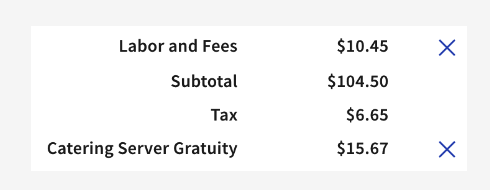
- For example, a "Labor and Fees" service charge (employer-kept) appears above the subtotal because it is a good or service rendered. A "Catering Server Gratuity" (mandatory gratuity) appears below the subtotal and tax and is given as a tip to the server associated with the invoice.
- You can configure a service charge as a mandatory gratuity or an employer-kept service charge. When editing the service charge, note the Assign to check owner (Gratuity)? field.
-
- Revenue centers. Create a catering-specific or Catering Online Ordering-specific revenue center. To learn how, see Create and Assign Revenue Centers.
- Assigning catering sales to a specific revenue center lets you isolate this revenue in Toast reporting. For example, some caterers create two revenue centers, Catering and Catering Online Ordering, to separate online catering orders from orders an employee builds through the Catering & Events workflow.
- Order types. Catering order types separate the styles of catering you offer and control the information a guest must provide to submit a catering online order. To learn how, see Get Started With Toast Catering and Events.
- Catering Online Ordering supports at most two order types, which appear behind the Takeout and Delivery labels.
- Catering online orders are visible on the Catering & Events calendar.
Configure Your Catering Online Ordering Settings
To configure the settings specific to Catering Online Ordering, in Toast Web go to Catering & events and select Online ordering from the left-hand menu.
In the General settings section, you can:
- Toggle the Online ordering enabled setting on or off
- Find your public URL for Catering Online Ordering
- Use the Spotlight feature to show a banner message of your choice at the top of your Catering Online Ordering page
The sections below explain the rest of your Catering Online Ordering settings.
Schedule and Order Setup
The Schedule settings let you adjust your Takeout and Delivery hours for your catering site. This schedule is independent of any other schedule in Toast Web and does not affect your regular restaurant hours.
- In the Overrides section, customize your Catering Online Ordering schedule for known closure days so orders do not come in when your staff is not there.
- The schedule you set here only affects Catering Online Ordering availability. To set the days and times your menus are visible on other channels, such as in-house orders, see Set Menu Availability.
In the Order setup section, you can configure:
- Default server. The server who should receive tips for a catering online order.
- Reporting. The revenue center you want to use for Catering Online Ordering.
- Special requests. Allow guests to add special requests when they add items to their cart.
Takeout and Delivery Setup
In the Takeout setup section, you can:
- Enable or disable Takeout orders for Catering Online Ordering
- Select the Order type associated with Takeout orders
- Select the Dining option to use for Takeout orders
- Set when guests can place takeout orders by adding a minimum lead time (so guests cannot place last-minute orders you cannot fulfill) and a maximum lead time (how many days in advance guests can order)
- Set Prep time, which controls how far in advance of the due time tickets print or show on your Kitchen Display System (KDS) device
- Set a minimum and maximum order amount for catering online orders
- Enable or disable tipping for catering takeout orders, and select your custom and default tip percentages
The Delivery setup section has a similar group of settings, plus delivery boundaries:
- Enable or disable Delivery orders for Catering Online Ordering
- Select the Order type and Dining option to use for Delivery orders
- Set when guests can place delivery orders using minimum and maximum lead times
- Set Prep time, minimum and maximum order amounts, and tipping options
- Add a Delivery boundary and zones to define where guests can place catering delivery orders. You can configure a delivery radius (a set number of miles in a straight line from your location, not driving distance) or draw a map to represent your delivery area. Drawing an area is ideal for avoiding waterways and highways or adjusting town limits. You can also add Zones to apply service charges based on delivery distance within your boundary. For more detail, see the Configure Delivery Boundary and Zones section in Optimize Toast Catering Online Ordering.
Note: You can set different lead times for Takeout and Delivery orders. With Toast Catering & Events, you can also enable Toast Delivery Services (TDS) to provide delivery via DoorDash Drive or Uber Direct. For instructions, see Optimize Toast Catering & Events.
Menu Management and Special Menus
The Menu management section is the only place that controls Catering Online Ordering menu settings. Here you can:
- Select default catering menus. Add the menus or specific menu groups that appear all the time on your catering site. These are overridden by Special menus on the days those menus are available.
- Set minimum and maximum item selections. Add minimum and maximum item-count restrictions on individual menu items for a catering online order.
Note: Catering Online Ordering menus can only be managed in the Menu management section of your Catering Online Ordering settings. There is no separate menu visibility setting. If you want a menu to appear only on your Catering Online Ordering page and not on your regular Online Ordering page, add the menu or groups directly in Catering Online Ordering > Menu management, and avoid adding that same menu to the Toast Online Ordering channel under Visible To.
In the Special menus section, you can set up menus for one-off or recurring dates. For example, you might offer a holiday menu only in November and December, or a Taco Tuesday menu every Tuesday. Special menus are the recommended way to create a menu for a specific offering, holiday, or event, because you can add or remove items and adjust prices for that day.
- Special menus can appear on your main catering site or on an independent catering site. An independent catering site lets you display special menus for events or holidays that are completely separate from your regular offering.
- Special menus have their own unique URL that directs customers to the orderable dates for that menu with no other options. After you create a special menu, find its URL to the right of it in the special menus table.
- Select the Availability for your special menu (specific dates or recurring dates) and indicate whether it applies to Takeout, Delivery, or both.
- Add the Menus that should appear for the special menu dates. You can choose whether they are offered in addition to your normal offerings or whether they replace them for the specific dates.
- In the Advanced section of a special menu, you can override Takeout and Delivery hours, override minimum lead time and maximum days ahead, override minimum and maximum order amounts, and override the default service charges.
Note: To have lead times and maximum-days-ahead settings operate independently for a special menu, set Are your main site menus also available for 'special menu name'? to No.
You can create as many special menus as you need. For more menu setup options, see Set Up Independent Catering Online Ordering Menus.
Checkout Experience and Catering Capacity
The Checkout experience settings include:
- Allow tax exempt ordering. Let guests place a tax-exempt catering online order by providing a Tax ID (toggle on or off).
- Allow promo codes. Apply promotion codes you previously set up. Only Entire check discounts are supported for Catering Online Ordering, for example, "Get $50 off orders of $500 or more." Guests see a Promo code field in the Payment Information section. To learn how to create codes, see Set Up a Discount Code for Online Orders.
- Checkout without payment. Allow unpaid orders to come in as confirmed. You will need to collect payment on these orders by entering a payment manually or sending an invoice.
The Catering capacity settings let you limit order volume per day, hour, 30 minutes, or 15 minutes:
- Set a maximum number of orders or a maximum dollar amount for Takeout, Delivery, or total orders
- Add overrides to customize capacity for specific dates
- Set daily item limits, with overrides for specific dates if needed
Confirm Your Site Is Live
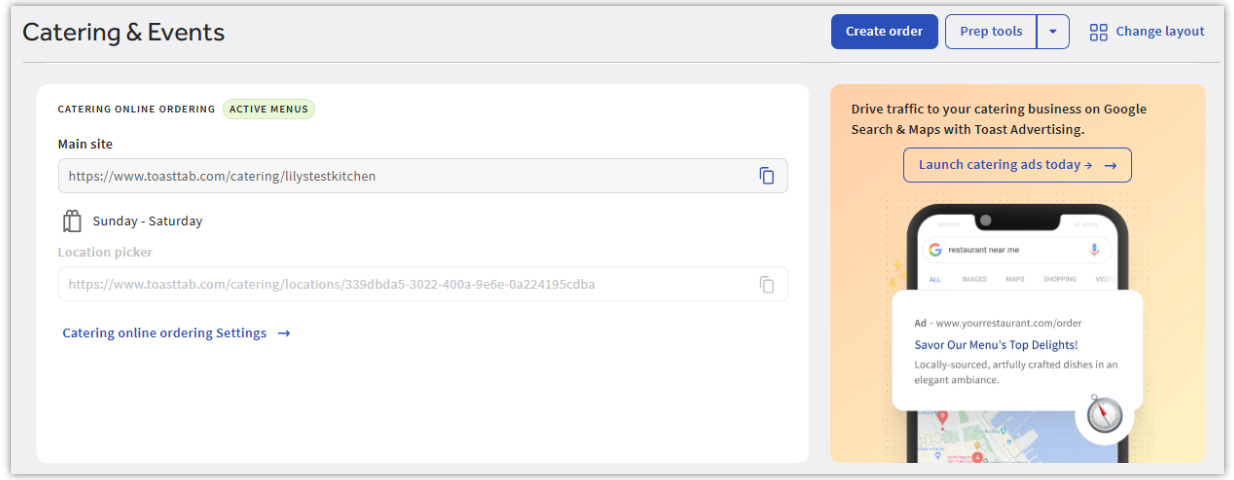
After finishing setup, navigate to Catering & events > Overview. If your catering online ordering site is live, you'll see a green Active menus badge next to Catering Online Ordering.
Frequently Asked Questions
Do I need Catering & Events to use Catering Online Ordering?
Yes, you need Catering & Events to use Catering Online Ordering. Catering Online Ordering is part of the Catering Online Ordering Pro package. Visit Toast Shop to learn more.
Do I need regular Toast Online Ordering for Catering Online Ordering?
No, you do not need regular Toast Online Ordering for Catering Online Ordering. Toast Online Ordering and Catering Online Ordering are separate products, and you do not need to use both.
Why can't my guests place a catering order for today?
Your guests may not be able to place a same-day catering order because of a minimum lead time. Review your minimum lead time under Catering & events > Online ordering for both Takeout and Delivery, and remove or shorten any lead-time entry that blocks same-day orders.
How do prep times and ticket printing work for catering orders?
Prep time controls how far in advance of the due time a catering order's ticket prints or shows on your KDS device. Prep times for catering online orders are currently tied to your regular online ordering prep times. If catering tickets are not printing or are printing at unexpected times, confirm your prep time aligns with your minimum and maximum lead times. If tickets still do not print correctly, contact Toast Customer Care.
How do I set up quote times for catering online orders?
Quote times for catering online orders are currently set on the Takeout & delivery page in Toast Web.
How do I assign menus for Catering Online Ordering?
To assign menus for Catering Online Ordering, go to Catering & events > Online ordering > Menu management and select from the drop-down of available menus. To add Special menus, select +Add special menus, where you can set visibility dates and dining options. Save and publish your changes. There is no separate menu visibility setting; menus are controlled only in Menu management.
Can I use my own drivers instead of Toast Delivery Services for catering delivery?
Yes, you can manage catering delivery with your own drivers, or you can enable Toast Delivery Services (TDS) to dispatch delivery via DoorDash Drive or Uber Direct. Dispatching catering delivery through TDS requires Catering & Events Pro and a TDS subscription. For setup, see Optimize Toast Catering & Events.
Why is the delivery address field missing when I place a catering order?
The delivery address field appears when the Delivery dining option is selected. Make sure Delivery is enabled in your Catering Online Ordering settings and that the order uses the Delivery dining option.
How are notifications set up for Catering Online Ordering?
Catering Online Ordering notifications are set on the order type. Go to Catering & events > Settings, select the pencil icon to edit your order type, and scroll to the Notifications settings. You can assign an employee or non-employee email to be notified. If you are not receiving order emails, confirm an email address is added on each order type you use for catering.
Are catering online orders visible on Orders Hub?
Yes, catering online orders are visible on Orders Hub. Both Toast Catering & Events and Catering Online Ordering orders appear there. To learn more, see Manage Off-Premise Orders With Orders Hub.
Can my guests use gift cards to pay on Catering Online Ordering?
No, guests cannot use gift cards to pay on the Catering Online Ordering platform at this time.
Can guests use stored cards or ACH, or set up recurring catering orders?
No, stored payments, ACH, and guest-managed recurring catering orders are not available for catering online orders at this time.
Is Catering Online Ordering a good fit for wholesaling?
Yes, Catering Online Ordering can work for wholesaling as long as you charge the business you are wholesaling to when the order is placed. Catering Online Ordering cannot process $0 orders at this time.
Why isn't my "Catering" revenue center being applied to my catering orders?
If your catering orders are not showing a revenue center, check your order type settings. Go to Catering & events > Settings > Order types, select the pencil icon next to your Catering order type, and scroll to Reporting. Open the Revenue center drop-down and select your Catering revenue center. Repeat for each order type, then save and publish.
Related Articles
- Optimize Toast Catering Online Ordering
- Set Up Independent Catering Online Ordering Menus
- Catering Online Ordering Minimum Lead Time
- Get Help With Catering Online Ordering
- Get Started With Toast Catering and Events
- Optimize Toast Catering & Events
- Manage Off-Premise Orders With Orders Hub
- Set Up a Discount Code for Online Orders