Online Ordering: Advanced Settings
Last updated: Sep 17, 2026, 1:30 PM
Looking for a live training experience with a Toast Training Expert? Sign up for a live Toast Classroom session to help you set-up and get started with Online Ordering! Select the button below to sign up.
See a guided walkthrough of the Advanced Settings for Online Ordering in your Toast Account.
Log in to Toast Web and select the button below for a step-by-step walkthrough in your Toast account of the advanced settings for online ordering and learn how to boost your Toast Online Ordering sales.
- Online Ordering Schedule
- Firing Delays for ASAP Online Orders
- Curbside Pickup for Online Orders
- Menu Item Images
- Toast Device Notifications for New Orders
- Online Order Email Notifications for New Orders
- Additional Resources
Online Ordering Schedule
Learn all of the ways you can customize your Toast Online Ordering schedule to meet the needs of your restaurant in this Support Center article, Manage Your Takeout and Delivery Schedule, including:
- Schedule overrides
- Order quote time
- Order cut-off time
- Scheduling future orders
- Minimum lead time
- Managing order volume (snooze/delay)
- and frequently asked questions about scheduling!
To review the basics of setting your online ordering hours, review the Set Your Online Ordering Hours section of this Support Center article, Get Started With Online Ordering.
Back to top
Firing Delays for ASAP Online Orders
You can also customize when ASAP online orders are fired to the kitchen. In other words, you can choose to immediately fire throttled ASAP orders regardless of delays. The default delay setting is based on the takeout & delivery prep times, as explained in the What is Prep Time? section of this Support Center article, Manage Your Takeout and Delivery Schedule. Note: This setting doesn't change the pickup or delivery time quoted to the guest — that quote already accounts for any throttling delay. It only affects when the order is sent to the kitchen.
To immediately fire throttled ASAP orders regardless of delays, follow these instructions:
- In Toast Web, navigate to Takeout & delivery > Availability > Online Ordering, and scroll down to the Online Ordering Scheduling Settings section.
- Select your desired behavior for the Immediately fire throttled ASAP orders setting:
- Yes: The order fires to the kitchen immediately, and the delay is added to the prep time shown on the kitchen ticket — giving the kitchen more time to prep before the guest's quoted time.
- No (default): The order is held and doesn't fire to the kitchen until the delay has passed, so it fires however many minutes later than it otherwise would, based on the throttle. The kitchen only gets the standard prep time before the guest's quoted time.
- Save and publish your settings once you're finished!
 | This setting excludes third-party online ordering channels, like Grubhub and DoorDash. This setting only applies to Toast Online Ordering orders. |
Curbside Pickup for Online Orders
In an effort to minimize direct contact between guests and employees, a guest can use the Curbside Pickup option for takeout orders. This provides instructions to the staff so they can deliver takeout orders directly to a guest's car parked outside your door. For instructions on how to set up and start using this feature, view this Support Center article: Get Started With Curbside Pickup for Online Orders.
Back to top
Menu Item Images
It's recommended to use images at the menu item level to optimize menu navigation and to provide a smooth experience for your guests. The menu item images you use for your main restaurant website are pulled to your Online Ordering site.
To add images to menu items:
- Navigate to the Menu section in Toast Web and select Advanced Properties.
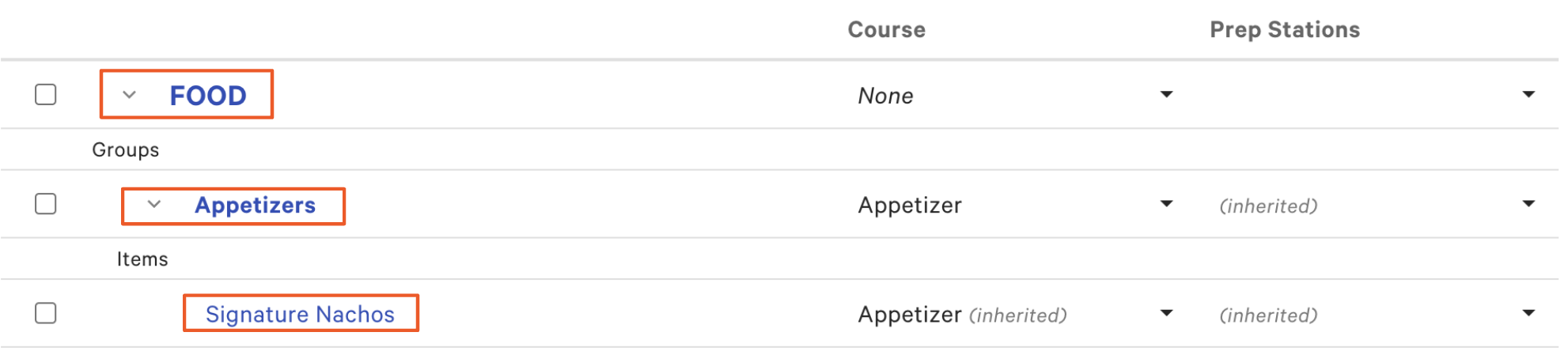
- Then, navigate to the menu item you want to add an image to. For example, if you wanted to add an image to the Signature Nachos Appetizer, you would navigate to FOOD > Appetizers > and select Signature Nachos.
- From here, navigate to the Properties section to upload an image and add a description. If you want this menu item to be available for your Online Ordering site, make sure you select Yes for Orderable Online. To learn more about making menus or menu items available/unavailable for online ordering, check out this article: Show or Hide Menu Items for Toast Online Ordering.
- If making changes to settings in advanced properties, you will be asked to confirm your edits before proceeding.
- Save and publish any changes.
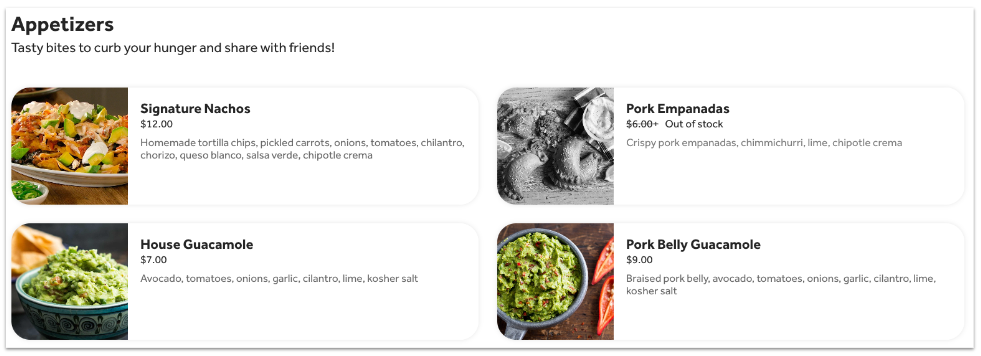
Here's an example of what items with menu images could look like on a Toast Online Ordering site:
Subscribed to Toast Online Ordering Pro? See Toast Online Ordering Pro: Menu Customization for more information on customizing your online ordering menu.
Back to top
Toast Device Notifications for New Orders
Pop-up alert notifications can be set up to appear on your Toast devices when a new online order is received. For instructions on how to set up these notifications, check out this Support Center article: Notifications in the Toast App
Back to top
Email Notifications for New Orders
To further ensure online orders are not overlooked or missed, Toast allows your restaurant to create a contact group that can receive email notifications anytime an online order is placed. For instructions on how to set up these email notifications, check out this Support Center article: Create Email Lists and Configure Employee Notifications.
Back to top