Tips Manager With Toast Payroll
Last updated: Oct 15, 2026, 11:55 AM
Move pooled tips from Toast Web into Toast Payroll so they pay out on the next payroll run, plus fixes for common send-to-payroll issues.
- Before You Begin
- Quick Fix: Common Send-to-Payroll Issues
- Set Up Tips Manager Earning Codes
- Map Your Employees
- Send Tips to Toast Payroll
- Send Tips From a Previous Pay Period
- Revert Sent Tips
- Pay Cash Tips Through Toast Payroll
- Frequently Asked Questions
- Before You Contact Customer Care
- Related Articles
Before You Begin
Applies to: Toast Tips Manager, Toast Payroll, Toast Web
Permissions needed:
- HR+ security role in Toast Payroll (required to send tips to payroll)
- Permission 4.1 Sales Reports in Toast Web (required to view the Tip management report)
- Permission 6.6 Restaurant Operations Setup in Toast Web (required to create or modify a tip pooling policy)
What you'll accomplish: Move each day's pooled tips from Toast Web into Toast Payroll so they are paid out on the next payroll run.
The federal government outlines tip pooling regulations in the Fair Labor Standards Act (FLSA). State and local governments may have their own regulations too. Prior to setting up tip pools or shares for your restaurant within Toast Web, consult an HR professional and consider federal, state, and local laws when defining your restaurant's tip policy and distribution rules.
Quick Fix: Common Send-to-Payroll Issues
Use this table to match the symptom you see to the most common cause and fix. Each row tells you whether you can resolve it yourself or need to contact Customer Care.
| Symptom | Most Common Cause | Quick Fix | Self-Service? |
| "Tips need approval" message in Toast Payroll, but the day shows Approved in Tips Manager | The day was approved but not sent. You would need to Send to payroll. | In Toast Web, navigate to Reports > Labor > Tip management, select the day, and select Send X day(s) to payroll. | Yes |
| Cannot send tips for a date due to a mapping error | An employee in that day's tip pool is not mapped, is mapped to a duplicate profile, or is the Default Online Ordering "employee" with no recipient clocked in. | First, in Toast Payroll, navigate to Settings > Toast > Employees and map any unmapped employees. If everyone is mapped, the cause is usually Default Online Ordering tips with no recipient—adjust the tip pooling policy so those tips redistribute to a job that was clocked in. | Yes |
| Send to payroll button does not appear at all for a location | Tips Manager subscription or tip pooling policy is missing for that specific location, so the integration is not enabled. | Confirm the new location has an active Toast Tips Manager subscription and a configured tip pooling policy. If both are present and the button is still missing, contact Customer Care to enable the integration on the back end. | Partial |
| Hours sync to Toast Payroll, but tips do not | Toast Web cannot attach the tips to a payroll for that date—usually a missing scheduled payroll, a timesheet not attached to the right pay group, or an employee in the pool from a different pay group whose payroll already ran. | In Toast Payroll, confirm an upcoming payroll is scheduled for that date and location, and that every tip-receiving employee has a timesheet attached to the right pay calendar. | Yes |
| Approve button is grayed out in Toast Payroll | Tips were already approved and sent, payroll has already started for that pay period, or the tip management setup for the location is incomplete. | If payroll has not started, refresh the page. If payroll has started, reset the payroll. If the option is still grayed out, contact Customer Care. | Partial |
| Tips from a previous pay period are still in Ready status, but payroll for that period is already submitted | Tips Manager cannot attach tips to a payroll that has already been processed. | Add the missed tip amounts manually to your next regular payroll, or run an off-cycle payroll just for those tips. See Send Tips From a Previous Pay Period below. | Yes |
| You sent tips to Toast Payroll, but they need to be edited | If payroll has not been posted, you can unsend the day, edit it, and resend. If payroll has been posted, you cannot revert. | Follow Revert Sent Tips below. If payroll has been posted, the tips are locked. | Yes |
Set Up Tips Manager Earning Codes
Toast Payroll uses earning codes to classify wages so taxes are calculated properly. When you first set up Tips Manager, the Complete Setup wizard takes you through this step. If you ever need to edit your settings, follow these instructions.
- In Toast Payroll, navigate to Settings > Toast > Tips.
- If you do not see Settings on the left side of the screen, select Payroll from the Toast Web navigation rail on the left to make the Toast Payroll navigation rail appear.
- Select Pooled Tips so Toast Payroll begins pulling tip earnings from Toast Web based on the tip pooling and sharing set up for each employee. Take note of the disclaimer below.
| Selecting Pooled Tips is an immediate change. If this setting is edited during a pay period, tip entries may be duplicated. Please ensure Tips Manager is part of your Toast package before selecting this option. All configuration steps must be completed in Toast Web for pooled tips to process to payroll. Selecting Pooled Tips here is the final step in tip pooling set up. |
- Assign an earning code for each tip type. The tips and gratuities that flow from Toast Web are logged under the selected earning codes. Once you have assigned an earning code to a category, you cannot select that earning code again. This step may already be complete, but verifying this information is recommended regardless:
- Declared Cash Tips: Cash tips declared by the employee at the end of a shift. Employees have normally received these tips already.
- Credit Card & Other Tips: Tips paid for by a credit card or other payment type.
- Cash Gratuities: Gratuities paid with cash
- Credit Card & Other Gratuities: Gratuities paid with a credit card or other payment type.
- If you need a new earning code created, fill out the New Earning Code Request form and send it to Toast Payroll using the blue chat button in the lower-right corner of any Toast Payroll page. Note: Toast Payroll is currently unavailable in Quebec. A French version of this form will be made available when the product launches in your region.
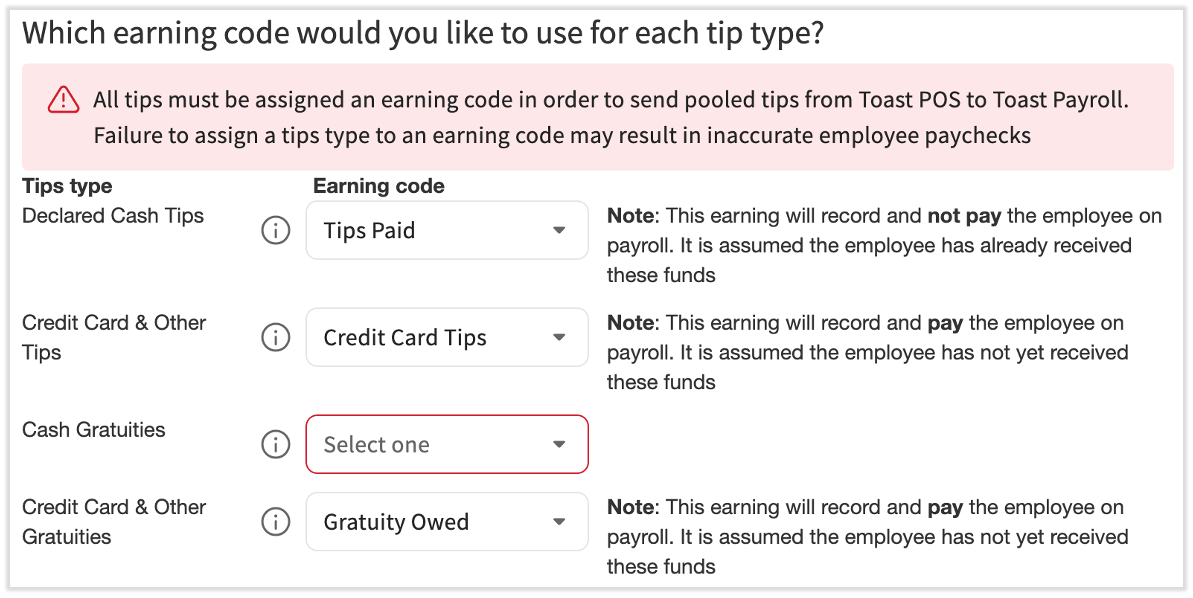
Expected outcome: Each tip and gratuity type is mapped to its own earning code, and Toast Payroll begins pulling pooled tips from Toast Web based on your tip pooling policy.
Map Your Employees
Employee profiles in Toast Payroll must be mapped to the corresponding profiles in Toast Web. If an employee is incorrectly mapped, their tips from Toast Web will not sync to their timesheets or their payroll, and you will receive an error message when sending tips or gratuities to payroll.
- In Toast Payroll, navigate to Settings > Toast > Employees to open the Employee Mapping tool.
- If you do not see Settings on the left side of the screen, select Payroll from the Toast Web navigation rail on the left to make the Toast Payroll navigation rail appear.
- Double-check employees who are already mapped for accuracy.
- Sync any profiles that are not mapped yet.
- Watch for duplicate profiles in either system. Duplicate profiles are the most common cause of an employee's tips not syncing.
Expected outcome: Every Toast Web employee profile is mapped to a single Toast Payroll profile, and the Unmapped POS Employees tab is empty (or only shows profiles that have been intentionally marked Ignored).
Send Tips to Toast Payroll
Sending tips to Toast Payroll is an important step before processing payroll. Before sending tips, confirm the following:
- You have set up distribution rules on your tip pooling policy page.
- You have completed earning code assignment and employee mapping in the sections above.
- You have completed any setup steps your Onboarding Coordinator has requested, including hiring employees into Toast Payroll.
- Your Onboarding Consultant has turned on your Toast Payroll and Toast Web integration. This is the final onboarding step ahead of your first payroll. Follow up with your Onboarding Consultant directly for more information.
Important: If you use auto payroll, you must approve and send your tips no later than 3:00 a.m. CST on the due date of a pay group's payroll. If tips are not sent by this time, auto payroll will be canceled, and you will need to submit your payroll manually.
To send tips to Toast Payroll:
- Review your employees' time entries before proceeding. In Toast Web, navigate to Reports > Labor > Time entry management to verify employee clock-in and clock-out times. Select the date range and location to narrow down this report. Make any adjustments/corrections, such as auto clock-outs.
- Now navigate to Reports > Labor > Tip management to view the Tip management report.
- At the top, select a date range that includes your pay period.
- Select each day (not the checkbox) with the Ready status to review the day's tip amounts and calculations. If you use the Service Period interval, verify the data in each shift's tab.
- After each appropriate day of tips has been reviewed and is ready to send to Toast Payroll, choose to send all days within the date range or only selected days:
- To select all available days, select the checkbox in the Date column header. Days with No Tips and In Progress statuses will not be selected; only days with a status of Ready will be selected.
- To send select days, only check the boxes for the days you are ready to send.
- Select Send X day(s) to payroll.
Expected outcome: The selected days move from Ready to Sent to Payroll status. Tip amounts are now posted to each employee's timesheet in Toast Payroll and will be included on the next payroll run.
If a Day Will Not Send Because of Mapping
If you see a mapping error, work through these checks in order:
- Unmapped employee. In Toast Payroll, navigate to Settings > Toast > Employees and map any employee marked unmapped. Then return to the Tip management report and try sending again.
- If you do not see Settings on the left side of the screen, select Payroll from the Toast Web navigation rail on the left to make the Toast Payroll navigation rail appear.
- Duplicate profile. If the same employee appears twice in either Toast Web or Toast Payroll, that is the most common cause of mapping errors. Contact Customer Care to merge the duplicates.
- Default Online Ordering tips with no recipient. If a job has no employee clocked in to receive its share of tips (most often the Default Online Ordering "employee"), tips collect against that job and block the send. Adjust your tip pooling policy so those tips redistribute to a job that was actually clocked in (for example, General Manager or Cooks).
If the issue persists, please contact Customer Care.
If a Day Will Not Send Because Hours Synced but Tips Did Not
If hours synced to Toast Payroll but tips did not, work through these checks in order:
- In Toast Web, navigate to Reports > Labor > Shifts for that date and review the Open Shifts section. If any shift is still open, tips for that employee will not sync. Close the shift and try sending again.
- In Toast Payroll, navigate to Payroll and confirm there is an upcoming payroll calendar scheduled for that date and location.
- When the Toast Web and Toast Payroll navigation menus are both visible, select Payroll from the Toast Payroll navigation sub-menu. If you don't see the Toast Payroll sub-menu, selecting Payroll from the Toast Web navigation menu will expand it.
- Still in Toast Payroll, navigate to Time and confirm that each tip-receiving employee has a timesheet for that date, and it's attached to the correct pay calendar.
- Confirm no tip-receiving employee is in another pay group whose payroll has already been processed for that pay period.
If all of the above check out and the Send to payroll button still does not appear, the issue may be that Tips Manager is not fully enabled for that location—see Before You Contact Customer Care.
Send Tips From a Previous Pay Period
If your tips show as Ready in Tips Manager but the targeted pay period in Toast Payroll has already been submitted, the system will not allow you to send those tips to the submitted payroll. The tip money has not been lost—it stays in-house at your restaurant—but you will need to pay it out in a different way.
You have two options:
- Add the missed tips to your next payroll. Add a Payroll To-Do for each affected employee for the next payroll run. This is the simplest option. See Toast Payroll: Get Started with Payroll To-Dos for setup steps.
- Run an off-cycle payroll just for the missed tips. Currently, there are no additional fees for processing off-cycle payrolls, making this service a cost-effective option. However, this is subject to change. See Toast Payroll: Set Up and Configure Off-Cycle Payrolls for setup steps.
To pull the exact amounts you need to enter, run the Tips and gratuity in pools view in the Tip management report for the affected dates.
Note: If you have tips from a prior payroll that are still within the same calendar quarter, you can include them on the next payroll without tax-period complications.
Expected outcome: Missed tips are paid out to your employees on the next payroll run (or the off-cycle payroll), even though Tips Manager could not sync them to the original pay period.
Revert Sent Tips
In Toast Tips Manager, you can undo the action of sending tips to Toast Payroll, as long as payroll has not been started yet.
- In Toast Web, navigate to Reports > Labor > Tip management.
- Select the day (not the checkbox) to open the Tip management report's By Day view.
- If tips have already been sent for that day, select Unsend this day.
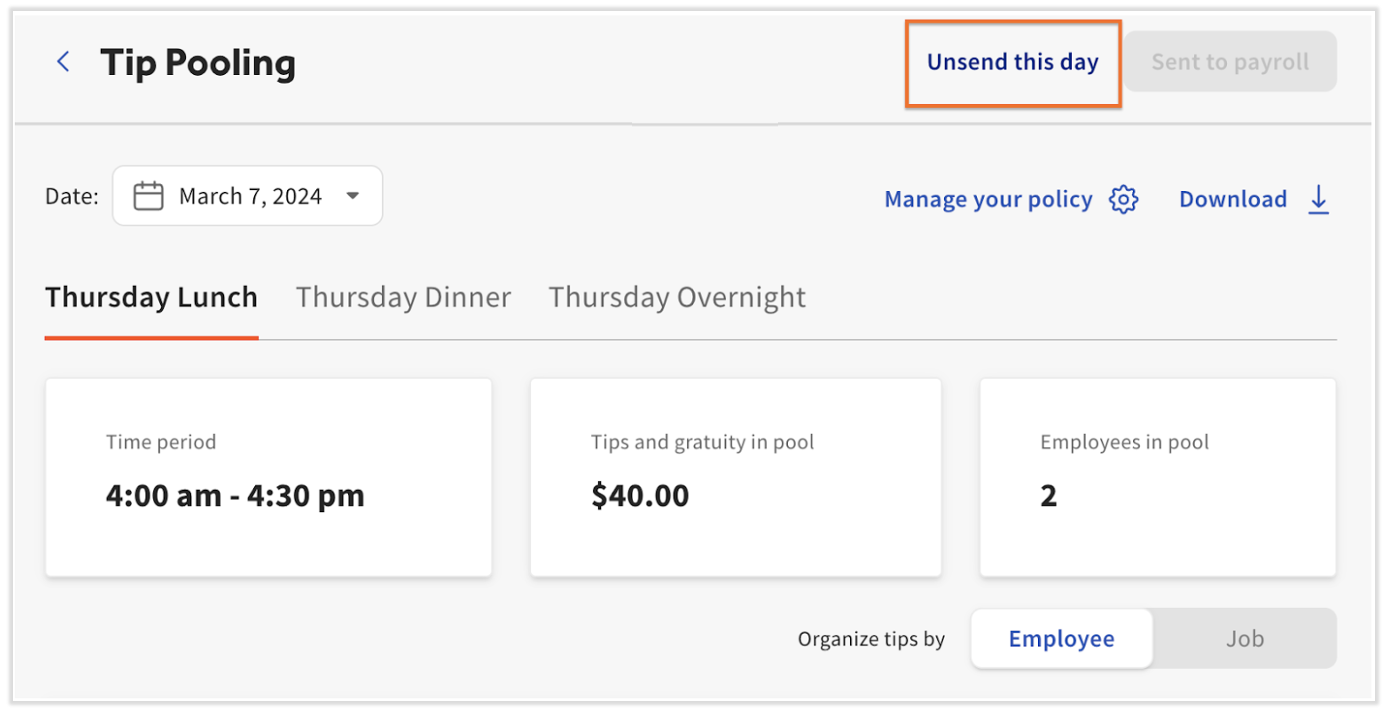
This action does two things:
- It returns the selected day to Ready status. You can now edit employee time entries or edit the tip policy itself before resending tips to Toast Payroll.
- It removes the tips that were posted to employee timesheets in Toast Payroll.
Important: The same restrictions apply to reverting tips as to sending tips. If payroll has been submitted, you cannot revert the tips. If timesheets have been approved or payroll has been started, follow this order:
- Reset the payroll.
- Unapprove the timesheets (if applicable).
- Revert (Unsend) the tip pool.
Once the tip pool has been corrected and resent, reapprove the timesheets and continue with payroll.
Expected outcome: The day returns to Ready status and tip amounts are removed from employee timesheets in Toast Payroll. You can now edit and resend.
Pay Cash Tips Through Toast Payroll
By following these steps, cash tips are properly claimed, recorded, and included in payroll while maintaining accurate records for restaurant deposits.
Before You Pay Pooled Cash Tips Through Payroll
Do these things one time before you start paying pooled cash tips through payroll.
- Identify if you have a Cash Tips Owed earning code in Toast Payroll. In Toast Payroll, navigate to any employee's profile, then to Recurring > Add+. (Learn how the new Toast Payroll navigation works by visiting Navigate Toast Payroll Within Toast Web.) Select the Earning drop-down menu to view the list of earning codes.
- Important: Do not save or add any recurring earnings on this screen—it is for viewing the list only.
- If you do not see the earning code you would like to use, fill out the New Earning Code Request form and send it to Toast Payroll using the chat button in the lower-right corner of any Toast Payroll page. Toast Payroll will let you know once it is set up and ready to use. Note: Toast Payroll is currently unavailable in Quebec. A French version of this form will be made available when the product launches in your region.
- Confirm that a cash tip rule is present on your tip pooling policy page. In Toast Web, navigate to Team > Settings > Tip pooling policy and confirm one or more tip rules have Cash tips selected as a source for all jobs that should pool cash tips, including Online Ordering and salaried personas, if applicable.
There are two options for employees to claim cash tips. Either way, employees turn in their tips to management at the end of each shift. However, the job an employee is clocked into must have the Tipped employee setting enabled in Team > Settings > Jobs in Toast Web in order to declare cash tips through either of these two options.
- Option 1: Shift Review. At the end of each shift, the employee completes their shift review and records or declares the amount of cash tips received during their shift.
- Option 2: Time entry management report. A manager or operator adds declared tips to the Time entry management report after the employee's shift has been completed. In Toast Web, navigate to Reports > Labor > Time entry management and edit the Cash tips decl. field directly on this page.
Each Night You Distribute Pooled Cash Tips
Do these things every night you are distributing pooled cash tips through payroll.
- Add collected cash tips to a cash drawer. Implement a procedure for managers or operators to make an Add Cash In Entry to a cash drawer for these cash tips. See the Update Cash Drawer Entries section of Use Cash Drawers.
- Use the Comments field to label this entry as "declared tips" for easy tracking.
- Add a cash in entry for each employee, or once for all employees.
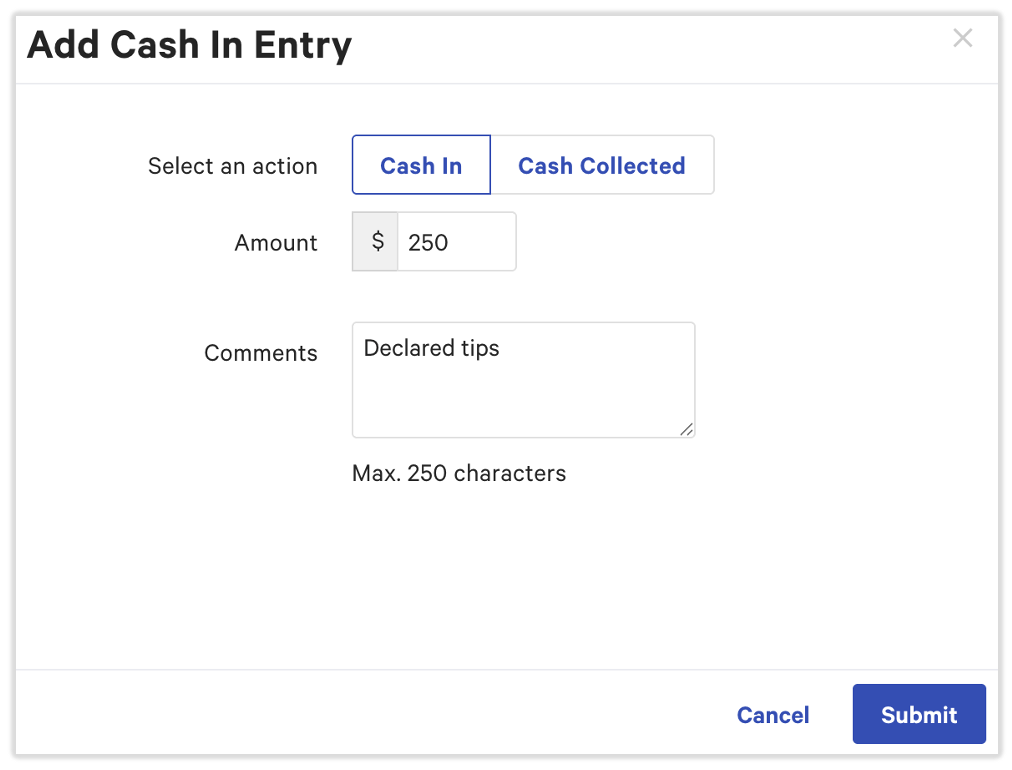
- Record cash tips for restaurant deposits. At the end of each night, reconcile each cash drawer. Confirm the balance of cash taken accurately matches tips recorded. The Cash In Entry amounts will be included in the restaurant's nightly deposit record, enabling these tips to be paid out via payroll.
Expected outcome: Pooled cash tips are recorded in Toast Payroll under the Cash Tips Owed earning code and are included on the next payroll run.
Frequently Asked Questions
Why does the Toast Payroll message say "tips need approval" when I already approved the day in Tips Manager?
The "Tip pooling days need approval" message in Toast Payroll continues to show even after you mark a day Approved in Tips Manager—the message means the tips have not been sent to Toast Payroll yet, not that you need to approve again. Approve tips is only step 1; you also have to select Send X day(s) to payroll. Open the action item in Toast Payroll, choose View Tips Management, then in Tips Manager, select the day and select Send to payroll.
Note: If a day has $0 in tips, then Payroll will say that day has not been approved.
Also asked as:
-
- It says my tips need approval but I have already approved?
- Tips show as approved but do not show in payroll?
My tips show "Approved" in Tips Manager, but the Approve button in Toast Payroll is grayed out. What now?
If the Approve button in Toast Payroll is grayed out, the tips cannot be added to that payroll run anymore. The most common causes are: payroll has already been started or posted for that date range, the timesheets for that date are already approved, or one of the employees in the pool is in another pay group whose payroll already ran. If payroll has not started, refresh the page. If payroll has started and you need to revert, follow the order in Revert Sent Tips.
I cannot send tips because of a mapping error, but every employee shows as mapped. Why?
If every employee shows as mapped but the day still will not send, the cause is usually that a job in your tip pool has no eligible employee clocked in to receive its share of tips. The most common offender is the Default Online Ordering "employee," which collects tips for online orders but is not a real recipient. Adjust your tip pooling policy so those tips redistribute to a job that was actually clocked in during that shift.
Alternatively, if those tips should stay in-house, then you can zero out the non-cash tips for that job. To do this, follow the instructions below:
-
- In Toast Web, navigate to Reports > Labor > Tip Management
- Select the day (not the checkbox) with the Ready status to review the day's tip amounts and calculations.
- Select the impacted employee to review their tip amounts and calculations.
- Under the Tips and Gratuities Earned from Pooling section, find "Additional tips (non-cash) earned"
- Enter a negative amount [For example: -1.99] to zero out the non-cash tips
- Try sending tips to payroll
Also asked as:
-
- I can't send tips because of mapping but I can't figure out why?
What if I just signed up for Tips Manager and want to disperse tips from a previous pay period?
If you just signed up for Tips Manager and have tips from a pay period whose payroll is already submitted, Tips Manager cannot attach those tips to the completed payroll. The tip money stays in-house at your restaurant—it has not been lost. To pay it out, add the missed amounts manually to your next payroll run, or run an off-cycle payroll. See Send Tips From a Previous Pay Period for the full procedure.
Also asked as:
-
- Where were the tips going?
- Have we been paid any tips from when we started until now?
Can I edit a tip pool after I have already sent it to payroll?
If payroll has not yet been submitted, you can edit an already sent tip pool by reverting it first. In Tips Manager, select the day and select Unsend this day. This brings the day back to Ready status and removes the tips from employee timesheets in Toast Payroll. Make your changes, then reapprove and resend. If payroll has been posted, you cannot revert—the tips are locked into that payroll run.
Also asked as:
-
- Once you send tips to payroll, but payroll isn't submitted, can you edit the tip pooling?
Why don't the tips in Toast match what was sent over to payroll?
A mismatch between the tips you see in Toast Web and the tips that were posted to payroll usually points to one of these causes: the day was not fully approved before payroll started, an employee in the pool is in a different pay group, an employee had an open shift, or the tip pooling policy excluded a job that was clocked in. To diagnose the discrepancy, compare the Tips and gratuity in pools total in the Tip management report against the Tips and Gratuities lines in the Toast Web Sales summary report (Reports > Sales > Sales Summary). For a step-by-step troubleshooting walk-through, see Get Help With Tip Discrepancies in Reporting.
Are credit card tips automatically added to each employee's paycheck?
Credit card tips are added to an employee's paycheck only after you approve and send each day's tips from Tips Manager to Toast Payroll. Approving tips alone does not move them to payroll—you also have to select Send X day(s) to payroll. Once sent, the credit card tip amounts post to each employee's timesheet in Toast Payroll under the appropriate Tips earning code (typically Tips Owed for tips paid through payroll).
Also asked as:
-
- Are credit tips paid out by me automatically added into each employee's checks?
Before You Contact Customer Care
Some Tips Manager + Toast Payroll issues genuinely require Customer Care because the resolution requires back-end account changes you cannot make yourself. Contact Customer Care if:
- The Send to payroll button does not appear at all for a location, even though Tips Manager subscription and tip pooling policy are set up. The integration may need to be enabled on the back end.
- Tips Manager shows Approved but the Approve button in Toast Payroll is grayed out and unclickable, and the issue persists after refresh and after confirming payroll has not started. The tip management setup for the location may be incomplete on the back end.
- You see an error stating "Your user profile is not connected to your Toast Payroll profile." Toast Payroll: Map Profiles for Tips Manager Onboarding first. If the error persists, contact Customer Care.
When you contact Customer Care, gather this information first to speed up resolution:
- Your Toast Payroll company code and POS access code
- The exact date range of the tips you are trying to send
- The location name (as it appears in both Toast Web and Toast Payroll)
- The exact wording of any error message
- A screenshot of the Tip management report showing the day's status
- A list of the troubleshooting steps you have already tried (from the Quick Fix table above)
You can contact Toast Payroll Customer Care in the following ways:
- Toast Payroll phone number: (312) 252-7341
- Start a chat with a Toast Payroll agent by selecting the blue chat button in the lower-right corner of any Toast Payroll page.
- Toast Payroll Customer Care hours are Monday - Friday, 8:30 a.m. - 10:00 p.m. ET.
Related Articles
- Toast Payroll: Manage and Integrate Tips
- Get Started With Toast Tips Manager
- Get Help With Tips Not Sending to Payroll
- Get Help With Toast Tips Manager
- Toast Tips Manager Reporting
This content is for informational purposes and is not intended as legal, tax, HR, or any other professional advice. Please contact an attorney or other professional for advice.