Nómina Toast: Revisar los informes de nómina
Última actualización: 15 oct 2026, 12:08 p.m.
- Buscar de informes de nómina
- Resumen del informe: gráfico
- Recursos adicionales
Buscar informes de nómina
Nota: Estos informes están disponibles solo en Nómina Toast y no se pueden encontrar en Toast Web.
Buscar informes de nómina mientras se ejecuta Nómina
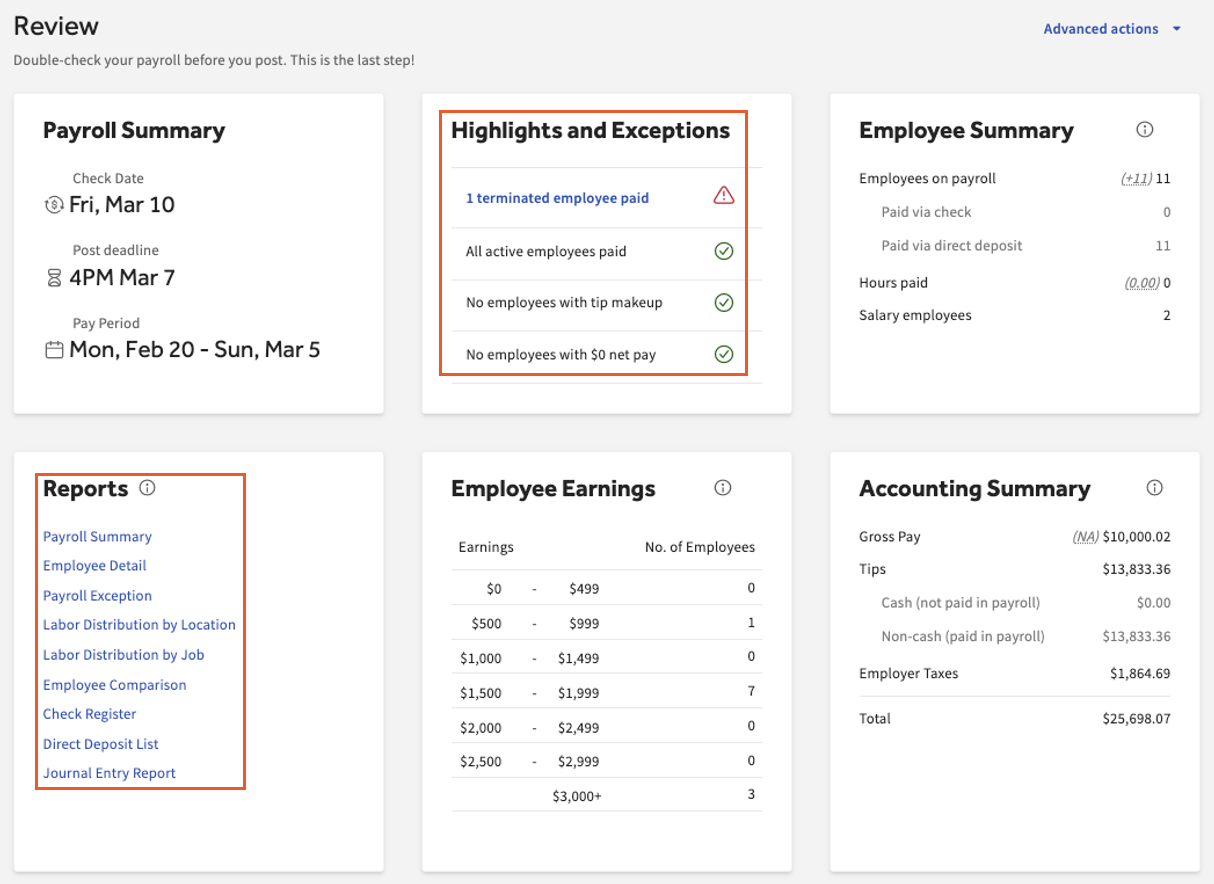
- Después de seleccionar Siguiente en el paso Ganancias del empleado, llegarás al paso Revisar y enviar. Desplázate hacia abajo para localizar el mosaico llamado Informes. Puedes ver estos informes antes de seleccionar Enviar nómina.
- Además, se recomienda revisar el mosaico Aspectos destacados y excepciones en este momento antes de enviar la nómina. Puedes seleccionar un rubro en azul para revisar. Por ejemplo, seleccionar 1 empleado despedido en el ejemplo a continuación te ofrecerá más detalles.
Buscar informes de nómina después de enviar la nómina
- Una vez enviada la nómina, los informes aparecerán nuevamente en la parte inferior de la página final.
- Puedes regresar a esta página en cualquier momento iniciando sesión en payroll.toasttab.com y yendo a Nómina > Pestaña Nóminas anteriores > Ver. (Cuando los menús de navegación de Toast Web y Nómina Toast sean visibles, selecciona Nómina en el submenú de navegación de Nómina Toast. Si no ves el submenú Nómina Toast, al seleccionar Nómina en el menú de navegación de Toast Web, se expandirá). Dependiendo de si esta nómina se ha barrido o no, puedes ver el Retiro estimado de nómina o el Recibo de retiro de nómina de Toast.
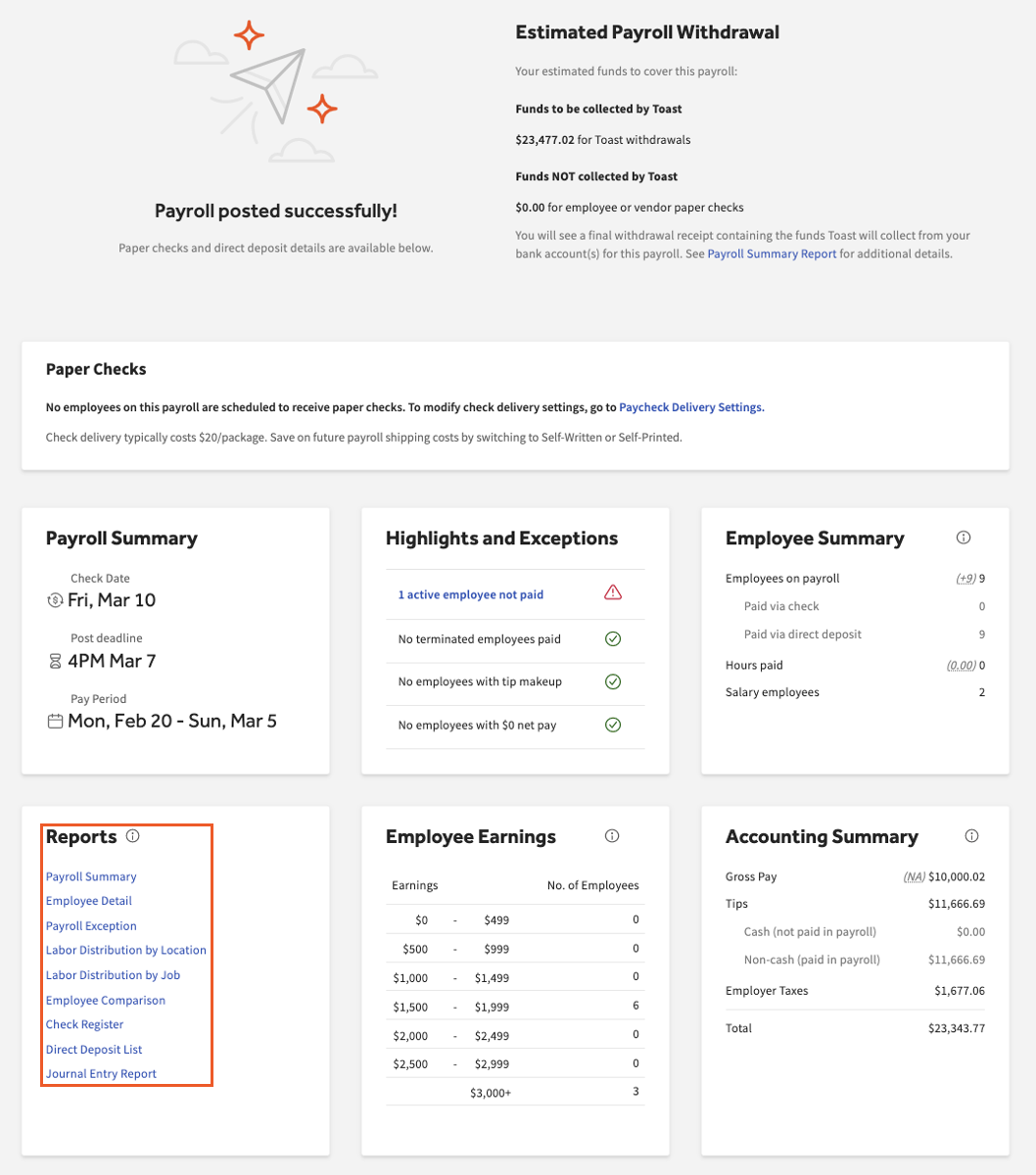
Gráfico de resumen del informe de nómina
| Informe | Descripción | Uso recomendado |
|---|---|---|
| Desglose de los totales de ingresos y deducciones, impuestos por nivel de gobierno e impuestos pagados por el empleado vs. impuestos pagados por el empleador. | Ubica el total de fondos necesarios para cubrir los impuestos de nómina y pagar a los empleados resumiendo las necesidades de efectivo y los artículos que no son débitos. | |
| Detalle del empleado | Los talones de pago y el monto neto de la cuenta de cada empleado aparecerán en una página con sus ganancias, deducciones e impuestos. Además, calcula los totales de cada ingreso, deducción o impuesto individual. | Vea rápidamente el pago neto de cada empleado o encuentre cálculos rápidos indicados por un borde punteado. Compara todos los talones de pago a la vez y verifica la exactitud de la nómina. Usa este informe antes de seleccionar Enviar nómina. |
| Excepción de nómina | Busca horas extras, empleados no pagados en la nómina, atrasos, compensación de propinas, empleados despedidos cobrando y más. | Revisa este informe antes de seleccionar Enviar nómina. Muchas veces, esto detectará lo que podría haber sido un posible error.
La tabla Brutas por encima del umbral indica a los empleados que recibieron salarios superiores a un monto establecido por tu negocio. Toast puede cambiar este monto si lo solicitas. |
| Distribución de mano de obra por ubicación | Los montos de ganancias, deducciones, impuestos y pagos netos individuales totalizados y ordenados por ubicación. | En una empresa con varias ubicaciones, puedes encontrar similitudes o diferencias en los fondos de nómina que se distribuyen a cada ubicación. |
| Distribución de mano de obra por tarea | De manera similar a los dos informes anteriores, se incluyen las ganancias, las deducciones, los impuestos y el pago neto por trabajo y por ubicación. | Encuentra el total de gastos de nómina de una tarea específica. Por ejemplo, mira si los bartenders ganan significativamente más que los meseros por período de pago. |
| Comparación de empleados | Informe lado a lado de horas de empleados y pagos brutos de la nómina actual en comparación con la nómina anterior. Se filtra por el cambio en el pago bruto. | Busca un empleado que haya trabajado más horas últimamente o que haya recibido menos ingresos. Con el filtro predeterminado, los empleados en la parte superior pueden necesitar más atención. |
| Registro de cheques | Detalles de los cheques para empleados y proveedores, incluidos números de cheque y montos brutos y netos por empleado y proveedor para cheques en papel. | Verifica la exactitud de los pagos de embargo. Consulta los cheques en papel (en vivo) de los empleados que se distribuirán en esta nómina. |
| Lista de depósitos directos | Un registro de los empleados que reciben depósito directo de esta nómina con montos netos y totales. | Encuentra fácilmente un desglose de cada empleado que recibe un depósito directo y el monto neto que recibirá. |
| Informe de asientos contables | Abre el informe de LM estándar por niveles, que es un registro de las transacciones de nómina del negocio. | El uso de códigos de LM puede ayudar a aumentar la eficiencia financiera y tomar el control de los costos de nómina. Consejo profesional: Si tu empresa utiliza QuickBooks Online, consulta la función de sincronización de contabilidad. |
Recursos adicionales para informes de nómina
¿Aún no encuentras un informe con la información que necesitas? Consulta Nómina Toast: Optimiza la biblioteca de informes para ver pasos para crear un informe personalizado o Nómina Toast: Revisa los informes comunes de nómina, donde encontrarás una lista de los informes populares de Nómina Toast.
Este contenido se publica con fines informativos y no tiene como propósito brindar asesoramiento legal, fiscal, de recursos humanos ni ningún otro tipo de recomendación profesional. Ponte en contacto con un abogado u otro profesional para recibir asesoramiento.