Toast Local FAQ
Last updated: Oct 8, 2026, 12:40 PM
Find answers to your frequently asked questions about the Toast Local mobile app.
Access thousands of potential new guests and give regulars easy reordering at their fingertips with our mobile ordering app for pickup or contactless delivery, commission-free.
Use the buttons below to download Toast Local on your device and experience the app from your guest's perspective.
Download on the App Store Get it on Google Play
Toast Local General FAQ
- Is Toast Local the same thing as Toast Takeout?
- Is the Toast Local mobile app available on Android?
- Why is my restaurant listed here when I’m not on Toast POS?
Is Toast Local the same thing as Toast Takeout?
Is the Toast Local mobile app available on Android?
Why is my restaurant listed here when I’m not on Toast POS?
As part of their strategic partnership, Resy and Toast plan to develop exciting product features for their customers as they integrate to connect two data-rich platforms that power thousands of restaurants across the U.S. First, Resy and Toast plan to make reservations bookable within the Toast Local app, broadening visibility for both Resy and Toast’s customers. Find out more information here (external link).
Toast Local Setup FAQ
How do I enable or disable Toast Local now that I have Online Ordering?
-
- Once subscribed to Online Ordering via the Digital Storefront Suite, log in to Toast Web and navigate to Takeout & delivery > Toast order sources > Toast Local App (formerly Toast Takeout).
- Under List my restaurant on the Toast Local app, select whether to list your restaurant on the app.
- Save and publish your changes.
- In this area of Toast Web for Toast Local, you can also set up or update the following:
- Restaurant List Image
- This is the image that will show within the Toast Local app, and here are the recommended settings for that image:
-
-
- High Res Image (Particularly something from their menu)
- Minimum 350 pixels in either Square or Landscape Orientation
- Pro Tip: Include a photo of a signature item or an array of popular items
-
-
- This is the image that will show within the Toast Local app, and here are the recommended settings for that image:
- Restaurant List Display Name
- Recommend name of the location goes here, e.g., Bob's Burger - Nashville
- Restaurant Description
- Currently, it can be left blank
- Cuisine Type
- Select from the dropdown menu the Cuisine Type for the location. Ex. Bob's Burger - Nashville is a Burger Joint , select Burgers.
- If one doesn’t exist or fit the location's style, please feel free to create one using Enter New Cuisine Type
- Restaurant List Image
Once all selections and/or edits have been made, save and publish your changes.
How will Toast Local impact my POS workflow?
Don't worry, Toast Local won't impact your POS workflows! Toast Local shares the same back-of-house order workflow as Toast Online Ordering. Incoming orders will not pop up on your main terminal screen and disrupt your work when you are trying to submit an order or anything else. If you have the system configured to notify you of an online order, the notification will pop up in the top left-hand corner that you must open up. Otherwise, if orders are set to fire directly to kitchen printers, then the orders will print out automatically and require no extra lift from you or the device.
What do we have to pay Toast to be listed on Toast Local?
The only card fees we charge you for Toast Local are the same as our current online ordering rates. So, you're paying the agreed-upon credit card keyed-in transaction rate as the only fee associated with the Toast Local feature.
Is the rate for Toast Local going to increase on us in the future?
We launched Toast Local to help our customers reduce the fees that you pay to other aggregators in the digital ordering space. Our goal is to be an alternative to current service providers on the market that ask for higher fees and minimize your profits. Remember that it still costs us money to operate Toast Local! We currently have no plans to charge any fees associated with Toast Local.
Where did you get the current image of my restaurant for the Toast Local app?
The current image for your restaurant on Toast Local is a free stock photo placeholder. You can change the image used for the Toast Local app by following the instructions in this article: Get Started With Toast Local.
What restaurants show on the Toast Local app?
Any restaurant with the Digital Storefront suite that has Toast Local enabled and is within 10 miles of the guest's address will be shown on the Toast Local app. The guest will see any restaurant (open or closed) that is within 10 miles, but will see open locations that are closest first. Recently visited restaurants will show up in the Your Restaurants section of the homepage.
How do I update my restaurant name on Toast Local?
You can change your restaurant name on Toast Local in Toast Web. First, navigate to the Takeout & delivery > Toast order sources > Restaurant info.
How is the order in which restaurants are listed on Toast Local determined?
Restaurants on the Toast Local app are listed based on their distance from the guest, with the restaurants closest to the guest appearing first. The Your Restaurants section includes restaurants that guests recently visited.
Does a guest use the same login information for online ordering and Toast Local?
Yes! Your guests can use the same username and password when ordering from your online ordering website or on the Toast Local app.
Is Toast Local available in Australia, Canada, Ireland, and the UK?
No. The Toast Local mobile app is not available in Australia, Canada, Ireland, or the United Kingdom (UK).
While the consumer-facing Toast Local app cannot be used outside of the United States, international restaurants can still accept standard takeout and pickup orders directly through their in-store Toast POS terminal.
Toast Local Orders FAQ
How do I know if Toast Local orders have been placed on the POS?
If a Toast Local order comes through, it'll do either one of two things, depending on how you've configured your system. In Toast Web, you can configure online ordering notifications by navigating to Front of house > POS notifications > Notification setup.
- A receipt will automatically print from the printer. The order is paid for and ready to be made.
- A notification will pop up at the top left corner of any tablet or terminal. You must select it to review and approve the order. It will then be directly fired to the kitchen printer.
How do I handle an increased order volume if I join Toast Local?
You can throttle Toast Local orders or turn them on/off throughout the day from your devices as well as Toast Web. Please review this Support Center article for more information: Manage Online Order Volume (Delaying/Snoozing Orders).
What happens if I didn't see the Takeout order and approve it on the POS?
Sometimes when Toast Local orders are not set to be printed out directly, they can be missed - especially during busy rush hours. If that's the case, then don't sweat it. Your guest is always notified via email or text five minutes after an order has been placed and there's been no action taken by your restaurant yet. In that communication, guests are encouraged to call your restaurant if there is a pressing time frame. You can reduce the risk of missing order notifications if you adjust your settings to print those tickets automatically.
The Toast Local app lists a current wait time for a food order. Can I change that?
To change and manage your quote times for Toast Local (and all online orders), navigate to the Takeout & delivery section in Toast. You can learn more about how to set up and configure quote times in this Support Center article on Manage Your Quote Time Strategy.
Why do two identical receipts print out for Toast Local orders?
Toast Local receipts print out in pairs so that one can be attached to the to-go bag and the other can be kept in-house for reference. You can customize these printing behaviors in Toast Web. For more information, see Customize Receipt Printing for Online Orders.
Do I have to ask guests to sign a receipt or show an ID on their way out when they use Toast Local?
Guest signatures or ID verification on Toast Local orders is completely dependent on your restaurant's preferences. Since the order is already paid for, technically, a signature is not required to make the credit card transaction valid. Most restaurants don't choose to check for identification, but if you feel the need to, it is your right to ask. Guests have been informed via terms of service and FAQ that they should always carry their ID with them to pick up their orders. Perhaps your restaurant would like to take additional protection measures by signing or verifying ID, but that is totally up to you!
A Toast Local order has already been placed, but the guest called in to adjust the order items - what do I do?
Yes, you can modify Toast marketplace facilitator orders on the POS. Third-party ordering marketplace facilitator orders like from DoorDash and Uber Eats will continue to be locked on the POS and cannot be edited.
When editing things on the order that do not change the price (for example changing a server), you can continue to make these changes as you would on any order. The order’s tax will continue to be tagged as marketplace facilitator tax in your reporting.
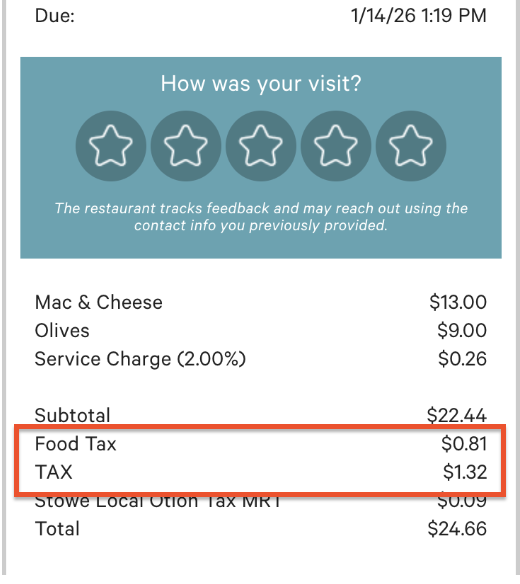
When editing things on the order that do change the price (for example removing or adding an item), the new items will continue to be tagged as marketplace facilitator tax in your reporting. This may result in multiple tax line items on the receipt as seen in the image below reflecting the original tax charged, and the tax charged for the updated item.
What happens when the guest changes the fulfillment method (pickup or delivery) or scheduled time before placing a Toast Local order?
When a Toast Local guest changes their order's scheduled time or fulfillment method, the cart will update to reflect the change. For example, lunch special items will be removed from the cart if the new scheduled time is not within the pre-set lunch period.
Can guests place curbside pickup orders on Toast Local?
Yes - if you've enabled it in Toast Web, your guests can use the curbside pickup feature on the Toast Local app. When placing an order through Toast Local, guests can request it be brought directly to their car. All a guest needs to do is select Bring my order to my car the enter the Make/Model and Vehicle color when placing an order. For more information, see Get Started With Curbside Pickup for Online Orders.
Toast Local Payments FAQ
- Do promotions work on Toast Local?
- How does the refund for Toast-funded rewards work?
- If an order needs to be refunded, how does that get handled?
- What types of payments can I accept using Toast Local?
- Can I change the tip percentages or require a default tip selection on the Toast Local app?
- Who receives the tip on a Toast-Takeout-Reward payment?
Do promotions work on Toast Local?
Discounts configured for Toast Online Ordering will also be valid on Toast Local. Guests can redeem these discounts by entering a promo code on the checkout screen of the Toast Local app.
Toast also occasionally funds promotions for orders placed through Toast Local to drive user adoption of the product. Guests redeem Toast-funded promotions by entering a promo code at the checkout screen of the Toast Local app. Note that these promo codes will work ONLY on Toast Local and can only be redeemed once per guest account. No additional action is required by the restaurants for the code to be redeemed. Toast facilitates these promo codes with a payment option called Toast-Takeout-Reward. The payment option will be visible in your Toast POS but never needs to be used in-store.
How does the refund for Toast-funded rewards work?
Toast refunds the redeemed promo codes on a monthly basis via ACH (direct deposit). For example, all Toast Local Reward payments redeemed in September are refunded by Toast in October. These numbers can be viewed by you in three places:
- Credit Card Statement (Other Account Activity > TakeOut Reimbursement - [MONTH])
- Daily Credit Card Activity Report (Adjustment > TakeOut Reimbursement - [MONTH])
- Sales Report (Toast Local Reward)
All of these numbers should match up.
The guest will submit an order via your Toast Online Ordering page, the Toast Local app, and/or when they are using the mobile payments feature - the promo will auto-apply itself to the order. Just so you know, Toast-wide promotions cannot be removed from the system. In addition, you must refrain from trying to add this code to the check; the code will be added to an online order, Toast Local order, or mobile payment order when the guest checks out. If you try to add the code manually, the system will recognize it as an "Other Payment Option," and your restaurant will not be reimbursed.
If a Toast Local order needs to be refunded, how does that get handled?
Any order placed through your restaurant via Toast Online Ordering or the Toast Local app will be managed by you, including refunds, modifications, and cancellations. If you offer delivery through Toast Delivery Services, you must resolve delivery issues and contact Uber Eats or DoorDash Drive. You can find information on troubleshooting delivery issues in our Toast Delivery Services Troubleshooting & FAQ. Note: If Toast is classified as a Marketplace Facilitator, partial voids, tax-only refunds, and custom amount refunds are not possible.
What types of payments can I accept using Toast Local?
You can only accept credit cards, Apple Pay, and Toast gift card payments on Toast Local. Cash payments, third-party gift cards, or in-house payments are not accepted.
Note: Imported gift card numbers can't be redeemed as payment for Toast Local orders. Guests can find their Toast gift card number on your Toast Gift Card Lookup Site and use that number instead. To set up the Lookup Site for imported cards, see Check or Adjust a Gift Card Balance.
Can I change the tip percentages or require a default tip selection on the Toast Local app?
No, at this time the tip options for the Toast Local app are not customizable.
Who receives the tip on a Toast-Takeout-Reward payment?
This depends on whether or not the order was placed through Toast Delivery Services (TDS). TDS orders are delivered by Uber Eats or DoorDash Drive drivers. In this case, the tip goes to the order's delivery driver. If the order was not placed through TDS, your location receives the tip. You can confirm whether or not a Toast-Takeout-Reward payment is also a TDS order or not by using Find Check in POS or Toast Web to locate the check in question; if it is a TDS order, you'll see "Toast Delivery Services" notated on the check.
Toast Local Delivery FAQ
Does Toast Local offer delivery features?
Yes! If Toast's delivery solution is enabled in Toast Web, it will show your restaurant in the Delivery section on the Toast Local app. After a guest selects your restaurant, they'll see the delivery details when ordering.
Delivery in the Toast Local app uses the same settings you've configured for your restaurant's online ordering. To learn more about this feature, check out this Support Center article on Delivery on Toast Local.
Can a guest specify instructions on where or how to pick up their food from a delivery driver?
Yes! By selecting the Delivery option at the top of the screen once on the restaurant's page, a guest will be taken to a screen where they can update the delivery address, add a suite #, schedule an order, and add instructions for delivery under Delivery instructions.
For example, a guest can write, "Ring the doorbell when you arrive and leave the food on the porch." The driver will get the instructions when the order is placed. Both Toast Online Ordering and Toast Local will offer these options.
On the Toast Local app, Request Contactless Delivery will appear as a checkbox option if you already have delivery instructions written in the field. Checking this will add "PLEASE MAKE THIS CONTACTLESS DELIVERY" to the end of your delivery instructions.
Does Toast Delivery Services work for orders placed through the Toast Local app?
Yes, all delivery options available for Toast Online Ordering will also be available for orders placed on the Toast Local app.
Toast Local Availability FAQ
A guest placed a Toast Local order during hours when we were closed - what do I do?
Your restaurant is in charge of the refund in this type of situation since it's your responsibility to set your online order hours correctly. If a diner contacts Toast Local Support regarding an order placed while your restaurant is closed, the Toast Local Care team may issue a refund or void the payment after verifying your restaurant was closed. Verification may include reviewing time card entries to see if any employees were clocked in for the time period or social media posts stating the restaurant may be closed. If a guest is refunded or their payment is voided, you will see a case listed in My Customer Care Cases on Support Center regarding the order.
If you want more details on double-checking your restaurant's online ordering hours, check out this Support Center article on Manage Your Takeout and Delivery Schedule.
Can I have a different schedule for online ordering and Toast Local?
No. Currently, different schedules for Toast Online Ordering and Toast Local are not supported.
Can I turn off online ordering on Toast Local if we're busy?
Yes, you can turn off all online ordering on the Toast Now app, or on Toast Web by toggling it off in the Online Ordering section of the Takeout & delivery page. Alternatively, you can snooze online orders temporarily using the online ordering throttling tool. For more information, check out this Support Center article: Manage Online Order Volume (Delaying/Snoozing Orders)
Toast Local Menu FAQ
- NEW! Can guests redeem Restaurant Funded Offers (RFOs) on Android?
Can I have different menus for online ordering and the Toast Local app?
No, at this time different menus for online ordering and the Toast Local app are not supported.
How does the Popular Items feature work on the Toast Local app?
When a guest is viewing your restaurant's page on the Toast Local app, a list of "Popular Items" will appear, enticing guests to try items that are most frequently ordered among your guests. Items shown in this section are based on 30-day order activity. This is a great feature to automatically showcase what you do best based directly on customer ordering trends. To learn more, see Edit Featured Items and Upsells.
How does the Offers feature work in the Toast Local app?
In the Toast Local app, you can incentivize your guests to order highlighted items by creating Offers and setting up discount codes. Learn more about how to set up this feature in this Support Center article, Set Up a Discount Code for Online Orders.
Can guests redeem Restaurant Funded Offers (RFOs) on Android?
Yes. Restaurant Funded Offers (RFOs) — the Offers you configure above — can now be redeemed by Android guests both on-premise and off-premise through the Toast Local app:
-
-
- On-premise: Android guests dining at your restaurant can apply RFOs at the point of sale using the Toast Local app.
- Off-premise: Android guests can apply RFOs when placing online orders through the Toast Local app.
-
Both redemption types were previously available only to iOS guests; Android now has full feature parity.
Are Toast Local menus searchable for guests?
Yes, guests can search your menu on the Toast Local app by typing in specific menu items or keywords.
Toast Local Reporting FAQ
After I approve the Toast Local order, where do I go to find the check?
You can find checks from Toast Local orders in Toast Web using the steps below.
- Navigate to Finance > Related > Settings > Find checks & issue refund.
- Find the check by check number, ID, customer info, credit card, or by a more advanced search using the tabs.
How do I see reporting on Toast Local orders?
You can see all Toast Local takeout orders in the Sales Summary report on Toast Web. Follow the steps below to apply the filters needed to see the data you're looking for.
- Navigate to Reports > Sales > Sales summary.
- Select More from the list of filters and select Source from the drop-down that opens.
- Open the Source drop-down that appears on the page, and select Toast Pickup App.
- The report is now filtered to only show takeout orders.
Toast Local with Loyalty/Other FAQ
- Where can guests see their points balance in the Toast Local app?
- Is there a Toast Local FAQ for guests?
Which restaurants are eligible for Loyalty on Toast Local?
To be an eligible restaurant for Loyalty on Toast Local, a restaurant must be listed on Toast Local, use Toast Loyalty (through the Marketing Essentials suite), and have Toast Online Ordering enabled within the module. To learn more about Toast Loyalty, read this Support Center article: Get Started With Toast Loyalty.
How do restaurants disable Loyalty on Toast Local?
Loyalty can be disabled on Toast Local by disabling Loyalty for online ordering in Toast Web. The following workflow can be used to disable Loyalty for online ordering:
- Navigate to Marketing > Loyalty > Loyalty settings.
- Navigate to the Channels tab to customize your loyalty settings on Toast Local.
- Save and publish your changes.
How will my guests know if they earned points with Toast Loyalty?
When guests have the Toast Local app installed and they are logged in to their account, they will receive a push notification when they make a payment on an order and have earned points. Note that if a guest uses different emails or accounts for Toast Local and Toast Loyalty, push notifications will not show up for the guest as a result. If guests would like to disable push notifications for Toast Local, they need to do so via their phone's settings.
Where can guests see their points balance in the Toast Local app?
Guests enrolled in your loyalty program can check their points balance in the Rewards Hub in the Toast Local app. To do this, a guest opens the Toast Local app, selects the Rewards Hub, and then selects your restaurant from the list of locations. Their current points balance for that location is displayed on the listing.
Note: The Rewards Hub is available on iOS only at this time.
How do guests log in to their accounts when ordering through Toast Local?
Guests will be able to create and log in to their Toast Local account once they are ready to check out with a mobile number (not an email address). Once a mobile number is entered, guests will then receive a one-time SMS code to enter to complete setup and log in.
Can guests use birthday rewards on Toast Local orders?
Yes, if your location has birthday rewards configured, guests can redeem their rewards through Toast Local.
Guests enrolled in one or more Toast loyalty programs can now see all their available birthday rewards in one place using Birthday Hub in the Toast Local app. Note: Birthday Hub only surfaces Toast-managed loyalty rewards.
Does my online ordering Spotlight feature show on Toast Local?
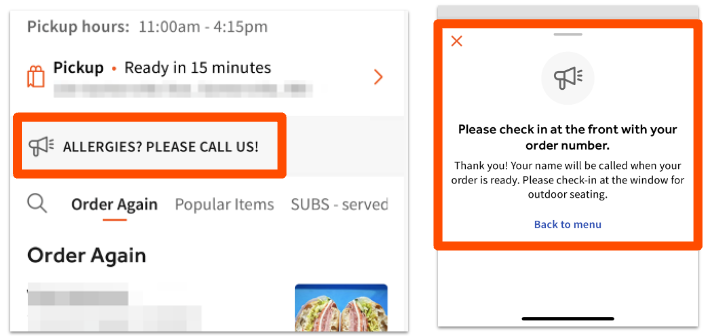
Yes, the online ordering Spotlight feature will be displayed on iOS devices in the Toast Local app. Examples below:
Is there a Toast Local FAQ for guests?
Yes, guests can visit the Toast Local Help Center.