xtraCHEF 101
Last updated: Jul 7, 2026, 4:11 PM
Looking for a live training experience with a Toast Training Expert? Sign up for a live Toast Classroom session to help you set-up and get started with First Steps with xtraCHEF! Select the button below to sign up.
Toast Classroom - Get Started with Toast xtraCHEF
What Is xtraCHEF?
Depending on your needs, xtraCHEF is available in two tiers, Essentials (formerly Lite) and Pro. In addition to streamlining your back-office accounting and operations, the full suite of xtraCHEF features allows you to use line items extracted from your supplier invoices as products in advanced food-cost reporting, recipe creation, and inventory management.
| What's Included | Essentials | Pro |
|---|---|---|
|
|
| |
| Sync (Accounting Integrations) |
|
|
|
|
| |
|
|
| |
|
|
| |
|
|
| |
|
|
| |
|
|
|


Don’t use xtraCHEF yet? Navigate to Toast Shop and sign up for a demo!
Note: This product is exclusively available in the US and is not available for customers in Australia, Canada, Ireland, or the UK.
How Does xtraCHEF Work?
xtraCHEF’s artificial intelligence and machine learning capture your purchases from invoices, pull sales from Toast, and automatically prepare reports to track performance in real-time and spotlight where improvements can be made.
If you are a Pro user, you can take xtraCHEF’s reporting capabilities even further by utilizing Recipe and Inventory functions. By digitizing your products and creating recipes, xtraCHEF can present you to-the-cent prime costs and, when combined with inventory management, allows you to quickly identify where waste, theft, breakage, and shrinkage are coming from.
The result is both an operational tool, streamlining your back office and saving you time, and a financial tool to keep your finger on the pulse of your business. The infographic below highlights how all of these features and functions tie together.
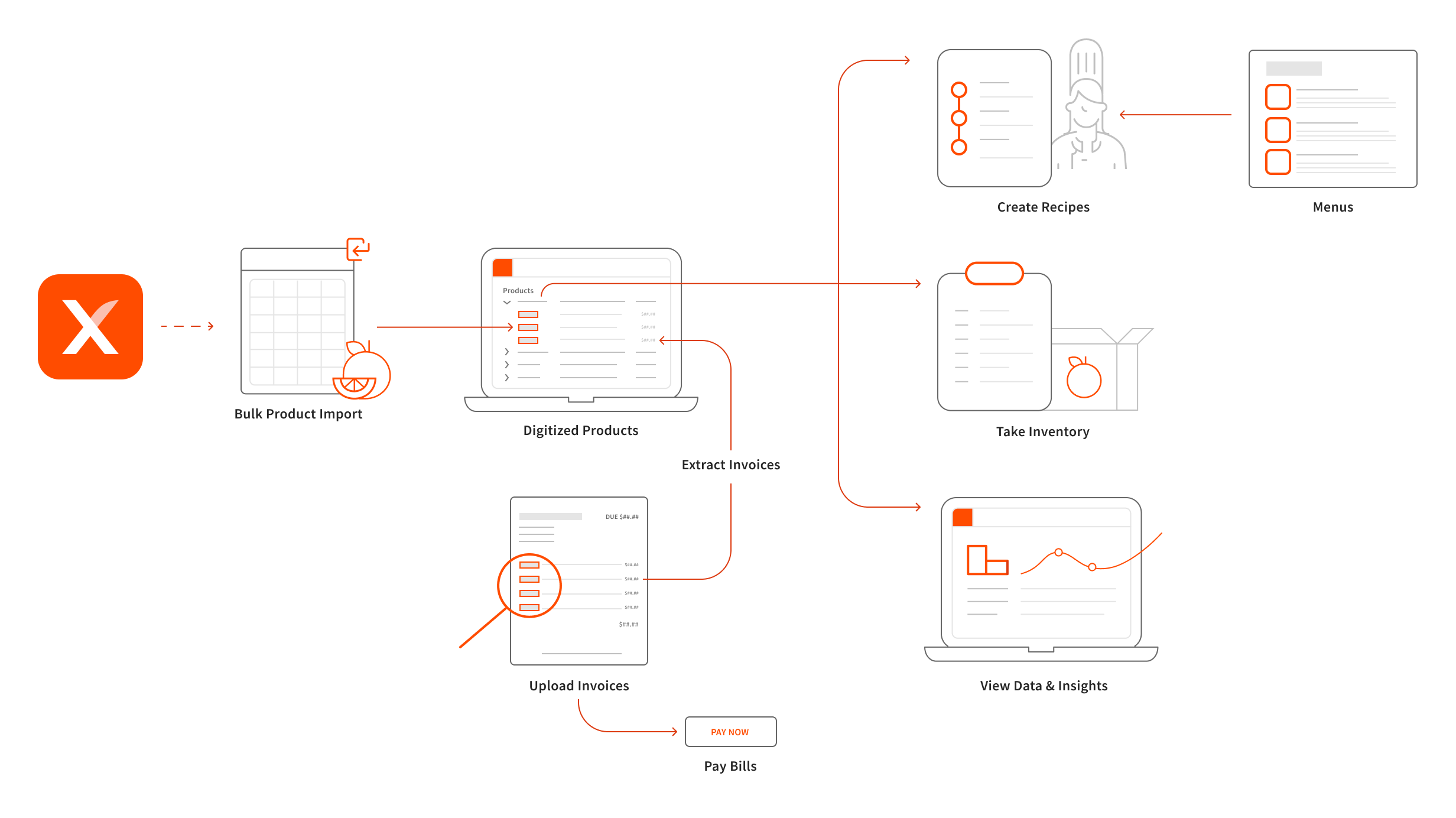
Let’s recap! What can xtraCHEF do for you?
- Digitize your invoices and automate your accounts payable
- View data and insights on your profit and spending
- Create recipes and see your plate costs (Pro-only)
- Take inventory and learn what you need to order and when (Pro-only)
- View advanced analytics on profit, margins, and inventory depletion (Pro-only)
Get Started With xtraCHEF
Ready to get started with xtraCHEF? Consider visiting our Getting Started with xtraCHEF page in addition to the recommended steps below.
- Kick Off Onboarding and Account Configuration: Kick-off onboarding with your Onboarding Consultant. Then, begin configuring your account by integrating with accounting software, syncing with Toast Web and Toast Payroll, and uploading invoices!
- Add your Inventory Items and Ingredients (Pro): Creating Products will build a list of your inventory items and ingredients in xtraCHEF. You can do this 1-by-1 or by importing an existing list into your account! This is a necessary step to begin taking inventory or creating recipes in xtraCHEF.
- For more detailed instructions on adding your Products to xtraCHEF, consider reviewing our articles titled, xtraCHEF: What are Products? and xtraCHEF: How to Create Products.
- Create your Recipes (Pro): With your Products created, you can begin setting up your recipes and connecting them with your Toast Menu. This will enable you to begin tracking your margins and monitor prime cost trends based on purchasing
- For more detailed instructions on creating recipes, consider reviewing our article titled: xtraCHEF: Recipe Costing.
- Create your Inventory Count (Pro): Using your Products, you can begin building and completing inventory counts in xtraCHEF. This will enable you to take physical inventory and build out data for Inventory Analytics.
- For more detailed instructions on inventory, consider reviewing our article titled: xtraCHEF: Inventory.
- View Data and Insights: Once configured, xtraCHEF will begin populating advanced cost tracking and profit margin reporting. You can access a number of these reports to gain insight into areas of your business, such as food costs, cost of goods sold (COGS), and spending.
- If you are a Pro user, you can dive even deeper into Recipe Costing, Inventory Waste, Shrinkage, and more.