Nómina Toast: Usar la tarjeta Toast Pay Card - Guía para empleadores
Última actualización: 9 oct 2026, 2:08 p.m.
| | Para empleadores |
| Para empleados Primeros pasos con la aplicación MyToast (comienza aquí) |
- Resumen de la tarjeta Toast Pay Card
- Configurar ajustes en Nómina Toast y Toast Web
- Incorporar empleados al programa
- Tu primera nómina con Toast Pay Card y Pay Out
Resumen de la tarjeta Toast Pay Card
Terminología
La aplicación MyToast es la aplicación que permite a los empleados de restaurantes que utilizan Toast Pay Card y PayOut pedir su Pay Card, gestionar su cuenta y aceptar ofertas Toast PayOut, si corresponde.1
La Toast Pay Card es una tarjeta de débito física que los empleados pueden usar en cualquier lugar que acepte Mastercard®.
Los pagos de Toast (si los ofreces) son las ganancias que un empleado puede aceptar en su tarjeta Toast Pay Card antes del día de pago.
¿Todo listo para continuar?
Para confirmar que tu contratación esté completa, se enviará un aviso por correo electrónico con el asunto: “Te aprobaron ofrecer la tarjeta Toast Pay Card y PayOut.” Si no recibiste el correo electrónico:
- El envío del correo electrónico puede tardar hasta 5 días hábiles después de que se complete el contrato.
- Es posible que otra persona de tu organización haya recibido el correo electrónico y haya comenzado el proceso de incorporación. Ponte en contacto con la persona (propietaria o controladora) que completó el contrato para confirmar su posible recepción.
- Es posible que tengas que completar contratos adicionales. Consulta la lista de verificación de configuración en Toast Web, debajo de cada ubicación, para asegurarte de haber completado un contrato para cada entidad que también financie una nómina.
A continuación, es hora de que tú y tus empleados empiecen a configurar la tarjeta Toast Pay Card y PayOut. Aquí encontrarás cómo completar la configuración:
Configurar ajustes en Nómina Toast y Toast Web
Ajusta la configuración de desembolsos de Toast dentro de Nómina Toast
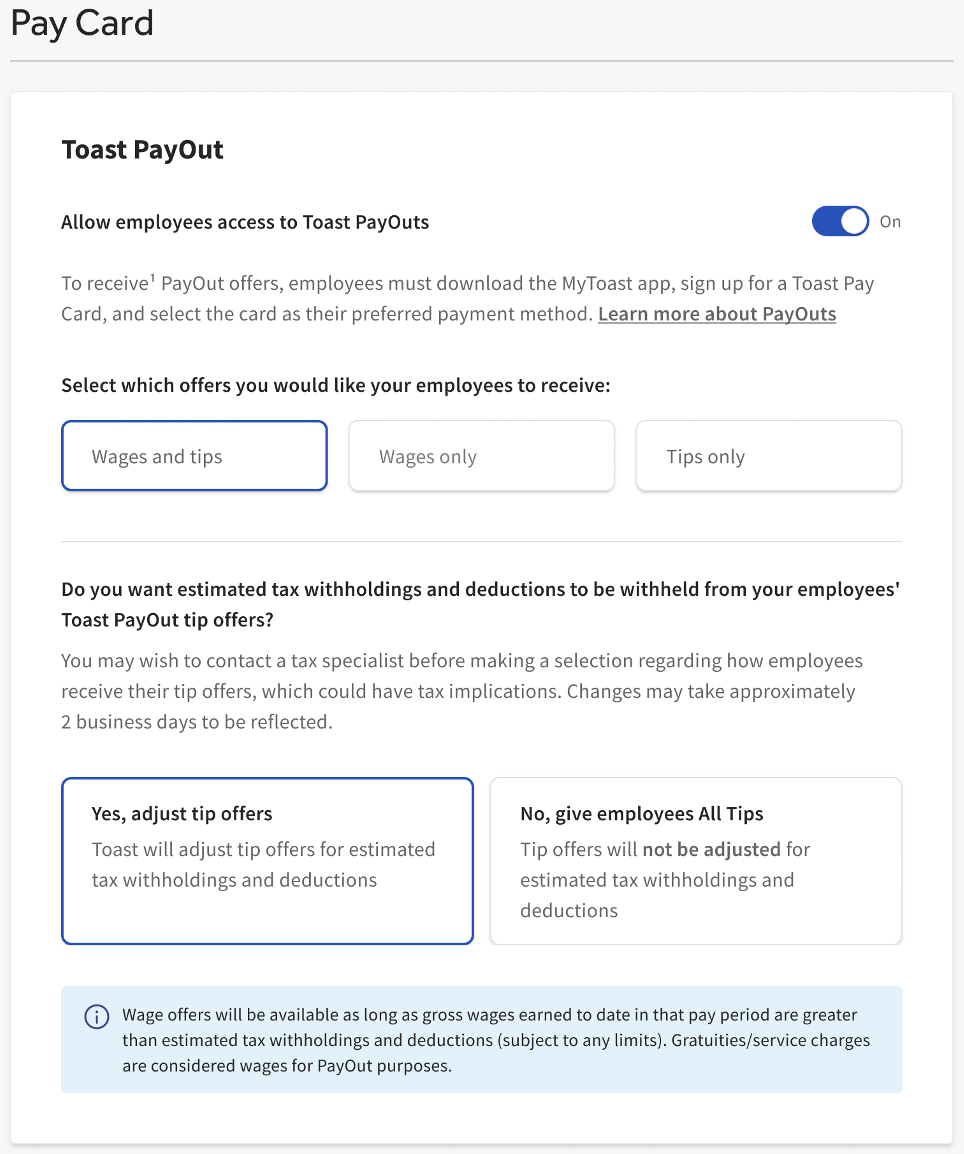
Los empleadores tienen la opción de personalizar la configuración de Toast PayOut. 2 La configuración predeterminada es ofrecer Toast PayOut que se limitan a una parte de los salarios y propinas para ayudar a contabilizar los impuestos, las retenciones y las deducciones estimados. Los empleadores pueden limitar el acceso a la función Toast PayOut para propinas y/o salarios u ofrecer Toast PayOut para propinas que no estén ajustadas en función de impuestos, retenciones y deducciones estimados. Para actualizar tu configuración, inicia sesión en Nómina Toast, ve a Configuración > Pay Card y sigue las instrucciones de la página. (Si no ves Configuración en el lado izquierdo de la pantalla, selecciona Nómina en la barra de navegación de Toast Web a la izquierda para que aparezca la barra de navegación de Nómina Toast).
Revisa la configuración de propinas en Nómina Toast
Si sincronizas las propinas directamente desde el POS, inicia sesión en payroll.toasttab.com y ve a Configuración > Toast > Propinas para confirmar que la configuración de propinas refleje cómo planeas usar Toast Pay Card y PayOut, de modo que la nómina sea precisa. (Si no ves Configuración en el lado izquierdo de la pantalla, selecciona Nómina en la barra de navegación de Toast Web a la izquierda para que aparezca la barra de navegación de Nómina Toast).
Por ejemplo, si anteriormente pagabas a los empleados en efectivo por la noche y registrabas esos montos en Nómina Toast, es probable que esas ganancias estén bajo un código de ganancia de “propinas pagadas”. Si planeas pagar propinas en la tarjeta Toast Pay Card, las propinas deberán registrarse como un código de ganancia de “propinas adeudadas”. Esto garantiza que Nómina Toast no solo registre las ganancias, sino que distribuya el saldo.
Si haces un fondo común de propinas, configura el gestor de propinas en Toast Web
Para que tus empleados puedan acceder al fondo común de propinas a través de Toast PayOut, también tendrás que comprar y configurar el Gestor de propinas de Toast. Este artículo te guiará a través de las instrucciones de configuración. Se recomienda configurar el Gestor de propinas de Toast antes o en tándem con la Toast Pay Card y PayOut.
Confirmar direcciones de correo electrónico de empleados en Toast Web
La aplicación MyToast requiere que los empleados tengan una dirección de correo electrónico válida en Toast Web. Si tú o tus empleados no están seguros de qué dirección de correo electrónico usar para iniciar sesión, estas instrucciones te indicarán cómo descargar esa información:
- Inicia sesión en Toast Web. Desde la barra de navegación de la izquierda, ve a Equipo > Empleados.
- Selecciona el botón Exportar todos los empleados. Se generará una hoja de cálculo con todas las direcciones de correo electrónico de los empleados (entre otra información) utilizadas para iniciar sesión en la aplicación MyToast.
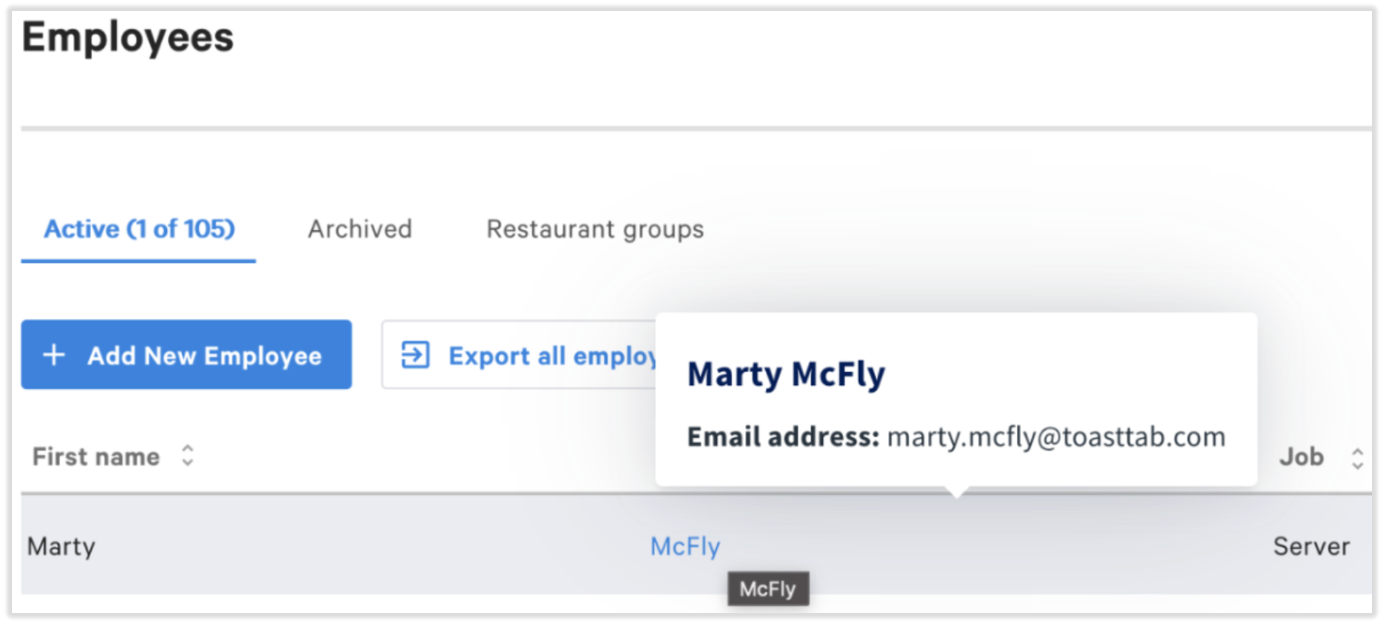
- Si solo necesitas la dirección de correo electrónico de un empleado, pasa el cursor sobre su nombre en esta página.
- Si solo necesitas la dirección de correo electrónico de un empleado, pasa el cursor sobre su nombre en esta página.
- Toast recomienda leer rápidamente esta lista de correos electrónicos en busca de cualquier error evidente, como “gmai.com” o “hotmail.co”. Si el empleado aún no aceptó su invitación a crear una cuenta, es posible que estos se corrijan desde el perfil del empleado en Toast Web siguiendo estos pasos.
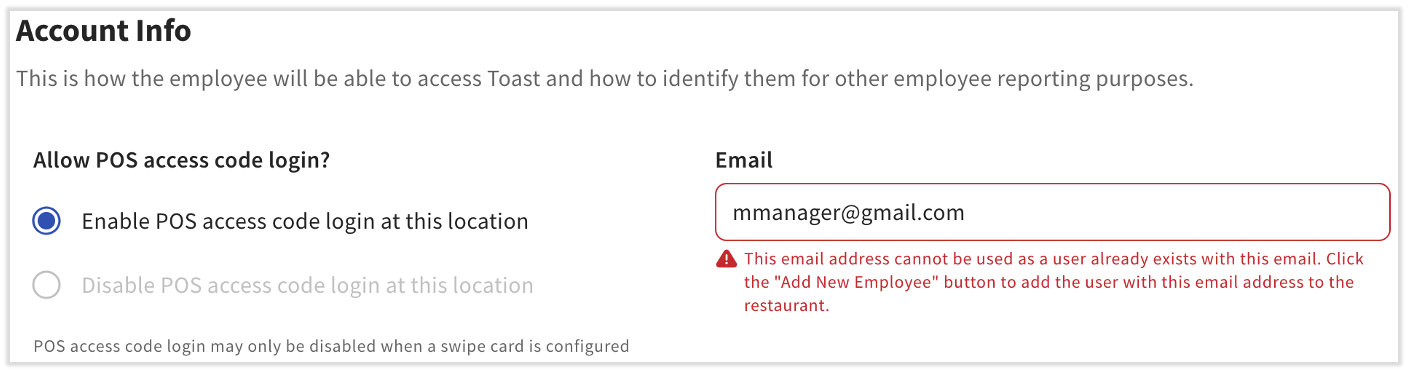
- Si vas a cambiar la dirección de correo electrónico de un empleado y recibes un mensaje de error que dice “el usuario ya existe”, vuelve a buscar otro empleado o perfil usando esta dirección de correo electrónico. Si no ves ninguno, ponte en contacto con el servicio de atención al cliente. Esto también ocurre cuando la dirección de correo electrónico de un empleado ya se usó en otro restaurante de Toast.
Incorporar empleados al programa
Enviar de información a los empleados
La información más importante se encuentra en la aplicación MyToast: Paga, donde detallamos los pasos para que los empleados pidan una tarjeta Toast Pay Card y comiencen a aceptar la función Toast PayOut, si decides ofrecerla.
Utiliza Primeros pasos con la aplicación MyToast para obtener ayuda con la descarga o el inicio de sesión en la aplicación MyToast. Una vez que los empleados reciban una tarjeta Toast Pay Card o tengan preguntas sobre el programa, envíales la guía del usuario.
Los empleados descargan la aplicación MyToast
La aplicación MyToast es obligatoria para que tus empleados pidan su tarjeta Toast Pay Card y, si corresponde, accedan a la función Toast PayOut.
Nota: A menos que el empleado haya habilitado la experiencia de inicio de sesión unificado, debe usar la dirección de correo electrónico asociada con su cuenta de POS de Toast, no con su cuenta de Nómina Toast. Aquí encontrarás detalles adicionales para solucionar problemas de inicio de sesión.
Los empleados piden su tarjeta Toast Pay Card
Una vez que inicies sesión en la aplicación MyToast, se les pedirá a los empleados que se registren y soliciten sus tarjetas Toast Pay Card. La tarjeta Toast Pay Card llega en aproximadamente 8 a 10 días hábiles a la dirección seleccionada por tus empleados durante este proceso de registro, dentro de la aplicación MyToast. No se te enviarán tarjetas para distribuir entre los empleados.
Los empleados activan y conectan/actualizan su método de pago
Cuando los empleados reciban la tarjeta, llamarán al número que aparece en el dorso para activarla.
Una vez activada, los empleados pueden actualizar su método de pago y conectar su tarjeta Toast Pay Card a Nómina Toast en la aplicación MyToast. Utiliza los recursos en el paso Enviar información al empleado que se encuentra justo arriba.
Tu primera nómina con Toast Pay Card y PayOut
- Si recién conoces Nómina Toast, tu director de proyectos se asegurará de que tus empleados se agreguen a Nómina Toast y se sincronicen tanto en el POS de Toast como en Nómina Toast. Se sincronizan los horarios de entrada y salida y se configura la cuenta para la aplicación MyToast.
- Si ya procesaste nóminas con Toast, los empleadores deben establecer una fecha en la que los empleados puedan comenzar a usar sus tarjetas Toast Pay Card como su preferencia de pago que tenga en cuenta la hora de Envío de las tarjetas Pay Card físicas.
- Cambiar a Toast Pay Card y (si se los ofreces) PayOuts MID puede requerir potencialmente entradas manuales adicionales y pasos de auditoría de nómina. Intenta cronometrar el cambio el primer día de un nuevo período de pago para lograr una transición fluida. Por ejemplo, si tu período de pago es semanal y comienza un lunes, realiza todos los ajustes de configuración ese lunes para poder usar la tarjeta Toast Pay Card y PayOut para el próximo período de pago y la próxima fecha de liquidación.
- Para que se genere una oferta de Toast PayOut, Nómina Toast necesita una entrada de plantilla horaria, que requiere un registro de entrada y salida junto con las propinas aprobadas enviadas a nómina. Si un empleado olvida registrar su salida, no hay entradas de plantilla horaria y no recibirá una oferta de Toast PayOut (a menos que se configure el registro automático de salida). Cualquier monto al que no se haya accedido de forma anticipada a través de Toast PayOut se pagará el día de pago asociado con ese ciclo de pago. Confirma que las plantillas horarias de Nómina Toast sean precisas diariamente para garantizar que Toast PayNuestras ofertas se calculen correctamente.
1 La función Toast PayOut puede limitarse a una parte del salario para ayudar a contabilizar los impuestos, las retenciones y las deducciones estimados. La función Propinas PayOut no está disponible en los restaurantes que tienen un fondo común de propinas sin usar el Gestor de propinas de Toast. Los empleados deben recibir su salario a través de la tarjeta Toast Pay Card para poder acceder a la función Toast PayOut. Las propinas se pagarán a los empleados en su tarjeta Toast Pay Card como si las recibieran en efectivo. Los salarios se adelantarán a los empleadores durante el período de pago y se deducirán del salario total que se les pague el día de pago.
2 Es posible que las opciones de personalización de PayOut no estén disponibles para todos los empleadores. Consulta tu acuerdo de crédito para obtener detalles.
Este contenido se publica con fines informativos y no tiene como propósito brindar asesoramiento legal, fiscal, de recursos humanos ni ningún otro tipo de recomendación profesional. Ponte en contacto con un abogado u otro profesional para recibir asesoramiento.